How Do Home Tv Projectors Work And Why They Are So Cool
How Do Home Tv Projectors Work by using a light source, imaging chip, and lens to project a big picture on your wall or screen. Home TV projectors turn any room into a cinema with bright colors and sharp details. They come in three main types: DLP, LCD, and laser, each with unique benefits. Understanding projector basics helps you pick the right one for your space and budget.
Have you ever wondered how a tiny box can throw a picture across an entire wall? That is the magic of home TV projectors. These devices have changed the way we watch movies, play games, and enjoy shows. They turn any blank wall into a giant screen that looks amazing.
How Do Home Tv Projectors Work is a question many people ask before buying one. The answer is simpler than you might think. A projector takes light, pushes it through a tiny image chip, and uses a lens to blow that image up on a wall or screen. The result is a big, bright picture that makes you feel like you are sitting in a movie theater.
People love projectors because they deliver a cinematic experience right in their living room. You do not need a massive TV to get that theater feel. A projector plus a simple white wall or a basic screen can give you an image over 100 inches wide. That is huge compared to even the biggest flat-screen TVs.
In this guide, we will break down everything you need to know. We will explore the technology inside these devices, look at the different types available, and share tips on choosing and setting one up. By the end, you will understand exactly why home TV projectors are so cool and how they can transform your entertainment setup.
Key Takeaways
- Home TV projectors use light, chips, and lenses to create a big screen image.
- DLP, LCD, and laser are the three main projector types, each with different strengths.
- Brightness, resolution, and throw ratio are key features to consider before buying.
- Setting up a projector is simple with the right location and cable connections.
- Regular cleaning and lamp care extend your projector lifespan significantly.
- Projectors offer a cinematic experience that TVs simply cannot match in size.
- You can connect phones, laptops, and streaming devices easily to most modern projectors.
📑 Table of Contents
How Do Home TV Projectors Work?
At its core, a home TV projector works like a super-powered flashlight. It shoots light through a small image and magnifies it onto a surface. But the process is much more refined than that. Let us break it down step by step.
The Light Source
Every projector starts with a light source. This is the engine that makes everything happen. Older projectors used bright lamps that lasted a few thousand hours. Modern projectors use LEDs or lasers that last much longer and produce better colors.
The light travels from the source through a series of mirrors and filters. These components split the light into the primary colors: red, green, and blue. This color separation is essential for creating a vivid and accurate picture.
The Imaging Chip
After the light is split into colors, it hits the imaging chip. This is the brain of the projector. The chip contains millions of tiny mirrors or pixels that flip on and off thousands of times per second. Each mirror represents one pixel in the final image.
When light hits a mirror that is “on,” it bounces toward the lens. When it hits a mirror that is “off,” it bounces away and does not reach the screen. This rapid switching creates the images you see. The more mirrors on the chip, the higher the resolution of your picture.
The Lens System
The lens is the final piece of the puzzle. It takes the light coming from the imaging chip and focuses it into a clear image on your wall or screen. The lens can zoom in or out, and some projectors allow you to shift the image up, down, left, or right without moving the device.
Projector lenses are designed to be very precise. Even small distortions can make the image look blurry or warped. That is why quality lenses matter so much. A good lens ensures your picture stays sharp from edge to edge.
Why Home TV Projectors Are So Cool
Projectors offer something that no TV can match: sheer size. Imagine watching a football game on a screen that is 120 inches wide. That is over 8 feet across. No TV on the market comes close to that size at a reasonable price.
Beyond size, projectors create a unique viewing experience. The light comes directly from the screen, not from a backlight behind a panel. This means the image feels more natural and less straining on your eyes during long movie sessions. Many people find projector viewing much more comfortable.
Another reason projectors are so cool is flexibility. You can move them from room to room. You can project onto a wall, a pull-down screen, or even a white bedsheet in a pinch. They are not stuck in one spot like a big TV mounted on a wall.
Projectors also make gatherings more fun. Movie nights with friends, gaming on a giant screen, or even watching sports with a crowd all feel more immersive with a projector. The shared experience of a big image brings people together in a way a small TV simply cannot.
If you are curious about using a projector for everyday TV watching, you might wonder whether can I use a projector as a TV. The short answer is yes, and many people do it every day with great results.
Types of Home TV Projectors
Not all projectors are the same. There are three main types you will encounter when shopping. Each uses different technology to create images, and each has its own strengths and weaknesses.
DLP Projectors
DLP stands for Digital Light Processing. These projectors use a chip made of tiny mirrors called a DMD (Digital Micromirror Device). Each mirror tilts toward or away from the light source to create light or dark pixels.
DLP projectors are known for their sharp image quality and smooth motion. They are popular for home theater setups because they produce excellent contrast and deep blacks. They also tend to be more compact and portable than other types.
One thing to watch for with DLP projectors is something called the “rainbow effect.” Some viewers see brief flashes of color during fast-moving scenes. Most people do not notice it, but it is worth knowing about before you buy.
LCD Projectors
LCD projectors use liquid crystal displays to create images. Light passes through three separate LCD panels, one for each color channel. The panels either block or allow light through to form the image.
LCD projectors tend to produce bright, vibrant colors. They are great for rooms with some ambient light because they can maintain a clear image even when it is not completely dark. They also typically cost less than DLP models with similar specs.
The downside of LCD projectors is that they can sometimes appear less sharp than DLPs. The pixels on LCD panels can create a visible grid pattern called “screen door effect.” However, newer LCD projectors have largely eliminated this issue.
Laser Projectors
Laser projectors are the newest and most advanced option. Instead of using a lamp or LED, they use laser diodes as the light source. This gives them several major advantages.
Laser projectors are incredibly bright and energy efficient. They also last much longer than lamp-based models. A laser light source can run for 20,000 hours or more before needing replacement. That means you may never need to replace the light source at all during normal use.
Color accuracy is another strength of laser projectors. They produce wide color gamuts that make movies and shows look stunning. The main drawback is price. Laser projectors tend to cost more upfront, but their longevity and performance make them a strong investment.
Key Features of Home TV Projectors
When shopping for a home theater projector, there are several key features you need to understand. These specs determine how your projector will perform in your specific space.
Brightness and Resolution
Projector brightness is measured in lumens. The higher the lumens, the brighter the image. For a room with some light, look for at least 2,000 lumens. For a completely dark room, 1,000 lumens may be enough.
Projector resolution refers to how many pixels make up the image. Full HD (1080p) is the sweet spot for most people. 4K projectors offer even sharper images but cost significantly more. For casual movie watching, Full HD is more than sufficient.
Here is a quick comparison of common specs:
- 720p: Basic HD, good for casual viewing and smaller screens.
- 1080p (Full HD): The standard for most home theater setups.
- 4K UHD: Ultra-sharp detail, ideal for large screens and movie enthusiasts.
Throw Ratio and Screen Size
The throw ratio determines how far the projector needs to be from the screen to produce a given image size. A short throw projector can create a large image from a short distance. This is perfect for small rooms or apartments.
Standard throw projectors need more space between the device and the wall. Long throw models work best in dedicated home theater rooms with plenty of depth. Check the throw ratio specs before buying to make sure the projector fits your room layout.
Projector contrast ratio is another important spec. It measures the difference between the brightest whites and darkest blacks. A higher contrast ratio means more vivid and detailed images, especially in dark scenes.
Setting Up Your Home TV Projector
Setting up a home TV projector is easier than most people expect. With a few simple steps, you can be watching movies on a giant screen in no time.
Choosing the Right Location
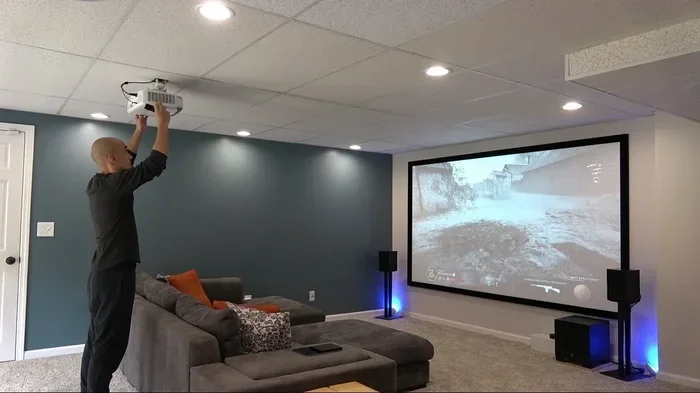
Start by picking the right spot for your projector. It needs to be stable and positioned at the correct distance from your screen or wall. Most projectors work best when mounted slightly above eye level and pointed straight at the screen.
Consider the ambient light in your room. Projectors perform best in darker environments. If your room has big windows, consider blackout curtains. This simple change can dramatically improve your image quality.
Make sure there is enough space behind the projector for ventilation. Projectors generate heat and need airflow to stay cool. Placing one in a cramped enclosed space can shorten its projector lifespan.
Connecting Your Devices
Most modern projectors offer multiple connection options. HDMI is the most common and provides the best quality for both video and audio. Simply plug an HDMI cable from your streaming device, laptop, or gaming console into the projector.
If you want to connect my phone to TV with HDMI cable, you will need an appropriate adapter. Many projectors also support wireless connections, so you can stream content without any cables at all.
For iPhone users, you might ask whether you can connect my iPhone to my TV with HDMI through a projector. The answer is yes, using a Lightning to HDMI adapter or a wireless casting solution.
Quick tips for a smooth setup:
- Use a high-speed HDMI cable for the best picture quality.
- Place the projector on a stable surface or mount it securely.
- Adjust the keystone setting to fix any trapezoid distortion.
- Test the image before finalizing your placement.
- Use a projector screen for the best results, though a clean white wall works too.
Maintaining Your Home TV Projector
Taking care of your projector keeps it running smoothly for years. Proper projector maintenance is simple but makes a big difference in performance and longevity.
Cleaning and Care Tips
Dust is the biggest enemy of any projector. Regularly clean the air filters to prevent dust from building up inside the device. Most projectors have removable filters that you can gently wash or replace.
Use a soft, dry cloth to wipe down the lens. Never use harsh chemicals or abrasive materials on the lens surface. A microfiber cloth works perfectly for this task. Keep the projector covered when not in use to minimize dust accumulation.
If your projector uses a replaceable lamp, keep track of its usage hours. Most lamps last between 3,000 and 5,000 hours. When the image starts to dim or flicker, it is usually time for a replacement.
Common Mistakes to Avoid
One of the biggest mistakes people make is placing the projector too close to the wall. This restricts airflow and can cause overheating. Always leave the recommended clearance space around the device.
Another common error is ignoring firmware updates. Manufacturers often release updates that improve performance, fix bugs, and add new features. Check for updates periodically through the projector menu or the manufacturer app.
Do not forget to turn off the projector properly. Many models have a cool-down cycle that protects the internal components. Simply unplugging the device can bypass this process and shorten its life.
If you are exploring wireless options, you might also ask whether you can mirror my phone to my smart TV without WiFi. While this is more about smart TVs, the same principle applies to some projectors with offline casting features.
Projector vs TV: Which Is Right for You?
Many people debate between buying a projector or a TV. Both have clear advantages depending on your needs and preferences.
Projectors win on size and immersion. A 100-inch image from a projector simply dwarfs even the largest TVs. For movie lovers and gamers who want a true cinematic feel, nothing beats a projector.
TVs win on convenience and brightness. They work great in any lighting condition and require zero setup. You turn them on and watch. TVs also tend to have better built-in smart features and apps.
Consider your room, budget, and viewing habits when deciding. If you have a dedicated dark room and want the biggest screen possible, a projector is the clear winner. If you need a set-and-forget solution that works in bright rooms, a TV might be the better choice.
Remember that you can always combine both. Use a projector for movie nights and a TV for everyday viewing. This gives you the best of both worlds.
Final Thoughts
How Do Home Tv Projectors Work is a fascinating topic that reveals just how clever modern technology really is. From the light source to the imaging chip to the precision lens, every component works together to deliver a big, beautiful image on any surface.
Home TV projectors offer a unique entertainment experience that continues to grow in popularity. They are versatile, portable, and capable of transforming any room into a personal theater. Whether you are a movie buff, a gamer, or someone who simply loves watching shows on a big screen, a projector is a fantastic investment.
Take the time to understand the different types, features, and setup requirements. With the right projector and a little planning, you will enjoy countless hours of immersive entertainment. The cool factor of a giant projected image never gets old. Start exploring your options today and bring the cinema home.
Frequently Asked Questions
Do home TV projectors need a special screen?
A special screen is not required, but it does improve the image quality significantly. A white wall works fine for casual viewing. However, a dedicated projector screen enhances brightness, color accuracy, and overall sharpness. Basic screens are affordable and easy to set up.
How long does a projector lamp last?
Most projector lamps last between 3,000 and 5,000 hours of use. LED and laser light sources last much longer, often 15,000 to 20,000 hours or more. Your usage patterns will determine how often you need to replace the light source.
Can I use a projector in a bright room?
Yes, but you need a bright projector with at least 2,000 lumens for decent results. Dark rooms always produce the best image quality. If you must use a projector in a bright room, consider blackout curtains or a high-gain screen to boost brightness.
Is a short throw projector better than a standard one?
Short throw projectors are great for small spaces because they produce a large image from a short distance. Standard throw projectors need more room behind them. The best choice depends on your available space and seating arrangement.
Do projectors support 4K resolution?
Yes, many modern projectors support 4K Ultra HD resolution. These models offer four times the detail of Full HD. However, 4K projectors cost more than 1080p models. For most living rooms, Full HD provides excellent quality at a more affordable price point.
Can I connect multiple devices to my projector at once?
Most projectors have multiple HDMI ports, allowing you to connect several devices. You can switch between inputs using the projector remote or menu. Some models also support wireless connections, making it easy to switch between phones, laptops, and streaming sticks.