Can You Print On Shirts With A UV Printer Absolutely Yes
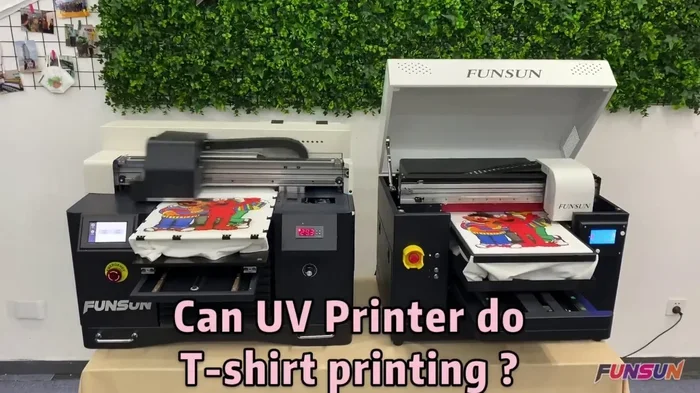
Yes, you can print on shirts with a UV printer, and the results are genuinely impressive. UV printing uses ultraviolet light to cure ink instantly on fabric, producing vibrant, durable custom designs. This guide covers everything from how the technology works to practical tips for getting professional-quality shirt prints at home or in a small business.
Have you ever wondered whether you can print on shirts with a UV printer? The short answer is absolutely yes. UV printing on fabric has exploded in popularity over the last few years, and for good reason. Whether you want to create custom t-shirts for a family reunion, launch a small apparel business, or just make one-of-a-kind gifts, a UV printer opens up a world of possibilities. Let me walk you through everything you need to know.
UV printing technology has come a long way from its early days in commercial signage and packaging. Today, UV printers can handle soft, flexible materials like cotton, polyester, and jersey knit fabrics with remarkable precision. The ink cures instantly under ultraviolet light, which means no waiting, no smudging, and incredibly vivid results. If you have been curious about UV printing on fabric, this is the perfect time to dive in.
Key Takeaways
- UV printers can print directly on shirts: The technology uses UV-curable ink that dries instantly under ultraviolet light, making it possible to print on cotton, polyester, and blended fabrics.
- UV printing offers several advantages: You get vibrant colors, durable prints, fast production times, and eco-friendly ink that contains no volatile organic compounds.
- Preparation matters a lot: Pre-treating fabric and choosing the right shirt material will dramatically improve print quality and longevity.
- UV printing beats traditional methods in many ways: It offers more detail, faster turnaround, and lower setup costs compared to screen printing.
- Common mistakes can ruin your prints: Avoid skipping fabric pre-treatment, using low-quality shirts, and ignoring printer maintenance for the best results.
- You can start small: A beginner-friendly UV printer costs less than you might think, and the learning curve is manageable with practice.
📑 Table of Contents
- What Is a UV Printer and How Does It Work?
- Can You Print On Shirts With A UV Printer?
- Benefits of UV Printing on Shirts
- UV Printer vs Traditional Printing Methods
- Step-by-Step Guide to Printing Shirts With a UV Printer
- Common Mistakes to Avoid When UV Printing on Shirts
- Expert Insights on UV Printing for Apparel
- Is a UV Printer Worth It for Shirt Printing?
What Is a UV Printer and How Does It Work?
A UV printer is a digital printing device that uses ultraviolet light to cure or dry ink the moment it touches a surface. Unlike traditional inkjet printers that rely on heat or air drying, UV printers flash a special light over the printed area instantly. This process is called UV-curable ink curing, and it creates a tough, durable bond with the material.
How UV Ink Differs from Regular Ink
Regular ink absorbs into paper or fabric and takes time to dry. UV ink sits on top of the surface and hardens when exposed to ultraviolet light. This gives it several key benefits:
- Instant drying: No smudging, no waiting, no mess.
- Vibrant color reproduction: UV ink produces richer, more saturated colors.
- Durability: The cured ink resists fading, scratching, and washing much better than standard ink.
- Eco-friendly: UV inks contain no volatile organic compounds, making them safer for you and the environment.
When you use a UV LED printer for shirt printing, the LED lamps emit a specific wavelength of light that triggers the ink to solidify immediately. This is why the process is so fast and why the prints last so long on fabric.
Can You Print On Shirts With A UV Printer?
The direct answer to can you print on shirts with a UV printer is a confident yes. UV printers are designed to print on a wide variety of materials, and shirts are one of the most popular applications. You can print on cotton, polyester, blends, and even specialty fabrics like bamboo or hemp.
What Makes UV Printing Work on Fabric?
The secret lies in the ink and the curing process. UV-curable ink adheres to fabric fibers when cured under ultraviolet light. The ink forms a thin, flexible layer that moves with the fabric without cracking or peeling. This is a huge advantage over some other printing methods where ink sits on top and eventually flakes off after washing.
For the best results, you should pre-treat the fabric before printing. A fabric pretreatment solution helps the ink bond more effectively with the fibers. It also enhances color vibrancy and wash durability. Think of it as priming a wall before painting. Skipping this step is one of the most common mistakes beginners make.
Which Shirt Materials Work Best?
Not all fabrics respond the same way to UV printing. Here is a quick breakdown of popular shirt materials:
- 100% Cotton: Absorbs ink well and produces soft, natural-feeling prints. Pre-treatment is essential for best results.
- Polyester: Delivers brilliant color vibrancy, especially on white or light-colored shirts. The ink bonds strongly to synthetic fibers.
- Cotton-Polyester Blends: A good middle ground. You get decent color and feel, though results may vary depending on the blend ratio.
- Dark-Colored Shirts: UV printers can print on dark fabrics, but you may need a white underbase layer for vibrant colors.
Many people also ask about digital printing on shirts using UV technology. The answer is that UV printers fall squarely into the digital printing category. They print directly from a digital file, which means no screens, no setups, and no wasted materials. This makes them perfect for print on demand businesses and small-batch custom orders.
Benefits of UV Printing on Shirts
UV printing offers a long list of advantages over traditional shirt printing methods. Here is why so many people are switching to UV printing technology for their garment projects.
Speed and Efficiency
UV printers cure ink instantly. This means your print is ready to wear or package the moment it comes off the machine. There is no drying time, no heat pressing, and no waiting for batches to cool. If you run a garment customization business, this speed translates directly into higher output and happier customers.
Print Quality and Detail
UV printers deliver exceptional detail. They can reproduce photographic images, fine text, and complex gradients with stunning clarity. The resolution of modern UV printers is incredibly high, which means your shirt design will look sharp and professional. Whether you are printing a small logo or a full-front photographic image, the results are consistently impressive.
Durability and Wash Resistance
A properly cured UV print on a shirt can withstand dozens of wash cycles without fading or cracking. The ink bonds chemically with the fabric fibers during the curing process. This is far superior to heat transfer vinyl, which tends to peel and crack after repeated washing. For customers who want long-lasting custom apparel, UV printing is hard to beat.
Versatility
UV printers are not limited to shirts. You can print on bags, hats, jackets, and even hard goods like phone cases and coasters. This versatility makes a UV printer a great investment if you want to expand your product line. Many entrepreneurs start with shirt printing and gradually add other items as their business grows.
Eco-Friendly Printing
UV inks are free of harmful solvents and emit no volatile organic compounds during printing. This makes UV printing a greener choice compared to traditional screen printing, which often uses solvent-based inks. If you are building a brand with sustainability values, UV printing on fabric aligns well with that mission.
UV Printer vs Traditional Printing Methods
Understanding how UV printing compares to other methods helps you make informed decisions. Let us look at the most common shirt printing techniques side by side.
| Feature | UV Printing | Screen Printing | Sublimation | Heat Transfer |
|---|---|---|---|---|
| Setup Cost | Low | High | Medium | Low |
| Print Detail | Excellent | Good | Excellent | Fair |
| Durability | Excellent | Excellent | Good | Fair |
| Speed | Fast | Slow for small batches | Medium | Slow |
| Color Range | Full color | Limited by screens | Full color | Limited |
| Fabric Types | Cotton, polyester, blends | Most fabrics | Polyester only | Most fabrics |
| Best For | Small to medium batches | Large bulk orders | Light polyester | One-offs and samples |
As you can see, UV printing on shirts holds its own against traditional methods in almost every category. The biggest advantage is the low setup cost and fast turnaround, which makes it ideal for custom orders and small businesses. If you are comparing options for your garment decoration needs, UV printing deserves serious consideration.
Step-by-Step Guide to Printing Shirts With a UV Printer
Ready to start printing? Here is a practical walkthrough of the process. Follow these steps carefully, and you will produce professional-quality shirt prints right from the start.
Step 1: Choose the Right Shirt
Start with a good-quality blank shirt. Look for tight weave, smooth surface, and consistent fabric weight. Cheap shirts with loose weaves or thin fabric often produce poor results. If you are just starting out, buy a few different shirt types to test and compare. This way you learn what works best with your specific printer model.
Step 2: Pre-Treat the Fabric
Apply a fabric pretreatment solution to the print area. Use a spray bottle or a dedicated applicator pad. Make sure the coverage is even and the shirt is completely dry before loading it into the printer. Pre-treatment is not optional if you want vibrant, wash-resistant prints. It prepares the fibers to accept and hold the UV ink.
Step 3: Prepare Your Design
Create or select your design in a graphic editing program. Use high-resolution files (at least 300 DPI) for sharp results. Match the color profile to your printer specifications. Many UV printer manufacturers provide ICC profiles for popular design software. Using the correct profile ensures the colors you see on screen match the colors you get on the shirt.
Step 4: Load the Shirt and Print
Place the shirt on the printer bed and secure it flat. Some UV printers come with a vacuum table or clamp system to hold fabric in place. Send your design to the printer and start the print job. Watch the first few passes to make sure the ink is curing properly and the registration is accurate. Most modern printers let you preview the print on screen before committing, which helps you catch any issues early.
Step 5: Cure and Finish
After printing, run the shirt under the UV curing lamp for the recommended time. This ensures the ink is fully hardened and bonded to the fabric. Once cured, let the shirt cool completely. Then, peel off any masking or protective film if your printer uses one. Your shirt is ready to wear, package, or ship.
Quick Tips for Better Results
- Always test print on a fabric swatch before committing to a full shirt.
- Keep your printer bed clean and free of lint. Dust particles can create imperfections in your print.
- Store UV ink in a cool, dark place. Light exposure can partially cure the ink inside the cartridge.
- Calibrate your printer regularly. This keeps colors accurate and prevents alignment issues.
- If you notice faded prints, check your ink levels and replace cartridges that are running low.
One thing that helps a lot is keeping your workspace organized. If you use a computer to manage your designs and orders, make sure your setup is comfortable and efficient. Even something as simple as checking whether your monitor is running on wifi 5 or 6 can affect how smoothly your workflow runs, especially when you are transferring large design files quickly. A fast, stable connection keeps everything moving.
Common Mistakes to Avoid When UV Printing on Shirts
Even with the best equipment, mistakes happen. Here are the most common errors beginners make, and how to avoid them.
Skipping Fabric Pre-Treatment
This is the number one mistake. Without pre-treatment, the ink does not bond properly to the fabric. You will get dull colors, poor wash resistance, and prints that crack or peel after just a few wears. Always pre-treat. It takes seconds and makes a massive difference.
Using Low-Quality Shirts
Cheap blanks may save money upfront, but they often have inconsistent fabric coatings and loose weaves that ruin print quality. Invest in decent blanks. Your customers will notice the difference, and so will you every time you pull a finished shirt off the printer.
Ignoring Printer Maintenance
UV printers have print heads, UV lamps, and moving parts that need regular care. Clean the print heads according to the manufacturer schedule. Replace UV lamps when they lose intensity. A well-maintained printer produces consistent results for years.
Wrong Print Settings
Every fabric type needs different print settings. Using the wrong speed, power, or pass count leads to under-cured ink, bleeding, or poor color saturation. Always refer to the printer manual for fabric-specific profiles. If your printer came with sample profiles, start there and adjust from your test prints.
Overlooking Design Resolution
Low-resolution designs look blurry and pixelated on fabric. Always use images at 300 DPI or higher. If you are working with a photograph, make sure it is high quality. A computer mouse with good precision helps a lot when you are fine-tuning design details and positions before sending a job to the printer. A responsive pointing device makes the whole design process smoother and more accurate.
Another practical tip: keep a simple spreadsheet to track your print settings, shirt brands, and results. Some people prefer using a tablet or phone for quick notes, but if you are managing order lists and inventory on a computer, knowing how to add prefixes to numbers on an iPhone or organize data efficiently in your preferred device can save you a lot of time when you are juggling multiple print jobs and customer orders.
Expert Insights on UV Printing for Apparel
Over the years, many print professionals have shared their insights on UV printing for apparel. Here are some expert perspectives that can help you get the most from your setup.
Start with a test batch. Before committing to a large order, print a few sample shirts and wash them several times. This tells you exactly how durable the print is and whether you need to adjust your settings or pretreatment process.
Invest in the right pretreatment. Not all pretreatment solutions are the same. Some work better on cotton, others on polyester. Match your pretreatment to your fabric type for the best bond and color vibrancy.
Keep a maintenance log. Tracking when you clean print heads, replace lamps, and change ink cartridges helps you stay ahead of problems. A well-documented maintenance routine extends the life of your printer and keeps your prints consistent.
Stay organized with your workflow. Whether you are managing orders in a spreadsheet or tracking designs digitally, having a system in place reduces errors and saves time. If you ever need to reference old order details or track inventory patterns, knowing how to find and fix a line that won’t delete in Microsoft Excel can be surprisingly useful when you are cleaning up your data and keeping your business records tidy.
These small operational habits separate hobbyists from professionals. They may seem minor, but they add up to a smoother, more profitable printing operation over time.
Is a UV Printer Worth It for Shirt Printing?
The final question many people ask is whether investing in a UV printer makes sense for shirt printing. The answer depends on your goals and volume. If you plan to print just a few shirts for personal use, you might consider a heat press or a professional printing service. But if you want to start a custom t-shirt business, produce small batches efficiently, or offer high-quality apparel decoration services, a UV printer is an excellent investment.
The upfront cost of a UV printer has dropped significantly in recent years. Entry-level models are now available at prices that small businesses can afford. Add to that the low cost of supplies, fast production speed, and minimal setup requirements, and the math starts to make a lot of sense. You are not just buying a printer. You are buying flexibility, quality, and the ability to bring any design to life on fabric.
If you are still exploring your options, you might also want to look at how your existing devices and tools fit into your workflow. For instance, if you use a computer for design work, understanding the advantages and disadvantages of a computer mouse can help you choose the right input device for precise design editing and efficient printing workflows.
Ultimately, UV printing on shirts is a powerful tool for anyone serious about garment customization. The technology is mature, the results are professional, and the market for custom apparel keeps growing. Whether you are a hobbyist or an entrepreneur, a UV printer gives you the ability to produce stunning, durable shirt prints with ease.
Frequently Asked Questions
Can a UV printer print on dark-colored shirts?
Yes, UV printers can print on dark-colored shirts. However, for the best color vibrancy on dark fabrics, you should apply a white underbase layer first. The white base creates a bright background that makes your colors pop. Without it, dark shirts may absorb the ink and produce muted results.
How durable is UV printing on shirts compared to screen printing?
UV prints are extremely durable and can withstand dozens of wash cycles without fading or cracking. Screen printing is also very durable, but UV printing offers comparable longevity with much faster production times and lower setup costs, especially for small to medium orders.
Do I need to pre-treat shirts before UV printing?
Yes, fabric pre-treatment is highly recommended for UV printing on shirts. It helps the ink bond properly with the fabric fibers, improves color vibrancy, and significantly increases wash durability. Skipping pre-treatment is the most common mistake beginners make.
What types of fabric work best with a UV printer?
Cotton, polyester, and cotton-polyester blends work best with UV printers. 100% cotton produces soft, natural-feeling prints, while polyester delivers the most vibrant colors. Avoid very thick or heavily textured fabrics, as they can cause uneven ink distribution and lower print quality.
Is UV printing on shirts safe and eco-friendly?
Yes, UV printing is considered safe and eco-friendly. UV inks contain no volatile organic compounds and produce no harmful fumes during printing. The curing process also consumes less energy than traditional heat-based drying methods, making it a greener choice for garment printing.
Can I use a UV printer for other products besides shirts?
Absolutely. UV printers are highly versatile and can print on bags, hats, jackets, tote bags, and even non-fabric items like phone cases, coasters, and signage. This makes a UV printer a great investment if you want to expand your product offerings beyond apparel.
=== CONCLUSION ===
The answer to can you print on shirts with a UV printer is a resounding yes. UV printing delivers vibrant, durable, and professional-quality results on a wide range of fabrics. Whether you are printing custom t-shirts for personal use, starting a small apparel business, or exploring garment customization as a creative outlet, a UV printer gives you the tools to succeed. The technology is accessible, the results are impressive, and the learning curve is manageable with a little practice.
Remember to always pre-treat your fabric, choose quality blanks, and follow the correct print settings for each material. Avoid the common mistakes outlined in this guide, and invest time in maintaining your printer. With these fundamentals in place, you will produce shirt prints that look great and last long. Start experimenting today, and you will be amazed at what a UV printer can do for your custom shirt projects.