Can I Go Somewhere To Use A 3d Printer Near Me Today
Yes, you can absolutely find a place to use a 3d printer near you today. From local makerspaces and public libraries to dedicated print shops, there are plenty of options for getting your 3D prints done without buying your own machine. This guide shows you exactly where to look, what to expect, and how to save money on every print.
Have you ever had a great idea for a 3D print but no printer of your own? You are not alone. Thousands of people search for a place to use a 3d printer every single day. Maybe you need a prototype for a project. Maybe you want a custom gift. Or maybe you are just curious about how 3D printing works in person. Whatever your reason, there are real options available right now.
The good news is that finding a 3d printer near me today is easier than most people think. You do not need to spend thousands on a machine. You do not need to be a tech expert either. There are community spaces, retail locations, and even online services that will print almost anything for you. Let us walk through every option so you can get started right away.
Many people assume they must own a printer to create 3D objects. That is simply not true. A quick search for can I go somewhere to use a 3d printer reveals a whole world of accessible printing options. Libraries, makerspaces, schools, and even some stores let the public use their machines. The key is knowing where to look and what to expect. This article breaks it all down in a simple, practical way.
Key Takeaways
- Multiple locations exist: Libraries, makerspaces, universities, and retail print shops all offer 3D printer access.
- Costs vary widely: You can pay as little as a few dollars or up to $50+ depending on the material and complexity.
- Preparation matters: Bringing the right file format and knowing your dimensions saves time and money.
- Membership options help: Many makerspaces offer affordable monthly passes for frequent users.
- Online alternatives exist: If no location is nearby, you can mail your files to a print service.
- Common mistakes are avoidable: Not checking bed size, material limits, and turnaround times are the top errors people make.
📑 Table of Contents
- Why You Might Need to Use a 3D Printer Somewhere Else
- Top Places Where You Can Use a 3D Printer
- How Much Does 3D Printing Cost at Different Locations
- What to Bring When You Visit a 3D Printing Spot
- How to Find the Best 3D Printing Location Near You
- Common Mistakes People Make When Searching for a Printer
- Expert Tips for Getting the Best 3D Print Results
- Can I Go Somewhere To Use A 3d Printer? Final Thoughts
Why You Might Need to Use a 3D Printer Somewhere Else
There are many reasons someone might need 3D printing services near me instead of buying their own machine. Let us look at the most common ones.
You Do Not Want to Buy a Printer
A decent 3D printer costs anywhere from $200 to $500 or more. That is a big investment if you only print a few items. Using a local service lets you explore 3D printing without the upfront cost. You can test designs, try different materials, and learn the process before committing to a purchase.
You Need a One-Time Print
Sometimes you just need one thing. A replacement part. A custom phone case. A small figurine. Buying a printer for a single job does not make sense. A local print shop near me can handle it quickly and affordably.
You Want Access to Better Equipment
Home printers often have smaller build volumes and fewer material options. Professional locations use industrial-grade machines. They can print in stronger plastics, flexible filaments, and even metal composites. If your project needs high quality, a local makerspace or fabrication lab is the way to go.
Top Places Where You Can Use a 3D Printer
So where exactly can you go? Here are the best options for finding a 3d printer location that fits your needs.
Public Libraries
Many public libraries now offer 3D printers for free or at a very low cost. You walk in, submit your file, and a librarian helps you get started. Some libraries require a quick orientation session first. But the process is simple and beginner-friendly.
Libraries are a fantastic starting point because the cost is minimal. You might pay $1 to $5 per print. The quality is usually good enough for most projects. Check your local library’s website or call ahead to confirm they have a printer available.
Makerspaces and Community Workshops
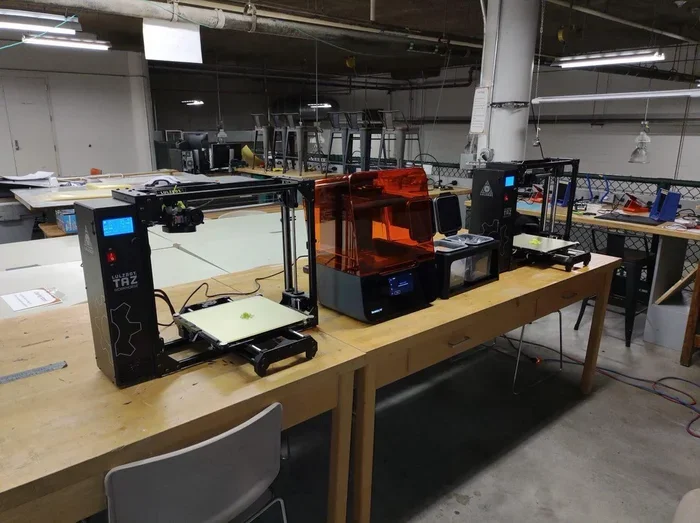
A local makerspace is a shared workspace where people create, build, and learn. Most makerspaces have 3D printers available for members and visitors. Some charge a small fee per print. Others include printing in a monthly membership.
Makerspaces are great because you get hands-on access. You can watch your print happen. You can talk to experienced makers who can help troubleshoot. If you plan to print often, a makerspace membership is a smart investment. Monthly fees typically range from $30 to $80.
University and College Labs
Many colleges and universities have fabrication labs open to the public or to local community members. These labs have high-end printers and expert staff. Some offer community hours where anyone can drop off a print job.
Check with nearby universities to see if they have a public-facing lab. Engineering departments and design programs often have the best equipment. You might find that a university lab offers professional-grade printing at a fraction of retail prices.
Retail Print Shops and Copy Centers
Stores like FedEx Office, Staples, and local print shops increasingly offer 3D printing services. You upload your file online or in-store. They handle the printing and notify you when it is ready. This option is convenient and requires zero technical knowledge.
The downside is that retail shops often charge more than community spaces. A small print might cost $10 to $30. But the tradeoff is speed and reliability. These shops also offer a wide range of materials and finishes.
Online Print Services
If you cannot find a physical location, online services are a great backup. Websites like Shapeways, 3D Hubs, and Xometry let you upload your design and choose a printer near you. They handle everything from printing to shipping.
Using your phone to find these services is easy. You can quickly search options on your device. If you need help organizing your print orders or tracking costs, a simple tool like a spreadsheet can help you stay on top of things. For instance, keeping a list of prices and turnaround times in a spreadsheet can make comparing options much easier, especially when you are dealing with a a line wont delete in microsoft excel situation that slows you down — knowing the right fix saves you frustration.
How Much Does 3D Printing Cost at Different Locations
Cost is one of the biggest factors when choosing where to print. Prices vary a lot depending on the location and the material. Here is a general breakdown.
| Location Type | Average Cost Per Print | Best For |
|---|---|---|
| Public Library | $1 – $5 | Small, simple prints |
| Makerspace | $5 – $20 | Medium projects, frequent printing |
| University Lab | $5 – $25 | Complex or large prints |
| Retail Print Shop | $10 – $50 | Quick turnaround, professional finish |
| Online Service | $15 – $100+ | Large or specialty prints |
These prices depend on the size of your print, the material used, and the complexity of the design. PLA plastic is usually the cheapest option. ABS, nylon, and resin materials cost more. Always ask for a quote before committing to a print job.
One thing many people overlook is the cost of file preparation. Some locations charge extra if your file needs fixes or adjustments. Having a clean, ready-to-print file saves you money. If you are working on a phone and need to add area codes or format numbers for a contact list, make sure you know how to add prefixes to numbers on iphone quickly so you can keep your communication organized with print shops and makerspaces.
What to Bring When You Visit a 3D Printing Spot
Walking into a makerspace or print shop without preparation is a mistake. Here is what you need to bring for a smooth experience.
Your 3D Model File
Most locations accept STL or OBJ files. These are the standard formats for 3D printing. Make sure your file is saved on a USB drive or accessible via email or cloud storage. Some shops also accept direct uploads from their website.
Before you go, check the file for errors. Many print shops will reject files with holes or flipped surfaces. Free tools like Meshmixer or Tinkercad can help you fix common issues. A clean file means a faster turnaround and fewer headaches.
Your Measurements and Dimensions
Know the size your print needs to be. Every printer has a build volume, which is the maximum size it can print. If your model is too large, it will need to be split into parts. Bring your dimensions written down or saved on your phone.
Material Preferences
Think about what material you want. PLA is the most common and affordable. It comes in many colors. ABS is stronger and heat-resistant but requires a heated bed. Resin prints are very detailed but need careful handling.
Not every location offers every material. Call ahead or check their website. Knowing what you want before you arrive saves time and helps you get an accurate price quote.
A Clear Description of What You Want
The more specific you are, the better the result. Tell the staff what the print is for. Are you making a prototype? A gift? A functional part? This helps them recommend the right material, fill density, and finish. Do not be afraid to ask questions. The staff at most locations are happy to help.
How to Find the Best 3D Printing Location Near You
Finding a good spot starts with a few simple searches. Here is a step-by-step approach to locate the best 3d printer access in your area.
- Start with Google Maps. Search for “3D printing near me” or “makerspace near me.” You will see a list of locations with reviews and contact info.
- Check your local library’s website. Many libraries list their maker services right on the homepage. Look for a “Maker Space” or “Technology” section.
- Search for community centers. Some community centers and recreation departments offer 3D printing as part of their programs.
- Use online directories. Websites like Meetup.com and Eventbrite often list local maker groups that share printer access.
- Ask at local hobby shops. Hobby and craft stores sometimes know about hidden gems in your area. They may also host 3D printing events.
Once you find a few options, compare them. Look at reviews, pricing, and the materials they offer. A quick visit or phone call can tell you a lot about the quality of service. Do not just pick the first result. Take a few minutes to explore your options.
When you are on the go, having your phone set up properly helps a lot. Whether you are looking up directions or saving contact info for print shops, keeping your device organized matters. Sometimes simple phone tasks like managing your contacts can get tricky, but knowing the right steps makes everything smoother.
Common Mistakes People Make When Searching for a Printer
Avoiding these mistakes will save you time, money, and frustration.
Not Checking the Build Volume First
This is the number one mistake. Every printer has a maximum print size. If your model is bigger than the build volume, it will not print. Always confirm the size limits before you commit. Most shops list this information on their website or will tell you over the phone.
Ignoring Material Options
Not all printers print in all materials. Some locations only offer PLA. Others have a wider selection. If you need a specific material for strength, flexibility, or heat resistance, make sure the location you choose offers it.
Forgetting to Ask About Turnaround Time
How long will your print take? Some shops can finish a small print in a few hours. Larger or more complex jobs might take days. If you need it by a certain date, always ask about the timeline upfront. Do not assume same-day service unless you confirm it.
Not Preparing Your File Properly
A messy file causes delays and extra charges. Make sure your model is watertight, scaled correctly, and oriented properly for printing. Many locations offer file preparation services, but they usually charge extra. Doing the prep work yourself saves money and speeds things up.
Skipping the Proof or Sample Print
For important or expensive prints, ask for a small test print first. This lets you check the size, orientation, and quality before committing to the full print. It is a small step that can prevent big disappointments.
Expert Tips for Getting the Best 3D Print Results
Here are some insider tips that experienced 3D printing users swear by.
- Start simple. Your first print at a new location should be something small and straightforward. A basic cube or keychain lets you test the quality and process without risk.
- Ask about infill percentage. Infill is how solid the inside of your print is. More infill means a stronger print but uses more material and costs more. For display pieces, 10-15% infill is usually fine. For functional parts, go higher.
- Choose the right orientation. The way your model sits on the print bed affects strength and surface quality. Ask the staff for advice on the best orientation for your specific design.
- Use supports for overhangs. Any part of your model that extends outward at an angle needs support material. This prevents sagging and failed prints. Most print shops include supports in their quote, but confirm this first.
- Build a relationship with your local shop. Regular customers often get better rates and priority scheduling. Visit the same location a few times and you will build rapport with the staff.
These tips come from years of experience in the 3D printing community. Following them will improve your results and make every visit smoother. Whether you are printing a gadget for yourself or looking for gadgets to make moms life easier with custom 3D printed organizers and tools, the right approach makes all the difference.
Can I Go Somewhere To Use A 3d Printer? Final Thoughts
The answer is a clear and confident yes. You can go somewhere to use a 3d printer today. Libraries, makerspaces, universities, retail shops, and online services all provide accessible options. The cost is reasonable, the quality is good, and the process is simpler than most people expect.
Start by searching for options in your local area. Call ahead, ask questions, and bring a clean, ready-to-print file. With a little preparation, you will have your 3D print in hand faster than you think. The world of 3D printing is open to everyone, and the best place to start is right in your own community.
Do not let the lack of a personal printer hold you back. The resources are out there. You just need to know where to look. Now that you have this guide, you are ready to take the next step. Find a location, upload your file, and watch your idea come to life.
Frequently Asked Questions
Can I use a 3D printer at my local library for free?
Many public libraries offer free or very low-cost 3D printing. However, not every library has a printer. Check your library’s website or call ahead to confirm their services. Some libraries require a brief orientation before you can use the printer.
How much does it cost to print something at a makerspace?
Costs at makerspaces typically range from $5 to $20 per print for small to medium projects. Some locations include printing in a monthly membership fee. The price depends on the size, material, and complexity of your print. Always ask for a quote before submitting your file.
What file format do I need for 3D printing?
The most common formats are STL and OBJ. These are universally accepted by almost all 3D printers. If you have a different file type, free conversion tools like Meshmixer or online converters can help. Always make sure your file is error-free before submitting it.
Can I watch my print being made at a local shop?
Yes, most makerspaces and community print shops welcome visitors to watch their prints. This is one of the best parts of using a local service. You can learn a lot by observing the process. Some retail shops may not allow viewing due to space or policy reasons, so it is worth asking ahead of time.
What materials can I print with at a local location?
Most locations offer PLA, which is the most common and affordable material. Many also support ABS, PETG, and TPU. Some advanced labs offer nylon, resin, or even metal-filled filaments. Check with your chosen location to see what materials they stock before you go.
How long does a 3D print take at a local shop?
Small prints can be done in a few hours. Medium prints might take a day or two. Large or complex prints can take several days. Turnaround time depends on the size, material, and current demand at the shop. Always confirm the estimated timeline when you submit your order.
=== CONCLUSION ===
Can I go somewhere to use a 3d printer near me today? Absolutely yes. The options are more available than ever, and the process is simpler than you might expect. Whether you choose a public library, a community makerspace, a university lab, or a retail print shop, you can get your 3D prints made without owning a printer. The costs are reasonable, the quality is impressive, and the community of makers is welcoming and helpful.
Start with the tips in this guide. Search your area, prepare your file, and reach out to a local location. You will be surprised at how easy it is to go from idea to finished print. The world of 3d printing is waiting for you, and the best place to start is right in your own neighborhood.