Can Ethernet Run Through USB C Everything You Need To Know
Yes, Ethernet can absolutely run through USB C. With the right USB C ethernet adapter or USB C docking station, you can enjoy a wired internet connection on any device with a USB C port. This guide covers how it works, speeds you can expect, and the best adapters on the market today.
Can Ethernet run through USB C? The short answer is yes, and it is simpler than most people think. If you have ever struggled with spotty Wi-Fi or needed a rock-solid internet connection for work or gaming, a USB C ethernet adapter might be exactly what you need.
USB C has become the standard port on modern laptops, tablets, and even smartphones. It carries power, data, and video signals through a single tiny connector. But many people do not realize that USB C can also handle wired internet connections through ethernet. This opens up a world of reliability and speed that Wi-Fi simply cannot match.
In this guide, we will walk through everything you need to know about running Ethernet through a USB C port. From how the technology works to which adapters deliver the best performance, you will find all the answers right here.
Key Takeaways
- USB C Ethernet works: You can get a wired internet connection through any USB C port using an adapter or cable.
- Speed depends on the adapter: USB C to Ethernet adapters can support up to gigabit speeds or even faster with Thunderbolt.
- Not all adapters are equal: Cheap adapters may limit your speed, while quality ones deliver full performance.
- Thunderbolt 3 and 4 offer the best experience: These protocols handle Ethernet with zero lag and maximum bandwidth.
- Wired is still faster than Wi-Fi: A USB C ethernet connection often beats wireless in stability and speed.
- Compatibility is broad: Laptops, tablets, phones, and desktops with USB C can all use ethernet adapters.
- Setup is simple: Just plug in the adapter, connect an ethernet cable, and you are online in seconds.
📑 Table of Contents
- What Is USB C Ethernet and Why It Matters
- How USB C Ethernet Adapters Work
- Speed and Performance: What to Expect
- Best USB C Ethernet Adapters and Hubs
- USB C Ethernet vs Wi-Fi: Which Is Better
- Troubleshooting Common USB C Ethernet Issues
- Expert Tips and Best Practices
- Frequently Asked Questions
- Conclusion
What Is USB C Ethernet and Why It Matters
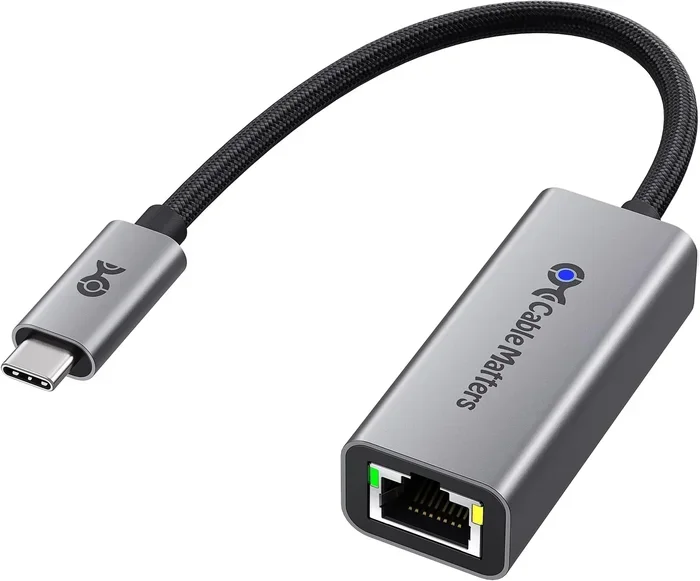
A USB C ethernet adapter is a small device that plugs into your USB C port and gives you a standard ethernet jack, usually an RJ45 port. You then connect a regular ethernet cable from your router or wall jack into the adapter, and your device gets a wired internet connection.
Why does this matter? Because wired connections are faster, more stable, and more secure than wireless ones. Whether you are working from home, gaming online, or streaming 4K video, a wired internet connection eliminates dropped signals and lag spikes.
Many modern laptops have dropped the traditional ethernet port entirely. Apple, Dell, HP, and Lenovo have all moved to USB C as their primary connection. This means you need an adapter to get wired internet. That is where USB C to Ethernet adapters come in.
Who Benefits From USB C Ethernet
Almost anyone with a USB C device can benefit from ethernet through USB C. Here are the groups who use this setup the most:
- Remote workers: Video calls and file uploads need a stable, fast connection.
- Gamers: Wired connections reduce ping and prevent lag during competitive matches.
- Students: Reliable internet for online classes and large file downloads.
- Content creators: Upload large video files without interruption.
- Home office setups: Ditch the Wi-Fi dongle and get a cleaner, faster connection.
How USB C Ethernet Adapters Work
Understanding how a USB C ethernet adapter works helps you choose the right one. The adapter contains a small network chip that translates the USB C data signal into a standard ethernet signal. This chip handles the communication between your device and the network.
The process is straightforward. You plug the adapter into your USB C port. Then you connect an ethernet cable from your router or modem to the adapter. Your operating system recognizes the adapter and treats it like a built-in ethernet port. No drivers are usually needed, though some advanced adapters may require a quick install.
USB C Protocols and Ethernet Speeds
Not all USB C ports are the same, and this directly affects how well ethernet works through them. Here is a quick look at the main protocols:
- USB 2.0: The slowest option. It can handle up to about 300 Mbps over ethernet, which is enough for basic browsing but not ideal for heavy use.
- USB 3.0 and USB 3.1: These support up to 5 Gbps, which is more than enough for gigabit ethernet speeds.
- USB 3.2: Offers up to 10 Gbps, giving you headroom for faster ethernet connections.
- Thunderbolt 3: Delivers 40 Gbps, making it perfect for high-speed networking and future-proof setups.
- Thunderbolt 4: The latest standard, also at 40 Gbps with additional security and display features.
The protocol your device uses determines the maximum network speed you can achieve. A Thunderbolt 4 USB C port paired with a quality adapter will give you the best results.
Quick Tips
- Always check your device’s USB C protocol before buying an adapter.
- Look for adapters that support your USB C version for full speed.
- A USB C docking station with built-in ethernet is a great all-in-one solution.
Speed and Performance: What to Expect
One of the most common questions is about network speed. How fast can Ethernet run through USB C? The answer depends on three things: your device’s USB C protocol, the quality of your adapter, and the ethernet cable you use.
With a standard USB 3.0 or better port and a good USB C to Ethernet cable, you can easily hit gigabit speeds, which is 1,000 Mbps. That is more than fast enough for almost any home or office use case. For comparison, most Wi-Fi 5 connections max out around 300 to 500 Mbps in real-world conditions.
Real-World Speed Comparison
Here is a practical comparison of what you can expect from different setups:
- USB 2.0 + basic adapter: 100 to 300 Mbps. Fine for email and light browsing.
- USB 3.0 + gigabit adapter: 900 to 1,000 Mbps. Great for streaming and video calls.
- USB 3.1/3.2 + quality adapter: 940+ Mbps. Ideal for large file transfers and gaming.
- Thunderbolt 3/4 + premium adapter: Full gigabit or beyond. The gold standard for USB C networking.
Keep in mind that your internet service provider speed also plays a role. If your plan only gives you 100 Mbps, a USB C ethernet adapter will not make it faster. But it will give you a more stable and consistent connection than Wi-Fi.
Common Mistakes That Slow Down USB C Ethernet
Many people buy a USB C ethernet adapter and wonder why the speed is disappointing. Here are the most common mistakes:
- Using a USB 2.0 adapter on a USB 3.0 port: This caps your speed at USB 2.0 levels.
- Using a cheap, low-quality adapter: Budget adapters often have poor network chips that bottleneck performance.
- Using an old Cat5 cable: A Cat5e or Cat6 cable is needed for gigabit speeds.
- Not updating drivers: Some adapters need driver updates for optimal performance.
Best USB C Ethernet Adapters and Hubs
Not all USB C ethernet adapters are created equal. Some deliver full gigabit speeds while others struggle to hit 100 Mbps. Here is what to look for when shopping.
What to Look for in a USB C Ethernet Adapter
- Gigabit support: Make sure the adapter supports 10/100/1000 Mbps.
- USB protocol compatibility: Match the adapter to your device’s USB C version.
- Build quality: Metal housings and reinforced cables last longer.
- Driver support: Check that the adapter works with your operating system out of the box.
- Extra ports: Many USB C hubs include ethernet alongside USB A ports, HDMI, and SD card readers.
Types of USB C Ethernet Solutions
There are three main types of solutions for getting ethernet through USB C:
- Standalone USB C to Ethernet adapters: Small, affordable, and easy to carry. These plug directly into your USB C port and add one ethernet jack.
- USB C docking stations with ethernet: Larger hubs that add multiple ports including ethernet, USB A, HDMI, and power delivery. Great for desk setups.
- USB C ethernet cables: These are all-in-one cables with a USB C connector on one end and an RJ45 ethernet jack on the other. No adapter needed.
For most users, a standalone adapter is enough. If you need multiple ports and USB C power delivery, a docking station is the better choice.
USB C Ethernet vs Wi-Fi: Which Is Better
Wi-Fi is convenient, but wired internet connection through USB C offers clear advantages in several areas. Let us break it down.
Speed
A wired ethernet connection through USB C is generally faster than Wi-Fi. While modern Wi-Fi 6 and Wi-Fi 6E routers can deliver impressive speeds, real-world performance often falls short of the advertised numbers. A USB C to Ethernet connection gives you consistent, reliable speeds that match your internet plan.
Stability
Wi-Fi signals can be disrupted by walls, other devices, and even microwaves. A wired internet connection is not affected by these issues. Once you plug in, the connection stays strong and steady.
Latency
For gaming and video calls, latency matters. Ethernet through USB C offers lower ping than Wi-Fi, which means smoother gameplay and clearer voice calls.
Security
Wired connections are harder to intercept than wireless ones. If you handle sensitive data or work with confidential files, a USB C ethernet connection adds an extra layer of security.
When Wi-Fi Still Makes Sense
Wi-Fi is not obsolete. For casual browsing, mobile devices, and situations where running a cable is impractical, Wi-Fi remains the better choice. The ideal setup often uses both: Wi-Fi for mobile devices and USB C ethernet for your main computer.
Troubleshooting Common USB C Ethernet Issues
Even with a great USB C ethernet adapter, you may run into occasional issues. Here are the most common problems and how to fix them.
No Internet Connection After Plugging In
If your device does not recognize the adapter, try these steps:
- Unplug the adapter and plug it back in.
- Try a different USB C port on your device.
- Check if your operating system needs a driver update.
- Restart your device and the router.
Slow Speeds
If your speed is lower than expected:
- Verify that your adapter supports gigabit speeds.
- Make sure you are using a Cat5e or Cat6 ethernet cable.
- Check that your USB C port is USB 3.0 or higher.
- Test with a different adapter to rule out a hardware issue.
Intermittent Connection Drops
A connection that keeps dropping can be frustrating. Common causes include:
- A loose or damaged ethernet cable.
- An overheating adapter.
- USB port power issues — try a different port or a powered hub.
- Network driver conflicts — update or reinstall your network drivers.
Expert Insights
Network engineers often recommend keeping a spare USB C ethernet adapter in your laptop bag. You never know when you will need a reliable wired connection in a hotel room, conference center, or coworking space. A quality adapter is a small investment that pays off every time you travel.
Expert Tips and Best Practices
Getting the most out of your USB C ethernet setup is easy with a few smart habits. Here are expert-tested tips that make a real difference.
1. Invest in a Quality Adapter
Do not cheap out on your USB C to RJ45 adapter. A well-built adapter with a reputable network chip will deliver consistent speeds and last for years. Look for brands known for quality networking hardware.
2. Use the Right Ethernet Cable
Your cable matters just as much as your adapter. For gigabit speeds, use a Cat5e or Cat6 cable. For 2.5 Gbps or 10 Gbps, look for Cat6a or Cat7 cables. A good cable costs just a few dollars and can double your speed.
3. Keep Drivers Updated
Some USB C ethernet adapters need specific drivers for peak performance. Check the manufacturer’s website periodically and install updates when available.
4. Use a USB C Docking Station for Your Desk
If you work at a desk all day, a USB C docking station with ethernet, USB ports, and display outputs is a game-changer. It keeps your workspace clean and gives you reliable wired internet without clutter.
5. Test Your Speed Regularly
Use a free speed test tool to check your network speed over USB C ethernet. Compare it to your Wi-Fi speeds. You will likely see a noticeable difference in both speed and consistency.
Frequently Asked Questions
Can I use any USB C ethernet adapter for gigabit speeds?
Not all adapters support gigabit speeds. You need to make sure the adapter explicitly states it supports 10/100/1000 Mbps. Cheap adapters that only support 10/100 Mbps will cap your speed at 100 Mbps, even if your USB C port and internet plan can handle more.
Do I need to install drivers for a USB C ethernet adapter?
Most modern USB C ethernet adapters work plug-and-play on Windows, macOS, and Linux. However, some adapters may require driver installation for full compatibility or to unlock advanced features. Always check the manufacturer’s website before purchasing.
Can I use USB C ethernet on a smartphone or tablet?
Yes, many Android phones and tablets with USB C support ethernet adapters. iPhones do not have USB C yet, but the new USB C iPad Pro and iPad Air models can use ethernet adapters as well. You may need an adapter that supports USB C power delivery if your device needs to charge while connected.
Does USB C ethernet affect battery life?
A USB C ethernet adapter uses very little power and should not noticeably impact battery life. In fact, a wired connection can sometimes save battery compared to Wi-Fi because the network chip works less hard to maintain a stable connection.
Can I daisy-chain USB C ethernet adapters?
No, you should not daisy-chain ethernet adapters. Each adapter is designed to connect directly to a USB C port and a single ethernet cable. Daisy-chaining will not improve your connection and may cause errors or damage your ports.
Is Thunderbolt 4 the best option for USB C ethernet?
Thunderbolt 4 offers the highest bandwidth and the most reliable performance for USB C networking. If you have a Thunderbolt 4 port, pairing it with a quality adapter gives you the best possible ethernet experience through USB C. It supports full gigabit speeds with minimal latency and excellent stability.
Conclusion
Can Ethernet run through USB C? Absolutely, and it is one of the most practical upgrades you can make for your device. Whether you are tired of unreliable Wi-Fi, need a faster connection for work, or want the stability of a wired network, a USB C ethernet adapter delivers exactly what you need.
The technology is mature, adapters are affordable, and setup takes just seconds. With the right adapter and cable, you can enjoy gigabit speeds, rock-solid stability, and lower latency than Wi-Fi can offer. From remote workers to gamers to students, USB C ethernet has something valuable for everyone.
Take a look at your current setup. If you are relying solely on Wi-Fi, consider adding a USB C to Ethernet adapter to your toolkit. It is a small change that can make a big difference in your daily internet experience. Your connection will be faster, more reliable, and more secure. Give it a try, and you will wonder how you ever worked without it.