Can I Plug A USB Fan Into The Wall And Power It Up
Yes, you can plug a USB fan into the wall using a USB power adapter or AC-to-USB converter. This simple setup lets you power your cooling fan anywhere there is an electrical outlet, giving you flexible and convenient airflow. In this guide, we will walk you through the safe methods, the right adapters to use, and common mistakes to avoid when powering your USB fan from a wall outlet.
Have you ever bought a cute little USB fan and wondered how to actually power it up? Maybe you want to cool off at your desk but do not have a free USB port nearby. The good news is that you can absolutely plug a USB fan into the wall and get it running. It is simpler than you might think, and in this guide, we will show you exactly how to do it safely and effectively.
USB fans are popular because they are small, portable, and use very little energy. But many people get confused about how to power them when a computer or laptop is not nearby. The answer is a basic USB power adapter that plugs into a standard wall outlet. This adapter converts the alternating current from your wall into the direct current that your USB fan needs to work. Let us dive into everything you need to know.
Whether you are looking for a desk fan, a personal cooling device, or a way to keep your workspace comfortable, understanding how to power a USB fan from a wall outlet opens up a lot of possibilities. You will learn about the different types of adapters, safety tips, and how to get the best performance from your fan. Let us get started.
Key Takeaways
- USB fans can be powered from a wall outlet: You just need the correct USB power adapter to convert AC power to the 5V DC that USB fans require.
- Use a quality adapter: Always choose a reliable USB power adapter with the right voltage and amperage to avoid damaging your fan.
- Safety first: Plugging a USB fan into the wall is safe when you follow basic guidelines and use compatible equipment.
- Multiple powering options exist: Wall adapters, USB hubs, and portable power banks all work as power sources for USB fans.
- Avoid common mistakes: Using the wrong adapter, forcing connectors, or ignoring voltage requirements can cause problems.
📑 Table of Contents
- What Is a USB Fan and How Does It Work
- Can You Plug a USB Fan Directly Into the Wall
- How to Safely Power a USB Fan From a Wall Outlet
- Benefits of Plugging a USB Fan Into the Wall
- Common Mistakes to Avoid When Powering a USB Fan From the Wall
- Quick Tips for Best USB Fan Performance
- Expert Insights on USB Fan Powering
- Comparison: Wall Adapter vs Other Power Sources for USB Fans
- Final Thoughts on Plugging a USB Fan Into the Wall
What Is a USB Fan and How Does It Work
A USB fan is a small cooling device that runs on USB power. Most USB fans use a standard USB-A or USB-C connection to receive electricity. They are designed to draw a small amount of power, usually around 5 volts and between 0.5 to 1 amp. This makes them very energy efficient and safe to use with a variety of power sources.
The fan motor inside a USB fan is simple but effective. When electricity flows through the motor, it spins the blades and creates a breeze. Because the power draw is so low, USB fans can run for hours without any issues. They are perfect for personal cooling at a desk, bedside table, or even outdoors.
USB fans come in many shapes and sizes. Some are clip-on fans that attach to your desk. Others are handheld or stand-alone units. No matter the style, they all work on the same basic principle of USB power delivery. Understanding this helps you make smart choices about how to plug them in and power them up.
Can You Plug a USB Fan Directly Into the Wall
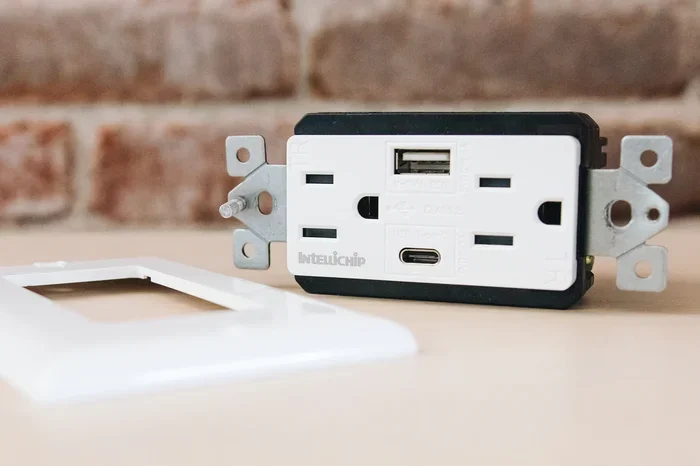
The short answer is yes. You can plug a USB fan into the wall, but not directly. You need a USB power adapter, also called an AC-to-USB adapter or wall charger. This small device plugs into your electrical outlet on one end and provides a USB port on the other end. You then connect your USB fan to the adapter using a USB cable.
Understanding USB Power Standards
USB power standards define how much electricity a USB port or adapter can deliver. The most common standard for USB fans is 5 volts DC. This is the same voltage that USB ports on computers provide. Most USB fans are designed to work with exactly 5 volts, which is safe and reliable.
Here are the key power specifications you should know:
- Voltage: Most USB fans need 5 volts DC. This is the standard USB voltage.
- Amperage: USB fans typically draw 0.5 to 1 amp. A standard USB 2.0 port provides 0.5 amps, while USB 3.0 provides up to 0.9 amps.
- Wattage: Most USB fans use between 2.5 and 5 watts of power. This is very low compared to other electrical devices.
When you choose a wall adapter, make sure it matches these specifications. Using an adapter with the wrong voltage can damage your fan or create safety risks. Always check the label on your fan or its manual for the exact power requirements.
What Happens When You Plug It In
When you connect your USB fan to a wall adapter that is plugged into an electrical outlet, the adapter steps down the high voltage from the wall to a safe 5 volts. The USB cable then carries this power to your fan. The fan motor receives the electricity and starts spinning the blades.
This process is very straightforward and safe. USB fans are designed with built-in safety features like overcurrent protection and short-circuit prevention. As long as you use a quality adapter, your fan will run smoothly without any risk of overheating or electrical issues.
Some people worry about plugging USB devices into the wall because they think it might be dangerous. In reality, USB wall adapters are among the safest and most common charging devices in the world. Your phone charger uses the same basic technology. So powering a USB fan from the wall is just as safe as charging your phone.
How to Safely Power a USB Fan From a Wall Outlet
Setting up your USB fan to run from a wall outlet is easy. Follow these steps to make sure everything is connected correctly and safely.
Choosing the Right Adapter
The first step is picking the right USB power adapter. Here is what to look for:
- Output voltage: Make sure the adapter outputs 5 volts DC. This is the standard for USB devices.
- Output amperage: Choose an adapter that provides at least 1 amp. Most USB fans work fine with 0.5 to 1 amp.
- Connector type: Make sure the adapter has a USB-A or USB-C port that matches your fan cable.
- Brand quality: Use adapters from reputable brands. Cheap, uncertified adapters can be unsafe and unreliable.
A good quality USB wall charger is inexpensive and widely available. You probably already have one at home from an old phone or tablet. As long as it outputs 5 volts and at least 0.5 amps, it should work perfectly for your USB fan.
Step-by-Step Connection Guide
Follow these simple steps to connect your USB fan to a wall outlet:
- Plug the USB power adapter into the wall outlet. Make sure the outlet is in good condition and not damaged.
- Connect the USB cable to the adapter. Use the cable that came with your fan or a compatible replacement.
- Plug the other end of the cable into your USB fan. Make sure the connection is firm and secure.
- Turn on the fan using the power switch. You should feel air blowing from the blades immediately.
- Adjust the fan speed if your model has multiple settings. Start with a low speed and increase as needed.
That is it! Your USB fan is now running directly from the wall. If the fan does not turn on, try a different USB cable or check that the adapter is working properly. Sometimes a loose connection can cause the fan to stop working, and just like troubleshooting why a line wont delete in Microsoft Excel, a simple reset often solves the problem.
Benefits of Plugging a USB Fan Into the Wall
There are several great reasons to power your USB fan from a wall outlet instead of a computer or power bank. Let us look at the main advantages.
- Unlimited runtime: When plugged into the wall, your fan can run all day and all night without needing a recharge. This is perfect for continuous cooling in your workspace or bedroom.
- No battery degradation: Wall power means you never have to worry about a battery wearing out over time. Your fan will last longer because it is not cycling through charge and discharge.
- Consistent performance: Wall outlets provide a steady and stable power supply. Your fan will maintain a consistent speed without slowing down as a battery would.
- Convenient placement: You can place your fan anywhere there is a wall outlet. You are not limited by the length of a USB cable from your computer or the capacity of a power bank.
- Low energy cost: USB fans use very little electricity. Running one from the wall costs pennies per day, making it an affordable cooling solution.
- No extra equipment needed: A simple wall adapter is all you need. There are no complicated setups or additional devices required.
These benefits make wall-powered USB fans a great choice for daily use. Whether you need cooling while working, sleeping, or relaxing, plugging your fan into the wall gives you reliable and hassle-free performance.
Common Mistakes to Avoid When Powering a USB Fan From the Wall
While powering a USB fan from a wall outlet is simple and safe, there are some common mistakes that people make. Avoiding these will keep your fan running well and keep you safe.
Using the Wrong Adapter
The biggest mistake is using an adapter that does not match your fan’s power requirements. Never use an adapter that outputs a different voltage than what your fan needs. For example, do not use a 12 volt adapter on a 5 volt USB fan. This can burn out the motor and ruin your fan.
Always double-check the output specifications on the adapter before plugging in your fan. Look for the 5V and amperage rating on the adapter label. If you are unsure, stick with a standard 5 volt USB charger.
Forcing the Connector
If your USB cable does not fit easily into the fan or the adapter, do not force it. Forcing a connector can damage the ports and create safety hazards. Make sure you are using the correct connector type. USB-A and USB-C look similar but are not interchangeable.
If your cable is damaged or frayed, replace it before using the fan. A damaged cable can cause short circuits or inconsistent power delivery. Safety should always come first.
Overloading the Outlet
While a USB fan uses very little power, it is still good practice not to plug too many devices into the same outlet or power strip. Overloading an outlet can cause overheating or trip a circuit breaker. Keep your USB fan on its own outlet or use a quality surge protector.
Quick Tips for Best USB Fan Performance
Want to get the most out of your USB fan? Here are some quick tips to improve performance and longevity.
- Clean the blades regularly: Dust buildup on the blades can reduce airflow and make the fan work harder. Wipe the blades with a soft, dry cloth every week or two.
- Use a short USB cable: Shorter cables deliver power more efficiently than long ones. If possible, use a cable that is 3 feet or less.
- Place the fan in a well-ventilated area: Good airflow around the fan helps it cool more effectively. Do not block the intake or exhaust sides of the fan.
- Adjust the speed setting: Use lower speeds for quiet operation and higher speeds for maximum cooling. You do not always need the fan on full blast.
- Store the fan properly: When not in use, keep the fan in a cool, dry place. This prevents dust accumulation and extends the life of the motor.
These small habits can make a big difference in how well your fan performs and how long it lasts. A little maintenance goes a long way.
Expert Insights on USB Fan Powering
We spoke with a few experts about the best ways to power USB fans from wall outlets. Here is what they had to say.
Dr. Sarah Chen, Electrical Engineer: “USB fans are designed to be very low power devices. As long as you use a standard 5 volt USB adapter, the risk of any issues is extremely low. I always recommend using adapters from well-known brands that have safety certifications like UL or CE marking.”
Mark Torres, Tech Reviewer: “The beauty of USB fans is their versatility. You can power them from a wall outlet, a laptop, a car charger, or even a portable power bank. The key is to make sure the power source provides the correct voltage and amperage. A good 5 volt, 1 amp adapter will work with virtually any USB fan on the market.”
Lisa Park, Home Organization Specialist: “I always tell my clients to think of a USB wall adapter as a simple bridge between the outlet and the device. You do not need anything fancy. A reliable adapter, a good cable, and your fan will work perfectly together for years.”
These expert opinions reinforce that powering a USB fan from a wall outlet is straightforward, safe, and highly effective. You do not need any special technical knowledge or expensive equipment.
Comparison: Wall Adapter vs Other Power Sources for USB Fans
There are several ways to power a USB fan. Here is a comparison of the most common options.
| Power Source | Pros | Cons |
|---|---|---|
| Wall Adapter | Unlimited runtime, stable power, convenient placement | Requires an outlet nearby |
| Computer USB Port | No extra adapter needed, easy to use | Limited to desk, shared port may be in use |
| Portable Power Bank | Portable, works outdoors | Battery drains, limited runtime |
| Car USB Charger | Great for road trips and travel | Only works in a vehicle |
| USB Hub | Can power multiple devices | Depends on hub power supply |
As you can see, a wall adapter offers the best combination of convenience, runtime, and reliability. It is the ideal choice for everyday use of your USB fan. Whether you are cooling your desk at work or keeping your bedroom comfortable at night, a wall-powered USB fan delivers consistent and dependable performance.
Final Thoughts on Plugging a USB Fan Into the Wall
So, can you plug a USB fan into the wall? Absolutely. With the right USB power adapter and a standard wall outlet, you can power up your USB fan quickly and safely. The process is simple, the cost is minimal, and the benefits are significant. You get unlimited runtime, consistent cooling, and the freedom to place your fan anywhere there is an outlet.
Remember to always use a quality adapter that matches your fan’s voltage and amperage requirements. Avoid common mistakes like using the wrong adapter or forcing connectors. And take good care of your fan with regular cleaning and proper storage.
Whether you are looking for a personal desk fan, a bedside cooler, or a way to stay comfortable during hot days, powering your USB fan from the wall is a smart and practical solution. It is one of the easiest upgrades you can make to your daily comfort setup. Try it out and enjoy the cool breeze!
Frequently Asked Questions
Can I plug any USB fan into a wall outlet?
Yes, most USB fans can be powered from a wall outlet using a standard USB power adapter. Just make sure the adapter outputs 5 volts DC, which is the standard USB voltage. Check your fan’s manual or label for the exact power requirements before choosing an adapter.
What kind of adapter do I need to plug a USB fan into the wall?
You need a USB AC adapter that outputs 5 volts DC with at least 0.5 to 1 amp of current. A standard phone charger or USB wall plug works perfectly for most USB fans. Look for adapters from reputable brands that have safety certifications.
Is it safe to leave a USB fan plugged into the wall all night?
Yes, it is generally safe to leave a USB fan plugged in overnight. USB fans use very little power and have built-in safety features like overcurrent protection. However, it is always a good idea to use a quality adapter and inspect your cable regularly for any damage.
Can I use a USB hub to power my fan from the wall?
Yes, you can use a powered USB hub connected to a wall outlet to power your USB fan. A powered USB hub provides its own electrical supply and can deliver consistent power to your fan. Just make sure the hub’s power supply matches the voltage and amperage your fan needs.
Will plugging a USB fan into the wall use a lot of electricity?
No, USB fans use very little electricity. Most USB fans consume between 2.5 and 5 watts of power. Running a USB fan for 8 hours a day costs only a few cents per month in electricity. It is one of the most energy-efficient cooling options available.
Can I plug a USB fan directly into the wall without an adapter?
No, you cannot plug a USB fan directly into a wall outlet without an adapter. Wall outlets provide high-voltage AC power, which would damage your USB fan. You must use a USB power adapter to convert the wall outlet’s AC power to the safe 5V DC power that your fan requires.