How Are Wireless Bluetooth Speakers Powered and Used
Wireless Bluetooth speakers are powered by rechargeable batteries, typically lithium-ion or lithium-polymer cells, that store energy for portable audio playback. Understanding how these speakers charge, how long they last, and how to get the most from each charge helps you enjoy wireless audio without interruptions. This guide covers everything from battery technology to real-world usage tips for Bluetooth speaker power and performance.
Wireless Bluetooth speakers have completely changed how we listen to music at home, outdoors, and on the go. These compact devices deliver surprisingly rich sound without any wires connecting them to your phone or laptop. But one question keeps coming up: how exactly are wireless Bluetooth speakers powered? The answer lies in their internal battery, charging technology, and the way they manage energy during use.
If you love taking your music anywhere, understanding Bluetooth speaker power is essential. Whether you are camping in the woods or hosting a backyard party, knowing how your speaker stays charged and how to make that charge last longer makes a big difference. This article breaks down everything you need to know about powering and using your wireless Bluetooth speakers.
## How Wireless Bluetooth Speakers Get Their Power
Every wireless Bluetooth speaker needs a reliable power source to function. Unlike traditional wired speakers that draw electricity directly from a wall outlet, Bluetooth speakers carry their own built-in power supply. This is what makes them truly portable and convenient for everyday use.
### Rechargeable Lithium-Ion Batteries
The heart of every Bluetooth speaker is its rechargeable battery. Most modern Bluetooth speakers use lithium-ion cells because they are lightweight, long-lasting, and hold a strong charge. Lithium-ion batteries have become the standard across portable electronics, from smartphones to tablets, and Bluetooth speakers are no different.
These batteries store electrical energy and release it steadily to power the speaker’s amplifier, Bluetooth chip, and drivers. A typical lithium-ion battery in a Bluetooth speaker ranges from 1,000 mAh to 5,000 mAh or more. The higher the milliamp-hour rating, the longer the speaker can play on a single charge.
### Lithium-Polymer Alternatives
Some premium Bluetooth speakers use lithium-polymer batteries instead. These batteries are thinner and can be shaped to fit compact speaker designs more easily. Lithium-polymer power cells offer similar performance to lithium-ion but are often found in smaller, more sleekly designed portable speakers. Both battery types are safe, rechargeable, and designed for hundreds of charge cycles.
### Built-In USB Charging Ports
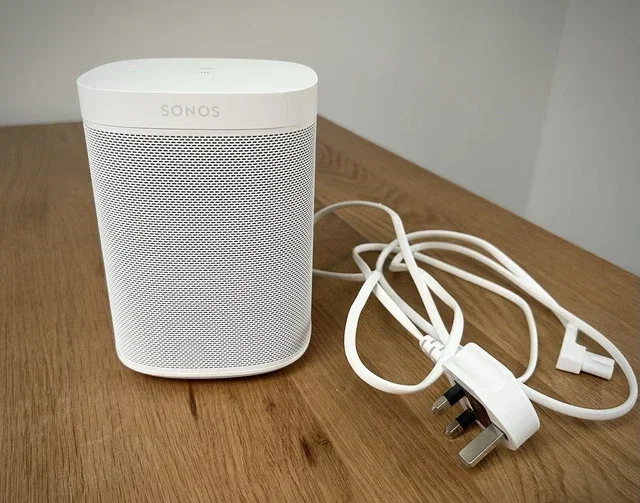
Charging your Bluetooth speaker is straightforward. Nearly all wireless Bluetooth speakers come with a built-in USB charging port. You can plug in a standard USB cable and connect it to a wall adapter, computer, or even a car charger. Many modern speakers now use USB-C connectors, which charge faster and are more widely available.
Some speakers still use micro-USB ports, which work perfectly fine but charge at a slower rate. Always check what type of charging port your speaker has before buying cables or adapters. Using the right cable ensures efficient speaker charging and helps protect the battery over time.
## Understanding Bluetooth Speaker Battery Life
Battery life is one of the most important factors when choosing a wireless Bluetooth speaker. Nobody wants their music to stop mid-song because the battery died. Let us look at what affects battery life and what you can realistically expect.
### Average Playtime Expectations
Most Bluetooth speakers offer between 8 and 20 hours of playtime on a full charge. Smaller portable speakers with compact batteries might last around 6 to 10 hours. Larger, more powerful speakers with bigger battery packs can push past 20 hours at moderate volume levels.
The advertised playtime is usually based on testing at 50 to 70 percent volume. If you crank the volume up to maximum, expect the battery to drain much faster. High volume playback demands more power from the amplifier and drains the rechargeable battery quickly.
### Factors That Drain Battery Faster
Several things cause wireless Bluetooth speakers to lose power faster than expected. Here are the most common culprits:
- High volume levels: Playing audio at maximum volume uses significantly more battery.
- LED light effects: Many speakers have colorful lights that look great but consume extra power.
- Constant Bluetooth connectivity: Maintaining a strong Bluetooth connection uses energy, especially over longer distances.
- Outdoor temperatures: Cold weather reduces battery efficiency and can shorten playtime.
- Aging battery: Over time, rechargeable batteries lose their capacity and hold less charge.
### How to Extend Your Bluetooth Speaker Battery Life
Making your battery last longer is easier than you might think. Try these simple tips during your next listening session:
- Keep the volume at 60 to 70 percent. This is the sweet spot for good sound and long battery life.
- Turn off LED lights if your speaker has them and you do not need them.
- Keep the speaker close to your device. A shorter Bluetooth range means less energy spent maintaining the connection.
- Avoid extreme temperatures. Store your speaker in a cool, dry place when not in use.
- Charge before the battery fully dies. Keeping your lithium-ion battery between 20 and 80 percent charged helps it last longer overall.
## How Wireless Bluetooth Speakers Are Used in Everyday Life
Wireless Bluetooth speakers are incredibly versatile. People use them for all kinds of activities, and understanding the different use cases helps you get the most out of your device. The way you use your speaker also affects how quickly it needs recharging.
### Home Use and Indoor Listening
Many people keep a Bluetooth speaker in their kitchen, bedroom, or living room. These speakers fill rooms with music, podcasts, and audiobooks without any messy cables. Indoor use is one of the easiest ways to enjoy wireless audio because the speaker stays close to its charging source when not in use.
If you want to make an older stereo system wireless, you can explore options to make your old stereo Bluetooth with a simple adapter. This lets you keep your existing speakers but gain the freedom of wireless connectivity. It is a great budget-friendly option for upgrading your home audio setup.
### Outdoor Adventures and Portable Use
One of the biggest reasons people buy wireless Bluetooth speakers is for outdoor use. Whether you are at the beach, on a hike, or grilling in the backyard, a portable Bluetooth speaker keeps the music going. Most outdoor speakers are designed to be water-resistant or waterproof, making them tough enough for adventures.
Portable speakers run on their internal battery, so keeping it charged before heading out is critical. Some users carry a small portable power bank to recharge their speaker on longer trips. This is especially useful for camping trips or beach days where wall outlets are not available.
### Pairing Multiple Speakers for Bigger Sound
Want to fill a large room or outdoor space with sound? Many Bluetooth speakers allow you to pair two or more units together. This creates a stereo effect or simply makes the audio louder and more immersive. Brands like Marshall and JBL offer built-in features for linking speakers wirelessly.
If you own two Marshall speakers, you can pair two Marshall speakers together using the manufacturer’s app or button combination. Keep in mind that when you pair speakers, each one draws power from its own battery. Playing at higher volumes across two speakers will drain both batteries faster than using a single unit.
### Using Alexa with Bluetooth Speakers
Smart speakers have opened up a new world of voice-controlled audio. Many people use Alexa-enabled Bluetooth speakers to play music, set timers, check the weather, and control smart home devices. Using Alexa as a Bluetooth speaker is simple and adds a layer of convenience that regular speakers cannot match.
When using voice assistants, the speaker’s battery may drain slightly faster because the microphone stays active listening for wake words. However, the difference is usually small and manageable with normal use.
## Charging Methods and Best Practices
How you charge your Bluetooth speaker matters more than most people realize. Proper charging habits can extend the overall lifespan of the internal battery and keep your speaker performing at its best for years.
### Wall Adapter Charging
The most common and fastest way to charge a Bluetooth speaker is with a wall adapter. Plug the USB cable into the speaker and connect the other end to a wall plug. Most speakers come with a compatible adapter in the box, but you can also use any standard USB wall charger.
A typical Bluetooth speaker takes 2 to 4 hours to fully charge from empty. Some fast-charging models can reach 80 percent in under an hour. Always use the charger that came with your speaker or a certified replacement to avoid damaging the battery.
### Charging via Computer or Laptop
You can also charge your wireless Bluetooth speaker using a computer’s USB port. This is convenient when you are working at your desk and want to top off your speaker between uses. However, computer USB ports deliver less power than wall adapters, so charging takes longer.
This method works perfectly for overnight charging or when you need a quick top-up. Just plug in your speaker before you go to bed, and it will be ready by morning.
### Portable Power Banks
For people who are always on the move, a portable power bank is a game-changer. These small, rechargeable battery packs can charge your Bluetooth speaker anywhere there is a USB connection. Look for a power bank with at least 10,000 mAh capacity to give your speaker one or two full recharges.
Power banks are especially useful during camping trips, festivals, or long days outdoors. They turn your Bluetooth speaker into a truly untethered device that never runs out of power as long as you carry a charged backup.
## Common Mistakes That Affect Bluetooth Speaker Power
Even experienced Bluetooth speaker users sometimes make mistakes that hurt battery performance. Avoiding these common errors keeps your speaker running strong.
### Overcharging the Battery
Leaving your speaker plugged in for days at a time can stress the battery. Most modern speakers have built-in protection that stops charging once the battery is full. However, keeping it connected for extended periods can still cause slight battery degradation over time. Unplug your speaker once it reaches 100 percent.
### Ignoring Firmware Updates
Many Bluetooth speakers receive firmware updates that improve battery management and Bluetooth efficiency. Ignoring these updates means you might be missing out on optimizations that help your Bluetooth speaker battery last longer. Check the manufacturer’s app regularly for updates.
### Storing Speakers at Zero Charge
If you are not going to use your speaker for a while, do not store it with a completely dead battery. Lithium-ion batteries perform best when stored at around 50 percent charge. A fully drained battery left unused for months may lose its ability to hold a charge altogether.
## Expert Tips for Getting the Most From Your Wireless Bluetooth Speaker
Experienced Bluetooth speaker users know that small habits make a big difference over time. Here are some expert-backed tips to maximize your speaker’s performance and battery life.
First, always charge your speaker in a cool, dry environment. Heat is the enemy of lithium-ion batteries. Charging in direct sunlight or near a heat source can reduce battery capacity over time.
Second, clean the charging port regularly. Dust and lint can build up in the USB port and interfere with proper charging. A quick blast of compressed air or a gentle brush keeps the connection strong and reliable.
Third, update your speaker’s firmware whenever a new version is available. Manufacturers often release updates that improve Bluetooth connectivity, fix battery drain issues, and add new features.
Finally, invest in a quality carrying case if you use your speaker outdoors. A good case protects the speaker from impacts and moisture, both of which can damage the internal battery and other components.
## Key Takeaways
Key Takeaways
- Rechargeable lithium-ion batteries are the most common power source for wireless Bluetooth speakers.
- Most Bluetooth speakers offer 8 to 20 hours of playtime on a single charge, depending on volume and features.
- USB charging, wall adapters, and portable power banks are the primary ways to recharge your speaker.
- Turning off extra features like LED lights and reducing volume can significantly extend battery life.
- You can turn regular speakers into Bluetooth-enabled ones using a Bluetooth adapter, giving them wireless power flexibility.
- Pairing multiple speakers together enhances sound but may drain batteries faster on each unit.
Key Takeaways
- Rechargeable lithium-ion batteries are the most common power source for wireless Bluetooth speakers.
- Most Bluetooth speakers offer 8 to 20 hours of playtime on a single charge, depending on volume and features.
- USB charging, wall adapters, and portable power banks are the primary ways to recharge your speaker.
- Turning off extra features like LED lights and reducing volume can significantly extend battery life.
- You can turn regular speakers into Bluetooth-enabled ones using a Bluetooth adapter, giving them wireless power flexibility.
- Pairing multiple speakers together enhances sound but may drain batteries faster on each unit.
## Frequently Asked Questions
How long does a Bluetooth speaker battery last on a single charge?
Most wireless Bluetooth speakers last between 8 and 20 hours on a full charge. Smaller speakers may last 6 hours, while larger, more powerful models can exceed 20 hours at moderate volume. Your actual battery life depends on volume level, Bluetooth range, and extra features like LED lights.
Can I use my Bluetooth speaker while it is charging?
Yes, most Bluetooth speakers allow you to use them while they charge. However, using the speaker during charging generates heat, which can slightly slow down the charging process. It is generally safe, but for the best battery health, it is better to charge the speaker fully before using it.
How do I know when my Bluetooth speaker needs replacing?
If your Bluetooth speaker no longer holds a charge like it used to, the internal battery may be wearing out. Other signs include shorter playtime, the speaker dying unexpectedly, or the battery not reaching 100 percent even after a full charge. In most cases, the battery is not user-replaceable, so you may need a replacement unit.
Can I turn regular speakers into Bluetooth speakers to save battery?
Yes, you can add Bluetooth functionality to regular speakers using a Bluetooth adapter or receiver. This is a great way to upgrade older speakers without buying a new wireless Bluetooth speaker. The adapter plugs into the speaker and draws its own power, so your existing setup gains wireless capability without replacing the original power source.
Does using Bluetooth headphones drain the speaker battery faster?
No, Bluetooth headphones connect directly to your phone or device and do not use your Bluetooth speaker’s battery. However, if you are streaming audio to both a speaker and headphones simultaneously, your phone’s battery will drain faster. The speaker itself is not affected by pairing with a separate Bluetooth device like headphones.
What is the best way to store a Bluetooth speaker when not in use?
Store your Bluetooth speaker in a cool, dry place with the battery charged to around 50 percent. Avoid leaving it in direct sunlight, inside a hot car, or in a damp environment. Checking the charge level every few months and recharging to 50 percent if needed helps keep the internal battery healthy during long storage periods.
## Conclusion
Wireless Bluetooth speakers are powered by smart, rechargeable battery technology that makes portable audio simple and convenient. From lithium-ion cells to USB-C charging and portable power banks, understanding how your speaker gets and keeps its charge helps you enjoy music everywhere you go. By following the tips in this guide, you can make your Bluetooth speaker battery last longer, charge more efficiently, and get the best performance from every session.
Whether you use your speaker at home, on the trail, or at a backyard gathering, knowing how it works and how to care for it pays off in the long run. Keep your speaker charged, store it properly, and it will keep delivering great sound for years to come.
Frequently Asked Questions
What is How Are Wireless Bluetooth Speakers Powered?
How Are Wireless Bluetooth Speakers Powered is an important topic with many practical applications.