Can You Run Two Bluetooth Speakers At The Same Time
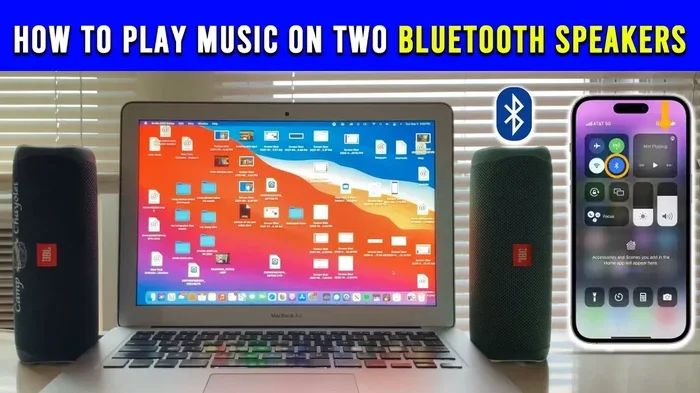
Yes, you can run two Bluetooth speakers at the same time, and it is easier than most people think. Whether you want louder volume, stereo sound, or to fill a bigger room, pairing two speakers opens up new possibilities. This guide walks you through every method, compatibility check, and common pitfall to help you get the best results.
This is a comprehensive guide about Can You Run Two Bluetooth Speakers At The Same Time.
Key Takeaways
- Dual speaker pairing is supported: Many devices and speaker brands allow you to connect two Bluetooth speakers simultaneously for stereo or amplified output.
- Compatibility matters: Not all speakers work together for dual pairing. You need matching models or brands that support this feature.
- Three main methods exist: Built-in dual mode, third-party apps, and audio splitter adapters each offer different ways to run two speakers.
- Sound quality improves: Running two speakers gives you better coverage, louder volume, and in some cases true stereo separation.
- Watch for latency: Some setups introduce audio delay, so choosing the right method reduces sync issues.
- Your phone or tablet can handle it: Most modern devices support multi-speaker output, but settings may need to be adjusted.
[FEATURED_IMAGE_PLACEHOLDER]
Can You Run Two Bluetooth Speakers At The Same Time?
The short answer is yes. You can absolutely run two Bluetooth speakers at the same time, and it is one of the easiest ways to upgrade your sound setup. Whether you are hosting a backyard party, setting up a home theater, or just want richer audio in your living room, dual speaker pairing delivers a noticeable difference.
But the process is not always plug-and-play. Different brands use different methods, and some devices work better together than others. This guide breaks down everything you need to know about running two Bluetooth speakers simultaneously, from compatibility checks to step-by-step setup instructions.
If you have ever tried to pair two Marshall speakers and ran into trouble, you are not alone. Many users face the same challenges, and understanding how the technology works makes all the difference. Let us dive in.
Why Would You Want Two Bluetooth Speakers?
Running two speakers at once is not just about showing off. There are real, practical reasons to set up a dual speaker configuration. Here are the biggest benefits:
Louder Volume
A single Bluetooth speaker has limits. When you add a second speaker, the volume increases significantly. This is perfect for outdoor gatherings, large rooms, or any space where one speaker simply cannot deliver enough punch.
Better Sound Coverage
One speaker creates a focused sound field. Two speakers spread the audio across a wider area. This means less dead space and more consistent listening from any position in the room.
Stereo Separation
Many dual-speaker setups allow you to designate one speaker as left and the other as right. This creates a true stereo experience, which makes music sound richer and more immersive.
Portable Party Setup
Want to throw a party without a heavy sound system? Two portable Bluetooth speakers are lightweight, battery-powered, and easy to move around. They are a great alternative to bulky audio equipment.
How Bluetooth Speaker Pairing Works
Understanding the basics of Bluetooth speaker pairing helps you troubleshoot issues and set up your system faster. Here is what happens behind the scenes when you connect two speakers.
Master and Slave Roles
When you pair two speakers, one acts as the master and the other as the slave. The master receives the audio signal from your phone or tablet, and the slave mirrors it. In most cases, you do not need to configure this manually. The speakers handle the roles automatically.
Bluetooth Version Matters
Newer Bluetooth versions offer better range, lower latency, and more stable connections. If both of your speakers support Bluetooth 5.0 or higher, you will enjoy a smoother experience. Older versions may cause lag or intermittent dropouts.
Codec Support
Bluetooth codecs determine how audio is compressed and transmitted. Advanced codecs like aptX and LDAC deliver better sound quality over Bluetooth. If both speakers support the same codec, you get a more consistent listening experience.
Can You Use a Bluetooth Speaker Without Bluetooth?
Some speakers offer auxiliary input or USB connections that bypass Bluetooth entirely. If you want to learn more about using Bluetooth speakers in non-Bluetooth scenarios, check out this guide on using a Bluetooth speaker without Bluetooth.
Methods to Run Two Bluetooth Speakers Simultaneously
There are several ways to connect two Bluetooth speakers at once. The method you choose depends on your speaker brand, your device, and your budget. Here are the most common approaches.
Method 1: Built-In Dual Speaker Mode
Many modern speaker brands include a native dual mode feature. Brands like JBL, Sony, Marshall, and Bose often support this out of the box. The process usually involves pressing a specific button or using a companion app to link two matching speakers together.
For example, if you own two Marshall speakers, you can follow the pairing process described in our guide on pairing two Marshall speakers. The same principle applies to other brands with dual mode support.
Pros: Easy setup, no extra equipment needed, reliable connection.
Cons: Usually requires matching models from the same brand.
Method 2: Third-Party Apps
If your speakers do not support native dual mode, you can use third-party apps to route audio to multiple Bluetooth devices. Apps like AmpMe, SoundSeeder, and Bluetooth Speaker Amplifier let you connect several speakers to one source device.
These apps work with most Bluetooth speakers regardless of brand. They are especially useful when you want to mix different speaker models together. However, some apps may introduce slight audio delay or reduce sound quality.
Pros: Works with mismatched speakers, flexible setup.
Cons: Possible latency, some apps require a paid version for full features.
Method 3: Audio Splitter or Adapter
An audio splitter adapter is a hardware solution that splits the audio output from your device into two separate streams. You connect one output to each speaker, either via Bluetooth or a wired connection.
This method works well when you want to connect speakers from different brands that do not support native pairing. You can also use this approach to turn regular speakers into Bluetooth by pairing a Bluetooth receiver with each speaker.
Pros: Brand-agnostic, no app required.
Cons: Requires extra hardware, potential sync issues.
Method 4: Speaker Chaining
Some advanced speaker systems support chaining, where you connect one speaker to another in a daisy-chain configuration. This is more common in professional audio setups but is becoming available in consumer-grade products too.
Speaker chaining provides the most stable connection because it does not rely solely on Bluetooth. Some systems use Wi-Fi or proprietary protocols for the inter-speaker link, which reduces latency and improves sync.
Compatibility: Which Speakers Work Together?
Not every pair of Bluetooth speakers can be run together. Compatibility depends on several factors, and checking these before you buy or set up saves a lot of frustration.
Matching Brands and Models
The easiest pairing happens when both speakers are the same brand and model. Manufacturers design their dual modes to work seamlessly between identical units. If you buy two JBL Charge 5 speakers, for instance, you can activate JBL Connect Plus to link them together.
Cross-Brand Pairing
Cross-brand pairing is trickier. Some brands lock their dual mode to their own products only. Others allow any Bluetooth speaker to connect through an app. Always check the manufacturer’s documentation before assuming two different brands will work together.
Doss Speakers
If you own Doss speakers, you might be wondering about pairing options. Our guide on pairing two Doss speakers together covers the specific steps and limitations for that brand.
Speaker Age and Firmware
Older speakers may not support dual pairing even if they are the same model. Firmware updates can add new features, so check if your speaker manufacturer has released any updates. Keeping your speakers updated ensures the best compatibility.
Step-by-Step Setup Guide
Here is a general walkthrough for setting up two Bluetooth speakers. The exact steps vary by brand, but the core process is similar across most devices.
Step 1: Charge Both Speakers
Make sure both speakers are fully charged or plugged in. A low battery can cause connection drops or reduced audio quality during setup.
Step 2: Turn on Bluetooth on Your Source Device
Enable Bluetooth on your phone, tablet, or laptop. Make sure it is visible and ready to pair. Disable any other active Bluetooth connections to avoid confusion.
Step 3: Pair the First Speaker
Put the first speaker into pairing mode. It should appear in your device’s Bluetooth menu. Tap to connect and play a short audio clip to confirm it works.
Step 4: Activate Dual Mode
Now activate the dual speaker mode. This varies by brand. Some speakers have a dedicated button, while others require you to use the companion app. Follow the specific instructions for your speaker model.
Step 5: Pair the Second Speaker
Put the second speaker into pairing mode. It should connect automatically if dual mode is active. If it does not, try resetting both speakers and repeating the process.
Step 6: Test and Adjust
Play music and listen for sync issues. If the audio sounds delayed or out of balance, move the speakers closer together or check the app settings. Adjust the volume balance between the two speakers for the best experience.
Common Mistakes and How to Avoid Them
Setting up two Bluetooth speakers is straightforward, but a few common mistakes can ruin the experience. Here is what to watch out for.
- Pairing mismatched speakers: Not all speakers support cross-brand dual mode. Always verify compatibility before attempting to pair.
- Ignoring firmware updates: Outdated firmware can cause connection drops and reduced functionality. Update both speakers before setup.
- Placing speakers too far apart: Bluetooth has a range limit, usually around 30 feet. Keep both speakers within range of your source device and each other.
- Forgetting to disable other connections: If your phone is already connected to headphones or another speaker, it may not route audio to the dual setup correctly.
- Overlooking latency: Some apps and adapters introduce audio delay. If you notice lipsync issues, try a different connection method.
Expert Tips for the Best Dual Speaker Experience
Want to get the most out of your two Bluetooth speakers? Here are some expert-backed tips that make a real difference.
Place Speakers Strategically
Position your speakers at ear level and angled slightly inward. This creates a wider soundstage and improves stereo separation. Avoid placing speakers in corners, as this can cause bass to sound muddy.
Use the Same Volume Settings
Match the volume on both speakers before you start. If one speaker is louder than the other, the sound feels unbalanced. Most dual mode apps include a volume balance slider to help with this.
Keep the Source Device Close
Your phone or tablet should be within reasonable distance of both speakers. If the source device is too far, the Bluetooth signal weakens and audio quality drops.
Consider a Wi-Fi Alternative
If Bluetooth range or latency is a concern, consider using Wi-Fi-based speakers instead. Systems like Sonos or Chromecast use Wi-Fi for multi-room audio with better range and zero latency. You can even buy temporary Wi-Fi for a quick setup if your venue does not have reliable internet.
Use an Equalizer App
An EQ app lets you fine-tune the sound output for your specific room. Boost the bass for a party or sharpen the mids for vocal-heavy music. This small adjustment can dramatically improve how your dual speaker setup sounds.
Can You Use a Bluetooth Speaker to Amplify My Voice?
If your goal is not just music but also amplifying your voice, a dual Bluetooth speaker setup can work well. Two speakers provide more volume and coverage than one, making them suitable for small events or outdoor speaking engagements. You can learn more about this use case in our article on using a Bluetooth speaker to amplify my voice.
Frequently Asked Questions
Can I pair any two Bluetooth speakers together?
Not always. Many brands only support dual pairing between matching models. Some third-party apps allow cross-brand pairing, but compatibility and sound quality vary. Always check your speaker’s manual or app for supported pairing options.
Does running two Bluetooth speakers reduce battery life?
Yes, running two speakers uses more power than one. The source device also works harder to maintain two Bluetooth connections. Plan for shorter battery life and keep chargers or power banks handy for longer sessions.
Can I connect more than two Bluetooth speakers?
Some apps and speaker brands support connecting three or more speakers. AmpMe, for example, allows you to add multiple speakers to a single group. The more speakers you add, the more likely you are to experience sync or quality issues.
Is there a delay when using two Bluetooth speakers?
Bluetooth inherently introduces a small amount of latency. In most music listening scenarios, this delay is barely noticeable. However, for video watching or gaming, the lag can become apparent. Using wired connections or Wi-Fi-based systems reduces this issue significantly.
Do I need special equipment to run two Bluetooth speakers?
For most setups, you do not need any special equipment. If your speakers support native dual mode, the process is built-in. For cross-brand pairing or extended range, an audio splitter or third-party app may be helpful.
Can I use one speaker as left and the other as right for stereo?
Yes, many dual speaker modes allow you to assign one speaker as the left channel and the other as the right channel. This creates a true stereo effect, making music sound wider and more immersive. Check your speaker’s app or manual for stereo mode options.
Final Thoughts
Running two Bluetooth speakers at the same time is a simple yet effective way to improve your audio experience. Whether you want louder volume for a party, stereo separation for your music, or better coverage for a large room, dual speaker pairing delivers real results.
The key is understanding your options. Built-in dual mode offers the simplest and most reliable setup. Third-party apps provide flexibility for mismatched speakers. And hardware solutions like audio splitters give you full control over your connections.
Take the time to check compatibility, update your firmware, and position your speakers thoughtfully. These small steps make a big difference in sound quality and reliability. With the right setup, two Bluetooth speakers can rival a dedicated sound system, and they are far more portable and affordable.
Start experimenting with your own dual speaker configuration today. You will be amazed at how much better your audio sounds with just one extra speaker.
Frequently Asked Questions
What is Can You Run Two Bluetooth Speakers At The Same Time?
Can You Run Two Bluetooth Speakers At The Same Time is an important topic with many practical applications.