Can You Play A Cd Through Bluetooth And Stream Your Music
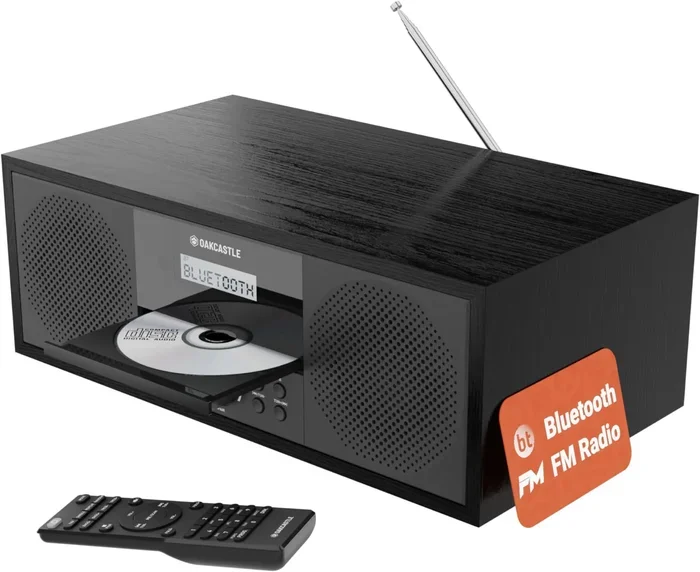
Yes, you can play a CD through Bluetooth by using a Bluetooth adapter or transmitter connected to your CD player. This lets you stream your music wirelessly to speakers, headphones, or car stereos without any cables. Whether you want to go cordless in your living room or enjoy CD audio in your car, the process is simple and affordable.
Key Takeaways
- Bluetooth adapters make CD players wireless: You can connect a Bluetooth transmitter to any CD player and stream audio to compatible speakers or headphones.
- Multiple connection options exist: From optical and RCA outputs to USB and AUX, there are several ways to link your CD player to a Bluetooth device.
- Car owners can upgrade easily: Adding Bluetooth to your car stereo lets you play CDs wirelessly on the road, similar to upgrading your car stereo to Bluetooth.
- Existing speakers can become Bluetooth-ready: You can convert regular speakers into Bluetooth speakers with a simple adapter, just like turning regular speakers into Bluetooth.
- Audio quality depends on your setup: Choosing the right Bluetooth codec and adapter ensures you get the best sound from your CDs.
📑 Table of Contents
- Can You Play A Cd Through Bluetooth And Stream Your Music?
- How Bluetooth Works With CD Players
- Step By Step Guide To Playing CDs Through Bluetooth
- Best Bluetooth Adapters For CD Players In 2024
- Can You Use Bluetooth Speakers With A CD Player?
- Streaming CD Music To Different Devices
- Audio Quality: Does Bluetooth Affect CD Sound?
- Common Problems And How To Fix Them
- Expert Tips For The Best Bluetooth CD Experience
- Frequently Asked Questions
- Conclusion
Can You Play A Cd Through Bluetooth And Stream Your Music?
Have you ever wanted to listen to your favorite CDs without any wires getting in the way? The good news is that you can play a CD through Bluetooth and enjoy your music wirelessly. Whether you have a stack of old CDs collecting dust or you love the sound quality of physical discs, Bluetooth technology opens up a whole new world of listening freedom.
Streaming your music wirelessly is easier than most people think. You do not need expensive equipment or technical skills. A simple Bluetooth adapter or transmitter can turn any CD player into a wireless music machine. In this guide, we will walk you through every step of the process. You will learn about different adapters, setup methods, and tips to get the best sound quality from your CDs over Bluetooth.
Many people still love CDs. They offer great audio quality and a tangible music collection. But wired connections can be annoying. Bluetooth solves that problem. You can stream your CD audio to speakers, headphones, or even your car stereo from across the room. Let us dive into how this works and what you need to get started.
How Bluetooth Works With CD Players
Understanding how Bluetooth connects to your CD player helps you make smart choices. Bluetooth is a wireless technology that sends audio data between devices. Your CD player reads the disc and outputs audio through its ports. A Bluetooth adapter takes that audio signal and transmits it wirelessly to a receiver.
The Basics of Bluetooth Audio Transmission
Bluetooth audio transmission works by converting the audio signal from your CD player into a wireless format. The Bluetooth transmitter sends this signal to a receiver. The receiver then plays the audio through speakers or headphones. This process happens almost instantly. You will not notice any delay in most cases.
There are different Bluetooth versions available. Newer versions offer better range and sound quality. Bluetooth 5.0 and above provide the best experience. They have a longer range of up to 30 feet and improved audio codecs. If you are buying a new adapter, look for one with Bluetooth 5.0 or higher for the best results.
Types of Bluetooth Adapters for CD Players
Not all Bluetooth adapters are the same. Different CD players have different outputs. Here are the most common types of Bluetooth adapters you can use:
- Bluetooth Transmitters: These plug into your CD player’s audio output. They send the signal wirelessly to Bluetooth speakers or headphones. Most transmitters connect via AUX, RCA, or optical ports.
- Bluetooth Receivers: These connect to your speaker system. They receive the Bluetooth signal from your phone or tablet. But you can also use them in reverse setups with a CD player.
- All-in-One Bluetooth Adapters: These devices both transmit and receive Bluetooth signals. They offer more flexibility and are great for setups where you want to switch between devices.
Step By Step Guide To Playing CDs Through Bluetooth
Setting up your CD player for Bluetooth streaming is straightforward. Follow these steps to get your music playing wirelessly in no time.
Step 1: Check Your CD Player’s Output Options
Before buying any adapter, check what outputs your CD player has. Most CD players come with one or more of these ports:
- 3.5mm AUX output: The most common output. It looks like a standard headphone jack.
- RCA outputs (red and white): These are the classic round audio ports found on many CD players.
- Optical output: A square port that sends digital audio. It provides the best sound quality for Bluetooth streaming.
- USB output: Some modern CD players have USB ports that can output audio digitally.
Step 2: Choose The Right Bluetooth Adapter
Once you know your output type, pick the right Bluetooth adapter. Here is a quick guide:
- If your CD player has a 3.5mm output, get a Bluetooth transmitter with a 3.5mm cable.
- If your CD player has RCA outputs, choose a transmitter with RCA cables included.
- If your CD player has an optical output, look for a Bluetooth transmitter with an optical input. This gives you the best audio quality.
Step 3: Connect The Adapter And Pair
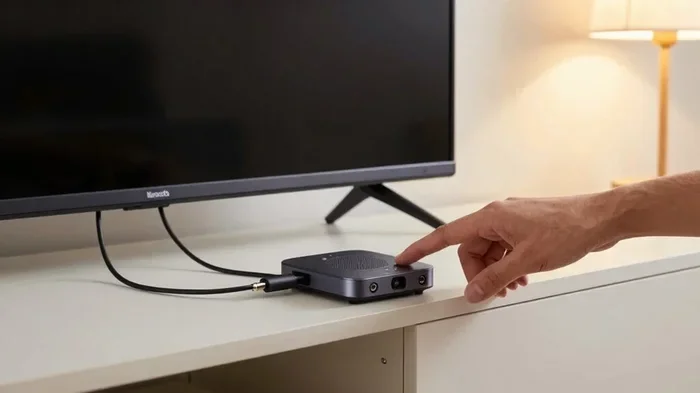
Connect the Bluetooth transmitter to your CD player using the appropriate cable. Then power on both the transmitter and your Bluetooth speaker or headphones. Put your receiver into pairing mode. The transmitter should find the device automatically. Once paired, you are ready to play your CDs wirelessly.
Quick Tip: Keep your CD player and Bluetooth receiver within 15 to 30 feet of each other for the best connection. Walls and obstacles can weaken the signal.
Best Bluetooth Adapters For CD Players In 2024
Not all Bluetooth adapters deliver the same quality. Some are budget-friendly, while others offer premium sound. Here are some top picks for playing CDs through Bluetooth.
| Adapter | Connection Type | Bluetooth Version | Price Range |
|---|---|---|---|
| Avantree Oasis Plus | Optical, AUX, RCA | Bluetooth 5.0 | $60 – $80 |
| 1Mii B06 Transmitter | Optical, AUX, RCA | Bluetooth 5.3 | $30 – $45 |
| TaoTronics TT-BA07 | AUX, RCA | Bluetooth 5.0 | $20 – $30 |
| Sennheiser Bluetooth Transmitter | Optical, AUX | Bluetooth 5.0 | $70 – $90 |
| Creative BT-W4 | USB, Bluetooth | Bluetooth 5.3 | $50 – $65 |
Each of these adapters works well with CD players. The Avantree Oasis Plus is a great choice if you want optical connectivity for the best sound. The 1Mii B06 offers excellent value with Bluetooth 5.3. Budget buyers will love the TaoTronics TT-BA07 for its affordable price and solid performance.
Can You Use Bluetooth Speakers With A CD Player?
Yes, you can absolutely use Bluetooth speakers with a CD player. In fact, this is one of the most popular ways people enjoy their CD collections wirelessly. You just need a Bluetooth transmitter connected to your CD player. The transmitter sends the audio signal to your Bluetooth speaker.
Most modern Bluetooth speakers work perfectly with CD player transmitters. Popular brands like JBL, Bose, and Sony all support standard Bluetooth connections. Simply pair your transmitter with the speaker, and you are good to go. You can even stream music from your CD player to multiple speakers at once if your adapter supports multipoint pairing.
If you want to boost the volume, you can connect a Bluetooth speaker to amplify your voice or music in a larger room. This is especially useful for outdoor gatherings or parties where you want to fill a big space with your favorite CD tracks.
Streaming CD Music To Different Devices
One of the best things about using Bluetooth with your CD player is the flexibility. You can stream your music to many different devices. Let us look at some common setups.
Streaming To Home Speakers
Your living room speakers do not need to be Bluetooth-ready to work with a CD player. You can connect a Bluetooth receiver to any speaker system. This works with both powered and passive speakers. Just add a Bluetooth receiver to the audio chain, and your speakers become wireless.
If you already have regular speakers, you can convert them to Bluetooth. Many people do this to avoid buying new speakers. It is a simple and cost-effective upgrade. You can learn more about turning regular speakers into Bluetooth in our other guide.
Streaming To Headphones
Want to listen to your CDs without disturbing anyone? Bluetooth headphones are a great option. Connect a Bluetooth transmitter to your CD player, pair your headphones, and enjoy your music privately. This works great for late-night listening or when you do not want to share the audio with others in the room.
For the best experience with headphones, look for adapters that support codecs like aptX or LDAC. These codecs deliver higher quality audio than standard Bluetooth. Your CDs will sound much better with these advanced codecs.
Streaming To Your Car Audio System
Playing CDs through Bluetooth in your car is also possible. You can use a Bluetooth transmitter connected to your car’s audio input. This works well if your car does not have a built-in CD player anymore but still has an AUX or USB port. You can also upgrade your car stereo to Bluetooth for a more permanent solution.
Some car owners use a Bluetooth FM transmitter. This plugs into your car’s cigarette lighter and broadcasts the audio on an FM frequency. Your car radio picks up the signal and plays your CD audio wirelessly. It is not the highest quality option, but it works well in a pinch.
Audio Quality: Does Bluetooth Affect CD Sound?
This is one of the most common questions people ask. The short answer is: it depends on your setup. Bluetooth has come a long way, but there are still some limitations compared to wired connections.
Understanding Bluetooth Audio Codecs
Bluetooth audio codecs determine how your music is compressed and transmitted. Different codecs offer different levels of quality:
- SBC: The default codec for most Bluetooth devices. It provides decent quality but is not the best for audiophiles.
- aptX: Offers better sound quality than SBC. It is a popular choice for music lovers who want good audio without spending a lot.
- aptX HD: Delivers high-definition audio over Bluetooth. Great for listening to CDs where you want to preserve the original sound quality.
- LDAC: Sony’s codec that supports even higher bitrates. It is excellent for streaming lossless audio from CDs.
If you want the best sound from your CDs, choose a Bluetooth adapter that supports aptX HD or LDAC. These codecs minimize the quality loss that can happen with wireless transmission. Your CDs will still sound fantastic over Bluetooth with the right setup.
Comparing Wired vs Bluetooth Sound Quality
Wired connections still offer the purest audio signal. There is no compression or wireless interference. But the difference is small with modern Bluetooth codecs. Most people cannot tell the difference between a wired connection and a high-quality Bluetooth stream. If you are not an audiophile, Bluetooth will more than meet your needs.
For the average listener, the convenience of Bluetooth far outweighs the slight quality difference. You get to enjoy your CD collection without being tethered to one spot in your house.
Common Problems And How To Fix Them
Even with a great setup, you might run into some issues. Here are the most common problems and their solutions.
Bluetooth Connection Keeps Dropping
If your Bluetooth connection drops frequently, try these fixes:
- Move closer to the Bluetooth receiver. Walls and furniture can block the signal.
- Make sure your adapter’s firmware is up to date. Check the manufacturer’s website for updates.
- Reduce interference from other wireless devices like Wi-Fi routers or microwaves.
- Restart both the transmitter and receiver. Sometimes a simple reboot fixes connection issues.
Poor Audio Quality Or Static
If your audio sounds bad or has static, check these things:
- Make sure your cables are securely connected. Loose cables cause signal loss.
- Try a different Bluetooth codec if your adapter supports multiple options.
- Check if your CD player’s output volume is too high or too low. Adjust it to match the adapter’s input level.
- Move away from other electronic devices that might cause interference.
CD Player Does Not Recognize The Adapter
If your CD player does not work with the Bluetooth adapter, try these steps:
- Check that you are using the correct input port on the adapter.
- Try a different cable. Some adapters come with multiple cable options.
- Make sure the adapter is powered on and in pairing mode.
- Consult the adapter’s manual for specific compatibility information.
Expert Tips For The Best Bluetooth CD Experience
Want to get the most out of your wireless CD setup? Here are some expert tips that make a big difference.
- Use an optical connection when possible. Optical outputs send digital audio directly to the Bluetooth adapter. This preserves the best sound quality from your CDs.
- Keep your firmware updated. Bluetooth adapters receive software updates that improve performance and fix bugs. Check for updates regularly.
- Invest in a good adapter. Cheap adapters often have weak signals and poor sound quality. Spending a little more upfront saves you frustration later.
- Position your adapter wisely. Place the Bluetooth transmitter in a central location. Avoid hiding it inside a closed cabinet where the signal might get blocked.
- Charge your Bluetooth devices fully. Low battery can cause connection drops and poor audio quality. Keep your speakers and headphones charged before long listening sessions.
These simple tips will help you enjoy your CD collection wirelessly with minimal hassle. You will wonder how you ever listened to CDs with wires.
Frequently Asked Questions
Can I Play CDs Through Bluetooth Without Any Extra Equipment?
No, you need a Bluetooth adapter or transmitter to connect your CD player to a Bluetooth speaker or headphone. Most CD players do not have built-in Bluetooth. A simple Bluetooth transmitter that plugs into your CD player’s audio output is all you need to get started.
Does Playing CDs Through Bluetooth Reduce Sound Quality?
It can, but the difference is very small with modern Bluetooth technology. Using an adapter that supports aptX HD or LDAC codecs minimizes quality loss. For most listeners, the sound quality over Bluetooth is nearly identical to a wired connection. Only the most sensitive audiophiles will notice a difference.
Can I Connect My CD Player To A Bluetooth Speaker Directly?
Not directly, because most CD players do not have Bluetooth built in. You need a Bluetooth transmitter connected to your CD player’s audio output. The transmitter then pairs with your Bluetooth speaker. This setup takes just a few minutes and costs very little.
How Far Can I Be From My Bluetooth Speaker While Playing CDs?
Most Bluetooth devices work within a range of 15 to 30 feet. Bluetooth 5.0 and newer versions can reach up to 40 feet in open spaces. Walls, furniture, and other obstacles can reduce this range. For the best experience, keep your CD player and speaker in the same room or nearby.
Can I Use Bluetooth To Play CDs In My Car?
Yes, you can. You can use a Bluetooth FM transmitter or a Bluetooth receiver connected to your car’s AUX input. This lets you play CDs wirelessly through your car speakers. For a more permanent solution, consider upgrading your car stereo to Bluetooth for seamless integration.
Is It Worth Converting My CD Player To Bluetooth?
Absolutely. Converting your CD player to Bluetooth adds a lot of convenience. You can listen from anywhere in your home without being tied to the CD player. Bluetooth adapters are affordable and easy to set up. It is one of the best small upgrades you can make to your listening experience.
Conclusion
Playing a CD through Bluetooth is simple, affordable, and incredibly convenient. You do not need to replace your CD player or buy expensive new speakers. A Bluetooth transmitter or adapter is all you need to make your CD player wireless. Whether you want to stream music to your home speakers, headphones, or car stereo, Bluetooth makes it possible.
We covered everything you need to know in this guide. You learned about different adapter types, setup steps, audio quality considerations, and common troubleshooting tips. The key is choosing the right Bluetooth adapter for your CD player’s output type and using the best audio codec for your needs.
Now you can enjoy your CD collection without any wires holding you back. Stream your music freely around your home or car. The wireless experience brings new life to your old CDs. Give it a try, and you will never go back to tangled cables again.
With the right setup, your CD player becomes a versatile wireless music source. You can share your favorite tracks with friends, listen privately through headphones, or fill your car with CD-quality audio. The possibilities are endless when you play a CD through Bluetooth and embrace the freedom of wireless streaming.