Can I Use a USB Bluetooth Transmitter For My Smart TV
Yes, you can absolutely use a USB Bluetooth transmitter for your Smart TV to go wireless. A USB Bluetooth transmitter lets you stream audio to headphones, speakers, or soundbars without cables. It is one of the simplest and most affordable ways to upgrade your Smart TV audio experience and enjoy wireless listening in any room.
Have you ever wanted to watch your favorite show on the couch with wireless headphones but your Smart TV just won’t cooperate? You are not alone. Many TV lovers face the same problem every day. The good news is that a USB Bluetooth transmitter can solve this issue fast and affordably.
So, can you use a USB Bluetooth transmitter for your Smart TV? The short answer is yes. A small USB device plugs right into your TV and sends audio wirelessly to your headphones, speakers, or soundbar. It opens up a whole new world of wireless audio streaming without spending a fortune. In this guide, we will walk you through everything you need to know.
Whether you are a late-night watcher who does not want to wake up the family or someone who loves listening to music from your TV speakers through a wireless speaker, a Bluetooth transmitter for TV makes it all possible. Let us dive in and explore how this simple gadget works and why it might be the best upgrade you make this year.
Key Takeaways
- Easy Wireless Upgrade: A USB Bluetooth transmitter transforms any Smart TV with a USB port into a wireless audio hub.
- Wide Compatibility: Most transmitters work with TVs, headphones, speakers, and soundbars that support Bluetooth.
- Low Latency Matters: Look for transmitters with aptX Low Latency to avoid audio-video sync issues.
- Simple Setup: Plug in, pair, and play. No technical expertise is needed.
- Affordable Option: USB Bluetooth transmitters cost much less than buying a new TV or sound system.
- Check Your TV First: Make sure your Smart TV has a USB port and supports audio output before buying.
- Range and Battery Are Key: Choose a transmitter with a strong Bluetooth range and reliable power source.
📑 Table of Contents
- What Is a USB Bluetooth Transmitter and How Does It Work?
- Benefits of Using a USB Bluetooth Transmitter with Your Smart TV
- How to Choose the Right USB Bluetooth Transmitter for Your TV
- Step-by-Step Setup Guide for Your Smart TV
- Common Problems and How to Fix Them
- Is a USB Bluetooth Transmitter Worth It for Your Smart TV?
- Frequently Asked Questions
- Conclusion
What Is a USB Bluetooth Transmitter and How Does It Work?
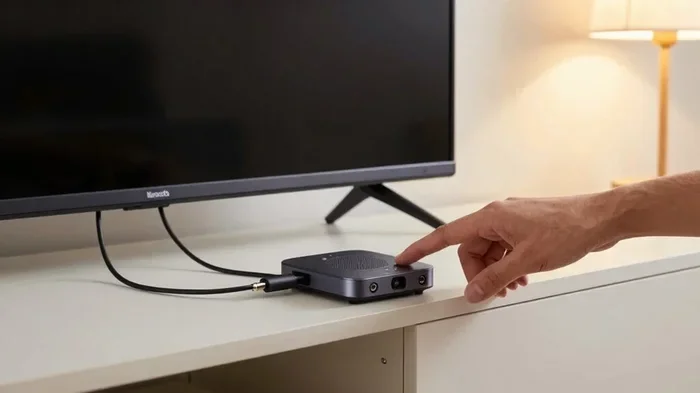
A USB Bluetooth transmitter is a small adapter that plugs into a USB port on your Smart TV. It takes the audio signal from your TV and sends it wirelessly using Bluetooth technology to any compatible device nearby. Think of it as a bridge between your TV and your wireless headphones or speakers.
Here is how it works in simple terms:
- The transmitter plugs into your TV’s USB port.
- It receives the audio signal from your TV.
- It sends that signal wirelessly via Bluetooth to your device.
- Your headphones or speakers receive the signal and play the sound.
Most transmitters support Bluetooth version 5.0 or higher, which means a stronger connection and a wider range. The typical Bluetooth range is about 30 feet, so you can move around your living room freely. Some advanced models also support aptX Low Latency, which reduces the delay between video and audio. This is super important for watching fast-action movies or sports where sync matters.
You might also hear people call this device a Bluetooth receiver for TV or a wireless audio adapter. They all mean the same thing. The key is that it makes your TV wireless-ready for audio.
Benefits of Using a USB Bluetooth Transmitter with Your Smart TV
There are many reasons why people add a USB Bluetooth transmitter to their Smart TV setup. Let us look at the biggest benefits.
1. Wireless Freedom
The top benefit is freedom from cables. You can walk around your home, stretch out on the bed, or even go to the kitchen without missing a second of your show. Wireless listening changes the way you enjoy TV time.
2. Late-Night Viewing Without Disturbing Others
Do you watch TV past midnight? A Bluetooth transmitter for TV lets you plug in wireless headphones and enjoy your shows at full volume without waking up anyone in the house. This is a game-changer for families with different sleep schedules.
3. Cost-Effective Upgrade
Buying a new TV with built-in Bluetooth can cost hundreds of dollars. A USB Bluetooth transmitter costs a fraction of that price. For under $30, you can add wireless audio capabilities to your existing setup.
4. Connect Multiple Devices
Many transmitters allow you to pair two Bluetooth devices at the same time. This means you and your partner can both wear wireless headphones and watch the same show in silence. Some models even let you switch between a Bluetooth speaker and wired speakers easily.
5. Works with Many Devices
A USB Bluetooth transmitter is not just for TVs. You can use it with laptops, tablets, and desktop computers. It is a versatile audio streaming tool for your entire home.
How to Choose the Right USB Bluetooth Transmitter for Your TV
Not all transmitters are the same. Choosing the right one can make a big difference in your experience. Here are the things you should look for.
Check Bluetooth Version and Range
Always go for a transmitter with Bluetooth 5.0 or higher. Newer versions offer better range, faster connections, and more stable performance. If your TV is far from where you sit, a stronger Bluetooth range matters a lot. Look for models that advertise at least 30 feet of range for the best results.
Look for Low Latency Support
Audio latency is the delay between what you see on screen and what you hear. If the sound lags behind the video, it gets annoying fast. Transmitters that support aptX Low Latency or similar codecs reduce this delay significantly. For movies, gaming, and sports, this feature is a must.
Consider Audio Codec Compatibility
Different transmitters support different audio codecs. Common ones include SBC, aptX, AAC, and aptX Low Latency. The codec determines the quality of the wireless audio. If you care about sound quality, pick a transmitter that supports high-quality codecs like aptX or AAC.
Check Your TV’s USB Port Type
Not all USB ports on Smart TVs provide enough power for a Bluetooth transmitter. Some TVs have USB ports that only supply power for firmware updates and not enough juice for active devices. Check your TV manual or look for USB ports labeled as “power output” or “host” ports. If your TV has a USB-C port, make sure the transmitter is compatible with it.
Read User Reviews and Ratings
Before you buy, take a few minutes to read reviews from other users. Look for feedback on connection stability, battery life (if the transmitter is battery-powered), and ease of setup. Real-world reviews often tell you more than product descriptions.
Step-by-Step Setup Guide for Your Smart TV
Setting up a USB Bluetooth transmitter is easier than you think. Follow these steps and you will be listening wirelessly in minutes.
Step 1: Plug in the Transmitter
Find an available USB port on your Smart TV. Insert the USB Bluetooth transmitter firmly into the port. Wait a few seconds for the TV to recognize the device. Some TVs will show a notification. Others may not show anything at all, and that is normal.
Step 2: Put Your Bluetooth Device in Pairing Mode
Turn on your wireless headphones, speaker, or earbuds. Put them into pairing mode. Most devices have a dedicated button or a long-press action to activate pairing mode. Check your device manual if you are unsure how to do this.
Step 3: Pair the Devices
On your TV, go to the audio output settings. Look for Bluetooth or audio output options. Select the Bluetooth transmitter from the list of available devices. Your TV and transmitter should connect automatically.
Some transmitters have a button you need to press to initiate pairing. If the connection does not happen right away, try pressing the pairing button on the transmitter. You should see a flashing light or hear a confirmation tone.
Step 4: Test the Audio
Play a video or music on your TV. Check if the sound comes through your Bluetooth device. If it does, you are all set. If not, make sure your Bluetooth device is selected as the audio output in your TV settings.
Step 5: Adjust Volume and Settings
You can now control the volume from your TV or from your Bluetooth device, depending on your preference. Some transmitters also have a volume control built in. Explore the settings to find what works best for you.
One thing to keep in mind: if you already use a 4 apps that are like Uber for finding dog walkers or similar apps, you know how easy modern Bluetooth connections are. The setup process for a TV Bluetooth transmitter is just as simple and straightforward.
Common Problems and How to Fix Them
Even though setup is easy, you might run into a few hiccups along the way. Here are the most common issues and how to solve them.
Audio and Video Are Out of Sync
This is the number one complaint about Bluetooth audio. The delay happens because Bluetooth takes a little time to transmit the signal. To fix this, look for a transmitter with aptX Low Latency support. You can also adjust the audio delay settings on your TV if your model supports it. Reducing the Bluetooth codec quality can sometimes help reduce lag too.
Transmitter Not Showing Up on TV
If your TV does not recognize the transmitter, try a different USB port. Some ports may not supply enough power. You can also try plugging the transmitter into a USB hub with its own power source. Make sure the transmitter is compatible with your TV brand and model.
Connection Drops Frequently
Interference from other wireless devices can cause dropouts. Move your TV and transmitter away from routers, microwaves, and other Bluetooth devices. Also, make sure you are within the recommended Bluetooth range of 30 feet for the best stability.
Poor Audio Quality
If the sound sounds tinny or compressed, your transmitter might be using a lower-quality codec. Check if your transmitter and headphones both support a higher-quality codec like aptX or AAC. Updating the firmware on your transmitter can also improve audio performance.
TV USB Port Does Not Provide Enough Power
Some Smart TV USB ports are designed only for low-power devices like flash drives. If your transmitter needs more power, use a powered USB hub or try a different port. A USB port on a soundbar or streaming device may also work if your TV lacks a suitable port.
Is a USB Bluetooth Transmitter Worth It for Your Smart TV?
After all the information above, you might be wondering if a USB Bluetooth transmitter is really worth your money. The answer depends on your needs and how you use your TV.
If you value wireless freedom, watch TV at night without disturbing others, or want to connect wireless headphones and speakers without buying a new TV, then yes, it is absolutely worth it. A USB Bluetooth transmitter is one of the most affordable and practical upgrades you can make to your home entertainment setup.
Think about it this way. A quality soundbar can cost $200 or more. A good Bluetooth transmitter costs $20 to $40. For a fraction of the price, you get the same wireless audio benefits. Plus, you can take the transmitter with you when you travel or use it with a different TV in another room.
The only situation where a transmitter might not be the best choice is if you need surround sound or premium audio quality that only a wired connection can deliver. For most casual viewers and families, a USB Bluetooth transmitter hits the sweet spot between convenience, cost, and quality.
Before you make a purchase, take a moment to compare a few models. Look at Bluetooth version, codec support, range, and user reviews. A little research goes a long way in finding the right transmitter for your Smart TV.
Frequently Asked Questions
Can any USB Bluetooth transmitter work with a Smart TV?
Most USB Bluetooth transmitters work with Smart TVs that have a USB port and support audio output. However, compatibility can vary. Check that your TV has a USB port that supports audio output and that the transmitter is compatible with your TV brand. Reading the product description and reviews before buying helps ensure a smooth experience.
Does a USB Bluetooth transmitter cause audio delay?
Some Bluetooth transmitters do cause a slight audio delay, especially with standard Bluetooth codecs. This delay is called latency. To minimize it, choose a transmitter that supports aptX Low Latency or similar low-latency codecs. These technologies reduce the gap between video and audio to nearly unnoticeable levels.
Can I connect multiple Bluetooth devices to one transmitter?
Yes, many modern transmitters support dual-device pairing. This feature lets you connect two Bluetooth headphones or speakers to the same transmitter at the same time. It is perfect for couples or families who want to watch TV together without sharing a single pair of headphones.
Do I need an internet connection to use a USB Bluetooth transmitter?
No, a USB Bluetooth transmitter does not need Wi-Fi or an internet connection. It uses Bluetooth technology to create a direct wireless connection between your TV and your audio device. This makes it a reliable option even if your internet is slow or unavailable.
Can I use a USB Bluetooth transmitter with a non-Smart TV?
Yes, as long as your TV has a USB port and supports audio output, a Bluetooth transmitter will work. You do not need a Smart TV to enjoy wireless audio. This makes it a great option for older TVs or basic models that lack built-in Bluetooth.
What is the best Bluetooth range for a TV transmitter?
A Bluetooth range of at least 30 feet is ideal for most living rooms. This gives you enough freedom to move around without losing the connection. If you have a very large room or like to listen from far away, look for transmitters that advertise extended range capabilities.
Conclusion
Using a USB Bluetooth transmitter for your Smart TV is one of the smartest and most affordable upgrades you can make. It brings wireless audio freedom to your living room without the hassle of new cables or expensive equipment. Whether you want to watch movies with wireless headphones, connect a wireless speaker for better sound, or simply enjoy late-night viewing in peace, a Bluetooth transmitter delivers.
The setup is simple, the benefits are real, and the cost is low. With the right transmitter, you can turn any Smart TV into a wireless audio powerhouse. Now that you know the answer to “Can I use a USB Bluetooth transmitter for my Smart TV,” it is time to take action. Pick a transmitter that fits your needs, follow the setup steps, and enjoy your favorite shows the wireless way.