Can I Use A Bluetooth Speaker To Amplify My Voice Easily
Yes, you can use a Bluetooth speaker to amplify your voice — but the results depend on the speaker type, setup, and your environment. This guide walks you through everything you need to know about voice amplification with Bluetooth speakers, from choosing the right device to avoiding common pitfalls. Whether you are hosting an outdoor event, giving a presentation, or just want louder sound, this guide has you covered.
Can I Use A Bluetooth Speaker To Amplify My Voice Easily
Have you ever been in a situation where you needed your voice to carry further? Maybe you are hosting a backyard gathering, leading a group exercise class, or trying to make an announcement at an outdoor event. The question on your mind might be simple: can I use a Bluetooth speaker to amplify my voice? The short answer is yes. But the full answer involves a few important details that can make or break your experience.
In this guide, we will walk you through everything you need to know about using a Bluetooth speaker for voice amplification. We will cover how it works, what to look for, common mistakes, and practical tips that get you real results. By the end, you will feel confident about setting up your own voice amplification system with a wireless speaker.
Let us dive right in.
Key Takeaways
- Bluetooth speakers can amplify your voice: Many portable speakers have built-in microphones or aux inputs that make voice amplification possible.
- Not all speakers are equal: Larger speakers with higher wattage deliver better voice projection than small personal speakers.
- Setup matters: Proper placement, mic connection, and EQ settings make a huge difference in sound quality.
- Limitations exist: Bluetooth speakers are not a replacement for professional PA systems in large venues.
- Check compatibility: Make sure your speaker supports microphone input before purchasing for voice amplification.
- Explore alternatives: For frequent voice amplification, consider dedicated voice amplifiers or portable PA systems.
📑 Table of Contents
- What Is a Bluetooth Speaker and How Does It Work?
- Can a Bluetooth Speaker Actually Amplify Your Voice?
- How to Set Up Your Bluetooth Speaker for Voice Amplification
- Best Bluetooth Speakers for Voice Amplification
- Pros and Cons of Using Bluetooth Speakers to Amplify Your Voice
- Common Mistakes and How to Avoid Them
- Expert Tips for Better Voice Amplification with Bluetooth Speakers
- Conclusion
What Is a Bluetooth Speaker and How Does It Work?
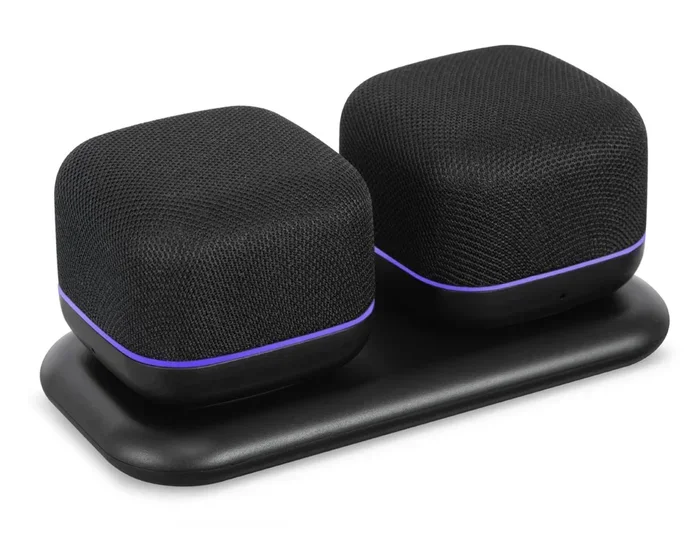
A Bluetooth speaker is a portable audio device that connects wirelessly to your phone, tablet, or laptop using Bluetooth technology. Instead of dealing with cables and cords, you simply pair your device and start streaming audio. These speakers come in all shapes and sizes, from tiny pocket-sized units to larger portable speakers that can fill a room with sound.
The way a Bluetooth speaker works is fairly straightforward. Your device sends an audio signal through the air using Bluetooth wireless connectivity. The speaker receives that signal and converts it into sound through its built-in drivers. Most Bluetooth speakers also have a built-in battery, which gives you the freedom to move around without being tethered to a wall outlet.
Now, here is where things get interesting for voice amplification. Some Bluetooth speakers come with built-in microphones or offer auxiliary input options. This means you can connect a microphone directly to the speaker and have your voice projected through the speaker’s drivers. That is the basic principle behind using a Bluetooth speaker to boost your voice.
But not every Bluetooth speaker is designed for this purpose. A small personal speaker meant for listening to music in your bedroom will struggle to amplify a voice effectively. On the other hand, a larger portable Bluetooth speaker with higher wattage and better drivers can do a surprisingly good job. Let us explore this in more detail.
Can a Bluetooth Speaker Actually Amplify Your Voice?
The short answer is yes, but with some important caveats. A Bluetooth speaker can amplify your voice if it has the right inputs and enough power to drive the sound. However, there is a big difference between amplifying a voice for a small group of friends and projecting it across a large outdoor field.
Here is what determines whether a Bluetooth speaker can effectively amplify your voice:
- Speaker size and wattage: Larger speakers with higher wattage produce louder and clearer sound. A 10-watt speaker will outperform a 3-watt speaker every time for voice projection.
- Microphone input options: Speakers with a 3.5mm aux input or a dedicated mic port make it easy to connect a microphone directly.
- Built-in microphone: Some speakers come with a built-in mic that picks up your voice and amplifies it. This is the simplest setup but offers the least control.
- Speaker driver quality: Better drivers produce clearer vocals and less distortion at higher volumes.
- Battery life: For events, you want a speaker that can run for several hours without needing a recharge.
If you are looking for gadgets that can make your life easier, including portable speakers for voice amplification, check out our 10 Gadgets To Make Moms Life Easier guide for more inspiration on useful portable devices.
So yes, a Bluetooth speaker can absolutely amplify your voice. The key is choosing the right speaker for your specific needs and setting it up properly. Let us look at how to do that.
How to Set Up Your Bluetooth Speaker for Voice Amplification
Setting up your Bluetooth speaker for voice amplification is easier than most people think. You do not need to be tech-savvy or have expensive equipment. With the right approach, you can have a working voice amplification setup in just a few minutes.
Step 1: Choose the Right Speaker
Start by selecting a Bluetooth speaker that suits your needs. If you are amplifying your voice for a small indoor gathering, a medium-sized portable speaker will work fine. For outdoor events or larger groups, look for a speaker with higher wattage and better sound projection.
Consider these factors when choosing your speaker:
- Wattage: Look for at least 10 watts for decent voice amplification.
- Input options: Check for aux input, USB mic support, or Bluetooth microphone compatibility.
- Portability: If you are moving around, a lightweight and battery-powered speaker is ideal.
- Durability: For outdoor use, look for water-resistant and shockproof models.
Step 2: Connect Your Microphone
Next, you need to connect your microphone to the speaker. There are a few ways to do this depending on your speaker model:
- Wired microphone with aux cable: Plug a 3.5mm microphone into the speaker’s aux port. This is the most common and reliable method.
- Bluetooth microphone: Some speakers support Bluetooth microphones. Pair the mic to the speaker just like you would pair your phone.
- Built-in microphone: If your speaker has a built-in mic, simply speak into it and adjust the volume.
- USB microphone: Some higher-end speakers accept USB microphones for direct connection.
Once connected, test the sound by speaking into the microphone and adjusting the volume. You want the sound to be loud enough to carry but not so loud that it distorts or produces feedback.
Step 3: Adjust the Settings
Most Bluetooth speakers have equalizer (EQ) settings that let you fine-tune the sound. For voice amplification, you want to boost the mid-range frequencies. This is where the human voice sits and where clarity matters most.
Here are some quick EQ tips for better voice projection:
- Boost the mids: This enhances vocal clarity and makes your voice stand out.
- Reduce the bass: Too much bass can muddy your voice and make it hard to understand.
- Keep treble moderate: A slight treble boost adds brightness but too much can sound harsh.
If you are using a portable Bluetooth speaker with a companion app, take advantage of any voice enhancement features. Many modern speakers include preset modes for speech, presentations, and live events that optimize the sound automatically.
For more ideas on gadgets that enhance everyday experiences, including audio devices, explore our 10 Gadgets To Make Moms Life Easier collection for practical tech tips.
Step 4: Position the Speaker Correctly
Speaker placement plays a huge role in how well your voice carries. Here are some positioning tips:
- Place the speaker at ear level: This ensures the sound projects directly toward your audience.
- Angle the speaker upward: For outdoor use, angling the speaker slightly upward helps the sound travel further.
- Keep the speaker away from walls: Walls can cause echo and distortion, especially at higher volumes.
- Face the speaker toward your audience: This might sound obvious, but it is one of the most overlooked setup mistakes.
Best Bluetooth Speakers for Voice Amplification
Not all Bluetooth speakers are created equal when it comes to amplifying your voice. Some models are specifically designed for presentations and live events, while others are better suited for casual music listening. Here are some categories and examples of speakers that work well for voice amplification.
| Speaker Type | Best For | Mic Input | Wattage Range | Portability |
|---|---|---|---|---|
| Portable Bluetooth Speaker | Small gatherings, outdoor picnics | Aux or Bluetooth mic | 5-20W | High |
| Portable PA Speaker | Medium events, presentations | Built-in mic or aux | 20-50W | Medium |
| Wireless Megaphone Speaker | Outdoor announcements, sports | Built-in mic | 10-30W | High |
| Smart Speaker with Mic | Small rooms, home use | Built-in smart mic | 5-15W | High |
For most people looking to amplify their voice, a portable PA speaker offers the best balance of power, portability, and ease of use. These speakers are designed specifically for voice projection and often come with built-in microphones and mixer controls.
If you want a more detailed look at helpful audio devices for everyday use, check out our 10 Gadgets To Make Moms Life Easier guide for additional recommendations on portable audio gear.
Top Features to Look For
When shopping for a Bluetooth speaker for voice amplification, keep an eye out for these features:
- Built-in microphone: The simplest option. Just turn it on and speak.
- Aux input port: Lets you plug in any wired microphone for better control.
- Rechargeable battery: Look for at least 8 hours of battery life for extended events.
- Water resistance: Important for outdoor events where weather is unpredictable.
- Carrying handle or strap: Makes it easy to move the speaker around during events.
- USB charging port: Allows you to charge your phone at the same time.
Pros and Cons of Using Bluetooth Speakers to Amplify Your Voice
Like any solution, using a Bluetooth speaker for voice amplification has its advantages and limitations. Let us break them down so you can make an informed decision.
Pros
- Portability: Most Bluetooth speakers are lightweight and easy to carry anywhere.
- Wireless convenience: No cables needed between your phone and the speaker. Just pair and play.
- Affordability: Many good Bluetooth speakers are available at reasonable prices, making this an accessible option.
- Versatility: The same speaker can play music, amplify your voice, and serve as a backup for other audio needs.
- Easy setup: Most speakers connect and start working within minutes.
- Battery powered: You can use them anywhere without access to a power outlet.
Cons
- Limited power: Bluetooth speakers cannot match the output of professional PA systems for large venues.
- Audio delay: Bluetooth technology introduces a slight delay, which can be noticeable in live voice amplification scenarios.
- Battery dependency: Long events may drain the speaker battery, leaving you without amplification.
- Sound quality trade-offs: Smaller speakers may distort at higher volumes, affecting vocal clarity.
- Range limitations: Bluetooth has a typical range of 30 feet, which limits how far you can move from your source device.
Understanding these pros and cons helps you set realistic expectations. For small to medium events, a Bluetooth speaker works wonderfully. For large auditoriums or concerts, you will need professional-grade equipment.
Common Mistakes and How to Avoid Them
Even with the best Bluetooth speaker, mistakes during setup can ruin your voice amplification experience. Here are the most common errors and how to avoid them.
Mistake 1: Using the Wrong Speaker Size
Many people buy small Bluetooth speakers and expect them to project their voice across a large room. This simply does not work. A small speaker lacks the power and driver size needed for meaningful voice amplification. Always match the speaker size to the size of your audience and venue.
Mistake 2: Ignoring Feedback and Echo
Feedback happens when the microphone picks up sound from the speaker and re-amplifies it, creating that annoying screeching noise. To avoid feedback:
- Keep the microphone away from the speaker.
- Reduce the volume until feedback stops.
- Use a directional microphone that picks up sound from a specific direction.
- Position yourself between the audience and the speaker.
Mistake 3: Poor EQ Settings
As mentioned earlier, the wrong EQ settings can make your voice sound muddy or harsh. Always boost the mid-range frequencies for vocal clarity and keep the bass moderate. Take a few minutes to experiment with the settings before your event starts.
Mistake 4: Forgetting to Charge the Speaker
There is nothing worse than your speaker dying mid-event. Always charge your Bluetooth speaker fully before use and bring a backup battery pack if you expect the event to last a long time.
Mistake 5: Not Testing Before the Event
Always do a sound check before your event begins. Stand at the back of the venue and speak into the microphone. Adjust the volume and EQ until the sound is clear and comfortable. This simple step can save you from a lot of trouble during the actual event.
Expert Tips for Better Voice Amplification with Bluetooth Speakers
Want to get the most out of your Bluetooth speaker for voice amplification? Here are some expert tips that make a noticeable difference.
Tip 1: Use a Lavalier Microphone
A small lavalier microphone clips onto your shirt and picks up your voice clearly without needing to hold a microphone. Many lavalier mics connect via a 3.5mm aux cable and work seamlessly with most Bluetooth speakers. This frees up your hands and lets you move naturally while speaking.
Tip 2: Keep the Speaker Between You and the Audience
Positioning the speaker between you and your audience ensures the sound travels in the right direction. It also reduces the chance of feedback since the microphone is farther from the speaker.
Tip 3: Use a Pop Filter for Clearer Speech
If you are using a microphone with a Bluetooth speaker, a simple pop filter can reduce harsh plosive sounds like “p” and “b.” This makes your speech sound cleaner and more professional.
Tip 4: Monitor Your Volume
Start at a lower volume and gradually increase until you reach a comfortable level. Speaking too loudly into an amplified system can cause distortion and discomfort for your audience.
Tip 5: Practice with Your Setup
Before any important event, practice with your full setup. Walk around the venue, check the sound from different positions, and make adjustments as needed. Familiarity with your equipment builds confidence and ensures a smooth experience.
Tip 6: Consider a Dedicated Voice Amplifier
If you find yourself amplifying your voice frequently, consider investing in a dedicated voice amplifier. These devices are specifically designed for speech projection and often provide better sound quality, longer battery life, and more reliable performance than a general-purpose Bluetooth speaker.
Conclusion
So, can you use a Bluetooth speaker to amplify your voice? Absolutely. With the right speaker, proper setup, and a few simple adjustments, you can project your voice clearly to a small or medium-sized audience. Whether you are hosting a party, leading a class, or making announcements at an outdoor event, a Bluetooth speaker offers a convenient and effective solution.
The key is choosing a speaker with enough power, connecting your microphone correctly, and positioning everything for the best sound. Avoid common mistakes like using a speaker that is too small or skipping the sound check. And remember, for frequent or large-scale voice amplification needs, a dedicated PA system or voice amplifier may be a better long-term investment.
Bluetooth technology has made voice amplification more accessible than ever. You do not need expensive equipment or technical expertise to get started. With the tips and guidance in this article, you are well-equipped to set up your own voice amplification system and make your voice heard loud and clear.
Start experimenting with your setup today. Try different speakers, microphones, and positions until you find what works best for your needs. The more you practice, the better your results will be. Happy amplifying!
Frequently Asked Questions
Can any Bluetooth speaker amplify my voice?
Not every Bluetooth speaker is designed for voice amplification. You need a speaker with a microphone input or a built-in microphone. Small personal speakers may not have enough power to amplify your voice effectively. Look for speakers with at least 10 watts and an aux input for the best results.
Do I need a special microphone to use with a Bluetooth speaker?
No, you do not need a special microphone. A standard wired microphone with a 3.5mm plug works with most Bluetooth speakers that have an aux input. You can also use a Bluetooth microphone if your speaker supports it. The key is matching the microphone output to the speaker’s input options.
How far can a Bluetooth speaker amplify my voice?
The range depends on the speaker’s wattage and the environment. In a quiet outdoor setting, a portable Bluetooth speaker with 20 watts can project your voice 50 to 100 feet. Indoors, the range is typically shorter due to walls and furniture absorbing sound. For larger venues, a dedicated PA system is recommended.
Is there a delay when using Bluetooth for voice amplification?
Yes, Bluetooth introduces a slight delay of about 100 to 200 milliseconds. This is usually not noticeable for casual use. However, for live performances or events where timing matters, the delay can be a problem. In those cases, a wired connection or a dedicated wireless microphone system is a better choice.
Can I use my phone’s microphone with a Bluetooth speaker?
Yes, you can. Most Bluetooth speakers have a built-in microphone that picks up your voice when you are on a call or using a voice app. However, the sound quality and volume may not be as good as using a dedicated external microphone connected directly to the speaker.
What is the best Bluetooth speaker for amplifying a voice?
The best speaker depends on your needs. For small gatherings, a portable Bluetooth speaker with 10 to 20 watts works well. For medium events, a portable PA speaker with 30 to 50 watts is ideal. Look for models with aux inputs, good battery life, and clear mid-range sound for the best voice amplification experience.
=== META DATA ===
SEO Title: Can I Use A Bluetooth Speaker To Amplify My Voice Easily
Meta Title: Can I Use A Bluetooth Speaker To Amplify My Voice?
URL Slug: can-i-use-bluetooth-speaker-amplify-voice
Primary Keyword: Bluetooth speaker to amplify voice
LSI Keywords: Bluetooth speaker, voice amplification, portable speaker, wireless speaker, sound amplification, speaker volume, Bluetooth technology, audio output, speaker connectivity, voice projection, speaker power, Bluetooth range, portable audio, speaker quality, wireless connectivity, sound system, speaker battery, audio device, speaker setup, voice enhancement, PA system, megaphone, aux input, microphone input, wattage, EQ settings, portable audio device, wireless microphone, speaker drivers, sound projection, live events, outdoor speaker, presentation speaker, audio amplification, voice clarity, portable PA speaker, Bluetooth pairing, sound distortion, feedback reduction