Can I Use Bluetooth Speaker Without Bluetooth at All
Yes, you can use a Bluetooth speaker without Bluetooth. There are several simple ways to connect your speaker using an aux cable, FM radio, or even a USB drive. Whether your phone is broken, Bluetooth is disabled, or you want a backup option, these methods keep your music alive. Using a Bluetooth speaker without Bluetooth is easier than most people think.
You bought a Bluetooth speaker for convenience. But what happens when Bluetooth just is not an option? Maybe your phone died. Maybe the Bluetooth chip stopped working. Or maybe you simply want to use your speaker in a situation where wireless connections are not available.
Here is the good news. Can I use Bluetooth speaker without Bluetooth? Absolutely yes. You have more options than you probably realize. A Bluetooth speaker is really just a small, portable audio system. Bluetooth is only one way to feed it sound. There are several other methods that work just as well, and some might even sound better.
In this guide, we will walk you through every practical way to use your Bluetooth speaker without relying on a Bluetooth connection. We will cover aux cables, FM radio, USB drives, and more. By the end, you will know exactly how to keep your music playing no matter what. Let us get into it.
Key Takeaways
- Aux Cable Connection: A simple 3.5mm audio cable lets you play music from any device with a headphone jack.
- FM Radio Mode: Many Bluetooth speakers have built-in FM radio, so you can listen without any wireless connection.
- USB Drive Playback: You can load music onto a USB flash drive and plug it directly into most Bluetooth speakers.
- Wired Audio Output: Using RCA or optical cables expands your options beyond Bluetooth pairing.
- Sound Quality: Wired connections often deliver better audio quality than wireless Bluetooth streaming.
- Battery Savings: Non-Bluetooth modes can sometimes use less power, extending your speaker battery life.
- Backup Option: Knowing these methods saves the day when Bluetooth fails or your device has no wireless capability.
📑 Table of Contents
- What Is a Bluetooth Speaker and How Does It Work?
- Can You Use a Bluetooth Speaker Without Bluetooth?
- Method 1: Using an Auxiliary Cable (AUX)
- Method 2: FM Radio Mode
- Method 3: USB Drive Playback
- Method 4: Using an SD Card
- Method 5: Using an Audio Cable or RCA Connection
- What Happens When You Use a Bluetooth Speaker Without Bluetooth?
- Common Mistakes People Make When Using Speakers Without Bluetooth
- Expert Tips for Getting the Best Sound From Any Connection
- When Should You Use a Bluetooth Speaker Without Bluetooth?
- Quick Tips Summary
- Conclusion
What Is a Bluetooth Speaker and How Does It Work?
A Bluetooth speaker is a portable wireless audio device. It receives audio signals from a paired device like a phone, tablet, or laptop. The speaker then plays that audio through its built-in drivers. But here is what many people miss. A Bluetooth speaker is much more than just a Bluetooth receiver.
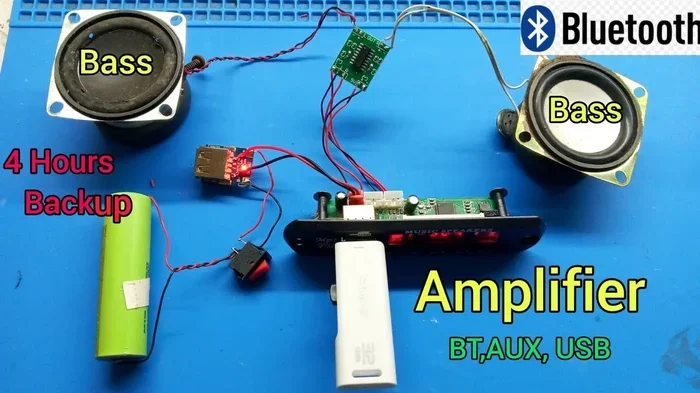
Inside every Bluetooth speaker, you will find a few key components. There is a Bluetooth module for wireless pairing. There is an amplifier to boost the audio signal. There are speakers (drivers) that produce the actual sound. And there is a battery that powers everything. The Bluetooth module is just one piece of the puzzle.
Most Bluetooth speakers also include additional input options. These can include an auxiliary input, USB ports, SD card slots, and FM radio tuners. This means the speaker can accept audio from many sources. Bluetooth is just the most popular one. Understanding this opens up a lot of possibilities.
When you think about it, a Bluetooth speaker is essentially a mini stereo system. It just happens to have a wireless feature built in. That wireless feature is helpful. But it is not the only way to get sound out of the device. Once you see the speaker as a complete audio tool, the options expand quickly.
Can You Use a Bluetooth Speaker Without Bluetooth?
The short answer is yes. You can absolutely use a Bluetooth speaker without ever turning on Bluetooth. The speaker does not care how the audio signal reaches it. It just needs a signal. Whether that signal comes through the air or through a cable, the result is the same. You hear music.
People often assume that a Bluetooth speaker only works wirelessly. This is a common misconception. In reality, most modern Bluetooth speakers come with multiple input methods. These alternatives give you flexibility. They also serve as backups when Bluetooth is not working.
So why would you want to use a Bluetooth speaker without Bluetooth? There are several reasons. Your phone might not support Bluetooth. You might be in an area with too many wireless signals causing interference. You might want better sound quality. Or you might just be in a situation where a wired connection is more reliable. All of these are valid reasons.
Using a Bluetooth speaker without Bluetooth is also great for saving battery. Bluetooth uses power to search for and maintain connections. When you use a wired or direct input, you eliminate that power drain. This can extend your speaker battery life significantly. For long outdoor trips or parties, this matters a lot.
Methods to Use a Bluetooth Speaker Without Bluetooth
There are several practical methods to connect a Bluetooth speaker without using Bluetooth. Each method has its own advantages. Let us explore them one by one so you can pick what works best for your situation.
Method 1: Using an Auxiliary Cable (AUX)
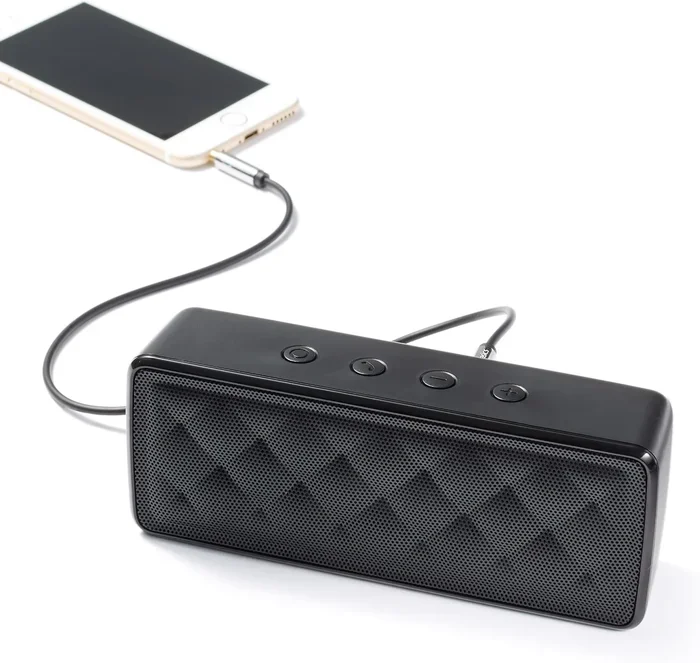
The most common way to use a Bluetooth speaker without Bluetooth is with an auxiliary cable. This is a simple 3.5mm audio cable. It looks like the cable you use for headphones. One end plugs into your device. The other end plugs into the Bluetooth speaker.
Almost every Bluetooth speaker has an AUX input. It is usually labeled as “AUX” or shown as a standard 3.5mm headphone jack. You just plug the cable in. The speaker switches from Bluetooth mode to wired mode automatically. It is that simple.
Here is how to do it step by step. First, grab a standard 3.5mm aux cable. Second, plug one end into your device’s headphone jack. Third, plug the other end into the Bluetooth speaker AUX port. Fourth, press play on your device. Fifth, adjust the volume on both the device and the speaker. That is it.
Aux cable connection works with phones, laptops, MP3 players, and even some smart TVs. As long as the device has a headphone output, you are good to go. This is probably the easiest and most widely available method. Keep a spare aux cable in your bag. You never know when you will need it.
Tips for Best AUX Performance
- Use a short, high-quality aux cable to reduce signal loss.
- Clean the AUX port on your speaker regularly. Dust can cause crackling sounds.
- Keep your device volume at around 70-80 percent for the best sound balance.
- Avoid running long aux cables. They can pick up interference and static.
- If you hear buzzing, try a different cable. The cable might be damaged.
Method 2: FM Radio Mode
Many Bluetooth speakers come with a built-in FM radio. This is a feature that people often overlook. If your speaker has an FM radio function, you can listen to live radio stations without any Bluetooth connection at all.
To use FM radio on your Bluetooth speaker, you typically need to press and hold the Bluetooth button or a dedicated radio button. The speaker will switch to radio mode. Then you can scan for available stations using the volume or navigation buttons.
FM radio mode is perfect for situations where you do not have a device to connect. It is great for camping trips, outdoor events, or when your phone battery dies. You just turn on the radio, find a station, and enjoy the music. No pairing required. No Bluetooth needed.
Keep in mind that FM radio reception depends on your location. You need to be within range of a radio tower. Signal strength varies by area. But for casual listening, FM radio on a Bluetooth speaker works surprisingly well. It is a free and easy way to enjoy audio without any wireless technology.
How to Get the Best FM Radio Signal
- Extend the speaker’s antenna fully if it has one.
- Stand near a window or go outside for better reception.
- Scan for new stations periodically. Station frequencies can change.
- Use an external antenna if your speaker supports it.
- Avoid placing the speaker near large metal objects that can block signals.
Method 3: USB Drive Playback
Another excellent way to use a Bluetooth speaker without Bluetooth is through a USB drive. Most modern Bluetooth speakers have a USB port. This port can do more than just charge the speaker. It can also read music files directly from a flash drive.
To use this method, you need a USB flash drive with music files on it. The best format is MP3 or WAV. These are universally supported by most Bluetooth speakers. Simply plug the USB drive into the speaker’s port. The speaker should detect the files automatically.
You can then browse your music library using the speaker’s controls. Press play, skip tracks, and adjust volume just like you would with Bluetooth. This method is incredibly convenient. You can pre-load an entire playlist onto the USB drive before you leave home.
USB drive playback is especially useful for parties. You do not need to worry about phone batteries or Bluetooth connections. Just load up the drive and let the music play. It is also great for speakers that will be used in areas without any wireless connectivity.
Best Practices for USB Music Playback
- Format your USB drive as FAT32 for maximum compatibility.
- Keep music files in a single folder for easier browsing.
- Use MP3 files for the best balance of quality and file size.
- Avoid USB drives larger than 32GB if your speaker has compatibility issues.
- Eject the USB drive properly before removing it to prevent data loss.
Method 4: Using an SD Card
Some Bluetooth speakers also have an SD card slot. This works similarly to the USB drive method. You load music files onto an SD card. Then you insert the card into the speaker. The speaker reads the files and plays them back.
SD cards are small and portable. You can carry thousands of songs on a tiny card. This makes them perfect for travel. Just make sure your Bluetooth speaker supports SD card playback. Check the product manual or look for an SD slot on the speaker itself.
The audio quality from SD card playback is generally very good. Since the signal is read directly from the card, there is no wireless interference. This can result in cleaner, more stable audio compared to Bluetooth streaming. For audiophiles who want reliable sound, this is a great option.
Method 5: Using an Audio Cable or RCA Connection
If your Bluetooth speaker has RCA inputs or other audio inputs, you have even more options. RCA cables are the classic red and white audio cables. They are commonly found on older audio equipment. Many Bluetooth speakers include RCA inputs for versatility.
You can connect a device like a CD player, a mixer, or even a turntable to your Bluetooth speaker using RCA cables. Simply plug the red and white cables into the corresponding ports. The audio signal flows directly from the source to the speaker.
Some Bluetooth speakers also support optical or coaxial digital inputs. These provide a digital audio signal for even better quality. However, these connections are less common on portable speakers. They are more often found on home audio systems.
Using a wired audio connection eliminates wireless interference completely. You get a clean, direct signal path. This is ideal for situations where Bluetooth is unreliable or when you want the best possible sound quality from your Bluetooth speaker.
What Happens When You Use a Bluetooth Speaker Without Bluetooth?
You might wonder how the experience differs when you use a Bluetooth speaker without Bluetooth. The answer is straightforward. The speaker plays the same way. The sound comes out of the same drivers. The volume controls work the same. The only difference is how the audio signal reaches the speaker.
In many cases, wired connections actually sound better than Bluetooth. Bluetooth audio is compressed. It loses some audio data during transmission. A direct aux or USB connection sends an uncompressed signal. This means you can get richer bass, clearer highs, and more detail in the midrange.
Another difference is latency. Bluetooth has a slight delay between the source and the speaker. This is called latency. When you use a wired connection, there is virtually no delay. The audio plays in real time. This matters for watching videos or playing games on a Bluetooth speaker.
Battery life also improves without Bluetooth. The Bluetooth module consumes power even when it is not actively streaming. By turning it off and using a wired input, your Bluetooth speaker battery lasts longer. This is a huge advantage for outdoor events and long listening sessions.
Sound Quality Comparison
Here is a quick look at how different connection methods affect sound quality on your Bluetooth speaker.
| Connection Method | Sound Quality | Battery Impact | Convenience |
|---|---|---|---|
| Bluetooth | Good (compressed) | Higher drain | Very convenient |
| AUX Cable | Excellent (uncompressed) | Lower drain | Easy and reliable |
| USB Drive | Excellent (uncompressed) | Low drain | Convenient for pre-loaded music |
| FM Radio | Good (depends on signal) | Low drain | Great for live broadcasts |
| SD Card | Excellent (uncompressed) | Low drain | Very portable |
As you can see, non-Bluetooth methods often deliver better sound quality and battery life. They are also very convenient once you set them up. The key is knowing which method to use for each situation.
Common Mistakes People Make When Using Speakers Without Bluetooth
Even though using a Bluetooth speaker without Bluetooth is simple, people still make mistakes. Here are the most common ones and how to avoid them.
Using a damaged or low-quality cable. A cheap aux cable can cause crackling, static, or no sound at all. Invest in a good quality cable. It makes a big difference in audio performance. If you hear buzzing or intermittent sound, replace the cable first.
Forgetting to switch input modes. Many speakers automatically detect the input source. But some require you to manually select the input mode. Check your speaker manual. Make sure you are on the right input setting. Otherwise, you will wonder why nothing is playing.
Overloading the speaker with too high volume. When using a wired connection, the signal can be stronger than Bluetooth. This means you might accidentally blow out your speaker drivers. Keep the volume at reasonable levels. Start low and gradually increase.
Ignoring firmware updates. Some Bluetooth speakers receive updates that improve non-Bluetooth input performance. Check the manufacturer’s website for updates. A simple firmware update can fix audio issues and add new features.
Not cleaning the ports. Dust and lint build up in AUX and USB ports over time. This causes poor connections and crackling audio. Use a soft brush or compressed air to clean the ports regularly. It takes two seconds and makes a huge difference.
Expert Tips for Getting the Best Sound From Any Connection
Want to get the most out of your Bluetooth speaker when using non-Bluetooth methods? Here are some expert tips that make a real difference.
First, always use the shortest cable possible for wired connections. Longer cables can pick up electromagnetic interference. This causes unwanted noise in your audio. A short, high-quality cable gives you the cleanest signal path.
Second, position your speaker away from other electronics. Phones, routers, and microwaves can all cause interference. Even when you are not using Bluetooth, other wireless signals can affect your audio quality. Keep your speaker at least a few feet away from these devices.
Third, equalize your audio settings. Most phones and computers have built-in equalizers. Use them to adjust the sound for your specific speaker. Boost the bass slightly for a fuller sound. Reduce the highs if they sound harsh. A little EQ goes a long way.
Fourth, keep your speaker firmware updated. Manufacturers regularly release updates that improve performance. These updates can enhance wired input quality, fix bugs, and add new features. Check for updates at least once a month.
Fifth, invest in a portable amplifier if you need louder sound. A small amp between your device and the Bluetooth speaker can dramatically improve volume and clarity. This is especially useful for outdoor gatherings where you need to fill a large space with sound.
When Should You Use a Bluetooth Speaker Without Bluetooth?
Knowing the methods is one thing. Knowing when to use them is another. Here are some real-world situations where using a Bluetooth speaker without Bluetooth makes perfect sense.
Outdoor camping trips. You might not have a phone with Bluetooth, or you want to save battery. An FM radio or USB drive is perfect for camping. You can pre-load your favorite playlists and enjoy them all weekend long.
Beach parties. Sand and water can damage Bluetooth connections. A wired aux connection is more reliable in these environments. Plus, you do not have to worry about pairing devices in a noisy, crowded setting.
Older devices without Bluetooth. Not every device supports Bluetooth. Some older MP3 players, CD players, and portable radios do not have wireless capabilities. A simple aux cable connects them to your Bluetooth speaker instantly.
Broken Bluetooth on your phone. If your phone Bluetooth is broken, you do not need to throw the phone away. Just plug in an aux cable and keep listening. This saves you money and keeps your music flowing.
High-fidelity listening. Bluetooth compresses audio. If you care about sound quality, a wired connection is the way to go. You get the full, uncompressed audio signal. This is especially noticeable with high-quality Bluetooth speakers that have good drivers.
Long events. For weddings, corporate events, or long parties, Bluetooth battery drain adds up. Wired connections keep the speaker running longer. They also eliminate the risk of connection drops mid-event.
Quick Tips Summary
- Always carry a spare aux cable. You never know when you will need it.
- Keep your Bluetooth speaker firmware updated for best performance.
- Clean your speaker ports regularly to prevent connection issues.
- Use MP3 or WAV files on USB drives for the best compatibility.
- Start with low volume when switching to a wired connection to protect your drivers.
- Experiment with FM radio for free, offline entertainment anywhere.
- Keep your speaker away from other electronics to reduce interference.
Conclusion
So, can I use Bluetooth speaker without Bluetooth? The answer is a resounding yes. A Bluetooth speaker is a versatile audio device that works with many types of connections. Bluetooth is just one of them. Whether you use an aux cable, FM radio, USB drive, SD card, or RCA input, your speaker delivers great sound.
Using a Bluetooth speaker without Bluetooth is not just possible. It is often better. You get cleaner audio, longer battery life, and more reliable connections. These are real advantages that make a difference in everyday use.
The next time your Bluetooth is not working or you find yourself in a situation where wireless is not an option, do not panic. You have plenty of alternatives. Keep an aux cable handy. Load up a USB drive with your favorite songs. Explore the FM radio feature on your speaker. You will be surprised at how much you can do without ever turning on Bluetooth.
A Bluetooth speaker is a tool. Bluetooth is just one feature of that tool. Once you understand all the ways you can use it, you get so much more value from your investment. Try these methods today and see the difference for yourself.
Frequently Asked Questions
Can I use a Bluetooth speaker without any device connected?
Yes, you can. Many Bluetooth speakers have built-in FM radio and USB playback. You can listen to live radio or pre-loaded music without connecting any external device. Just make sure your speaker supports these features before you buy it.
Does using a Bluetooth speaker without Bluetooth save battery?
Yes, it does. Bluetooth uses power to search for and maintain connections. When you use a wired aux cable or USB input, the Bluetooth module stays off. This reduces power consumption and extends your speaker battery life significantly.
Will the sound quality be better without Bluetooth?
In most cases, yes. Wired connections like aux cables and USB drives send uncompressed audio signals. Bluetooth compresses the audio, which can reduce quality. If you care about sound fidelity, using a Bluetooth speaker without Bluetooth often gives you cleaner, richer audio.
Can I connect my phone to a Bluetooth speaker using a cable?
Absolutely. You can use a standard 3.5mm aux cable to connect your phone to a Bluetooth speaker. Just plug one end into your phone’s headphone jack and the other into the speaker’s AUX input. The speaker will play your phone’s audio through its drivers without using any Bluetooth.
What should I do if my Bluetooth speaker has no AUX input?
Check if your speaker has a USB port or SD card slot. These can serve as alternative input methods. You can also look for speakers that include FM radio. If none of these options are available, you may need an adapter or a different speaker model.
Are Bluetooth speakers worth buying if I never plan to use Bluetooth?
Yes, they are still worth it. Bluetooth speakers offer portability, good battery life, and versatile input options. Even if you primarily use wired connections, the speaker’s built-in amplifier and drivers provide great sound. Bluetooth is just one feature among many that make these speakers valuable.