Are Galaxy Projectors Safe For Eyes Worth Checking
Are galaxy projectors safe for eyes? The short answer is yes, when used correctly. Galaxy projectors use LED or laser light to create stunning nebula and star effects, but prolonged direct exposure can cause eye strain or discomfort. This guide covers galaxy projector eye safety, risks, and expert tips to protect your vision while enjoying immersive room lighting.
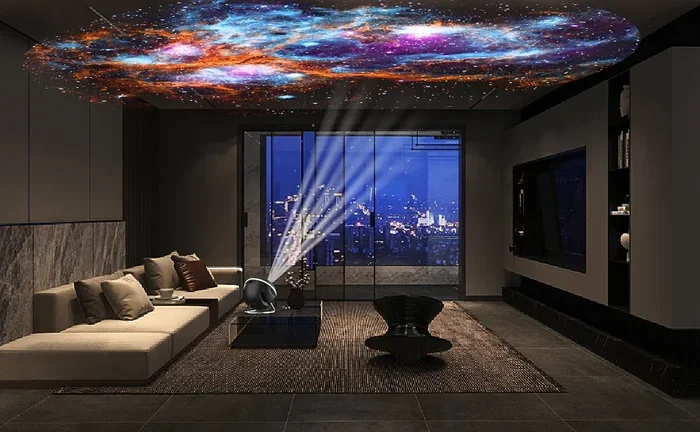
Have you ever walked into a room and felt like you were floating among the stars? Galaxy projectors create that magical feeling in seconds. They fill your walls and ceiling with swirling nebula clouds, twinkling stars, and colorful nebula effects. These devices have become hugely popular for bedrooms, game rooms, and meditation spaces.
But here is the big question many people ask. Are galaxy projectors safe for eyes? If you are thinking about buying one, you want to know the answer before you bring it home. The good news is that most galaxy projectors are perfectly safe when used the right way. However, like any light-based device, there are a few things you should know to protect your vision.
In this guide, we will break down everything you need to know about galaxy projector eye safety. We will cover how they work, what the risks are, and simple steps you can take to enjoy your galaxy projector without any worries. Let us dive in.
Key Takeaways
- Galaxy projectors are generally safe for eyes: Most use low-power LED or laser technology that is not harmful at normal viewing distances.
- Direct staring is the main risk: Looking straight into the projector beam for extended periods can cause eye strain or temporary discomfort.
- Brightness and distance matter: Keeping the projector at a safe distance and dimming it reduces any potential eye health risks.
- Children and sensitive individuals need extra care: Kids, people with light sensitivity, and those with eye conditions should use galaxy projectors with caution.
- Follow the 20-20-20 rule: Every 20 minutes, look at something 20 feet away for 20 seconds to reduce eye strain.
- Choose the right projector for your needs: LED projectors are generally safer than laser projectors for extended use in small rooms.
- Proper placement prevents issues: Aim the projector at walls or ceilings, never directly at your eyes.
📑 Table of Contents
- How Galaxy Projectors Work and Why Eye Safety Matters
- Are Galaxy Projectors Safe For Eyes? What the Experts Say
- Common Eye Risks and How to Avoid Them
- Tips for Safe Galaxy Projector Use
- Galaxy Projectors for Kids and Sensitive Groups
- Galaxy Projector Eye Care: Quick Tips and Common Mistakes
- Final Verdict: Should You Use a Galaxy Projector?
- Conclusion
How Galaxy Projectors Work and Why Eye Safety Matters
Before we answer the big question, let us understand what a galaxy projector actually does. A galaxy projector is a device that uses built-in LEDs or lasers to project moving images of stars, galaxies, and nebula clouds onto your walls and ceiling. Some models also include rotating discs with star patterns. The result is a calming, immersive light show that transforms any room into a personal planetarium.
LED vs. Laser Galaxy Projectors
There are two main types of galaxy projectors on the market right now. LED projectors use light-emitting diodes to create bright, colorful nebula effects. They are generally lower powered and considered very safe for regular use. Laser projectors use focused laser beams to produce sharper, more vivid star fields and galaxy patterns. While they look amazing, laser projectors can be more intense on the eyes if used incorrectly.
Most galaxy projectors sold for home use fall into the LED category. These are designed with eye safety in mind. They emit soft, diffused light that is gentle on your vision. Laser models, on the other hand, can be more powerful. This is where galaxy projector eye safety becomes an important topic to understand.
How Light Affects Your Eyes
Your eyes are sensitive to light. When light enters your eye, it hits the retina at the back of your eye. Too much bright light over time can cause discomfort, strain, or even long-term damage in extreme cases. This is true for the sun, bright screens, and yes, even galaxy projectors.
The key factor is intensity and duration. A galaxy projector sitting on your shelf, projecting onto your ceiling from a few feet away, produces very low light intensity. Your eyes handle this easily. But if you stare directly into the projector lens for hours, or place the projector too close to your face, the light becomes concentrated and can cause problems.
Are Galaxy Projectors Safe For Eyes? What the Experts Say
The short answer is yes. Most galaxy projectors are safe for eyes when used as intended. Eye care professionals generally agree that LED galaxy projectors pose very little risk to eye health. They produce soft, ambient light that is similar to a nightlight or a lava lamp. You can enjoy them for hours without significant concern.
However, the answer is not a simple yes or no. There are some situations where galaxy projector use can become a concern. Let us look at what the experts say and what you should watch out for.
What Ophthalmologists Recommend
Eye doctors, also known as ophthalmologists, generally recommend following a few basic rules when using any light-based device. First, never look directly into the projector beam. Second, keep the projector at a reasonable distance from your eyes. Third, take breaks if you are using the projector for extended periods.
Most ophthalmologists agree that galaxy projectors are safe for casual use. They are not like staring at the sun or looking directly at a high-powered laser. The light output from a typical galaxy projector is very low compared to medical or industrial laser devices. That said, people with existing eye conditions should consult their eye doctor before using any new light device regularly.
Are Galaxy Projectors Safe For Eyes During Sleep?
Many people use galaxy projectors as a sleep aid. The gentle, moving lights help them relax and fall asleep. But is this safe for your eyes while you sleep? The answer is generally yes. Since you are asleep, your eyes are closed. The light passes through your eyelids and creates a calming ambient glow.
Some experts note that even closed-eye exposure to bright light can affect your sleep quality. The light can suppress melatonin production slightly, which is the hormone that helps you sleep. If you use a galaxy projector all night, consider using a dimmer setting or a timer that turns it off after 30 to 60 minutes. This protects both your eyes and your sleep cycle.
Common Eye Risks and How to Avoid Them
While galaxy projectors are mostly safe, it is important to know about the potential risks. Understanding these risks helps you use your projector more safely and enjoy it for years to come. Let us look at the most common eye-related concerns.
Eye Strain and Fatigue
The most common issue people experience is eye strain. This happens when your eyes focus on moving light patterns for too long without a break. You might notice symptoms like dry eyes, blurred vision, headaches, or tired eyes after a long galaxy projector session.
Eye strain from a galaxy projector is not permanent. It is temporary and goes away once you rest your eyes. But it can be uncomfortable, especially if you use the projector every night before bed. The good news is that preventing eye strain is very easy with a few simple habits.
Blue Light Exposure
Many galaxy projectors use LED lights that emit blue light. Blue light is part of the visible light spectrum and is also emitted by screens, phones, and LED bulbs. Some studies suggest that prolonged blue light exposure can contribute to eye strain and may affect sleep patterns.
Galaxy projectors do not emit as much blue light as a phone or computer screen. Still, if you are sensitive to blue light, you might notice some discomfort after extended use. Look for galaxy projectors that offer warm light modes or adjustable color settings. These reduce blue light exposure and are gentler on your eyes.
Direct Beam Exposure
This is the biggest risk with any projector. If you look directly into the projector lens, the concentrated light beam can be much brighter than the projected image on your wall. Direct beam exposure, even for a short time, can cause temporary flash blindness or discomfort.
With laser galaxy projectors, this risk is slightly higher. Laser beams are more focused and intense than LED light. Always place your projector where the beam cannot hit anyone’s eyes directly. This means pointing it upward toward the ceiling or wall, never horizontally at eye level.
Migraine and Light Sensitivity
For people who suffer from migraines or light sensitivity, galaxy projectors can sometimes be a trigger. The moving, flickering light patterns can overstimulate the visual cortex in the brain. This can lead to headaches, nausea, or migraine episodes in sensitive individuals.
If you have a history of migraines or light sensitivity, start with short sessions. Use the dimmest setting available. Choose models that offer smooth, slow-moving patterns rather than rapid flickering. Listen to your body and stop using the projector if you feel any discomfort.
Tips for Safe Galaxy Projector Use
Using a galaxy projector safely is not complicated. A few simple habits can make a huge difference. Here are practical tips that everyone should follow to protect their eyes while enjoying the magic of a galaxy projector.
Keep a Safe Distance
Place your galaxy projector at least 3 to 5 feet away from where you sit or sleep. This gives the light time to spread out and soften before it reaches your eyes. The further the projector is from you, the gentler the light will be. A projector placed on a high shelf or dresser works great for bedroom use.
Use the Dimmer Setting
Most quality galaxy projectors come with adjustable brightness settings. Use the lowest brightness that still gives you the effect you want. Dimmer settings reduce eye strain and are especially helpful if you use the projector every night. You can always increase the brightness if needed, but starting low is the safer choice.
Follow the 20-20-20 Rule
This is a well-known eye care rule that works great with galaxy projectors too. Every 20 minutes, look at something at least 20 feet away for 20 seconds. This gives your eyes a chance to relax and refocus. It is a simple habit that prevents eye strain and keeps your eyes comfortable during long galaxy projector sessions.
Aim the Projector Correctly
Always aim your galaxy projector at a wall or ceiling, never directly at people or pets. The projected light should spread across a large surface area, which naturally reduces the intensity of light reaching any single point, including your eyes. A projector pointed at the ceiling creates a beautiful starfield overhead without any direct light exposure.
Take Breaks
Even though galaxy projectors are relaxing, your eyes still need rest. If you are using the projector while reading, meditating, or winding down for bed, give your eyes regular breaks. Close your eyes for a few minutes every half hour. This simple practice goes a long way in maintaining good eye health.
Choose the Right Projector for Your Space
Not all galaxy projectors are created equal. Some are designed for large rooms and produce very bright output. Others are made for small bedrooms and use softer light. Match your projector to your space. A projector that is too bright for a small room can cause unnecessary eye exposure. Look for models that offer adjustable brightness and multiple light modes so you can customize your experience.
Galaxy Projectors for Kids and Sensitive Groups
Galaxy projectors are a hit with kids. Children love the magical starry skies and colorful nebula effects. But when it comes to galaxy projector eye safety for children, extra caution is needed. Kids’ eyes are more sensitive than adult eyes, and they may not understand the importance of not staring directly at the projector beam.
Here are a few guidelines for using galaxy projectors around children and sensitive groups.
- Supervise young children: Make sure they do not look directly into the projector lens. Explain that the projector is for projecting on walls, not for staring at.
- Use lower brightness settings: Children’s eyes are more delicate. Start with the dimmest setting and increase only if needed.
- Choose LED models for kids: LED galaxy projectors are safer and less intense than laser models. They are the better choice for children’s rooms.
- Use timers: Set the projector to turn off after 30 or 60 minutes. This prevents overnight exposure and helps children sleep better.
- Watch for signs of discomfort: If a child rubs their eyes, squints, or complains of headaches after using the projector, reduce the usage time or brightness.
For adults with existing eye conditions like macular degeneration, cataracts, or light sensitivity, it is always best to consult an eye care professional before using a galaxy projector regularly. They can give personalized advice based on your specific eye health needs.
Galaxy Projector Eye Care: Quick Tips and Common Mistakes
Let us quickly cover some do’s and don’ts of galaxy projector use. These tips are easy to remember and will help you keep your eyes safe while enjoying the beauty of a galaxy projector.
Quick Tips for Galaxy Projector Eye Care
- Do place the projector on a high shelf or mount it on the ceiling.
- Do use the dimmest setting that works for your space.
- Do take breaks every 20 to 30 minutes.
- Do aim the projector away from seating and sleeping areas.
- Do choose LED models for safer, gentler light.
- Don’t stare directly into the projector lens.
- Don’t place the projector at eye level where the beam could hit you.
- Don’t use the projector at maximum brightness in a small room.
- Don’t run the projector all night if you are sensitive to light.
- Don’t ignore discomfort. If your eyes feel tired or irritated, turn off the projector and rest.
Common Mistakes People Make
One of the most common mistakes is placing the projector too close to the bed or seating area. This puts your eyes in the direct path of the projected light and increases exposure. Another mistake is using the highest brightness setting in a small bedroom. The light has nowhere to go and becomes concentrated, which can cause eye strain.
Some people also forget to take breaks. They leave the galaxy projector running for hours while reading or watching TV. This leads to eye fatigue and discomfort. Finally, many users ignore the type of projector they buy. Cheap, unregulated projectors may use low-quality LEDs or lasers that emit stronger light than safe. Always buy from reputable brands that follow eye safety standards.
Final Verdict: Should You Use a Galaxy Projector?
So, are galaxy projectors safe for eyes? The answer is a clear yes, with a few simple precautions. Galaxy projectors are a wonderful way to create a calming, beautiful atmosphere in your home. They are safe for most people when used correctly and in moderation.
The key to safe use is understanding how the light works and taking basic steps to protect your eyes. Keep the projector at a safe distance, use dimmer settings, take regular breaks, and never stare directly into the beam. If you follow these simple rules, you can enjoy the magic of a galaxy projector for years without any eye health concerns.
For parents, choosing an LED model and supervising young children adds an extra layer of safety. For people with existing eye conditions, a quick chat with your eye doctor can give you peace of mind. And for everyone else, a galaxy projector can be a lovely addition to your bedtime routine or relaxation space.
The galaxy projector experience is meant to be enjoyable and relaxing. It should never cause pain or discomfort. If it does, something needs to change. Adjust the brightness, move the projector, or reduce your usage time. Your eyes are precious, and taking care of them should always come first.
So go ahead and bring that galaxy into your room. With the right knowledge and a few smart habits, you can enjoy the stars safely. A galaxy projector is a wonderful tool for creating ambiance, improving relaxation, and adding a touch of wonder to your everyday life. Just remember to use it wisely, and your eyes will thank you.
Conclusion
Galaxy projectors are a fantastic way to bring the beauty of the cosmos into your home. The question of whether they are safe for your eyes is important, and the answer is reassuring. When used correctly, galaxy projectors pose very little risk to your eye health. The key is to follow basic safety practices like maintaining distance, using dimmer settings, and taking regular breaks.
Whether you are using a galaxy projector for sleep, relaxation, or just to create a stunning visual effect, eye safety should always be a priority. Choose quality LED models, avoid direct beam exposure, and listen to your body. If something feels off, take a break and adjust your setup.
With the right approach, you can enjoy all the beauty and calming effects of a galaxy projector without any worries. Your eyes and your stars will both be happy.
Frequently Asked Questions
Can galaxy projectors cause permanent eye damage?
No, galaxy projectors cannot cause permanent eye damage when used as intended. The light they emit is low intensity and similar to ambient room lighting. However, staring directly into the projector beam for extended periods can cause temporary discomfort or flash blindness. Always use the projector at a safe distance and avoid looking directly into the lens.
Are LED galaxy projectors safer than laser projectors for eyes?
Yes, LED galaxy projectors are generally safer for eyes than laser projectors. LED lights produce softer, diffused light that is gentle on the eyes. Laser projectors are more focused and intense, which can cause more eye strain if used improperly. For regular home use, especially in bedrooms and children’s rooms, LED models are the recommended choice.
How far should a galaxy projector be from your eyes?
A galaxy projector should be at least 3 to 5 feet away from your eyes for safe use. The further the projector is from you, the more the light spreads out and becomes gentler. Placing the projector on a high shelf or mounting it on the ceiling is ideal. Never place the projector at eye level where the beam could directly hit your eyes.
Is it safe to use a galaxy projector every night?
Using a galaxy projector every night is generally safe if you follow a few precautions. Use the dimmest setting, limit sessions to 30 to 60 minutes, and aim the projector away from your direct line of sight. If you notice any eye strain, headaches, or sleep disruption, reduce the frequency or duration of use. A timer function can help automate safe usage.
Are galaxy projectors safe for children’s eyes?
Galaxy projectors can be safe for children when used with supervision and proper settings. Choose LED models over laser ones, use the lowest brightness setting, and make sure children do not look directly into the projector lens. Use a timer to automatically turn off the projector after a set period. If a child shows signs of discomfort, reduce usage time immediately.
What should I do if my eyes hurt after using a galaxy projector?
If your eyes hurt after using a galaxy projector, turn off the device and rest your eyes for a few minutes. Close your eyes gently or look at a distant object to help them relax. Drink water and avoid screens for a while. If the discomfort continues or worsens, consult an eye care professional. To prevent future discomfort, reduce brightness, increase distance, and take more frequent breaks during use.