Are Laptop Wifi Cards Universal Fit for Every Device
Are laptop wifi cards universal? The short answer is no. Not every wireless card fits every laptop, and not every card works with every model. Your laptop’s slot type, driver support, and antenna design all matter when picking a laptop wifi card. This guide breaks down everything you need to know to make the right choice.
Have you ever tried to upgrade your laptop wifi card and felt completely lost? You are not alone. Many people assume that all wireless cards work the same way. They assume any card will just plug in and work. But that is far from the truth.
The world of wireless cards is more complex than most people realize. Different laptops use different slots. Different cards support different wireless standards. And different brands have different requirements for driver support. Understanding these differences is the key to making a smart upgrade.
In this guide, we will answer the big question: Are laptop wifi cards universal? We will cover everything from slot types to performance factors. By the end, you will know exactly what to look for when buying a new wifi adapter or internal wireless card. Let us get into it.
Key Takeaways
- Laptop wifi cards are not universal: Different laptops use different slots and standards, so compatibility varies by model.
- Three main types exist: M.2 wifi cards, mini PCIe cards, and USB wifi adapters each serve different needs.
- Check your slot type first: Opening your laptop and identifying the slot is the most important step before buying any card.
- Driver support matters just as much as hardware: A card that lacks driver support for your operating system will not work.
- Antenna design and wireless standards affect performance: Wi-Fi 6 and dual-band capabilities make a big difference in speed and range.
- USB wifi adapters offer the easiest upgrade path: They require no opening your laptop and work across most devices.
- Always research your specific laptop model: Checking forums and manufacturer specs saves time and money.
📑 Table of Contents
- What Is a Laptop Wifi Card?
- Are Laptop Wifi Cards Universal? The Short Answer
- Types of Laptop Wifi Cards
- How to Check Compatibility Before Buying
- Factors That Affect Wifi Card Performance
- Comparison Table: Popular Wifi Cards
- Common Mistakes When Choosing a Wifi Card
- Expert Tips for Upgrading Your Wifi Card
- Final Thoughts
What Is a Laptop Wifi Card?
A laptop wifi card is a small hardware component that connects your laptop to a wireless network. It sends and receives radio signals between your device and your router. Without it, your laptop would have no way to connect to wireless connectivity unless you use an external option.
Most people never think about their network adapter until something goes wrong. But when your connection is slow or your card is outdated, it becomes a big deal. The wifi module inside your laptop determines your network speed, range, and even whether you can connect to the latest Wi-Fi 6 networks.
There are two main categories of internal wifi cards. The first is the card built into your laptop during manufacturing. The second is any card you add or swap out later. Both do the same job, but they come in different shapes and sizes.
A laptop wifi card also often handles Bluetooth connections. Many modern cards combine wireless networking and Bluetooth into a single unit. This saves space inside your laptop and reduces the number of components you need to manage.
Are Laptop Wifi Cards Universal? The Short Answer
So, are laptop wifi cards universal? The honest answer is no. They are not a one-size-fits-all component. While they all do the same basic job, they differ in size, connector type, and compatibility with specific laptops.
Think of it like USB cables. They all look similar, but not every cable works with every device in the same way. A wifi card is the same. The slot it plugs into, the drivers it needs, and the antenna connections it uses can all vary from one laptop to another.
Here is why universal compatibility does not exist for laptop wifi cards:
- Different slot sizes: Some laptops use M.2 slots while others use mini PCIe slots. A card designed for one will not fit the other.
- Different connector keys: Even within M.2 slots, there are different key types. An M.2 B-key card will not fit an M.2 M-key slot.
- Driver requirements: Your laptop’s motherboard and operating system need to support the card’s driver. If the driver is missing, the card will not work.
- Antenna connectors: Laptops use different types of antenna connectors. Some use IPEX connectors while others use different setups.
- BIOS and firmware limits: Some laptop manufacturers lock down their systems. They may not recognize third-party wireless cards at all.
The bottom line? You cannot just buy any wireless card and expect it to work. You need to check your laptop’s specific requirements first. This is the most important rule when shopping for a laptop wifi card.
Types of Laptop Wifi Cards
Not all laptop wifi cards look the same. In fact, they come in several different form factors. Knowing which type your laptop uses is the first step toward a successful upgrade.
M.2 Wifi Cards
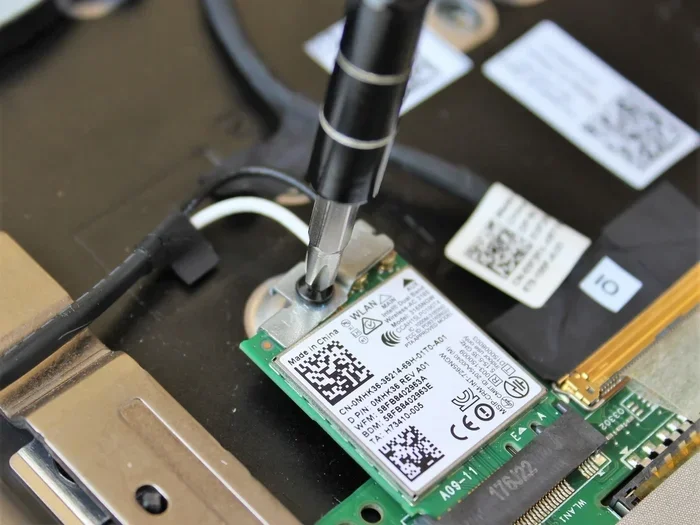
M.2 wifi cards are the most common type found in modern laptops. They are small, thin, and fit into M.2 slots on the motherboard. Most laptops made after 2018 use this format.
M.2 wifi cards are also called M.2 wifi modules. They are tiny, usually about the size of a stick of gum. They connect directly to the motherboard and often include built-in Bluetooth support.
Popular M.2 wifi cards include Intel models like the AX200 and AX210. These are Wi-Fi 6 cards that offer excellent network speed and range. Qualcomm also makes popular M.2 cards like the QCA6174 and QCA6390.
One thing to watch out for with M.2 cards is the M.2 slot type. Some laptops have M.2 slots that support both storage drives and wifi cards. But the key type matters. An M.2 2230 card might not fit an M.2 2242 slot, even though both are M.2.
Mini PCIe Cards
Mini PCIe cards are older but still found in some laptops and mini PCs. These cards are larger than M.2 cards. They plug into a mini PCIe slot on the motherboard.
You will often find mini PCIe cards in older business laptops and industrial devices. They are still reliable and widely available. Many mini PCIe wifi cards also include a Bluetooth module on the same card.
If your laptop has a mini PCIe slot, you have plenty of options. However, the selection is smaller than what is available for M.2 cards. You may also need to update your laptop’s BIOS to support newer mini PCIe cards.
USB Wifi Adapters
USB wifi adapters are the easiest type of external wifi adapter to use. They plug directly into a USB port on your laptop. No opening your laptop is required. No technical knowledge is needed.
USB wifi adapters are great because they are portable. You can use them on multiple devices. They are also a good option if your laptop does not have an internal slot for a wifi card upgrade.
The downside is that USB adapters are usually larger than internal cards. They can block other USB ports. And they may not offer the same signal strength as a high-quality internal card.
Some premium USB wifi adapters come with external antennas. These antennas can significantly improve wireless connectivity. They are a great choice for people who need better range without opening their laptop.
How to Check Compatibility Before Buying
Before you buy any laptop wifi card, you need to check a few things. Skipping this step is the most common mistake people make. Here is exactly what to do.
Check Your Laptop’s Slot Type
Open your laptop and look at the existing wifi card. You will see what kind of slot it uses. Is it M.2? Is it mini PCIe? Take a photo or write it down.
You can also check your laptop’s manual or the manufacturer’s website. Search for your laptop model number and look for specifications. The slot type will be listed there.
If you are not comfortable opening your laptop, you can use a free tool like CPU-Z. It will show you the network adapter details and the slot type your laptop supports.
Verify Driver Support
Even if the card physically fits, it needs driver support. Check whether your laptop’s operating system supports the card you want to buy. Windows, macOS, and Linux all have different driver requirements.
Go to the card manufacturer’s website and look up the supported operating systems. If your OS is not listed, the card may not work. This is especially important for Linux users, as some wifi cards have limited Linux support.
Check Antenna Connector Types
Your laptop’s antenna connectors need to match the new card. Most modern cards use IPEX or U.FL connectors. But some older cards use different setups.
Look at the existing card’s antenna connections. Compare them to the new card you want to buy. If they do not match, you may need an adapter or a different card altogether.
Factors That Affect Wifi Card Performance
Not all laptop wifi cards deliver the same performance. Several factors determine how fast your connection is and how far the signal reaches.
Wireless Standards and Speeds
The wireless standard your card supports is the biggest factor in performance. Older cards support 802.11n, which is fast but outdated. Newer cards support 802.11ac and 802.11ax, which are much faster.
Wi-Fi 6 (also known as 802.11ax) is the latest mainstream standard. It offers faster network speed, better performance in crowded areas, and lower latency. Wi-Fi 6E goes even further by adding support for the 6 GHz band.
Here is a quick look at the different standards:
- 802.11n (Wi-Fi 4): Max speed around 600 Mbps. Older but still functional.
- 802.11ac (Wi-Fi 5): Max speed around 3.5 Gbps. Very common in mid-range laptops.
- 802.11ax (Wi-Fi 6): Max speed around 9.6 Gbps. The current standard for most new laptops.
- Wi-Fi 6E: Adds the 6 GHz band. Less congestion and faster speeds.
If you want the best wireless connectivity, go with a Wi-Fi 6 or Wi-Fi 6E card. These cards will serve you well for years to come.
Antenna Design and Signal Strength
The antenna design on your wifi card affects signal strength and range. Cards with more antennas usually perform better. Most internal wifi cards have two or three antennas.
Higher-quality antennas can pick up weaker signals. They also reduce interference from other devices. This is especially important in apartment buildings or offices with many networks.
If you buy an external USB wifi adapter, look for one with detachable antennas. You can upgrade the antennas later for better signal strength.
Bluetooth Integration
Many laptop wifi cards also handle Bluetooth. This is convenient because you only need one card for both functions. But not all cards include Bluetooth.
If you need Bluetooth, make sure the card you choose supports it. Check the Bluetooth version too. Bluetooth 5.0 and newer offer better range and speed than older versions.
Some people prefer to use a separate Bluetooth card and a wifi-only card. This gives them more flexibility. But for most users, a combo card is the simpler choice.
Comparison Table: Popular Wifi Cards
Here is a quick comparison of some popular laptop wifi cards on the market:
| Card Model | Type | Standard | Max Speed | Bluetooth |
|---|---|---|---|---|
| Intel AX210 | M.2 | Wi-Fi 6E | 2.4 Gbps | Yes (BT 5.2) |
| Intel AX200 | M.2 | Wi-Fi 6 | 2.4 Gbps | Yes (BT 5.0) |
| Qualcomm QCA6390 | M.2 | Wi-Fi 6 | 2.4 Gbps | Yes (BT 5.1) |
| TP-Link Archer T3U | USB | Wi-Fi 5 | 1.3 Gbps | No |
| Intel 7260 | Mini PCIe | Wi-Fi 5 | 867 Mbps | Yes (BT 4.2) |
This table shows that internal wifi cards generally outperform USB adapters. They also tend to have better signal strength because they are inside the laptop case. However, USB adapters are much easier to install and work across more devices.
Common Mistakes When Choosing a Wifi Card
Many people make avoidable mistakes when buying a laptop wifi card. Here are the most common ones and how to avoid them.
Mistake 1: Assuming all M.2 cards fit. Not all M.2 slots are the same. Some support only storage drives. Others support wifi cards. Check your slot type before buying.
Mistake 2: Ignoring driver support. A card might be physically compatible but lack driver support for your operating system. Always verify this before purchasing.
Mistake 3: Buying the cheapest option. Cheap wifi adapters often have poor signal strength and slow speeds. You get what you pay for in most cases.
Mistake 4: Forgetting about antenna connectors. If the connectors do not match, you cannot install the card. Always double-check this detail.
Mistake 5: Not checking BIOS compatibility. Some laptop manufacturers block third-party wireless cards. Check forums for your specific laptop model before buying.
Avoiding these mistakes will save you time, money, and frustration. A little research goes a long way.
Expert Tips for Upgrading Your Wifi Card
Upgrading your laptop wifi card can dramatically improve your wireless connectivity. Here are some expert tips to get the best results.
Tip 1: Go with Wi-Fi 6 or Wi-Fi 6E. These are the current best standards. They offer the fastest speeds and the best performance in crowded areas. A Wi-Fi 6 card is a future-proof investment.
Tip 2: Choose a card with good antenna support. More antennas mean better signal strength. If your laptop supports it, go with a card that has two or three antenna connections.
Tip 3: Update your drivers after installation. Even if the card works out of the box, the latest drivers from the manufacturer will improve performance and fix bugs.
Tip 4: Consider a USB adapter for a quick fix. If you do not want to open your laptop, a USB wifi adapter is a simple and effective solution. It is not as fast as an internal card, but it is very convenient.
Tip 5: Check forums for your laptop model. Other users have likely already tested wifi card upgrades for your specific model. Their experience can save you a lot of trial and error.
Tip 6: Do not forget about Bluetooth. If your current setup has weak Bluetooth, a new combo wifi and Bluetooth card can fix both issues at once.
These tips come from years of hands-on experience. Following them will help you get the most out of your wifi card upgrade.
Final Thoughts
So, are laptop wifi cards universal? No, they are not. But that does not mean upgrading is difficult. It just means you need to do your homework first.
Check your laptop’s slot type. Verify driver support. Make sure the antenna connectors match. And choose a card that supports the wireless standard you need. Follow these steps and you will find the right laptop wifi card for your device.
Whether you choose an M.2 card, a mini PCIe card, or a USB wifi adapter, the right choice depends on your needs and your laptop’s specifications. Take your time, do the research, and you will enjoy faster network speed and better wireless connectivity in no time.
A good wifi card is one of the best upgrades you can make for your laptop. It costs less than you might think and the difference in performance is noticeable every single day. Do not settle for slow, weak connections when a simple upgrade can fix the problem.
Are Laptop Wifi Cards Universal?
No, laptop wifi cards are not universal. Different laptops use different slot types, connectors, and require specific drivers. Always check your laptop’s specifications before purchasing a new wifi card.
Can I Use Any M.2 Wifi Card in My Laptop?
Not necessarily. M.2 slots come in different sizes and key types. An M.2 2230 card may not fit an M.2 2242 slot. Check your laptop’s manual to confirm the exact M.2 type supported.
Do USB Wifi Adapters Work on All Laptops?
Most USB wifi adapters work on any laptop with a USB port. However, performance varies based on the USB version and the adapter’s quality. USB 3.0 adapters offer the best speeds.
How Do I Know If My Laptop Supports Wi-Fi 6?
Check your laptop’s specifications on the manufacturer’s website or use a tool like CPU-Z. If your current wifi card supports 802.11ax, your laptop is Wi-Fi 6 compatible.
Is It Worth Upgrading an Old Laptop’s Wifi Card?
Yes, if your laptop has a compatible slot. A new Wi-Fi 6 card can dramatically improve your network speed and signal strength compared to an older card.
What Is the Difference Between a Wifi Card and a Network Adapter?
A wifi card is a physical component that connects to the motherboard. A network adapter is a broader term that includes both internal cards and external USB wifi adapters. They serve the same purpose but in different form factors.
Frequently Asked Questions
What is Are Laptop Wifi Cards Universal?
Are Laptop Wifi Cards Universal is an important topic with many practical applications.