Can I Add Bluetooth to My Amplifier for Wireless Streaming
Yes, you can add Bluetooth to your amplifier using a Bluetooth adapter, module, or receiver. This simple upgrade lets you stream music wirelessly from your phone or tablet. Adding Bluetooth to amplifier setups is affordable, easy, and transforms any old stereo into a modern wireless sound system.
Have you ever wanted to stream music from your phone directly to your amplifier without any wires? Maybe you have a great stereo system sitting in your living room, but it feels stuck in the past. Adding Bluetooth to amplifier setups is one of the simplest and most satisfying upgrades you can make. It opens up a whole new world of wireless audio and makes your listening experience way more convenient.
The good news is that you do not need to buy a whole new amplifier to get Bluetooth functionality. There are several affordable and effective ways to add wireless streaming to your existing sound system. Whether you are a tech beginner or a bit more experienced, this guide will walk you through every option. By the end, you will know exactly which method works best for your setup and budget.
In this article, we will cover everything you need to know about making your amplifier Bluetooth-ready. We will look at external adapters, internal modules, and even some creative workarounds. You will also learn about audio quality, pairing tips, and common mistakes to avoid. Let us dive in and get your music streaming wirelessly.
Key Takeaways
- Bluetooth adapters are the easiest way to add wireless streaming to any amplifier without opening the case.
- Internal Bluetooth modules offer a cleaner install but require some technical skill.
- Audio quality matters — choosing the right Bluetooth codec can make a big difference in sound.
- Wireless amplifiers and accessories range from budget-friendly to premium, so there is an option for every need.
- Common mistakes like ignoring latency or choosing cheap adapters can hurt your listening experience.
- Pairing your devices is simple and takes only a few minutes once you have the right gear.
- Making your amplifier Bluetooth-ready is one of the best upgrades for any home entertainment setup.
📑 Table of Contents
- Why Add Bluetooth to Your Amplifier?
- Method 1: Using a Bluetooth Adapter (Easiest Option)
- Method 2: Installing a Bluetooth Module Inside the Amplifier
- Method 3: Using a Bluetooth Receiver or Audio Transmitter
- Understanding Bluetooth Codecs and Audio Quality
- Common Mistakes to Avoid When Adding Bluetooth
- Expert Insights: Making the Most of Your Wireless Setup
- Frequently Asked Questions
- Conclusion
Why Add Bluetooth to Your Amplifier?
There are many reasons why people want to add Bluetooth capability to their amplifier. The biggest one is convenience. Think about how many devices you use every day. Your phone, tablet, laptop, and maybe even a smartwatch. All of these devices can stream music, podcasts, and videos. But without Bluetooth, you are stuck using cables or figuring out other workarounds.
Here are some of the top benefits of wireless audio streaming through your amplifier:
- No more cables — You can move freely around your room without being tethered to your phone.
- Easy pairing — Most Bluetooth devices connect in seconds with just a few taps.
- Multiple device support — You can switch between your phone, tablet, and laptop without unplugging anything.
- Modern convenience — It makes your older amplifier feel brand new again.
- Better integration — You can use voice assistants like Siri or Google Assistant to control your music.
Another great reason to upgrade is compatibility with modern gadgets. Many newer phones no longer have a headphone jack. And let us be honest, cables get tangled, worn out, and annoying. A Bluetooth connection eliminates all of that hassle. Plus, if you have ever looked at gadgets that simplify everyday life, you know how much a wireless setup can improve your daily routine.
Method 1: Using a Bluetooth Adapter (Easiest Option)
The simplest and most popular way to add Bluetooth to your amplifier is by using a Bluetooth adapter. This is a small device that plugs into your amplifier and creates a wireless bridge between your phone and your speakers. You do not need any special tools or technical skills to set one up.
How Bluetooth Adapters Work
A Bluetooth adapter acts as a bridge. It receives the Bluetooth signal from your phone and converts it into an audio signal that your amplifier can understand. Most adapters plug into the aux input, RCA ports, or even the headphone jack on your amplifier. Once connected, you simply pair your phone with the adapter, and you are good to go.
These adapters come in different shapes and sizes. Some are tiny and discreet. Others are a bit larger but offer better range and sound quality. The key is to find one that matches your amplifier’s inputs and your budget.
Top Things to Look For in a Bluetooth Adapter
- Bluetooth version — Look for version 4.0 or higher for better range and lower power use.
- Codec support — Adapters that support aptX, aptX HD, or LDAC deliver better audio quality.
- Input options — Make sure the adapter has the right inputs for your amplifier (RCA, aux, or 3.5mm).
- Battery life — If it is a portable adapter, check how long it lasts on a single charge.
- Range — Most adapters work well within 30 to 50 feet. Some premium ones go further.
- Build quality — A sturdy adapter will last longer and resist interference better.
When choosing a Bluetooth adapter, think about where you will place it. If your amplifier is across the room, you want one with a strong signal and good range. Cheap adapters from unknown brands often have weak signals and poor sound quality. It is worth spending a little more to get a reliable one.
Step-by-Step Setup Guide
Setting up a Bluetooth adapter is incredibly simple. Here is how to do it:
- Plug the adapter into your amplifier’s input (aux, RCA, or headphone jack).
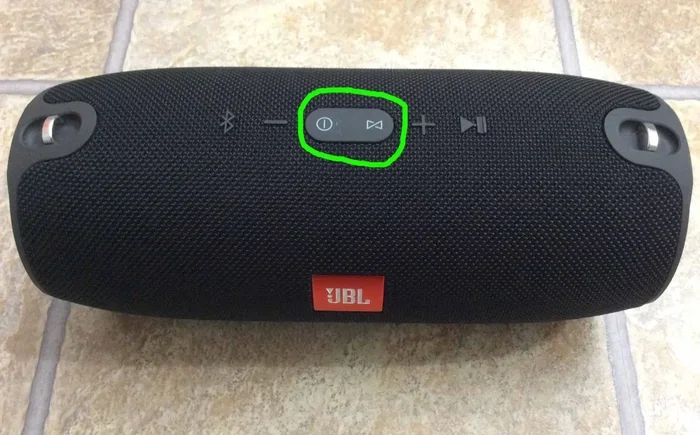
- Turn on the adapter and put it in pairing mode.
- Go to your phone’s Bluetooth settings and find the adapter in the list.
- Tap to pair and wait for the connection to establish.
- Play some music and adjust the volume on both your phone and amplifier.
That is it! You are now streaming wirelessly. If you run into any issues, try moving closer to the adapter or checking for interference from other devices.
Method 2: Installing a Bluetooth Module Inside the Amplifier
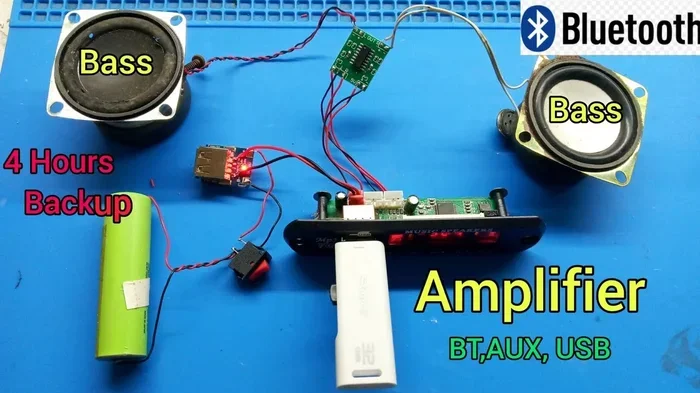
If you are comfortable opening up your amplifier, you can install a Bluetooth module directly inside the unit. This method gives you a cleaner look because there is no external device hanging off your amplifier. However, it does require some basic electronics knowledge and soldering skills.
What Is a Bluetooth Module?
A Bluetooth module is a small circuit board with a Bluetooth chip built in. It receives the wireless signal and sends the audio output to your amplifier’s circuit board. You can find these modules online for as little as $10 to $30, depending on the features and quality.
Popular Bluetooth modules include the HC-05 and HC-06 for basic projects, and more advanced ones like the CSR8645 or BM66 for better audio quality. These modules support different Bluetooth codecs, which affects how your music sounds.
Pros and Cons of Internal Installation
- Cleaner appearance — No extra cables or external devices cluttering your setup.
- Better integration — The module becomes a permanent part of your amplifier.
- Potentially better sound — A direct connection to the amplifier’s circuit can reduce signal loss.
- Requires technical skill — You need to know how to solder and read basic circuits.
- May void warranty — Opening your amplifier could void the manufacturer’s warranty.
- More time-consuming — This is not a quick fix like an external adapter.
Before you start, make sure you understand your amplifier’s internal layout. Take photos before you disassemble anything. And if you are not comfortable with electronics, stick with the external adapter method. There is no shame in choosing the easier option.
Method 3: Using a Bluetooth Receiver or Audio Transmitter
Another great option is to use a dedicated Bluetooth receiver or audio transmitter. These devices are specifically designed for audio applications and often deliver better sound quality than generic adapters.
A Bluetooth receiver takes the wireless signal from your phone and turns it into an audio output your amplifier can use. A Bluetooth transmitter does the opposite — it sends audio from a non-Bluetooth device to Bluetooth headphones or speakers. For adding Bluetooth to an amplifier, you want a receiver.
Some popular Bluetooth receivers include brands like 1Mii, Avantree, and Creative. These devices often support high-quality codecs like aptX and LDAC, which means your music will sound much better than with a basic adapter.
Quick Tips for Choosing a Receiver
- Check that the receiver has the right output for your amplifier (RCA, optical, or 3.5mm).
- Look for low audio latency if you plan to watch videos or play games.
- Choose a receiver with a good range — at least 30 feet for most home setups.
- Read reviews from other users to get a sense of real-world sound quality.
- Consider whether you need a rechargeable battery or if a plug-in model works better for you.
One thing many people overlook is audio latency. This is the delay between when the audio leaves your phone and when you hear it through your speakers. For music, latency is usually not a big deal. But if you are watching videos or gaming, even a small delay can be annoying. Look for receivers that advertise low-latency codecs like aptX Low Latency.
Understanding Bluetooth Codecs and Audio Quality
Not all Bluetooth connections sound the same. The secret lies in something called a Bluetooth codec. A codec is a way of compressing and sending audio data wirelessly. Different codecs offer different levels of quality, range, and latency.
Here is a quick comparison of the most common Bluetooth codecs:
| Codec | Quality | Latency | Best For |
|---|---|---|---|
| SBC | Standard | Medium | Basic music streaming |
| aptX | High | Medium | General music listening |
| aptX HD | Very High | Medium | Audiophile listening |
| LDAC | Excellent | Medium | High-resolution audio |
| aptX Low Latency | High | Low | Video and gaming |
If audio quality is important to you, look for a Bluetooth adapter or receiver that supports aptX HD or LDAC. These codecs deliver much better sound than the standard SBC codec. Your ears will definitely notice the difference, especially if you are using quality speakers or headphones.
Keep in mind that both your phone and your adapter need to support the same codec for it to work. If your phone supports aptX but your adapter only supports SBC, the connection will fall back to SBC quality. Always check compatibility before you buy.
Common Mistakes to Avoid When Adding Bluetooth
Adding Bluetooth to your amplifier is usually straightforward, but there are some common mistakes that can ruin your experience. Here are a few things to watch out for:
Buying a Cheap, Low-Quality Adapter
The cheapest Bluetooth adapters on the market often have poor sound quality, weak signals, and short range. They might save you a few dollars upfront, but they will frustrate you in the long run. Invest in a reputable brand and you will get much better results.
Ignoring Audio Latency
As we mentioned earlier, latency can be a real problem, especially when watching videos. If you notice the sound is out of sync with the video, your adapter or receiver might not support a low-latency codec. Look for aptX Low Latency or similar options.
Placing the Adapter Too Far Away
Bluetooth has a limited range, usually around 30 to 50 feet. Walls, furniture, and other electronics can weaken the signal. Keep your adapter close to the device you are streaming from for the best connection.
Not Updating Firmware
Some Bluetooth adapters and receivers have updatable firmware. Manufacturers release updates to fix bugs and improve performance. Check the manufacturer’s website to see if updates are available for your device.
Overlooking Compatibility Issues
Not all adapters work well with all amplifiers. Make sure the adapter’s output matches your amplifier’s input. And if you are using a Bluetooth receiver with RCA outputs, make sure you have the right cables to connect them.
Expert Insights: Making the Most of Your Wireless Setup
We reached out to a few audio experts to get their advice on upgrading amplifiers with Bluetooth. Here is what they had to say:
Mark T., Audio Engineer: “The biggest mistake people make is thinking all Bluetooth is created equal. A $15 adapter will sound noticeably worse than a $50 one that supports aptX or LDAC. Spend a little more on the adapter, and your music will sound so much better.”
Sarah L., Home Audio Enthusiast: “I added a Bluetooth receiver to my old stereo system, and it completely changed how I listen to music. I can stream from Spotify, Apple Music, or even YouTube without ever touching a cable. It is the best $30 I ever spent.”
James R., Sound System Installer: “If you are not comfortable opening up your amplifier, go with an external adapter. They work great and take about five minutes to set up. Internal installations are fine for hobbyists, but they are not for everyone.”
These experts all agree on one thing: adding Bluetooth to your amplifier is a worthwhile upgrade that anyone can do. Whether you choose an external adapter or an internal module, the result is a more convenient and modern listening experience.
Frequently Asked Questions
Can I add Bluetooth to any amplifier?
Yes, you can add Bluetooth to almost any amplifier. The easiest way is to use an external Bluetooth adapter that plugs into your amplifier’s aux, RCA, or headphone input. As long as your amplifier has an audio input, you can make it Bluetooth-enabled. Internal Bluetooth modules are also an option, but they require more technical skill to install.
Does adding Bluetooth reduce audio quality?
It can, but it depends on the adapter or receiver you use. Basic Bluetooth adapters that only support the SBC codec may reduce audio quality slightly. However, adapters that support advanced codecs like aptX, aptX HD, or LDAC deliver near-lossless sound quality. Choosing a high-quality Bluetooth adapter is the key to maintaining great audio.
How much does it cost to add Bluetooth to an amplifier?
External Bluetooth adapters and receivers range from about $15 to $100, depending on features and audio quality. Internal Bluetooth modules can be even cheaper, around $10 to $30, but they require more effort to install. Overall, it is one of the most affordable upgrades you can make to your sound system.
Is Bluetooth audio latency a real problem?
Audio latency can be noticeable, especially when watching videos or playing games. Standard Bluetooth codecs have a delay of about 100 to 200 milliseconds. However, adapters that support aptX Low Latency or similar codecs can reduce this delay significantly. For music listening alone, latency is usually not a concern.
Can I connect multiple phones to a Bluetooth adapter?
Most Bluetooth adapters support multipoint pairing, which allows you to connect two or more devices at the same time. This means you can switch between your phone and tablet without having to unpair and reconnect. Check the specifications of the adapter you buy to confirm if it supports this feature.
What Bluetooth version should I look for?
Look for Bluetooth version 4.0 or higher for the best performance. Bluetooth 5.0 and above offer longer range, lower power consumption, and better connection stability. If your phone and adapter both support Bluetooth 5.0, you will get the best wireless experience possible.
Conclusion
Adding Bluetooth to your amplifier is one of the smartest upgrades you can make for your home entertainment setup. It is affordable, easy, and instantly makes your old amplifier feel modern again. Whether you choose a simple Bluetooth adapter, a premium wireless receiver, or a full internal module install, the result is the same — wireless music streaming at the touch of a button.
Remember to choose a high-quality adapter or receiver that supports modern Bluetooth codecs for the best sound. Avoid the cheapest options, and always check compatibility with your amplifier’s inputs. With the right setup, you can stream music from any device in your home without dealing with cables or hassle.
If you are looking for more ways to upgrade your home setup, check out these gadgets that make life easier for some inspiration. And if you want to explore more about wireless audio, consider looking into wireless amplifiers and smart sound systems that take everything to the next level.
Now that you know how to make your amplifier Bluetooth-ready, there is no reason to wait. Pick the method that works best for you, grab the right adapter or module, and start streaming your favorite music wirelessly today. Your ears will thank you.