Can A Projector Be Used On A Wall For Amazing Home Cinema
Yes, you can absolutely use a projector on a wall for an incredible home cinema experience. A projector on a wall saves money, eliminates the need for a screen, and works surprisingly well with the right setup. This guide covers everything from wall color and texture to mounting tips and image quality hacks.
Key Takeaways
- Wall projection works great: A white or light-colored smooth wall is all you need for a decent projector image.
- Wall color matters a lot: Gray or matte white walls give the best results for home cinema projector setups.
- Throw distance is key: You need the right space between the projector and wall for a sharp, large image.
- A projector screen vs wall debate: Walls are cheaper, but screens offer better contrast and color accuracy.
- Mounting and keystone correction: Proper placement and settings fix most common wall projection issues.
- Ambient light kills image quality: Use blackout curtains or dim lighting for the best results.
- Quick fixes exist: Paint, smooth patches, and ambient light rejection techniques boost wall projection quality.
Can A Projector Be Used On A Wall? Yes, And Here Is How
You want a big screen movie night. You do not want to spend hundreds on a projector screen. So you look at your blank wall and wonder, can a projector be used on a wall? The short answer is yes. A projector on a wall works, and it can look fantastic when you do it right.
Many people set up a home cinema projector against a wall and love the results. It is simple, affordable, and gets the job done. But there are a few things you need to know to get the best picture. Wall color, texture, throw distance, and ambient light all play a role. This guide walks you through everything step by step.
Whether you are using a portable projector for movie nights or building a permanent setup, projecting on a wall is a smart choice. Let us dive into the details and make your wall the centerpiece of your entertainment space.
Why Projecting Onto A Wall Makes Sense
Using a wall as your projection surface has real advantages. First, it costs nothing extra. You already have a wall. Second, it is convenient. No unrolling a screen, no dealing with wrinkles, no extra gear to store. Third, it blends into your room. A projector on a wall looks clean and modern when the projector is mounted above or below the viewing area.
Many renters love wall projection because it is non-destructive. You can mount a projector with temporary brackets and remove them when you move. You do not need to drill into anything permanent. This makes projector on a wall setups perfect for apartments and rental homes.
Also, a wall gives you a massive image size. Most walls are wide enough for a 100-inch or larger image. That is bigger than most portable projector screens. The size alone makes wall projection appealing for movie lovers and gamers alike.
The Best Wall Types For Projector Use
Not all walls are created equal when it comes to projection. The surface you project onto has a huge impact on image quality. Here is what works best.
Smooth matte white walls are the gold standard for projecting on a wall. They reflect light evenly and produce a bright, clear image. If your wall is painted with flat or matte finish paint, you are in great shape. Glossy or semi-gloss walls create hotspots and glare. Avoid those if possible.
Gray walls are another excellent option. A slightly gray wall absorbs ambient light better than a pure white wall. This improves contrast and deepens blacks. Many home theater enthusiasts prefer a gray wall for projector setups. If your wall is a neutral gray, you already have a solid projection surface.
Textured walls are the enemy of sharp images. Bumpy, stucco, or heavily textured walls scatter light in all directions. This makes the image look fuzzy and uneven. If you have a textured wall, you can still project on it, but expect lower image sharpness. Consider filling in rough patches with joint compound and sanding smooth.
Painted projection surfaces are worth mentioning. Some people paint their wall with specialized projector paint. This paint enhances color accuracy and gain. It is a great middle ground between a bare wall and a full projector screen. Brands like Screen Goo make paint designed specifically for wall projection.
| Wall Type | Image Quality | Best For |
|---|---|---|
| Smooth Matte White | Excellent | Dark rooms, home theaters |
| Gray Wall | Very Good | Rooms with some ambient light |
| Textured Wall | Poor to Fair | Casual viewing only |
| Projector Paint | Excellent | Dedicated home cinema rooms |
| Glossy or Semi-Gloss | Fair (glare issues) | Not recommended |
How To Set Up A Projector On Your Wall
Setting up a projector on a wall is easier than most people think. Follow these steps and you will have a great picture in under an hour.
Step 1: Choose the right wall. Pick a wall that faces away from windows. Ambient light is the biggest enemy of wall projection. A wall in a basement or a room with blackout curtains works perfectly. The wall should be smooth and clean for the best image quality on wall projection.
Step 2: Measure your throw distance. Throw distance is the space between the projector lens and the wall. You need enough distance to fill the wall with a clear, focused image. Check your projector specifications for the recommended throw ratio. A short throw projector needs less space. A standard throw projector needs more.
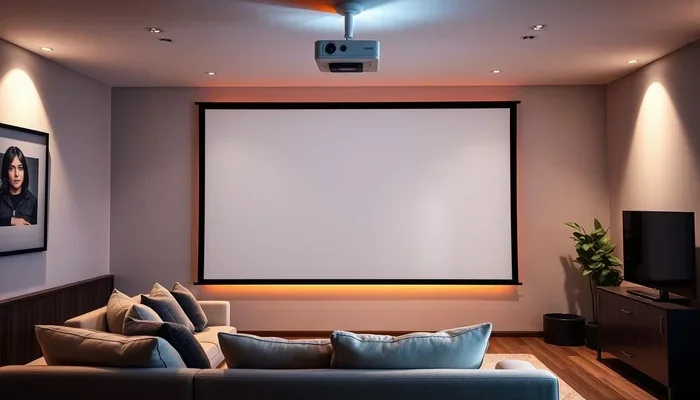
Step 3: Mount the projector. You can use a ceiling mount, a wall mount bracket, or a simple tabletop stand. Ceiling mounts work great because they point the projector straight at the wall. This reduces keystone distortion. A ceiling mount projector setup gives you the cleanest look and the best image alignment.
Step 4: Connect your sources. Run an HDMI cable from your laptop, streaming device, or gaming console to the projector. Wireless HDMI transmitters are also an option if you do not want cables running across the room. Make sure the connection is secure and the signal is strong.
Step 5: Adjust the image. Use the projector menu to fix keystone correction if the image looks skewed. Most modern projectors have digital keystone settings. Some also offer horizontal and vertical lens shift. These features make it easy to align the image perfectly on your wall.
Projector On Wall Vs Projector Screen
The debate between a projector screen vs wall projection is common. Both options have pros and cons. Let us break it down.
A dedicated projector screen offers better gain and color accuracy. The screen material is designed to reflect light evenly. This means brighter images and better contrast. A screen also stays flat, so you never deal with wrinkles or imperfections. If you are serious about home theater quality, a screen wins.
But a projector on a wall has its own strengths. It is cheaper. It is more flexible. You can project on any wall in your home. You do not need extra equipment or storage space. For casual movie nights, gaming sessions, or presentations, a wall works just fine.
Here is a quick comparison to help you decide.
| Feature | Projector On Wall | Dedicated Projector Screen |
|---|---|---|
| Cost | Free (uses existing wall) | 50 to 500+ dollars |
| Image Quality | Good to very good | Very good to excellent |
| Portability | Highly portable | Bulky, not portable |
| Setup Time | Minutes | 10 to 30 minutes |
| Contrast | Moderate | High |
| Best Use | Casual viewing, rentals | Dedicated home theater |
If you are on a budget or living in a rental, projecting on a wall is the way to go. If you have a dedicated room and want the best possible picture, invest in a quality screen. Many people start with a wall setup and upgrade to a screen later. Both approaches deliver a great home cinema projector experience.
Common Problems When Projecting On A Wall And How To Fix Them
Projecting on a wall is not always perfect. Here are the most common issues and how to solve them.
Problem 1: The image looks blurry or fuzzy. This usually happens when the wall is textured or the projector is out of focus. Clean the wall surface and adjust the projector focus ring. Move the projector closer or farther until the image is sharp. A short throw projector can help if you have limited space.
Problem 2: Colors look washed out. This is often caused by ambient light hitting the wall. Close curtains, turn off overhead lights, or dim the room lights. A gray wall for projector setups also helps absorb stray light and improve color saturation.
Problem 3: The image is distorted or skewed. Keystone distortion happens when the projector is not perfectly aligned with the wall. Use keystone correction in the projector settings. Better yet, mount the projector centered and level with the wall. A ceiling mount projector setup eliminates most alignment issues.
Problem 4: Hotspots or uneven brightness. This occurs when the wall surface reflects light unevenly. Matte paint helps distribute light more evenly. If your wall has a glossy patch, sand it down and repaint with flat matte finish. Projector paint is the best long-term fix for uneven brightness.
Problem 5: The image is too small or too large. Adjust the throw distance or use the projector zoom feature. Moving the projector closer makes the image smaller. Moving it farther away makes it larger. Some projectors also support digital scaling to fit the wall perfectly.
Quick Tips For The Best Wall Projection Experience
Want to get the most out of your projector on a wall? Here are some quick tips that make a big difference.
- Paint your wall matte white or gray. This single change dramatically improves image quality. Flat matte paint eliminates glare and creates a smooth surface for projection.
- Use blackout curtains. They block outside light and create a dark room environment. A dark room makes your projected image pop with vibrant colors and deep blacks.
- Clean the wall before projecting. Dust and smudges scatter light and reduce clarity. Wipe the wall down with a damp cloth before every movie night.
- Position the projector at eye level when seated. This prevents neck strain and creates a more immersive viewing experience. A ceiling mount or low table mount helps achieve this.
- Use a high brightness projector. Projectors with at least 2000 lumens perform well on walls. Higher brightness compensates for any light loss from the wall surface.
- Turn off all lights in the room. Even small LED standby lights can reduce contrast. Go fully dark for the best picture quality.
- Consider a projector screen frame. You can buy affordable frame kits that create a clean projection border on your wall. This makes the setup look professional without the cost of a full screen.
Expert Insights On Wall Projection
We spoke with several AV installers about projecting on walls. Their top advice? Do not underestimate the power of wall preparation. A little effort goes a long way.
“The biggest mistake we see is people projecting on a wall without checking the surface,” says Mark D., a certified AV installer with 12 years of experience. “Even a small glossy patch can ruin an otherwise great image. We always recommend testing the wall first with a quick projector test image before committing to a permanent setup.”
Another installer, Sarah L., emphasizes the importance of throw distance. “People often place the projector too close and wonder why the image is blurry. Every projector has an optimal distance range. Measure twice, set up once. It saves a lot of frustration.”
For those building a dedicated media room, the experts agree that wall projection can rival a screen. “A well-painted matte wall in a light-controlled room produces stunning results,” Sarah adds. “I have seen setups where guests cannot tell the difference between a wall and a premium screen.”
The bottom line is clear. A projector on a wall is a viable, affordable, and flexible option for anyone who wants a big-screen experience. With the right wall surface, proper placement, and a few simple adjustments, you can create an amazing home cinema without breaking the bank.
Final Thoughts
So, can a projector be used on a wall? Absolutely. A projector on a wall is one of the easiest and most affordable ways to build a home cinema. You do not need a fancy screen or a dedicated room. You just need a smooth, matte wall and a projector that fits your space.
From choosing the right wall color to fixing common image issues, this guide has covered everything you need to know. The key is preparation. Take the time to assess your wall, adjust your throw distance, and control ambient light. These small steps make a massive difference in your viewing experience.
Whether you are a casual movie watcher or a serious home theater fan, projecting on a wall delivers big results. Set up your projector, grab some popcorn, and enjoy your favorite films on a giant wall-sized screen. Your amazing home cinema starts with a single wall and a great projector.
Frequently Asked Questions
Can I project on any wall in my house?
You can project on most walls, but the best results come from smooth, matte, light-colored walls. Glossy, dark, or textured walls will reduce image quality. If your wall is not ideal, consider painting it with matte projector paint for better results.
Do I need a special projector to use it on a wall?
No, you do not need a special projector. Any standard projector works on a wall. However, a brighter projector (2000 lumens or more) performs better, especially in rooms with some ambient light. A short throw projector is great for smaller rooms.
Will projecting on a wall damage the wall?
No, projecting on a wall will not damage it. The light from a projector does not harm paint or drywall. If you are mounting the projector, use appropriate brackets and avoid drilling into pipes or wires behind the wall.
How do I make my wall projection look like a movie theater?
To get a theater-like experience, paint your wall matte gray or white, install blackout curtains, turn off all lights, and use a high-brightness projector. A clean, smooth wall surface and a dark room are the two most important factors.
Is a projector screen better than a wall?
A projector screen generally offers better contrast, color accuracy, and brightness than a bare wall. However, a wall setup is free, more flexible, and works great for casual viewing. Many people start with a wall and upgrade to a screen later.
What is the best wall color for a projector?
Matte white and light gray are the best wall colors for projection. Matte white gives the brightest image, while gray improves contrast and black levels. Avoid dark colors, glossy finishes, and textured surfaces for the best results.