Can Bluetooth Work In Airplane Mode Heres What Happens
Can Bluetooth work in airplane mode? The short answer is yes, but with important limitations. Airplane mode disables cellular and Wi-Fi connections, yet you can manually re-enable Bluetooth wireless technology on most devices. This means you can still enjoy Bluetooth headphones, wireless keyboards, and other Bluetooth pairing devices while flying. Understanding how flight mode interacts with wireless connectivity helps you stay entertained and productive during your next trip. Let us break down exactly what happens and how to make the most of it.
Have you ever settled into your airplane seat, flipped on airplane mode, and then realized you wanted to listen to music or watch a movie on your Bluetooth headphones? It is a frustrating moment. You wonder, can Bluetooth work in airplane mode? The answer might surprise you. Airplane mode does not block everything. It leaves a small window open for wireless connectivity through Bluetooth. This means you can still enjoy your favorite wireless Bluetooth devices while flying. In this guide, we will walk through exactly what happens, why it works, and how you can use Bluetooth safely during your next flight.
Flying used to mean disconnecting completely. But technology has changed. Airlines now welcome passengers to stay connected in limited ways. Bluetooth technology plays a big role in that shift. Whether you want to use Bluetooth headphones, a wireless keyboard, or a Bluetooth speaker for offline content, knowing the rules helps you avoid trouble. Let us dive into everything you need to know about Bluetooth and airplane mode.
Key Takeaways
- Bluetooth can work in airplane mode: You can manually turn Bluetooth back on after enabling flight mode on your device.
- Cellular and Wi-Fi stay off: Airplane mode blocks cellular signals and Wi-Fi, but Bluetooth operates on a different radio frequency.
- Most airlines allow Bluetooth: Many airlines now permit Bluetooth headphones and other wireless devices during flights.
- Check your devices settings: Always verify your device settings to ensure Bluetooth is enabled after toggling airplane mode.
- Follow airline policies: Each airline has its own rules about when you can use wireless technology during a flight.
- In-flight entertainment works offline: You can use Bluetooth speakers and headphones with offline content without any issues.
- Expert tip: Pair your devices before turning on airplane mode for a smoother experience.
📑 Table of Contents
- What Is Airplane Mode and Why Do We Use It?
- Can Bluetooth Work In Airplane Mode? The Short Answer
- How Bluetooth Technology Actually Works
- When Bluetooth Works and When It Doesnt
- Tips for Using Bluetooth on Flights
- Common Myths About Bluetooth and Airplane Mode
- Expert Insights on Bluetooth and Air Travel
- Key Takeaways
- Conclusion
What Is Airplane Mode and Why Do We Use It?
Understanding Flight Mode on Your Device
Airplane mode is a setting on your phone, tablet, or laptop that disables all wireless signal transmission capabilities. When you turn it on, your device stops sending and receiving cellular network signals, Wi-Fi connections, and sometimes GPS location data. The name comes from the original reason: preventing electronic devices from interfering with an airplanes radio frequency systems during takeoff and landing.
Most travelers enable flight mode as soon as the captain announces it. It is a habit built over years of airline safety announcements. But what many people do not realize is that airplane mode does not shut down every single wireless function. It targets specific types of wireless technology that could potentially cause interference.
Here is what airplane mode typically disables:
- Cellular connections for calls and text messages
- Wi-Fi networks for internet browsing
- GPS location services for mapping and navigation
- Cellular data for streaming and downloads
But Bluetooth operates differently. It uses a much lower radio frequency and shorter range. This is why airlines and aviation authorities generally allow it even when other wireless functions are turned off.
Why Do Airlines Require Airplane Mode?
Airlines ask passengers to switch to flight mode primarily for safety reasons. The concern is that electronic devices emit signals that could interfere with the airplanes navigation and communication systems. While modern studies have shown this risk is very low, airlines still follow precautionary rules set by aviation authorities like the Federal Aviation Administration (FAA) and the International Civil Aviation Organization (ICAO).
These rules have evolved over time. Years ago, passengers had to turn off all portable devices completely. Then came the rule allowing devices in airplane mode during cruise. Now, many airlines even permit Wi-Fi and Bluetooth use throughout the flight. The key takeaway is that airline policies vary, so always check with your specific carrier.
Can Bluetooth Work In Airplane Mode? The Short Answer
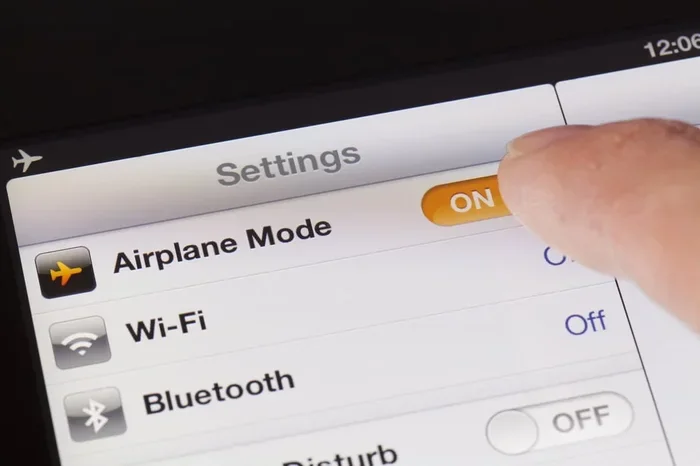
The direct answer to can Bluetooth work in airplane mode is yes. When you enable airplane mode, your device cuts off cellular and Wi-Fi radios. But you can go back into your device settings and manually turn Bluetooth back on. This allows your Bluetooth headphones, wireless keyboard, or Bluetooth speaker to connect and function normally.
Here is how it works in practice:
- You swipe down from the top of your screen and tap the airplane mode icon.
- All wireless connections turn off except Bluetooth if you go into settings and re-enable it.
- Your Bluetooth pairing with headphones or speakers remains intact.
- You can now listen to downloaded music, watch offline movies, or type on a wireless keyboard.
This works on nearly all modern smartphones, tablets, and laptops. Both iOS and Android devices support this feature. Apple iPhones, Samsung Galaxy phones, iPads, and Windows laptops all allow you to re-enable Bluetooth wireless connections after turning on airplane mode.
Why Does Bluetooth Stay Available?
Bluetooth technology uses short-range radio frequency waves, typically around 2.4 GHz. These waves have very low power output compared to cellular signals. Aviation experts have determined that Bluetooth signals are extremely unlikely to interfere with an airplanes communication systems. This is why regulators allow Bluetooth devices to operate even when other wireless functions are disabled.
Think of it this way. Your cellular signal reaches towers miles away. It needs significant power to do that. Bluetooth only reaches about 30 feet. It uses a tiny fraction of the power. This difference is what makes Bluetooth safe to use during flights.
How Bluetooth Technology Actually Works
The Basics of Bluetooth Wireless Connectivity
Bluetooth is a wireless technology standard for exchanging data over short distances. It uses radio frequency waves to create a personal area network between devices. When you pair your phone with Bluetooth headphones, they establish a direct connection without needing the internet or cellular service.
This is a crucial point. Bluetooth pairing does not require a cellular network or Wi-Fi connection. It works entirely on its own wireless connectivity protocol. This is why you can use Bluetooth devices offline, including during a flight with airplane mode enabled.
Here are some common Bluetooth devices people use on flights:
- Bluetooth headphones for music and podcasts
- Wireless earbuds for calls and audio
- Bluetooth speakers for sharing audio
- Wireless keyboards for typing on tablets
- Bluetooth mice for easier navigation
- Smartwatches that sync via Bluetooth
All of these devices connect through Bluetooth wireless technology and work perfectly fine in offline mode. You do not need internet access for them to function.
Bluetooth vs. Wi-Fi vs. Cellular: Key Differences
Understanding the differences between these three types of wireless technology helps explain why Bluetooth works in airplane mode while others do not.
| Feature | Bluetooth | Wi-Fi | Cellular |
|---|---|---|---|
| Range | Short (about 30 feet) | Medium (about 100 feet) | Long (miles) |
| Power Output | Very low | Moderate | High |
| Requires Internet? | No | Yes | Yes |
| Allowed in Airplane Mode? | Yes (manually) | Usually no | No |
| Interference Risk | Very low | Low to moderate | Higher |
As you can see, Bluetooth stands apart from Wi-Fi and cellular in terms of range and power. This is exactly why aviation authorities consider it safe to use during flights.
When Bluetooth Works and When It Doesnt
Situations Where Bluetooth Works in Airplane Mode
Most of the time, you can use Bluetooth headphones and other devices after re-enabling Bluetooth in airplane mode. Here are common situations where it works smoothly:
- Listening to downloaded music or podcasts on Bluetooth headphones
- Watching offline movies on your tablet with wireless earbuds
- Using a wireless keyboard to type notes during a flight
- Connecting a Bluetooth speaker for offline audio playback
- Using a smartwatch that syncs through Bluetooth pairing
In all these cases, your Bluetooth device connects directly to your phone or tablet. No internet or cellular signal is needed. Airplane mode does not block this type of short-range wireless connection.
Situations Where Bluetooth Might Not Work
There are a few scenarios where Bluetooth might not work even though you have re-enabled it in airplane mode:
- Airline restrictions: Some airlines ask passengers to keep all wireless devices off during takeoff and landing. Always follow crew instructions.
- Device limitations: Older devices or budget models might not allow Bluetooth re-enabling after airplane mode is turned on.
- Battery saver mode: Some device settings automatically disable Bluetooth to save power when airplane mode is active.
- Bluetooth glitches: Sometimes Bluetooth pairing drops after toggling flight mode. A quick restart usually fixes this.
If your Bluetooth headphones stop connecting after you turn on airplane mode, try turning Bluetooth off and back on again. This simple fix resolves most issues.
Tips for Using Bluetooth on Flights
Step-by-Step Guide to Enabling Bluetooth in Airplane Mode
Follow these steps to get your Bluetooth devices working after enabling airplane mode:
- Turn on airplane mode using your quick settings or control center.
- Open settings and look for the Bluetooth option.
- Toggle Bluetooth on to re-enable the wireless connection.
- Pair your device if it was previously connected. Most devices remember Bluetooth pairing automatically.
- Test the connection by playing audio or typing on your wireless keyboard.
That is all it takes. Your Bluetooth headphones or speakers should work just like they do at home.
Best Bluetooth Devices for Air Travel
Not all Bluetooth devices are created equal for travel. Here are some top picks for using wireless technology on flights:
- Noise-canceling Bluetooth headphones: Great for blocking out engine noise during long flights.
- Compact Bluetooth speakers: Perfect for sharing audio with a travel companion.
- Portable wireless keyboards: Handy for working on tablets without a screen keyboard.
- Long battery life earbuds: Essential for extended flights where charging options are limited.
When choosing Bluetooth devices for travel, prioritize battery life, comfort, and Bluetooth pairing stability. These factors make a big difference at 30,000 feet.
Quick Tips for a Smooth Bluetooth Experience on Planes
Here are some practical tips to keep in mind:
- Pair your devices before the flight. This saves time and avoids frustration at your seat.
- Download content offline. Since airplane mode blocks Wi-Fi and cellular data, you cannot stream. Download movies, music, and podcasts beforehand.
- Carry a backup wired option. Some airlines provide in-flight entertainment systems that use wired headphones. Bring a backup just in case.
- Respect crew instructions. If the flight crew asks you to turn off all wireless devices, comply immediately.
- Keep your devices charged. Bring a portable charger so your Bluetooth devices stay powered throughout the flight.
Common Myths About Bluetooth and Airplane Mode
Myth 1: Bluetooth Interferes with Aircraft Systems
This is one of the most persistent myths about wireless technology on planes. The truth is that Bluetooth signals are too weak and too short-range to interfere with an airplanes navigation systems. Aviation regulators have reviewed the evidence and concluded that Bluetooth devices pose minimal risk during flights.
Myth 2: Airplane Mode Blocks Everything
As we have covered, airplane mode does not block Bluetooth. It primarily disables cellular network and Wi-Fi connections. You can always re-enable Bluetooth wireless through your device settings. This misconception leads many travelers to unnecessarily disconnect their Bluetooth headphones.
Myth 3: You Cannot Use Any Wireless Devices on a Plane
Modern aviation rules are much more relaxed than they used to be. Most airlines now allow Bluetooth headphones, wireless keyboards, and other Bluetooth devices throughout the flight. The key is following airline policies and using airplane mode as a starting point.
Myth 4: Bluetooth Uses the Same Signal as Cellular
Bluetooth and cellular are completely different wireless technologies. They operate on different radio frequencies and serve different purposes. Bluetooth connects devices locally, while cellular connects you to networks miles away. This is why one is restricted in airplane mode and the other is not.
Expert Insights on Bluetooth and Air Travel
What Aviation Experts Say
Aviation safety experts generally agree that Bluetooth technology is safe to use during flights. The Federal Aviation Administration has approved the use of Bluetooth devices in airplane mode on most commercial flights. Experts emphasize that passengers should always follow the specific guidelines of their airline and the flight crew.
Device settings play an important role in ensuring a smooth experience. Keeping your Bluetooth firmware updated and your device charged helps prevent connectivity issues during travel. Experts also recommend downloading content before your flight so you are not reliant on wireless connectivity that may not be available.
How Airlines Are Adapting to Wireless Technology
Airlines have evolved significantly in their approach to electronic devices. Many carriers now offer in-flight Wi-Fi and encourage passengers to use Bluetooth headphones with their in-flight entertainment systems. This shift reflects a broader acceptance of wireless technology in the aviation industry.
Some airlines even provide Bluetooth pairing instructions in their in-flight magazines. This shows how normalized Bluetooth devices have become in air travel. As wireless technology continues to advance, we can expect even more seamless integration of Bluetooth devices on flights.
Key Takeaways
- Bluetooth can work in airplane mode: You can manually re-enable Bluetooth after turning on flight mode on your device.
- Airplane mode blocks cellular and Wi-Fi: These signals operate on different frequencies than Bluetooth and are restricted for safety reasons.
- Bluetooth uses low-power radio frequency: This makes it safe for use during flights according to aviation authorities.
- Check airline policies before flying: Each carrier has its own rules about when wireless devices can be used.
- Pair devices before enabling airplane mode: This ensures a smoother Bluetooth pairing experience during your flight.
- Download content offline: Since you cannot stream in airplane mode, pre-downloading ensures uninterrupted entertainment.
- Respect crew instructions: Always follow the guidance of flight attendants regarding device usage during critical flight phases.
Conclusion
Can Bluetooth work in airplane mode? Yes, it absolutely can. Airplane mode disables cellular and Wi-Fi connections, but it does not block Bluetooth wireless technology. You can re-enable Bluetooth through your device settings and continue using your Bluetooth headphones, wireless keyboard, or Bluetooth speaker during your flight.
Understanding how flight mode interacts with different types of wireless connectivity empowers you to stay entertained and productive while traveling. The key is to follow airline policies, respect crew instructions, and use Bluetooth devices responsibly.
Next time you board a plane, do not panic when you flip on airplane mode. You can still enjoy your favorite music, watch offline movies, or type up notes using wireless technology. Just remember to re-enable Bluetooth, pair your devices, and settle in for a comfortable flight. Safe travels and happy listening!
Frequently Asked Questions
Can I use Bluetooth headphones during takeoff and landing?
Most airlines allow Bluetooth headphones during takeoff and landing when airplane mode is enabled and Bluetooth is manually turned on. However, some airlines require all wireless devices to be powered off during these critical phases. Always follow the specific instructions given by the flight crew.
Do I need Wi-Fi to use Bluetooth on a plane?
No, Bluetooth technology does not require Wi-Fi or a cellular network to function. It creates a direct wireless connection between your devices using low-power radio frequency waves. This is why Bluetooth devices work perfectly fine in airplane mode without internet access.
Will using Bluetooth drain my battery faster on a flight?
Bluetooth uses very little battery power compared to cellular or Wi-Fi connections. Since you are likely using offline content during a flight, the battery drain from Bluetooth pairing is minimal. To conserve battery, keep your screen brightness low and close unused apps.
Can I use a Bluetooth speaker on a plane?
Yes, you can use a Bluetooth speaker in airplane mode as long as you re-enable Bluetooth through your device settings. However, be considerate of fellow passengers. Use a low volume and remember that some airlines may have additional rules about audio output devices.
What happens if my Bluetooth disconnects after I turn on airplane mode?
This is a common issue. Bluetooth pairing can drop when you toggle flight mode. Simply go back to your device settings, turn Bluetooth off and back on, and re-pair your device. This usually takes only a few seconds and resolves the problem quickly.
Are there any airlines that completely ban Bluetooth?
Most major airlines now allow Bluetooth devices in airplane mode. However, a few airlines may have stricter airline policies that restrict all wireless technology during certain phases of flight. Check your airlines website or contact their customer service before your trip to confirm their device usage rules.