Can A Smartphone Be Used As A Security Camera Today
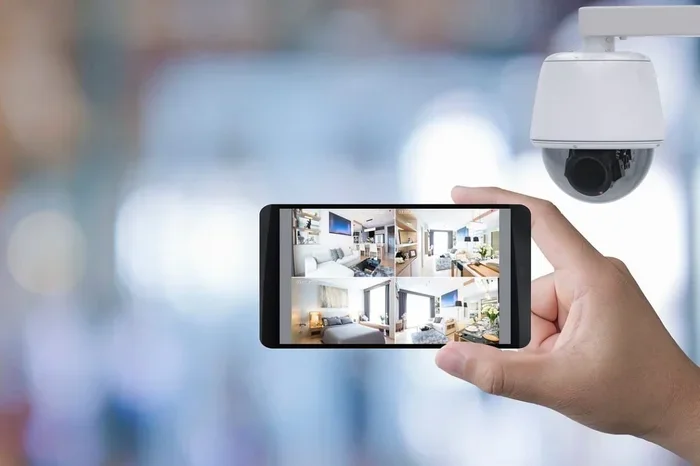
Yes, you can absolutely use a smartphone as a security camera. With the right apps and a spare device, your old phone transforms into a powerful surveillance tool that offers live streaming, motion detection, and remote monitoring. It is a budget-friendly alternative to expensive CCTV systems and works surprisingly well for most homes and offices.
Have you ever looked at an old smartphone sitting in a drawer and wondered if it still had a purpose? The answer might surprise you. Can a smartphone be used as a security camera? The short answer is yes. In fact, turning an old phone into a home surveillance device is one of the smartest and most affordable tricks you can try today.
More and more people are ditching expensive CCTV systems and picking up their spare phones instead. Whether you want to watch your front door, keep an eye on a pet, or monitor a vacation home, your phone can do the job. This guide walks you through everything you need to know about using a smartphone as a security camera. We will cover setup, apps, pros and cons, and expert tips to help you get the best results.
Key Takeaways
- Smartphones make excellent security cameras: They have built-in cameras, microphones, Wi-Fi, and apps that turn them into full-featured surveillance devices.
- Free and paid apps are available: Apps like Alfred, Manything, and AtHome Camera offer motion detection, cloud storage, and live streaming.
- You need a spare phone: Using an old device you no longer need is the most cost-effective way to set up a phone security camera.
- There are pros and cons: Phone cameras lack the durability of dedicated CCTV cameras, but they are cheaper and easier to set up.
- Placement matters a lot: Proper positioning, lighting, and Wi-Fi strength determine how well your phone works as a security camera.
- Privacy and security are important: Always use strong passwords and keep your apps updated to protect your footage.
📑 Table of Contents
- Why People Are Turning Their Phones Into Security Cameras
- How To Set Up Your Phone As A Security Camera
- Best Apps For Using Your Phone As A Security Camera
- Pros And Cons Of Using A Smartphone As A Security Camera
- Tips To Get The Most Out Of Your Phone Security Camera
- Common Mistakes People Make With Phone Security Cameras
- Is A Smartphone Better Than A Dedicated Security Camera?
- Key Takeaways
- Frequently Asked Questions
- Final Thoughts
Why People Are Turning Their Phones Into Security Cameras
The idea of phone camera security has grown in popularity over the last few years. There are some very good reasons for this shift. Let us look at why so many people are choosing this route.
Cost Savings
A proper home surveillance system can cost hundreds of dollars. You need cameras, a recording device, and sometimes a monthly subscription for cloud storage. With a smartphone, you already own the hardware. All you need is a free or low-cost app. This makes budget-friendly security monitoring a reality for almost anyone.
Repurposing Old Devices
Most of us have at least one old phone lying around. Instead of letting it collect dust, you can give it a second life. An older phone still has a working camera and Wi-Fi capability. It does not need to be the latest model to serve as a reliable surveillance camera.
Convenience and Flexibility
Smartphones are portable. You can move them from room to room or even take them with you when you travel. This kind of flexible remote monitoring is hard to beat with traditional security cameras. You are not stuck with one fixed location.
How To Set Up Your Phone As A Security Camera
Setting up your phone as a security monitoring device is easier than you might think. You do not need to be tech-savvy. Follow these simple steps and you will be up and running in no time.
Step 1: Choose Your Device
You need two things for this to work. One phone acts as the camera unit, and another phone or computer acts as the monitoring screen. The camera phone should have a working camera and a stable Wi-Fi connection. It does not need to be plugged in all the time, but keeping it on a charger is a good idea for long-term use.
Step 2: Pick The Right App
The app is the heart of your setup. It handles live streaming, motion alerts, and recording. More on the best apps in the next section. For now, just know that your choice of app will shape your entire experience.
Step 3: Position The Camera Phone
Find a good spot for the phone. Place it near a window or doorway where you want to monitor activity. Make sure the camera lens is clean. Avoid direct sunlight hitting the lens, as it can cause glare and wash out the image. A stable surface or a phone mount works best.
Step 4: Connect To Wi-Fi And Test
Connect both phones to the same Wi-Fi network if possible. Open the app on the camera phone and the viewer phone. Test the live feed. Check the audio and video quality. Adjust the position if needed. Once everything looks good, you are ready to go.
Quick Setup Tips
- Use a wall mount or tripod to keep the phone steady.
- Turn off all notifications on the camera phone to avoid interruptions.
- Enable airplane mode for the camera phone if you want to save battery, then switch it off airplane mode only when needed.
- Clean the lens regularly for clear footage.
- Keep the phone plugged in during extended monitoring sessions.
Best Apps For Using Your Phone As A Security Camera
The app you choose makes all the difference when you turn your phone into a security camera. Some apps are free, while others offer premium features for a small fee. Here are the top options worth considering.
Alfred Camera
Alfred Camera is one of the most popular options available. It is free to use and works on both Android and iOS. The app turns your old phone into a live streaming security camera with motion detection alerts. You can view the feed from any other device with the app installed. It also offers cloud storage for recorded clips. Many users love it because the setup takes less than five minutes.
Manything
Manything is another solid choice. It works well for home surveillance and offers a clean, easy-to-use interface. The free plan includes basic features, and the paid plan adds more storage and advanced alerts. It is a great option if you want a simple setup without a steep learning curve.
AtHome Camera
AtHome Camera supports both two-way audio and live streaming. This means you can not only see what is happening but also speak through the phone. It is especially useful if you want to talk to pets, children, or even visitors at your door. The free version has some limits, but it still delivers solid performance.
IP Webcam
IP Webcam is a great option for Android users who want more control. It turns your phone into an IP camera that you can access through any web browser. This gives you a lot of flexibility. The app is not as polished as some others, but it is powerful and customizable.
Comparison Table
| App | Free Version | Two-Way Audio | Motion Detection | Cloud Storage | Platform |
|---|---|---|---|---|---|
| Alfred Camera | Yes | No | Yes | Yes | Android & iOS |
| Manything | Yes | No | Yes | Yes (paid) | Android & iOS |
| AtHome Camera | Yes | Yes | Yes | Yes (paid) | Android & iOS |
| IP Webcam | Yes | No | Yes | No | Android |
Pros And Cons Of Using A Smartphone As A Security Camera
Like any solution, using a phone as a video security device has its strengths and weaknesses. Let us look at both sides honestly so you can make an informed decision.
The Pros
- Very affordable: You likely already own the device. No need to buy expensive cameras.
- Easy to set up: Most apps guide you through the process step by step.
- High-quality video: Modern smartphone cameras rival or even beat many budget security cameras.
- Portable and flexible: You can move the phone anywhere you need it.
- Smart features: Many apps offer motion detection, night vision, and cloud alerts.
- No subscription required: Several apps work fully without a monthly fee.
The Cons
- Battery drain: Continuous streaming can drain a phone battery quickly. You will need to keep it plugged in.
- Not weatherproof: Most phones are not built to handle rain, extreme heat, or cold. You need to protect them if placing them outdoors.
- Durability concerns: A phone is more fragile than a dedicated CCTV camera. It can break if dropped or bumped.
- Limited field of view: Phone cameras usually have a narrower view than wide-angle security cameras.
- Dependence on Wi-Fi: If your internet goes down, you lose remote access to the feed.
Overall, the pros of phone-based surveillance outweigh the cons for most people. It is a practical solution that works well for everyday home monitoring needs.
Tips To Get The Most Out Of Your Phone Security Camera
Want your smartphone surveillance setup to work like a pro? Follow these practical tips to boost performance and get the best results.
Use Night Vision Mode
Most security monitoring happens at night. Make sure your app supports night vision or low-light mode. Some apps automatically switch to infrared or enhance the image in dark conditions. Test this feature before you rely on it for overnight monitoring.
Optimize Wi-Fi Signal
A weak Wi-Fi signal means a choppy or laggy live feed. Place the camera phone close to your router if possible. If the signal is weak in that area, consider using a Wi-Fi extender to boost the connection. A strong and stable connection is essential for smooth live streaming.
Adjust Motion Detection Sensitivity
Most apps let you adjust how sensitive the motion detection feature is. Set it too high, and you will get alerts every time a leaf blows by. Set it too low, and you might miss important movement. Find a sweet spot that works for your environment.
Secure Your Device
Your phone is now a surveillance device, which means it holds access to your home. Use a strong password on the app. Enable two-factor authentication if available. Keep the app updated to patch any security vulnerabilities. A compromised camera phone is a serious privacy risk.
Use a Dedicated Power Source
For long-term monitoring, keep the camera phone plugged into a charger at all times. This prevents battery drain and ensures the camera stays online 24/7. A smart plug with a timer can help manage power usage if you are concerned about electricity costs.
Expert Insight
“The biggest mistake people make is placing the phone too high or too far from the action. Keep the camera at eye level and close enough to capture clear faces and details. A blurry feed defeats the purpose of video security.” – Home Security Expert
Common Mistakes People Make With Phone Security Cameras
Even with the best setup, people often make avoidable errors that reduce the effectiveness of their phone-based security system. Here are the most common mistakes and how to fix them.
Ignoring Storage Limits
Recording video takes up a lot of space. If you do not manage storage, your phone will eventually run out and stop recording. Use cloud storage through the app or regularly transfer footage to another device. Some apps offer automatic deletion of old clips to save space.
Forgetting to Update the App
Outdated apps can have bugs and security holes. Developers release updates regularly to fix issues and improve performance. Check for updates at least once a week to keep your surveillance setup running smoothly.
Placing the Phone In Direct Sunlight
Direct sunlight can damage the phone over time and cause poor image quality. Avoid placing the camera phone in spots where the sun hits the lens directly. Shaded spots near windows or under eaves work much better.
Not Testing the System Regularly
A setup that works today might not work tomorrow. Wi-Fi changes, app updates, or phone settings can break the connection. Test your system at least once a week to make sure everything is working as it should.
Using a Phone With a Cracked Screen
A damaged phone might still work, but its camera and sensors could be compromised. A cracked screen can also affect the camera lens alignment. Use a phone in good condition for the best surveillance results.
Is A Smartphone Better Than A Dedicated Security Camera?
This is a question many people ask when exploring phone camera security. The honest answer is that it depends on your needs.
A dedicated CCTV camera is built for long-term, 24/7 use. It is weatherproof, has a wider field of view, and often includes advanced features like facial recognition and night vision. If you need a permanent, outdoor security system, a dedicated camera is the better choice.
However, if you want a quick, affordable solution for indoor monitoring or occasional use, a smartphone works surprisingly well. It offers high-resolution video, smart app features, and the convenience of remote access from anywhere. For renters, travelers, or anyone on a budget, using a phone as a security camera is a smart and practical option.
Can a smartphone be used as a security camera in a way that rivals dedicated systems? For most everyday situations, yes. It might not replace a full professional setup, but it comes closer than most people expect.
Key Takeaways
- Smartphones make excellent security cameras: They have built-in cameras, microphones, Wi-Fi, and apps that turn them into full-featured surveillance devices.
- Free and paid apps are available: Apps like Alfred, Manything, and AtHome Camera offer motion detection, cloud storage, and live streaming.
- You need a spare phone: Using an old device you no longer need is the most cost-effective way to set up a phone security camera.
- There are pros and cons: Phone cameras lack the durability of dedicated CCTV cameras, but they are cheaper and easier to set up.
- Placement matters a lot: Proper positioning, lighting, and Wi-Fi strength determine how well your phone works as a security camera.
- Privacy and security are important: Always use strong passwords and keep your apps updated to protect your footage.
Frequently Asked Questions
Can I use an old smartphone as a security camera without Wi-Fi?
Most surveillance apps require Wi-Fi for live streaming and remote access. However, some apps allow local recording over a direct connection. Without Wi-Fi, you lose the ability to monitor your phone from a distance. For full functionality, a stable Wi-Fi connection is essential.
How long can a smartphone run as a security camera?
This depends on the battery, the app, and whether the phone is plugged in. With the screen off and motion detection enabled, a phone can run for several hours on battery alone. For 24/7 monitoring, keep the phone connected to a power source. Using a charger and a smart plug ensures uninterrupted operation.
Is it safe to use a phone as a security camera?
Yes, it is generally safe if you take the right precautions. Use strong passwords, enable two-factor authentication, and keep the app updated. Avoid using public Wi-Fi for monitoring. Stick to reputable apps from trusted developers to minimize the risk of unauthorized access to your video security feed.
Can I record audio with my phone as a security camera?
Most security camera apps support audio recording along with video. However, laws about audio recording vary by location. In some areas, you must notify people that they are being recorded. Always check local laws before enabling audio recording on your phone surveillance setup.
Do I need a special phone to use it as a security camera?
No special phone is required. Any smartphone with a working camera and Wi-Fi capability can be used. Older phones with lower-resolution cameras will still work for basic monitoring. The newer the phone, the better the video quality will be, but even an older model can serve as a functional home surveillance device.
Can I use my phone as a doorbell camera?
Yes, you can. Place the phone near your front door and use an app with motion detection and live streaming. While it will not replace a dedicated doorbell camera, it works well for casual monitoring. Some apps even support two-way audio, allowing you to speak to visitors through the phone.
Final Thoughts
The answer to can a smartphone be used as a security camera is a resounding yes. With the right app, proper placement, and a few simple precautions, your old phone becomes a capable security monitoring tool. It saves you money, reduces e-waste, and gives you peace of mind.
Whether you are watching your home while on vacation, keeping an eye on a pet, or simply wanting an extra layer of home surveillance, a phone-based setup delivers real results. The technology has come a long way, and modern smartphones are more than equipped to handle the job.
Start with a free app like Alfred or Manything. Grab that old phone sitting in your drawer. Set it up in minutes and test it out. You might be surprised at how effective phone camera security can be. It is one of the smartest and simplest upgrades you can make for your home this year.