Bluetooth Wavelength Frequency What You Need to Know
Bluetooth wavelength frequency refers to the radio waves used by Bluetooth devices to communicate wirelessly. Understanding this frequency helps you troubleshoot connection issues, improve signal strength, and choose the right Bluetooth devices for your needs. This guide breaks down everything from the 2.4 GHz band to Bluetooth 5.3 technology in simple, easy-to-understand terms.
You use Bluetooth every single day. You connect your phone to wireless earbuds. You pair your laptop with a speaker. You maybe even sync your smartwatch without thinking twice. But have you ever stopped to wonder how all of this actually works?
The answer comes down to Bluetooth wavelength frequency. This is the invisible science behind every wireless connection you make. And once you understand it, a lot of frustrating tech problems suddenly make sense.
Bluetooth wavelength frequency is the specific radio frequency that Bluetooth devices use to send and receive data. It operates in the 2.4 GHz ISM band, which stands for Industrial, Scientific, and Medical. This band is available worldwide and does not require a license. That is a big reason why Bluetooth became so popular so quickly. Today, we are going to break this whole topic down for you in a way that is easy to follow. Whether you are a tech beginner or just curious, this guide has something for you.
Key Takeaways
- Bluetooth operates on the 2.4 GHz wireless frequency band: This is the same frequency range used by Wi-Fi and other wireless devices.
- Frequency hopping spread spectrum reduces interference: Bluetooth switches between 79 channels 1,600 times per second to maintain a stable connection.
- Newer Bluetooth versions offer better range and speed: Bluetooth 5.0 and 5.3 provide significant improvements over older versions.
- Interference from other devices is common: Microwaves, Wi-Fi routers, and other Bluetooth devices can weaken your signal.
- Understanding Bluetooth wavelength frequency helps you troubleshoot: Knowing how the technology works empowers you to fix common connectivity problems.
- Bluetooth Low Energy uses the same frequency but differently: BLE optimizes power consumption while maintaining wireless connectivity.
📑 Table of Contents
- What Is Bluetooth Wavelength Frequency?
- How Bluetooth Frequency Works: The Science Behind the Connection
- Bluetooth Versions and Their Frequency Characteristics
- Bluetooth Range and Signal Strength
- Common Bluetooth Interference Issues
- Tips to Improve Your Bluetooth Performance
- The Future of Bluetooth Frequency Technology
What Is Bluetooth Wavelength Frequency?
Let us start with the basics. Bluetooth wavelength frequency describes the electromagnetic waves that carry data between Bluetooth devices. These waves travel through the air at the speed of light. They carry your music, your voice calls, and your file transfers. All without a single wire.
The term “wavelength” refers to the distance between two peaks of a wave. “Frequency” refers to how many wave cycles pass a point per second. Together, these two concepts define how Bluetooth signals behave. Higher frequency means shorter wavelength. And shorter wavelength affects how far the signal can travel and how much data it can carry.
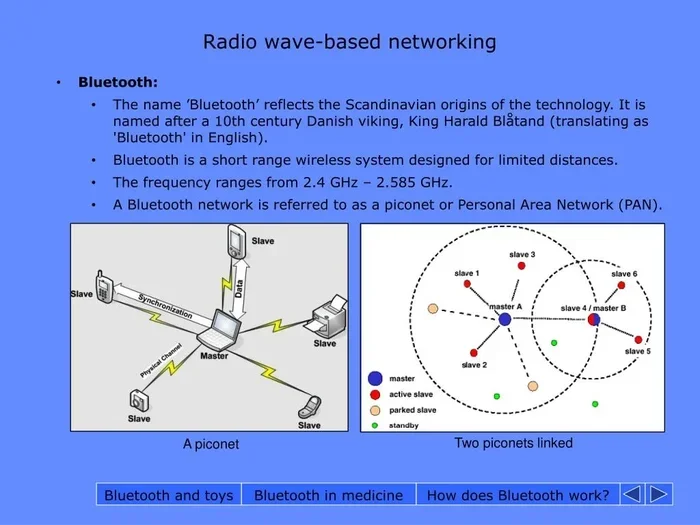
Bluetooth uses radio waves in the 2.4 GHz range. That means the frequency is 2.4 billion cycles per second. This is a microwave frequency. It is the same band your Wi-Fi router uses. It is also the same band that microwave ovens operate on. This shared space creates both opportunities and challenges. More on that later.
Why Does Frequency Matter for Bluetooth?
The frequency your Bluetooth device uses directly impacts three things. Range, speed, and interference resistance. Lower frequencies generally travel farther. They also penetrate walls and obstacles better. But they carry less data. Higher frequencies deliver faster speeds. However, they have shorter range and struggle with obstacles.
Bluetooth wavelength frequency sits in a sweet spot. It balances decent range with good data speeds. This makes it perfect for personal audio devices, peripherals, and IoT gadgets. You do not need satellite-level range. You just need reliable connectivity across a room. And that is exactly what Bluetooth delivers.
The Relationship Between Wavelength and Frequency
Here is a fun fact. Wavelength and frequency are inversely related. When frequency goes up, wavelength goes down. The formula is simple: wavelength equals the speed of light divided by frequency. For Bluetooth, this works out to about 12.5 centimeters. That is roughly the length of a banana. Pretty small, right?
This short wavelength is actually useful. It means Bluetooth antennas can be tiny. Your earbuds, your keyboard, and your smartwatch all have small antennas because the wavelength is short. This miniaturization is a huge reason Bluetooth devices are so portable and convenient.
How Bluetooth Frequency Works: The Science Behind the Connection
Now let us dig deeper into how Bluetooth wavelength frequency actually enables wireless communication. The process is fascinating and more clever than you might think.
Frequency Hopping Spread Spectrum
One of the coolest features of Bluetooth technology is something called frequency hopping spread spectrum, or FHSS. Here is how it works. The Bluetooth signal constantly jumps between different channels within the 2.4 GHz band. It switches channels 1,600 times every single second.
Why does it do this? To avoid interference. If one channel gets crowded or noisy, the signal simply hops to the next one. This makes Bluetooth connections remarkably resilient. Even in busy environments full of wireless devices, your connection stays stable most of the time.
Think of it like a game of musical chairs. There are 79 available channels. The Bluetooth signal moves to a new channel 1,600 times per second. It is almost impossible for two devices to collide on the same channel for long. This clever trick is a big reason Bluetooth has become so reliable over the years.
The Role of Radio Waves in Bluetooth Connectivity
Bluetooth devices communicate using radio waves. These are a type of electromagnetic radiation. They are all around us all the time. Light is a form of electromagnetic radiation. So is your Wi-Fi signal. So is the signal from your baby monitor.
What makes Bluetooth radio waves special is their frequency and power level. Bluetooth devices transmit at very low power. Class 1 devices can reach up to 100 milliwatts. Class 2 devices, which are the most common, transmit at about 2.5 milliwatts. Class 3 devices go even lower. This low power is intentional. It keeps energy consumption down and limits interference with other devices.
How Data Travels Through Bluetooth Frequency
When you hit play on your Bluetooth headphones, here is what happens. Your phone converts the audio file into digital data. It then modulates this data onto a Bluetooth wavelength frequency carrier wave. The carrier wave travels through the air to your headphones. The headphones demodulate the signal and convert it back into audio.
This whole process happens in milliseconds. You never notice it. But the engineering behind it is impressive. Modern Bluetooth codecs like aptX and LDAC compress and encode audio in clever ways. They maximize sound quality while staying within the frequency constraints. This is why you can enjoy high-resolution wireless audio without any wires.
Bluetooth Versions and Their Frequency Characteristics
Bluetooth has evolved a lot over the years. Each new version brought improvements to how devices use the wireless frequency. Let us walk through the major versions and what they mean for your experience.
Bluetooth 4.0 and Bluetooth Low Energy
Bluetooth 4.0 introduced a game-changing feature called Bluetooth Low Energy, or BLE. BLE operates on the same Bluetooth wavelength frequency as classic Bluetooth. But it uses the frequency much more efficiently. It sends small bursts of data and then goes to sleep. This dramatically reduces power consumption.
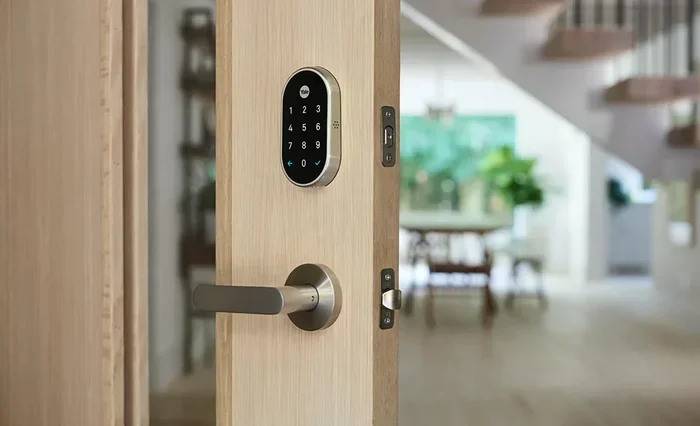
BLE is perfect for fitness trackers, smart locks, and health sensors. These devices need to run for months or even years on a tiny battery. BLE makes that possible. It does this by staying quiet most of the time and only waking up to send small packets of data.
Bluetooth 5.0: A Major Leap Forward
Bluetooth 5.0 was a huge upgrade. It doubled the data rate to 2 megabits per second. It also quadrupled the effective range. Some Bluetooth 5.0 devices can reach up to 240 meters in open space. That is about 800 feet.
Bluetooth wavelength frequency did not change. It still operates in the 2.4 GHz band. But the way devices use that frequency became much smarter. Bluetooth 5.0 introduced better error correction and more efficient frequency hopping. This means fewer dropped connections and faster data transfers.
Bluetooth 5.3 and Beyond
Bluetooth 5.3 brought further refinements. It improved connection stability and reduced power consumption even more. The Channel Sounding feature in newer versions promises even better range and location accuracy. These advances all build on the same foundational frequency band.
As Bluetooth continues to evolve, the core Bluetooth wavelength frequency remains the same. The 2.4 GHz band is universal and unlicensed. This is a deliberate design choice. It ensures that every Bluetooth device, from any manufacturer, can work together seamlessly. Compatibility is built into the very foundation of the technology.
| Bluetooth Version | Max Range | Max Data Rate | Key Feature |
|---|---|---|---|
| Bluetooth 4.0 | 60 meters | 1 Mbps | Bluetooth Low Energy |
| Bluetooth 5.0 | 240 meters | 2 Mbps | Double speed, quadruple range |
| Bluetooth 5.3 | 240 meters | 2 Mbps | Improved stability and power efficiency |
Bluetooth Range and Signal Strength
One of the most common questions about Bluetooth wavelength frequency is about range. How far can your Bluetooth signal actually travel? The answer depends on several factors.
Understanding Bluetooth Classes
Bluetooth devices are classified by their transmit power. Class 1 devices have the longest range. They are often used in industrial and commercial settings. Class 2 devices are the standard for consumer products like phones and headphones. Class 3 devices have the shortest range and lowest power.
Most of the devices you own are Class 2. They work well within a 10-meter range. That is about 33 feet. This is more than enough for most home and office use. You can walk around your living room with wireless earbuds and rarely lose connection.
What Affects Bluetooth Signal Strength?
Several things can weaken your Bluetooth signal. Physical obstacles like walls and furniture absorb and reflect radio waves. Other wireless devices operating on the same 2.4 GHz band create interference. Even your microwave oven can disrupt a Bluetooth connection when it is running.
Distance also matters. The further you are from the source device, the weaker the signal becomes. This is because the radio waves spread out as they travel. By the time they reach your device, there is less energy to decode the signal.
Bluetooth wavelength frequency plays a role here too. The 2.4 GHz band has a relatively short wavelength. Short wavelengths do not penetrate solid objects as well as longer wavelengths. This is why Bluetooth range decreases when there are walls between devices.
How to Extend Bluetooth Range
Want better Bluetooth range? There are practical steps you can take. First, reduce physical barriers between devices. Keep your phone and speaker in the same room if possible. Second, minimize interference from other wireless devices. Move your Bluetooth speaker away from your Wi-Fi router.
Third, consider a Bluetooth range extender. These devices amplify the signal and rebroadcast it. They can double or even triple your effective range. Fourth, keep your devices updated. Firmware updates often include improvements to Bluetooth signal processing and frequency management.
Common Bluetooth Interference Issues
Interference is the number one enemy of Bluetooth wavelength frequency performance. Understanding what causes it helps you avoid it.
Devices That Cause Bluetooth Interference
Many household devices operate in the 2.4 GHz band. Wi-Fi routers are the biggest culprits. Cordless phones, baby monitors, and smart home hubs also use this frequency. Even some USB 3.0 ports can generate electromagnetic interference that disrupts Bluetooth signals.
Microwave ovens are surprisingly disruptive. They heat food by generating microwave radiation at 2.4 GHz. When your microwave is running, it can temporarily drown out Bluetooth signals in your home. This is why your wireless headphones might glitch when you heat up leftovers.
How to Reduce Bluetooth Interference
You can take several steps to minimize interference. Keep Bluetooth devices away from Wi-Fi routers. If possible, use the 5 GHz Wi-Fi band instead of 2.4 GHz. This frees up space on the 2.4 GHz band for your Bluetooth devices.
Also, avoid clustering too many Bluetooth devices in one area. Each device adds to the congestion on the frequency band. Spread your devices out when you can. And keep your Bluetooth firmware and drivers up to date. Manufacturers constantly improve how their devices handle crowded frequency environments.
Why Your Bluetooth Keeps Cutting Out
If your Bluetooth connection drops frequently, interference is often the cause. But it is not the only reason. Low battery levels can weaken Bluetooth signal strength. Outdated drivers or firmware can cause compatibility issues. Sometimes the problem is simply too much distance between devices.
Try these quick fixes first. Turn Bluetooth off and back on. Restart both devices. Move closer to the source device. If none of that works, check for firmware updates. A simple update can often resolve stubborn connection problems.
Tips to Improve Your Bluetooth Performance
Want to get the most out of your Bluetooth devices? Here are some practical tips that really work.
Keep Your Devices Close
The simplest way to improve Bluetooth performance is to keep devices within a few feet of each other. Bluetooth wavelength frequency signals weaken with distance. The closer your devices are, the stronger and more stable the connection will be.
Update Your Firmware and Drivers
Manufacturers regularly release updates that improve Bluetooth performance. These updates can fix bugs, improve frequency management, and enhance compatibility. Make it a habit to check for updates on your phone, laptop, and Bluetooth peripherals.
Reduce Wireless Congestion
If you have many wireless devices in your home, they are all competing for space on the 2.4 GHz band. Turn off devices you are not using. Switch your Wi-Fi to the 5 GHz band when possible. These small changes can make a big difference in Bluetooth performance.
Use Quality Bluetooth Devices
Not all Bluetooth devices are created equal. Premium devices often have better antennas and more sophisticated frequency management. They handle interference better and maintain stronger connections. When buying new Bluetooth gear, look for devices that support the latest Bluetooth versions. They will give you the best performance.
Restart Before You Troubleshoot
It sounds simple, but turning devices off and back on fixes more Bluetooth problems than you might think. A fresh restart clears temporary glitches and refreshes the Bluetooth connection. Make this your first step whenever something goes wrong.
The Future of Bluetooth Frequency Technology
Bluetooth wavelength frequency technology is not standing still. The Bluetooth Special Interest Group continues to innovate. Future versions promise even better performance, longer range, and smarter frequency management.
One exciting development is Bluetooth LE Audio. This new standard brings improved audio quality and lower power consumption. It also introduces Auracast broadcasting, which allows one device to stream audio to multiple receivers simultaneously. This could change how you experience audio in public spaces like gyms, airports, and museums.
Another area of development is higher frequency bands. While current Bluetooth operates in the 2.4 GHz range, future versions may explore the 6 GHz band. This would open up more channels and reduce congestion. It would also enable faster data transfer rates for bandwidth-heavy applications like streaming high-resolution audio.
The fundamental Bluetooth wavelength frequency principles will remain the same. Frequency hopping, low-power transmission, and universal compatibility are core to what makes Bluetooth so successful. As the technology evolves, these principles will continue to guide its development.
Bluetooth wavelength frequency is more than just a technical specification. It is the foundation of the wireless experience you enjoy every day. From your morning podcast to your evening video calls, Bluetooth frequency makes it all possible. Understanding this technology helps you use it better. It helps you troubleshoot problems faster. And it helps you make smarter buying decisions.
The next time your wireless earbuds connect seamlessly, remember the invisible waves that make it happen. Bluetooth wavelength frequency is working hard behind the scenes. And now you know exactly how it all works.
Frequently Asked Questions
What is Bluetooth wavelength frequency?
Bluetooth wavelength frequency refers to the radio frequency that Bluetooth devices use to communicate wirelessly. It operates in the 2.4 GHz ISM band. This frequency allows Bluetooth devices to send and receive data through the air without any physical connection.
Does Bluetooth wavelength frequency affect audio quality?
Yes, it can. The 2.4 GHz frequency band has a limited data capacity compared to wired connections. However, modern Bluetooth codecs like aptX and LDAC compress audio efficiently. This allows high-quality wireless audio transmission over Bluetooth wavelength frequency without noticeable loss in sound quality.
How far can Bluetooth signals travel?
The range depends on the Bluetooth class and version. Class 2 devices, which are the most common, work well within 10 meters. Bluetooth 5.0 and newer can reach up to 240 meters in open space. Physical obstacles and interference from other devices can reduce this range significantly.
Can other devices interfere with Bluetooth frequency?
Absolutely. Wi-Fi routers, microwave ovens, cordless phones, and even USB 3.0 ports can interfere with Bluetooth wavelength frequency. This happens because many of these devices also operate in the 2.4 GHz band. Reducing wireless congestion can help minimize interference.
Is Bluetooth wavelength frequency safe for health?
Yes. Bluetooth devices transmit at very low power levels, typically between 1 and 100 milliwatts. These levels are far below what health organizations consider a concern. Bluetooth has been extensively studied and is considered safe for everyday use by all major health authorities.
Will future Bluetooth versions use a different frequency?
Current Bluetooth versions still use the 2.4 GHz band. However, future versions may explore the 6 GHz frequency band. This would provide more channels and less congestion. Even with new frequency options, the core principles of Bluetooth wavelength frequency will remain consistent.
=== CONCLUSION ===
Bluetooth wavelength frequency is the invisible force that powers your wireless world. From the moment you pair your headphones to the moment you finish a hands-free call, this technology works silently in the background. Understanding how it works gives you a real advantage. You can troubleshoot problems faster. You can optimize your setup for better performance. And you can make more informed decisions when buying new devices.
The 2.4 GHz band may seem crowded and chaotic. But Bluetooth has built clever systems on top of it. Frequency hopping, low-energy protocols, and continuous version upgrades keep everything running smoothly. As Bluetooth continues to evolve, you can expect even better performance and more exciting features.
Take what you have learned from this guide and apply it today. Move your router away from your Bluetooth speaker. Update your device firmware. Keep your devices charged. These small steps can make a big difference in your wireless experience. Bluetooth wavelength frequency is a fascinating topic, and now you are equipped with the knowledge to get the most out of it.