Can I Pair Two Marshall Speakers for Better Stereo Sound
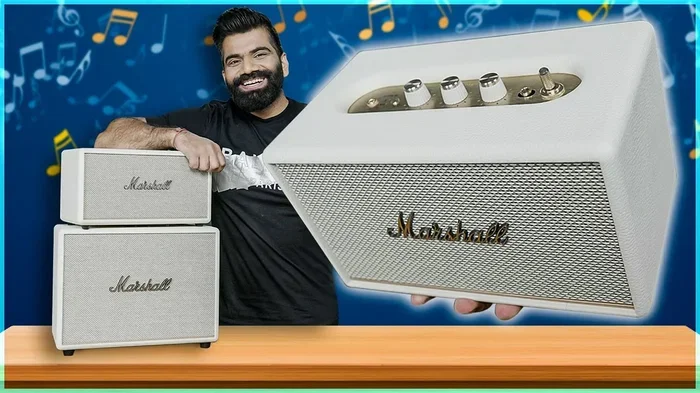
Yes, you can pair two Marshall speakers to create a richer stereo sound experience. Many Marshall Bluetooth speakers support stereo pairing through their dedicated app or built-in mode, letting you split left and right channels across two units. Whether you own the Marshall Emberton, Stockwell, or Woburn, stereo pairing can transform your listening sessions at home or outdoors.
You love your Marshall speaker. The sound is rich, the design is iconic, and it looks amazing on your desk or by the pool. But sometimes, one speaker just isn’t enough. You want that full, room-filling stereo experience that makes music feel alive. So you start asking yourself, can I pair two Marshall speakers?
The short answer is yes. In many cases, you absolutely can pair two Marshall speakers together for a better stereo sound. But the process depends on your specific model, the Marshall app, and a few other factors you need to know about. This guide walks you through everything step by step.
Whether you are at home, camping in the backyard, or hosting a small gathering, stereo pairing two Marshall speakers changes the game. You get a wider soundstage, more balanced audio, and a listening experience that a single speaker simply cannot match. Let’s dive into how it all works.
Key Takeaways
- Stereo pairing works on select Marshall speakers: Not every model supports it, so check compatibility first.
- The Marshall Bluetooth App is your best friend: It simplifies pairing and gives you control over settings.
- Two speakers sound dramatically better than one: You get wider soundstage, deeper bass, and more immersive audio.
- Pairing is simple but has specific steps: Follow the exact process for your model to avoid frustration.
- Common issues are usually easy to fix: Distance, firmware, and placement all matter.
- Marshall’s Party Boost offers another option: It lets you connect multiple speakers in a different way.
- Placement affects stereo quality: Position your speakers correctly for the best left-right balance.
📑 Table of Contents
- What Is Stereo Pairing and Why Does It Matter?
- Which Marshall Speakers Support Stereo Pairing?
- How to Pair Two Marshall Speakers Together
- Marshall Stereo Pairing vs. Other Speaker Brands
- Common Problems When Pairing Marshall Speakers
- Tips to Get the Best Stereo Sound from Two Marshall Speakers
- Frequently Asked Questions
- Final Thoughts
What Is Stereo Pairing and Why Does It Matter?
Stereo pairing means connecting two speakers so one handles the left audio channel and the other handles the right channel. This creates a sense of space and direction in the music. Instead of sound coming from one point, it spreads out across the room. The result is a more natural, immersive listening experience.
Single speakers play all audio through one unit. They use internal tricks to simulate stereo, but it never truly feels the same. When you pair two Marshall speakers, each speaker focuses on its dedicated channel. This gives you real stereo separation. You can hear instruments coming from the left, vocals centered, and drums pulling to the right.
For Marshall fans, stereo pairing unlocks the full potential of the brand’s signature sound. Marshall is known for its powerful bass, warm mids, and crisp highs. When you split that across two speakers, the effect is even more impressive. The bass hits harder, the mids stay clear, and the highs sparkle without sounding harsh.
Not every Bluetooth speaker supports stereo pairing. It requires specific hardware and software support. Marshall has built this feature into several of its popular portable models, making it easy for users to expand their setup without buying expensive audio equipment.
Which Marshall Speakers Support Stereo Pairing?
Before you try to pair two units, you need to know if your speaker supports it. Marshall has a solid lineup, and stereo compatibility varies from model to model. Here is a breakdown of the most popular Marshall speakers and their pairing capabilities.
Marshall Emberton and Emberton II
The Marshall Emberton and Emberton II are among the most popular portable speakers Marshall makes. Both models support stereo pairing through the Marshall Bluetooth App. The Emberton II adds improved battery life and a slightly refined driver design, but the stereo pairing process remains the same. These speakers are compact and waterproof, making them perfect for outdoor use.
Marshall Stockwell and Stockwell II
The Marshall Stockwell and Stockwell II are mid-size speakers with a classic Marshall look. They also support stereo pairing. The Stockwell II brings a USB-C charging port and a few extra EQ presets. Both models deliver strong performance and pair reliably when you follow the correct steps.
Marshall Woburn and Woburn II
The Marshall Woburn series is the larger, more powerful option. These speakers are designed for bigger rooms and deliver deeper bass. The Woburn II features a rechargeable battery and multi-device connectivity. Stereo pairing works well with these models, and the larger drivers make the stereo effect even more noticeable.
Marshall Mode and Mode II
The Marshall Mode is a more affordable option that still delivers great sound. It supports basic stereo pairing features. While it may not have all the bells and whistles of the Emberton or Woburn, it still benefits from dual-speaker setups for a wider soundstage.
Here is a quick comparison of Marshall speakers and their stereo pairing support.
| Speaker Model | Stereo Pairing | App Required | Battery Life |
|---|---|---|---|
| Marshall Emberton II | Yes | Yes | Up to 30 hours |
| Marshall Stockwell II | Yes | Yes | Up to 20 hours |
| Marshall Woburn II | Yes | Yes | Up to 40 hours |
| Marshall Mode II | Yes | Yes | Up to 18 hours |
| Marshall Emberton | Yes | Yes | Up to 20 hours |
| Marshall Stockwell | Yes | Yes | Up to 15 hours |
Always check the latest specs on Marshall’s official website. Firmware updates can sometimes add or change stereo pairing features on older models.
How to Pair Two Marshall Speakers Together
The pairing process is straightforward once you know the steps. Marshall uses its Marshall Bluetooth App as the primary tool for stereo pairing. You can also use the speaker’s built-in controls on some models. Here is how to do it.
Step 1: Download the Marshall Bluetooth App
Go to the App Store on iPhone or Google Play Store on Android. Search for Marshall Bluetooth and download the free app. Make sure your phone or tablet is connected to Wi-Fi before you start. The app is essential for managing paired speakers and adjusting settings.
Step 2: Power On Both Speakers
Turn on both Marshall speakers. Place them close together for the initial pairing process. Make sure both speakers have enough charge. A low battery can cause connection issues during pairing.
Step 3: Open the App and Select Your Speaker
Open the Marshall Bluetooth App on your phone. The app will scan for nearby Marshall speakers. Tap on the first speaker to connect. Once connected, look for the stereo pairing option in the app menu.
Step 4: Initiate Stereo Pairing Mode
In the app, select the option to add a second speaker. The app will guide you through the process. You may need to press and hold the Bluetooth button on the second speaker. The LED indicator will blink to show it is ready to pair.
Step 5: Confirm the Pairing
Once both speakers connect, the app will display a confirmation. You should see one speaker labeled as the left channel and the other as the right channel. Play some music and test the stereo effect. If the sound feels balanced, you are all set.
Quick Tips for a Smooth Pairing Process
- Keep both speakers within 3 feet of each other during the initial pairing.
- Update the firmware on both speakers before pairing.
- Turn off other Bluetooth devices nearby to avoid interference.
- Restart your phone if the app does not detect the speakers.
- Reset both speakers if pairing fails repeatedly.
Following these steps ensures a clean, reliable connection between your two Marshall speakers. The process takes about 3 to 5 minutes once you have the app installed.
Marshall Stereo Pairing vs. Other Speaker Brands
Marshall is not the only brand that offers stereo pairing. Several other Bluetooth speaker companies provide similar features. Let us compare Marshall’s approach with a few popular alternatives.
Marshall vs. JBL
JBL offers a feature called PartyBoost that lets you connect multiple JBL speakers. However, PartyBoost is more about creating a single shared audio source rather than true left-right stereo separation. Marshall’s stereo pairing gives you actual channel separation, which audiophiles prefer.
Marshall vs. Sony
Sony speakers like the SRS-XB43 support Party Connect. Similar to JBL, this links speakers for a louder combined output. Sony also offers true stereo pairing on select models through its Sony Music Center app. Marshall’s approach is simpler and more intuitive for most users.
Marshall vs. Bose
Bose uses Bose SimpleSync to pair speakers. Bose speakers are known for their balanced, smooth sound. Marshall speakers lean toward a warmer, bass-forward profile. When you pair two Marshall speakers, the stereo effect emphasizes that signature warmth across a wider space.
Marshall vs. Ultimate Ears
Ultimate Ears offers UE MegaBlast and PartyUp features. These focus on volume and multi-room audio. Marshall stereo pairing focuses more on sound quality and stereo imaging. For pure music listening, many users find Marshall’s approach more satisfying.
The table below summarizes how Marshall compares with other major brands.
| Brand | Pairing Feature | True Stereo | App Required | Multi-Speaker Support |
|---|---|---|---|---|
| Marshall | Stereo Pairing | Yes | Yes | 2 speakers |
| JBL | PartyBoost | No | Yes | Up to 100 speakers |
| Sony | Party Connect / Stereo | Yes (select models) | Yes | Up to 4 speakers |
| Bose | SimpleSync | Limited | Yes | 2 speakers |
| Ultimate Ears | PartyUp | No | Yes | Up to 8 speakers |
Marshall stands out for its balance of simplicity and true stereo separation. You do not need advanced tech skills to pair two Marshall speakers. The app walks you through everything, and the result sounds fantastic.
Common Problems When Pairing Marshall Speakers
Stereo pairing is not always smooth sailing. Even with clear instructions, things can go wrong. Here are the most common issues and how to fix them.
Speakers Will Not Connect
If the second speaker refuses to pair, try resetting both units. On most Marshall speakers, you hold the Bluetooth and volume down buttons simultaneously for 10 seconds. This clears the Bluetooth memory and lets you start fresh.
Sound Is Unbalanced
Sometimes one speaker sounds louder than the other. This usually happens when the speakers are placed unevenly. Move both speakers to the same surface and ensure they are the same distance from your listening position. Check the app to confirm the left and right channel assignment.
Connection Drops Frequently
Bluetooth interference from Wi-Fi routers, microwaves, or other devices can cause dropouts. Move the speakers closer together and away from other electronics. If the problem persists, update the firmware through the Marshall app.
One Speaker Will Not Turn On
A dead battery or a faulty charging cable can prevent a speaker from powering on. Charge both speakers fully before attempting to pair. Try a different USB cable if the charging port seems loose.
App Does Not Detect Speakers
Make sure Bluetooth is turned on and your phone is not connected to another speaker. Restart the app and your phone. If the issue continues, uninstall and reinstall the Marshall Bluetooth App.
Most pairing problems have simple solutions. Patience and a systematic approach will get you through almost any issue.
Tips to Get the Best Stereo Sound from Two Marshall Speakers
Pairing is only half the battle. How you set up and position your speakers matters just as much for sound quality. Follow these tips to get the most out of your stereo pair.
Place Speakers at Ear Level
Set both speakers on a table or shelf at roughly ear height. This creates the most natural stereo image. Placing speakers on the floor or too high can distort the soundstage and make the stereo effect less noticeable.
Keep Speakers About 6 to 10 Feet Apart
Too close together and the stereo effect disappears. Too far apart and the sound becomes disconnected. A spacing of 6 to 10 feet works well for most rooms and outdoor settings. Experiment with different distances to find your sweet spot.
Angle the Speakers Toward the Listening Area
Point both speakers toward where you usually sit or stand. A slight inward angle helps blend the left and right channels. This creates a more cohesive stereo image in the center of the room.
Use the Marshall App EQ Settings
The Marshall Bluetooth App includes equalizer presets. Try the Live or Club presets for a more energetic sound. For a balanced listen, the Flat preset works well. Adjusting the EQ can compensate for room acoustics and speaker placement.
Keep Both Speakers on the Same Surface
Placing speakers on different surfaces can cause vibrations that interfere with sound quality. Use a flat, stable table or shelf. Avoid placing speakers on uneven or resonant surfaces like hollow wood panels.
Update Firmware Regularly
Marshall releases firmware updates that improve Bluetooth stability and audio performance. Open the Marshall app occasionally and check for updates. Keeping both speakers updated ensures the best possible pairing experience.
Use the Same Model for Best Results
While you can pair different Marshall models, using two identical speakers gives the most balanced sound. Different models may have slightly different driver sizes and frequency responses. Matching models ensures both speakers deliver the same audio profile.
Avoid Obstacles Between the Speakers
Walls, furniture, and large objects between the speakers can weaken the Bluetooth signal and muddy the stereo effect. Keep the path between the two speakers clear for the strongest connection and cleanest sound.
These tips might seem small, but they make a big difference. A well-set-up stereo pair of Marshall speakers sounds genuinely impressive. You will notice details in your music that a single speaker simply cannot reveal.
Frequently Asked Questions
Can I pair two different Marshall speaker models together?
Yes, in most cases you can pair different Marshall models using the Marshall Bluetooth App. However, for the best stereo balance, using two identical speakers is recommended. Different models may have varying driver sizes and sound signatures that can create an uneven stereo image.
Does stereo pairing drain the battery faster?
Yes, running two speakers simultaneously uses more power than a single speaker. Your battery life will roughly halve when stereo pairing is active. The Marshall Emberton II, for example, offers up to 30 hours on a single unit but closer to 15 hours when paired with another speaker.
Can I pair more than two Marshall speakers?
Marshall’s stereo pairing feature is designed for two speakers only. If you want to connect more speakers, look into Marshall’s Party Boost feature or consider using additional speakers through other connectivity methods. True stereo pairing remains a two-speaker setup.
Do I need the Marshall app to pair two speakers?
Yes, the Marshall Bluetooth App is required for stereo pairing on most models. The app handles the channel assignment and connection management. Without the app, you can still connect two speakers via Bluetooth, but you will not get true stereo separation.
What is the difference between stereo pairing and Party Boost?
Stereo pairing splits left and right audio channels between two speakers for a wider soundstage. Party Boost combines multiple speakers into a single loud output without channel separation. They serve different purposes, and Marshall speakers may support one or both features depending on the model.
Can I use one speaker while the other is charging?
Yes, you can use one Marshall speaker while the other charges. The stereo pair connection will remain active as long as both speakers are powered on. Just make sure the charging speaker stays connected to Bluetooth and does not enter sleep mode during charging.
Final Thoughts
So, can I pair two Marshall speakers? Absolutely. Stereo pairing is one of the best ways to unlock the full potential of your Marshall audio setup. Whether you own the Emberton, Stockwell, Woburn, or Mode, the process is straightforward and the results are worth the effort.
Pairing two Marshall speakers gives you a wider soundstage, better stereo separation, and a more immersive listening experience. It transforms your music from background noise into something you can truly feel. The bass hits with more authority, the vocals sit perfectly in the center, and every instrument has its own space in the mix.
Follow the steps in this guide, use the Marshall Bluetooth App, and position your speakers correctly. You will be enjoying rich, full stereo sound in minutes. The investment of a second Marshall speaker pays off in a big way for anyone who loves music and values sound quality.
Grab your second Marshall speaker, fire up the app, and experience your favorite tracks the way they were meant to sound. Stereo pairing is simple, it is effective, and it is one of the easiest upgrades you can make to your portable audio setup.