How Do I Charge My 2boom Bluetooth Speaker Properly
Charging your 2boom Bluetooth speaker correctly keeps the battery healthy and ensures long-lasting performance. This guide walks you through everything from choosing the right cable to troubleshooting common charging problems. You will learn simple steps, expert tips, and mistakes to avoid so your speaker stays ready to go.
Key Takeaways
- Use the right cable: Always use the USB cable and adapter that came with your 2boom speaker for safe charging.
- Watch the LED light: The charging indicator tells you when your speaker is fully powered and ready to use.
- Avoid overcharging: Unplug your speaker once it reaches full charge to protect battery health.
- Charge in a cool, dry place: Heat and moisture can damage the battery and reduce its lifespan.
- Troubleshoot fast: If your speaker won’t charge, try a different cable, clean the port, or reset the device.
📑 Table of Contents
- How Do I Charge My 2boom Bluetooth Speaker
- What You Need to Charge Your 2boom Bluetooth Speaker
- Step-by-Step Charging Instructions
- How Long Does It Take to Charge a 2boom Bluetooth Speaker
- Common Charging Mistakes to Avoid
- Tips to Extend Your 2boom Speaker Battery Life
- Troubleshooting Charging Issues
- Expert Insights on Bluetooth Speaker Battery Care
- When to Replace Your 2boom Speaker Battery
- Frequently Asked Questions
- Conclusion
How Do I Charge My 2boom Bluetooth Speaker
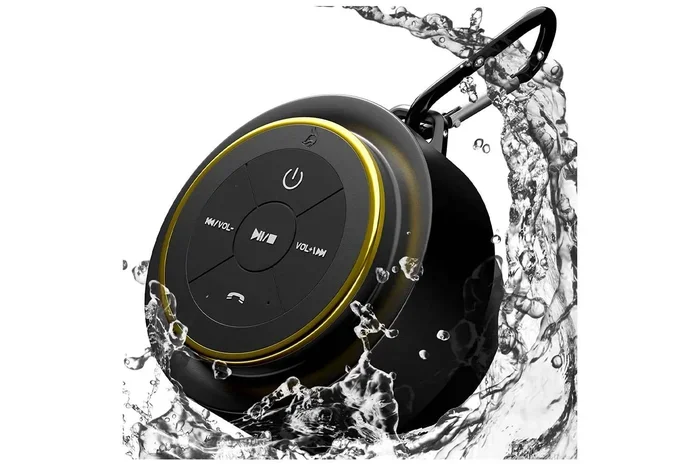
Your 2boom Bluetooth speaker is built to deliver great sound wherever you go. But like any portable device, it needs regular charging to keep working. Whether you just bought your first 2boom speaker or you have been using one for a while, understanding how to charge it properly makes a big difference. This guide will walk you through every step of the process.
Charging seems simple on the surface. You plug in a cable, wait a while, and you are good to go. But there is more to it than that. The way you charge your speaker affects how long the battery lasts, how well it performs, and how many charging cycles it can handle over time. Taking a few extra minutes to charge correctly can add years to your device’s life.
In this article, we will cover everything you need to know. From the tools you need to the step-by-step charging process, common mistakes, and tips to extend battery life. By the end, you will feel confident about keeping your portable Bluetooth speaker powered up and ready for any occasion.
What You Need to Charge Your 2boom Bluetooth Speaker
Before you start, make sure you have the right tools. Having the correct equipment prevents damage and ensures a safe charging experience. Here is what you will need.
The Right USB Cable
Most 2boom speakers come with a micro USB cable or a USB-C cable, depending on the model. This is the cable you should use every time. While other USB cables might fit, using the original one ensures the correct voltage and current reach your speaker. A cheap or damaged cable can slow down charging or even harm the battery.
If you lost your original cable, look for a high-quality replacement that matches the connector type. Avoid using frayed or bent cables. A worn-out cable can cause intermittent charging, which means your speaker might charge slowly or stop altogether.
A Wall Adapter or Power Source
You need a power source to plug the USB cable into. A standard wall adapter works great. Your phone charger is a good option as long as it outputs 5 volts. You can also plug the cable into a computer or laptop USB port. Some users prefer to charge their devices through a USB port on a wall outlet because it is convenient and reliable.
Optional: A Car Charger or Power Bank
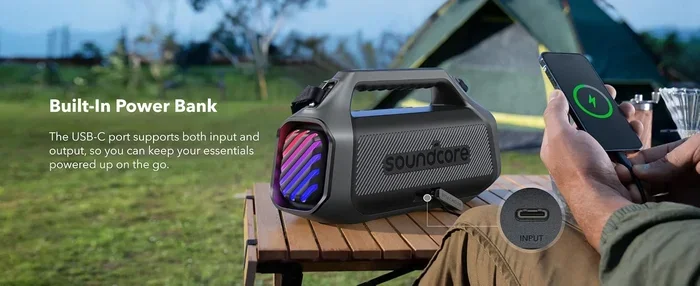
If you are on the road, a car charger lets you top up your speaker while driving. You can also use a power bank for outdoor trips where wall outlets are not available. Many people already carry power banks to power their laptops and other devices, and they work just as well for Bluetooth speakers.
Step-by-Step Charging Instructions
Now that you have everything ready, let us walk through the charging process. These steps apply to most 2boom Bluetooth speaker models.
- Locate the charging port. It is usually on the bottom or back of the speaker. Some models have a small rubber flap covering the port. Gently open it if your speaker has one.
- Plug the USB cable into the speaker. Make sure the connector fits snugly. Do not force it. If it does not fit easily, check that you are using the correct cable type.
- Connect the other end to your power source. This could be a wall adapter, a computer, or a power bank.
- Look for the LED indicator light. Most 2boom speakers have a light that turns on when charging starts. The color or blinking pattern tells you the charging status.
- Wait for the speaker to fully charge. This usually takes a few hours. We will cover exact times in the next section.
- Unplug the speaker once it is done. Do not leave it connected longer than needed. A full battery should last several hours of playtime.
That is all there is to it. The process is straightforward, but following these steps every time helps protect your battery. Consistent charging habits are one of the best ways to keep your speaker performing well over the long term.
How Long Does It Take to Charge a 2boom Bluetooth Speaker
Charging time depends on the model and battery size. Most 2boom speakers take between two and four hours to reach a full charge from empty. Smaller models with less battery capacity may charge faster, while larger speakers with bigger batteries take a bit longer.
Factors That Affect Charging Speed
Several things can change how fast your speaker charges. Here are the most common factors.
- Cable quality: A high-quality cable delivers power efficiently. A damaged or low-grade cable slows things down.
- Power source: A wall adapter usually charges faster than a computer USB port because it provides more power output.
- Battery level: Charging from empty takes longer than topping up from 20 percent.
- Temperature: Cold or hot environments can slow down the charging process. Room temperature is ideal.
- Using the speaker while charging: Playing music while it charges slows the process because power goes to both functions.
How to Check If Your Speaker Is Fully Charged
Most 2boom speakers use an LED light to show charging status. When the light turns solid or stops blinking, your speaker is fully charged. Some models may change color to indicate a full battery. Check your user manual if you are unsure about what the lights mean on your specific model.
Common Charging Mistakes to Avoid
Even though charging seems simple, many people make mistakes that shorten their speaker’s battery life. Here are the most common ones and how to avoid them.
Overcharging Your Speaker
Leaving your speaker plugged in for hours after it reaches full charge puts extra stress on the battery. While most modern devices have overcharge protection, it is still a good habit to unplug once the light shows a full charge. Think of it like charging your phone overnight. You might do it once in a while, but making it a habit can wear down the battery over time.
Using the Wrong Cable
Not all USB cables are the same. Some cables only transfer data and do not carry enough power to charge a speaker. Using a cable that is not designed for charging can result in very slow charging or no charging at all. Always use the cable that came with your speaker or a certified replacement.
Charging in Extreme Temperatures
Heat is the enemy of lithium-ion batteries. Charging your speaker in direct sunlight or near a heat source can cause the battery to degrade faster. Cold temperatures can also reduce charging efficiency. The best practice is to charge your speaker indoors at room temperature. If you are on a hot beach, wait until you are in the shade or inside before plugging in.
Ignoring a Dirty Charging Port
Dust, lint, and debris can build up in the charging port over time. This can prevent the cable from making proper contact, leading to slow or interrupted charging. Periodically check the port and gently clean it with a dry toothbrush or compressed air. A clean port ensures a steady and reliable connection.
Quick Tips for Better Charging
- Always unplug your speaker once it reaches 100 percent.
- Use the original cable or a certified high-quality replacement.
- Charge in a cool, dry place away from direct sunlight.
- Clean the charging port every few weeks to prevent buildup.
- Do not use your speaker while it is charging for the fastest results.
Tips to Extend Your 2boom Speaker Battery Life
Want your speaker to last for years? Taking care of the battery is the key. Here are some practical tips to keep your battery healthy and strong.
Charge Before the Battery Dies Completely
Lithium-ion batteries do not like being drained all the way to zero. Try to charge your speaker when it drops to around 20 percent. Letting it run completely empty too often can reduce its overall capacity over time. Think of it like fueling a car before the tank hits empty.
Store It Properly When Not in Use
If you are not going to use your speaker for a while, charge it to about 50 percent before storing it. Keep it in a cool, dry place. Storing a fully charged or fully dead speaker for a long period can damage the battery. A half-charged state is the sweet spot for storage.
Update Firmware When Available
Some 2boom speakers receive firmware updates that improve power management and battery efficiency. Check the manufacturer’s website or app for updates. Keeping your firmware current can help your speaker run more efficiently and last longer on a single charge.
Handle the Charging Port With Care
Do not force the cable into the port. A loose or wobbly connection can damage the internal contacts over time. If the port feels loose or the cable keeps falling out, it might be time to replace the speaker or have the port repaired.
Troubleshooting Charging Issues
Sometimes things go wrong. Your speaker might not charge even when you plug it in. Here are the most common problems and how to fix them.
Speaker Won’t Charge at All
Start by trying a different USB cable. A faulty cable is the most common cause of charging problems. If the new cable works, your old one was the issue. If the speaker still does not charge, try a different power source. Plug the cable into a different wall adapter or a computer USB port to rule out a bad outlet.
Speaker Charges Slowly
Slow charging usually points to a weak power source or a damaged cable. Make sure you are using a proper wall adapter and not a computer port, which often provides lower power output. Also check the cable for visible damage like fraying or bent connectors.
Charging Light Does Not Turn On
If the LED light does not come on when you plug in your speaker, the battery might be completely drained. Let it charge for at least 30 minutes without interruption. Sometimes deeply drained batteries need a longer period before the charging light activates. If the light still does not appear after an hour, the battery or charging port may need professional attention.
Speaker Resets During Charging
A rare but possible issue is the speaker resetting itself while connected to power. This usually happens because of a faulty connection or a power surge. Unplug everything, wait a few seconds, and try again with a different cable and adapter. If the problem continues, contact 2boom customer support for assistance.
Expert Insights on Bluetooth Speaker Battery Care
Battery care experts agree that how you charge your device matters just as much as how often you charge it. According to battery specialists, lithium-ion batteries perform best when kept between 20 and 80 percent charge. This range reduces stress on the battery cells and helps maintain long-term capacity.
Another expert tip is to avoid charging your speaker to 100 percent every single time. If you only need a quick boost, charging to 80 or 90 percent is gentler on the battery. This is similar to advice given for smartphones and laptops. The idea is to avoid pushing the battery to its limits too often.
Temperature control is also critical. Studies show that storing and charging batteries at moderate temperatures (between 50 and 77 degrees Fahrenheit) significantly extends their lifespan. This is a simple habit that makes a big difference over months and years of use.
When to Replace Your 2boom Speaker Battery
Even with the best care, batteries do not last forever. Over time, you may notice your speaker does not hold a charge as long as it used to. If you find yourself charging it every day or if the battery dies within an hour of playtime, it might be time for a replacement.
Some 2boom models have replaceable batteries, while others do not. Check your model’s specifications or contact customer service to find out. For models with non-replaceable batteries, you may need to replace the entire unit or seek professional repair services.
Before replacing anything, try a full reset of your speaker. Sometimes a software glitch causes the battery indicator to show inaccurate levels. A reset can fix this issue without any cost or effort.
Frequently Asked Questions
Can I Charge My 2boom Speaker With Any USB Cable?
It is best to use the cable that came with your speaker or a certified replacement. While many USB cables look the same, they vary in power delivery capability. Using an uncertified or damaged cable can result in slow charging or no charging at all. Always check that the cable supports both data and power transfer for the best results.
How Long Does a 2boom Bluetooth Speaker Take to Fully Charge?
Most 2boom models take between two and four hours to fully charge from empty. The exact time depends on the battery size, the power source, and the cable quality. A wall adapter typically charges faster than a computer USB port. Avoid using the speaker while it charges to get the fastest charging time.
Is It Safe to Leave My Speaker Charging Overnight?
While most modern speakers have overcharge protection, it is not recommended to leave them plugged in overnight regularly. Unplugging the speaker once it reaches full charge protects the battery health in the long run. Think of it as a simple habit that adds years to your device’s battery life.
Why Is My 2boom Speaker Not Charging?
The most common reasons are a faulty cable, a dirty charging port, or a completely drained battery. Start by trying a different cable and power source. Clean the charging port with compressed air or a soft brush. If none of these steps work, the battery or internal charging circuit may need professional inspection.
Can I Use a Power Bank to Charge My 2boom Speaker?
Yes, you can. A power bank is a great option for charging your speaker on the go. Make sure the power bank outputs at least 5 volts and 1 amp for reliable charging. Power banks are especially useful during outdoor trips, camping, or travel where wall outlets are not available.
How Do I Know When My 2boom Speaker Is Fully Charged?
Most 2boom speakers use an LED light to indicate charging status. When the light turns solid or stops blinking, the speaker is fully charged. Some models may change color to show a full battery. Refer to your user manual for the specific indicator behavior of your model.
Conclusion
Charging your 2boom Bluetooth speaker properly is one of the simplest things you can do to keep it performing at its best. By using the right cable, avoiding common mistakes, and following the tips in this guide, you can extend your battery life and enjoy great sound for years to come.
Remember the key points. Use the original or certified USB cable. Charge at room temperature. Unplug once the battery is full. Clean the charging port regularly. And treat your battery with care by not letting it drain completely too often. These small habits add up to a big difference.
Your 2boom speaker is designed to be portable, durable, and reliable. With the right charging routine, it will be ready to play your favorite music at parties, on road trips, at the beach, or during quiet moments at home. Take a few minutes today to review your charging habits and make any adjustments. Your speaker will thank you with better performance and longer life.