Does Gigabyte B450m DS3h WiFi Support Ryzen 5 5600G
The Gigabyte B450M DS3H does not have built-in WiFi, but it does support the Ryzen 5 5600G processor with a BIOS update. You will need a separate WiFi adapter or PCIe card to go wireless. This guide covers every detail you need to know about motherboard compatibility, wireless setup, and the best WiFi solutions for this combo.
Are you planning to build a budget PC with the Gigabyte B450M DS3H motherboard and the Ryzen 5 5600G? Maybe you are wondering whether this combo even works. And more importantly, does this board support WiFi? These are great questions, and they come up all the time in PC building communities.
The short answer is yes, the Gigabyte B450M DS3H WiFi setup can work with the Ryzen 5 5600G. But there is a catch. This motherboard does not have WiFi built in. You will need to add a wireless adapter yourself. In this guide, we walk through everything step by step. You will learn about processor compatibility, BIOS requirements, WiFi options, and how to get the best performance out of your build.
Whether you are a first-time builder or upgrading an existing system, this article has you covered. We keep things simple and practical. No jargon. No fluff. Just the info you need to make the right decision for your AM4 platform build.
Key Takeaways
- The B450M DS3H supports the Ryzen 5 5600G: but you need a BIOS update first.
- No built-in WiFi exists on this board: you must add your own wireless adapter.
- USB WiFi adapters and PCIe WiFi cards are the two main options for wireless connectivity.
- Ethernet remains the most stable choice: but WiFi is totally doable with the right hardware.
- BIOS version matters a lot: always update before installing the Ryzen 5 5600G.
- The AM4 socket ensures broad CPU support: making this board a solid budget option.
📑 Table of Contents
What Is the Gigabyte B450M DS3H?
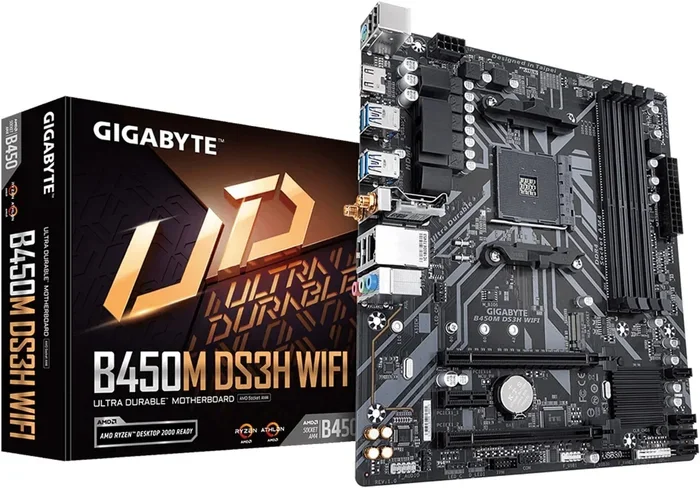
The Gigabyte B450M DS3H is a micro-ATX motherboard built around the AMD B450 chipset. It uses the AM4 socket, which supports a wide range of AMD processors. This board has been around for several years and remains popular among budget builders.
Here are some key specs of the B450M DS3H:
- Socket: AM4
- Chipset: AMD B450
- Form Factor: Micro-ATX
- RAM Support: DDR4, up to 64GB
- Expansion Slots: PCIe 3.0 x16, PCIe 2.0 x1
- USB Ports: USB 3.1 Gen 1, USB 2.0
- Storage: M.2, SATA III
- Built-in WiFi: No
As you can see, this board is a solid, no-frills option. It handles the basics well. But the lack of built-in wireless is something you need to plan for. If you want to go wireless, you have a few choices ahead of you.
Does the Ryzen 5 5600G Work with the B450M DS3H?
The good news is that the Ryzen 5 5600G is compatible with the B450 chipset. AMD designed the Ryzen 5000 series to work with AM4 motherboards. However, compatibility depends on one critical thing: your BIOS version.
Why BIOS Updates Matter
When AMD released the Ryzen 5 5600G, the B450 chipset was already a few years old. Gigabyte had to release a BIOS update to add support for the 5000-series processors. Without this update, your board will not recognize the CPU.
Here is what you need to do:
- Check your current BIOS version. You can do this by entering the BIOS setup or using Gigabyte’s EasyTune software.
- Visit Gigabyte’s official website. Look up the B450M DS3H support page.
- Download the latest BIOS. Make sure it supports Ryzen 5000 series CPUs.
- Flash the BIOS. Use the Q-Flash Plus feature or the standard BIOS flash tool.
Important tip: Always flash your BIOS with a supported CPU. If you only have a Ryzen 5 5600G and an older BIOS, you may need to borrow a compatible older CPU to perform the update. Some B450 boards support BIOS flashback without a CPU, but the DS3H does not always have this feature. Double-check before you buy.
What About the 5600G’s Integrated Graphics?
The Ryzen 5 5600G comes with Radeon Vega graphics built in. This means you do not need a dedicated GPU for basic tasks, browsing, and even light gaming. The B450M DS3H supports this just fine through its PCIe and display output ports. You can plug in a monitor directly to the motherboard’s HDMI or VGA ports.
This makes the combo great for budget builds where every dollar counts. You save money on a graphics card and still get decent performance for everyday use and casual gaming.
WiFi Support on the B450M DS3H
Here is where things get important. The Gigabyte B450M DS3H does not come with built-in WiFi. Unlike some higher-end motherboards that include a WiFi module right on the board, this one keeps things basic. You get ethernet for wired internet, but nothing wireless out of the box.
So how do you add WiFi? You have several options, and we will go through each one.
Option 1: USB WiFi Adapter
The easiest and cheapest way to add WiFi is a USB WiFi adapter. These small dongles plug right into a USB port and connect to your wireless network. They are simple to set up and work with any computer.
Pros of USB WiFi adapters:
- Very affordable
- Plug and play setup
- No opening your PC case
- Portable and easy to move between systems
Cons:
- Slower speeds compared to PCIe cards
- Can block other USB ports
- Less stable connection in some cases
If you just need basic internet for browsing and streaming, a USB adapter works fine. Look for one that supports WiFi 5 (802.11ac) or better for decent speeds.
Option 2: PCIe WiFi Card
A PCIe WiFi card is a better option if you want faster and more reliable wireless speeds. These cards plug into a PCIe slot on your motherboard, just like a graphics card or sound card.
The B450M DS3H has a PCIe x16 slot and a PCIe x1 slot. Either can work for a WiFi card. Most PCIe WiFi cards use the x1 slot, so the x16 slot stays free for a graphics card if you have one.
Pros of PCIe WiFi cards:
- Faster and more stable than USB adapters
- Better antenna placement outside the case
- Supports WiFi 5 and WiFi 6 standards
- Dedicated processing for wireless tasks
Cons:
- Costs more than a USB adapter
- Requires opening your PC case
- Takes up a PCIe slot
Popular choices include cards from TP-Link, ASUS, and Intel. Look for one that matches your needs and budget.
Option 3: Use Ethernet Instead
Do not forget that the B450M DS3H has a built-in Gigabit Ethernet port. A wired connection is always faster and more stable than WiFi. If your PC will sit close to your router, ethernet is the way to go.
You can also look into extending your WiFi with an Ethernet cable if the router is far away. This gives you the best of both worlds: a wired connection without a long cable running across your house.
Setting Up WiFi with the Ryzen 5 5600G and B450M DS3H
Once you have chosen your WiFi solution, setting things up is straightforward. Here is a quick walkthrough.
Step-by-Step Setup
- Install the CPU and RAM. Put the Ryzen 5 5600G into the AM4 socket and add your DDR4 memory.
- Install your WiFi hardware. Either plug in the USB adapter or seat the PCIe card in the slot.
- Connect the antenna. If you use a PCIe card, attach the antennas that come with it.
- Power on and install drivers. Windows should recognize most adapters. Install the latest drivers from the manufacturer’s website.
- Connect to your network. Click the WiFi icon in your taskbar, pick your network, and enter the password.
Quick tip: Always download drivers from the official manufacturer website. Do not rely on Windows Update for the best performance. Updated drivers fix bugs and improve wireless connectivity speed and stability.
Best WiFi Adapters for This Build
Not all WiFi adapters are the same. Here are a few solid options for the B450M DS3H and Ryzen 5 5600G combo:
| Adapter | Type | Speed | Price Range |
|---|---|---|---|
| TP-Link Archer T3U | USB | AC1300 | $10-$15 |
| TP-Link Archer TX3000E | PCIe | AX3000 (WiFi 6) | $40-$50 |
| ASUS USB-AC53 Nano | USB | AC1200 | $12-$18 |
| Intel AX200 PCIe Card | PCIe | AX1800 (WiFi 6) | $20-$30 |
The right choice depends on your needs and budget. For basic use, a USB adapter under $20 works well. For gaming or streaming, invest in a PCIe WiFi 6 card for the best wireless network performance.
Common Mistakes to Avoid
When building with the B450M DS3H and Ryzen 5 5600G, people often make a few avoidable mistakes. Here are the big ones:
- Skipping the BIOS update. This is the number one reason the 5600G will not work on older B450 boards. Always update first.
- Assuming WiFi comes built in. The DS3H does not have WiFi. Plan ahead and buy an adapter before you build.
- Using an outdated WiFi standard. If you buy a WiFi 4 adapter, you will get slow speeds. Go with WiFi 5 or WiFi 6 for a better experience.
- Ignoring the Ethernet option. WiFi is convenient, but a wired connection is always better for gaming and video calls.
- Not checking BIOS flashback support. If you do not have a compatible older CPU, you cannot flash the BIOS. Plan for this scenario.
Avoiding these mistakes saves you time, money, and frustration. Take the extra few minutes to research before you start building.
Expert Insights on AM4 Platform Compatibility
The AM4 platform from AMD has been one of the most versatile CPU sockets in recent years. It supports Ryzen 1000 through Ryzen 5000 series processors, which is impressive for a budget chipset like the B450.
However, not all B450 boards are created equal. Some manufacturers added 5000-series support through BIOS updates, while others did not. Gigabyte did update the B450M DS3H, but you need to make sure you have the right version. Always check the support page on Gigabyte’s website for the latest information.
The Ryzen 5 5600G is a fantastic processor for budget builds. It offers 6 cores and 12 threads, which is plenty for gaming, streaming, and productivity tasks. Paired with the B450M DS3H, you get a reliable and affordable platform. Just remember to add your own WiFi solution since the board does not include one.
If you are looking to expand your wireless setup later, consider adding mesh WiFi to your existing router. This can help cover larger areas with strong wireless signals, especially if your PC is in a different room from your router.
Final Verdict
So, does the Gigabyte B450M DS3H WiFi support the Ryzen 5 5600G? Yes, it does. The motherboard fully supports this processor, as long as you update the BIOS first. However, the board lacks built-in WiFi, so you will need to add a USB adapter or PCIe WiFi card to go wireless.
This combo is a great choice for budget-conscious builders. The B450M DS3H is affordable, reliable, and compatible with a wide range of AMD processors. The Ryzen 5 5600G brings strong multi-core performance and integrated graphics to the table. Together, they make a solid foundation for a budget PC.
Just remember to plan for WiFi from the start. Pick the right adapter for your needs, keep your drivers updated, and you will be online in no time. If you are exploring other WiFi options or need help with network setups, check out our guides on extending WiFi with Ethernet and buying your own WiFi box for more helpful tips.
Building a PC should be fun and rewarding. With the right information and a little preparation, your Gigabyte B450M DS3H and Ryzen 5 5600G build will serve you well for years to come.
Frequently Asked Questions
Do I need a BIOS update to use the Ryzen 5 5600G with the B450M DS3H?
Yes, absolutely. The B450 chipset was released before the Ryzen 5000 series. You must update the BIOS to the latest version that supports Ryzen 5000 CPUs. Without the update, the board will not recognize the processor. Always check the Gigabyte support page for the correct BIOS file.
Can I add WiFi to the Gigabyte B450M DS3H after purchase?
Yes, you can. Since the board does not have built-in WiFi, you will need to add a WiFi adapter. A USB WiFi adapter is the easiest option. A PCIe WiFi card offers better speeds and stability. Both options work great with this motherboard and the Ryzen 5 5600G.
What is the best WiFi option for this build?
It depends on your needs. For basic internet use, a USB WiFi 5 adapter under $20 works fine. For gaming or streaming, a PCIe WiFi 6 card delivers much better performance. The Intel AX200 and TP-Link Archer TX3000E are popular choices that work well with AM4 motherboards.
Can I use the Ryzen 5 5600G without a dedicated graphics card?
Yes, the Ryzen 5 5600G has integrated Radeon Vega graphics. You can connect a monitor directly to the motherboard’s HDMI or VGA port and use the PC without a dedicated GPU. This is perfect for budget builds where you want to save money on a graphics card.
Is the B450M DS3H good for gaming?
It can be, especially with the Ryzen 5 5600G and its integrated graphics. For casual and esports gaming, this combo handles titles like Fortnite, Rocket League, and Valorant well. For demanding AAA games, you will want to add a dedicated graphics card to the PCIe x16 slot.
Can I connect to WiFi without a WiFi adapter on this board?
No, the B450M DS3H does not have built-in WiFi. You must use a USB WiFi adapter or a PCIe WiFi card to connect to a wireless network. Alternatively, you can use an Ethernet cable for a wired connection, which is always faster and more stable than WiFi.
=== CONCLUSION ===
The Gigabyte B450M DS3H WiFi support story is straightforward. The board works well with the Ryzen 5 5600G as long as you update the BIOS. It does not have built-in WiFi, but adding wireless connectivity is easy and affordable. Whether you choose a USB adapter or a PCIe card, you will be up and running quickly.
This motherboard and processor combo remains a strong choice for budget builders. You get reliable performance, solid features, and plenty of room to grow. Just plan ahead for your WiFi solution, keep your drivers updated, and enjoy your build. With the right setup, the Gigabyte B450M DS3H and Ryzen 5 5600G deliver excellent value and a smooth computing experience.
=== INTERNAL LINKS ===
Need to connect to a wireless network without extra hardware? Check out Can I Connect To Wifi Without Wifi Adapter for helpful tips.
Want to explore purchasing your own networking equipment? Read our guide on Can I Buy My Own Wifi Box for all the options available.
Looking for a stable wired alternative? Learn how to extend your WiFi with an Ethernet cable and get the best of both worlds.