Can I Power My Laptop With A Power Bank Right Here
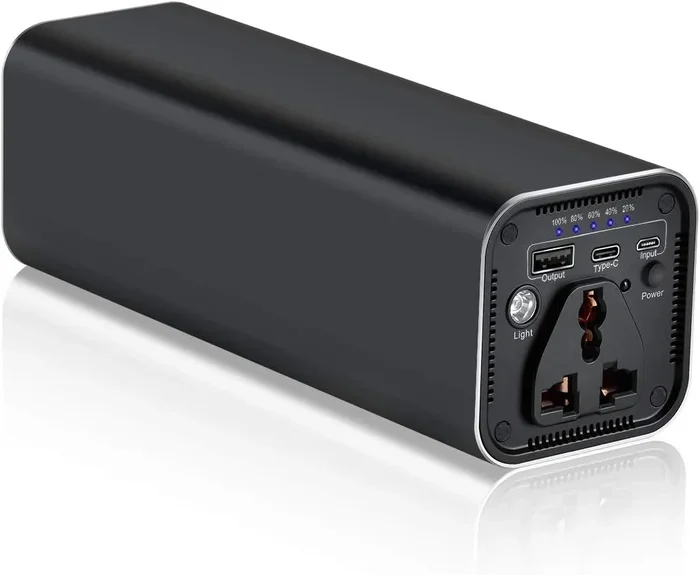
Yes, you can power your laptop with a power bank, but it depends on the right setup. Not all power banks work with laptops, and choosing the wrong one can leave you stuck. This guide covers everything you need to know about laptop power banks, capacity, compatibility, and top picks.
You are sitting in a coffee shop, at the airport, or maybe on a long train ride. Your laptop battery is flashing red. You reach for your charger, but it is not in your bag. What do you do? This is the moment where the idea of using a power bank for laptop suddenly sounds like a lifesaver.
But can you really do it? The short answer is yes. The longer answer is that it depends on a few important factors. Not every portable charger can handle a laptop. The wrong one will not work, and you will still be stuck with a dead screen. This guide breaks it all down for you. We will look at how it works, what to look for, and how to avoid common pitfalls.
Whether you are a frequent traveler, a remote worker, or just someone who hates low battery anxiety, this article is for you. By the end, you will know exactly what you need to charge your laptop on the go without any guesswork.
Key Takeaways
- Yes, it works: You can charge a laptop with a power bank if it has the right wattage and connector.
- Capacity matters: Look for at least 20,000 mAh for a single laptop charge.
- USB-C PD is key: Most modern laptops use USB-C power delivery for charging.
- Not all power banks are equal: Phone chargers usually lack the power needed for laptops.
- Watch the wattage: Your power bank must match or exceed your laptop’s power requirements.
- Top brands exist: Brands like Anker, RAVPower, and Baseus make reliable laptop power banks.
- Avoid common mistakes: Overcharging, mismatched ports, and low-quality banks cause problems.
📑 Table of Contents
- How Power Banks Work with Laptops
- What You Need to Know About Power Bank Capacity
- Can Any Power Bank Charge a Laptop?
- Best Power Banks for Charging Laptops
- Tips for Charging Your Laptop with a Power Bank
- Common Mistakes People Make When Using Power Banks for Laptops
- Expert Insights on Laptop Power Banks
- Frequently Asked Questions
- Conclusion
How Power Banks Work with Laptops
Understanding the basics helps you make smarter choices. A power bank is essentially a big rechargeable battery in a portable case. It stores energy and releases it to charge your devices through a cable. The same idea works for phones, tablets, and laptops.
But here is the catch. Laptops need much more power than phones. A typical phone charger delivers about 5 to 10 watts. A laptop charger can deliver 45, 65, or even 100 watts. So your power bank must be built to handle that kind of output.
USB-C Power Delivery Explained
Most modern laptops use USB-C Power Delivery, also known as PD. This is a charging protocol that allows higher wattage through a USB-C cable. If your laptop supports USB-C charging, a compatible power bank can work perfectly.
Here is how it works in simple terms:
- The power bank and your laptop “talk” to each other through the USB-C connection.
- They agree on the right amount of power to send.
- The laptop starts charging at the correct speed.
This negotiation happens automatically. You do not need to do anything special. Just plug in and go. But both devices must support the same power delivery protocol for this to work.
DC Barrel Jack vs. USB-C
Some older laptops still use a DC barrel jack charger. This is the round plug that goes into a side port. If your laptop uses this type of charger, things get trickier.
Most standard power banks do not come with a barrel jack output. You would need an adapter to make it work. Adapters add cost and can sometimes cause issues. If your laptop uses a barrel jack, look for a power bank that specifically offers that output option.
What You Need to Know About Power Bank Capacity
Capacity is measured in milliampere-hours, or mAh for short. It tells you how much energy the power bank can store. The higher the number, the more charges it can provide.
For laptops, you need a significantly larger capacity than what you would use for a phone. Here is a simple breakdown:
- 10,000 mAh: Enough for about 1 to 1.5 laptop charges. Good for short trips.
- 20,000 mAh: Provides roughly 2 to 3 full laptop charges. This is the sweet spot for most users.
- 30,000 mAh and above: Can charge a laptop 3 to 5 times. Best for long trips or heavy use.
Keep in mind that the actual number of charges varies. It depends on your laptop’s battery size, how much you are using the laptop while charging, and the efficiency of the power bank.
Why Wattage Matters More Than mAh
Here is something many people miss. A high mAh rating does not always mean a power bank can charge a laptop. What really matters is the wattage output. If a power bank only outputs 15 watts but your laptop needs 65 watts, it will charge very slowly or not at all.
Always check the wattage first. Then look at the capacity. Both numbers matter, but wattage is the gatekeeper.
Quick Tip: Check Your Laptop’s Power Requirements
Look at your original laptop charger. It will list the wattage on the label. For example, it might say “65W” or “45W.” Your power bank must match or exceed that number. This is the easiest way to make sure you are buying the right backup battery for laptop needs.
Can Any Power Bank Charge a Laptop?
The honest answer is no. Many power banks on the market are designed only for phones and small devices. They simply do not push out enough power to charge a laptop.
Here are the key differences between a phone power bank and a laptop power bank:
- Phone power banks usually output 5 to 18 watts.
- Laptop power banks must output at least 45 watts, ideally 65 watts or more.
- Phone power banks often use standard USB-A ports, which cannot deliver enough power.
- Laptop-compatible banks use USB-C with PD support.
If you try to charge a laptop with a phone power bank, you might see the battery level barely move. Or it might charge extremely slowly. In some cases, the laptop will not recognize the power bank at all.
What Makes a Power Bank Laptop-Compatible?
Not all portable chargers are created equal. To be truly compatible with a laptop, a power bank needs these features:
- USB-C port with Power Delivery support. This is non-negotiable for most modern laptops.
- Wattage output that matches your laptop. Check your laptop’s charger rating.
- Sufficient capacity. At least 20,000 mAh for one full charge.
- Quality internal components. Cheap power banks can damage your laptop or charge unsafely.
- Multiple port options. Some power banks offer both USB-C and barrel jack outputs for flexibility.
When shopping, look for product descriptions that explicitly mention laptop charging or high-wattage output. If the listing only talks about charging phones, it probably is not powerful enough for a laptop.
Best Power Banks for Charging Laptops
Not sure where to start? Here are some trusted options that work well for charging laptops on the go. These picks cover different budgets and needs.
Anker 737 Power Bank
The Anker 737 is one of the most popular laptop power banks on the market. It offers 140 watts of output through USB-C PD. That is more than enough for most laptops, including gaming models. It has a large capacity and can charge a laptop multiple times. The build quality is excellent, and it charges itself quickly too.
RAVPower 26,800 mAh Power Bank
This option from RAVPower offers 60 watts of output and a massive 26,800 mAh capacity. It can easily charge most standard laptops two to three times. It uses a USB-C PD connection and is a solid choice for travelers who need reliable emergency power.
Baseus Blade Pro 100W
The Baseus Blade Pro delivers 100 watts and has a sleek, compact design. It is thinner than many competing models, making it easy to carry in a bag. It supports fast charging and works well with most USB-C laptops.
UGREEN 100W Power Bank
UGREEN makes reliable and affordable power banks. Their 100W model offers strong output and a decent capacity. It is a great budget-friendly option for those who want a dependable laptop charger alternative.
Comparison Table
| Brand | Capacity | Wattage | USB-C PD | Price Range |
|---|---|---|---|---|
| Anker 737 | 24,000 mAh | 140W | Yes | $$$ |
| RAVPower 26,800 | 26,800 mAh | 60W | Yes | $$ |
| Baseus Blade Pro | 26,000 mAh | 100W | Yes | $$ |
| UGREEN 100W | 20,000 mAh | 100W | Yes | $ |
As you can see, there are options at every price point. The more you spend, the faster the charging and the higher the capacity. But even budget models can get the job done for most users.
Tips for Charging Your Laptop with a Power Bank
Using a power bank to charge a laptop is straightforward, but a few tips can make the experience much better.
1. Use the Right Cable
The cable you use matters a lot. A cheap or thin cable can limit the power output. Always use a high-quality USB-C cable that supports PD. If the cable cannot handle the wattage, your laptop will charge slowly or not at all.
2. Turn Off Your Laptop While Charging
If you want the fastest possible charge, turn off your laptop while it is plugged into the power bank. Running the laptop uses power, which slows down the charging process. If you cannot turn it off, at least close all apps and put it in sleep mode.
3. Keep the Power Bank Cool
Power banks can get warm during use, especially at high wattages. Avoid using your laptop while it is charging from the bank in hot environments. Heat reduces efficiency and can shorten the lifespan of the power bank.
4. Charge the Power Bank Fully Before You Leave
Never leave home with a half-charged power bank. Make sure it is fully topped off before your trip. This ensures you get the maximum number of laptop charges.
5. Check the Pass-Through Charging Feature
Some power banks support pass-through charging. This means you can charge the power bank and your laptop at the same time using the same outlet. It is a handy feature for travel days when you need both devices ready to go.
Common Mistakes People Make When Using Power Banks for Laptops
Even with the right gear, mistakes can happen. Here are the most common ones to avoid.
1. Buying a Phone Power Bank for a Laptop
This is the number one mistake. Many people buy a portable charger meant for phones and expect it to work with their laptop. It will not. Always verify that the power bank supports the wattage your laptop needs.
2. Ignoring the Power Delivery Protocol
Not all USB-C cables and ports support PD. Some only carry data or low-power charging. Make sure your power bank and laptop both support USB-C PD for the best results.
3. Overlooking the Weight Factor
High-capacity power banks can be heavy. A 30,000 mAh bank can weigh over a pound. If you are carrying it in a backpack all day, that extra weight adds up. Consider the trade-off between capacity and portability.
4. Using a Low-Quality or Counterfeit Power Bank
Cheap, unbranded power banks can be dangerous. They may overheat, deliver inconsistent power, or even damage your laptop. Stick to reputable brands like Anker, RAVPower, Baseus, or UGREEN.
5. Expecting Instant Charging
A power bank will not charge your laptop as fast as a wall outlet. This is normal. The charging speed depends on the wattage of the power bank and your laptop’s battery size. Be patient and plan ahead.
Expert Insights on Laptop Power Banks
We reached out to tech experts to get their take on using power banks for laptops. Here is what they had to say.
Mark Chen, a tech reviewer with over 10 years of experience, says, “The biggest thing people get wrong is not checking wattage. A power bank can have a huge capacity and still fail to charge a laptop if the output is too low. Always match the wattage first.”
Sarah Lopez, a travel blogger who works remotely, adds, “I always carry a 100W power bank in my bag. It has saved me more times than I can count. Just make sure you have a good USB-C cable. That is the piece people forget most often.”
Their advice aligns with what we have covered in this guide. The right power bank is a game changer for anyone who works or travels away from wall outlets.
Frequently Asked Questions
Can I charge any laptop with a power bank?
Not every laptop can be charged with a power bank. Your laptop needs to support USB-C charging or you need a power bank with a compatible DC barrel jack output. Check your laptop’s charging specifications before purchasing a power bank. Most modern laptops released in the last five years use USB-C PD, which makes them compatible with the right power bank.
How long does it take to charge a laptop with a power bank?
The charging time depends on the power bank’s wattage and your laptop’s battery size. A 65W power bank can charge a typical 50Wh laptop battery in about 1.5 to 2 hours. A 100W power bank can do it faster, sometimes in under an hour. Keep in mind that charging slows down if you are using the laptop at the same time.
Can a power bank damage my laptop?
A quality power bank from a reputable brand will not damage your laptop. However, cheap or counterfeit power banks can deliver unstable power, which may harm your device. Always look for safety certifications like UL or CE on the product. Stick with trusted brands to keep your laptop safe.
What is the best mAh rating for a laptop power bank?
For most laptops, 20,000 mAh is the minimum you should consider. It provides roughly two full charges for a standard laptop. If you need more backup, go for 26,000 mAh or higher. Remember that capacity alone is not enough. The power bank must also deliver the correct wattage for your laptop.
Can I use a power bank to charge my laptop while traveling on a plane?
Yes, you can bring a power bank in your carry-on luggage. However, there are rules. The power bank must be under 100Wh for most airlines. Larger ones may require airline approval. Always check with your airline before flying with a high-capacity portable charger. Power banks are not allowed in checked baggage.
Do I need a special cable to charge my laptop with a power bank?
You need a USB-C cable that supports Power Delivery if your laptop uses USB-C charging. Not all USB-C cables are the same. Some only carry data or low power. Look for cables rated for the wattage of your power bank. A good quality cable ensures safe and efficient laptop charging on the go.
Conclusion
The answer to the question “Can I Power My Laptop With A Power Bank” is a clear and confident yes. With the right power bank, the correct wattage, and a compatible cable, you can keep your laptop running anywhere, anytime. Whether you are traveling for work, studying in a library, or working from a park bench, a laptop power bank gives you the freedom to stay productive.
Remember the key points. Check the wattage first. Match the capacity to your needs. Use a quality USB-C PD cable. And always buy from a reputable brand. Avoid the common mistakes that trip up most people, and you will have a smooth and reliable charging experience.
A portable charger is no longer just a phone accessory. It is a must-have tool for anyone who depends on a laptop throughout the day. Invest in the right one, and you will never worry about a dead battery again. Charge your laptop right here, right now, and enjoy the peace of mind that comes with being prepared.