Do Any Airpods Use Usb C Everything You Need To Know
Yes, some AirPods models now use USB C for charging. The AirPods Pro 2nd generation and AirPods 3rd generation both support USB C through a dongle or direct cable. Apple is slowly moving away from the Lightning connector, and knowing which models work with USB C helps you stay ahead of the change.
This is a comprehensive guide about Do Any Airpods Use Usb C.
Key Takeaways
- AirPods Pro 2nd Gen and AirPods 3rd Gen: These models support USB C charging, either through a dongle or a direct USB C cable.
- Older models still use Lightning: AirPods 1st Gen, AirPods 2nd Gen, and AirPods Pro 1st Gen rely on the Lightning connector.
- The USB C dongle is essential: Most USB C AirPods come with a small adapter dongle that plugs into the USB C cable.
- USB C offers faster charging: USB C Power Delivery can charge your AirPods case more quickly than Lightning.
- Future AirPods will likely go fully USB C: Apple is expected to phase out Lightning entirely across its accessory lineup.
- Check your model before buying cables: Not all AirPods use USB C, so confirm your model number first.
[FEATURED_IMAGE_PLACEHOLDER]
Do Any Airpods Use Usb C Everything You Need to Know
If you have been wondering do any AirPods use USB C, you are not alone. Apple has been slowly shifting its product lineup toward the USB C standard, and AirPods are no exception. The short answer is yes, some AirPods models now support USB C charging. But the full story is a bit more detailed than that.
This guide covers every AirPods model that uses USB C, how the charging works, what accessories you need, and what Apple might do next. Whether you are shopping for a new pair or trying to figure out your current setup, you will find everything you need right here.
The transition from Lightning to USB C has been one of the biggest changes in the Apple accessory world. EU regulations pushed Apple toward USB C, and the company has been adapting its product lineup ever since. AirPods sit in an interesting spot because they use a charging case, which adds a layer of complexity to how USB C works with them.
Which AirPods Models Support USB C Charging
Not every AirPods model supports USB C. Apple has released several generations of AirPods, and only the newer ones have made the switch. Here is a clear breakdown of which models use USB C and which still rely on Lightning.
AirPods Pro 2nd Generation
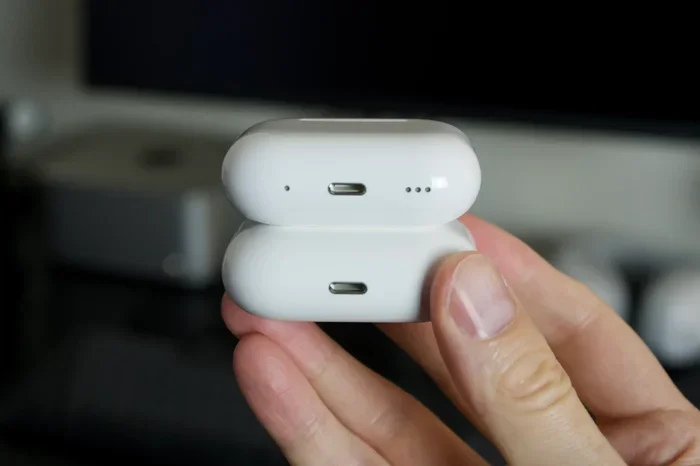
The AirPods Pro 2nd generation are one of the first AirPods models to support USB C charging. These earbuds come with a USB C to Lightning cable and a small USB C dongle. You plug the dongle into the USB C cable, and then connect the Lightning end to the charging case. It is a simple setup once you understand the pieces involved.
These AirPods also support wireless charging through MagSafe and Qi chargers. So even if you do not have a USB C cable handy, you can still charge them on a MagSafe pad or any Qi-compatible charging pad.
AirPods 3rd Generation
The AirPods 3rd generation also support USB C charging. Apple introduced USB C support with this model alongside the AirPods Pro 2nd Gen. The charging setup works the same way, with a dongle and USB C to Lightning cable included in the box.
These AirPods do not have active noise cancellation like the Pro models, but they share the same USB C charging capability. If you want a lighter, more affordable entry into the USB C AirPods world, the 3rd generation is a solid choice.
Older AirPods Models Still Use Lightning
Here is where it gets important. The following models do not support USB C:
- AirPods 1st generation (2016)
- AirPods 2nd generation (2019)
- AirPods Pro 1st generation (2019)
- AirPods Max (over-ear headphones)
All of these older models use the Lightning connector for charging. If you own any of these, you will need to stick with Lightning cables or upgrade to a newer model if you want USB C convenience.
Quick Comparison Table
Here is a simple comparison to help you see at a glance which models support USB C and which do not.
| AirPods Model | Charging Port | USB C Support |
|---|---|---|
| AirPods Pro 2nd Gen | Lightning (with USB C dongle) | Yes |
| AirPods 3rd Gen | Lightning (with USB C dongle) | Yes |
| AirPods Pro 1st Gen | Lightning | No |
| AirPods 2nd Gen | Lightning | No |
| AirPods 1st Gen | Lightning | No |
| AirPods Max | Lightning | No |
How USB C Charging Works with AirPods
Understanding how USB C charging works with AirPods helps you get the most out of your device. The process is straightforward, but there are a few details worth knowing.
The Dongle Setup
Most USB C AirPods come with a small USB C to Lightning dongle. This is a tiny adapter that plugs into the end of a USB C cable. The other end of the dongle is a Lightning connector that plugs directly into the AirPods charging case.
To charge your AirPods with USB C, you simply:
- Plug the USB C cable into a power source or your computer.
- Connect the USB C dongle to the other end of the cable.
- Plug the Lightning end of the dongle into the charging case.
- Place the case on a flat surface and wait for the light to show it is charging.
It might seem like a lot of small pieces, but once you do it a few times, it becomes second nature. The dongle is tiny and easy to lose, so keep it in a safe spot.
USB C Power Delivery and Charging Speed
One of the biggest advantages of USB C is USB C Power Delivery. This technology allows for faster and more efficient charging compared to the older Lightning standard. When you use a USB C Power Delivery charger with your AirPods, the case can charge more quickly.
For example, a 20-watt USB C Power Delivery brick can charge your AirPods case faster than a standard 5-watt Lightning charger. This is especially useful if you are in a hurry and need a quick top-up before heading out the door.
Wireless Charging Still Works
Even though USB C charging is new, Apple did not remove wireless charging from the equation. Both the AirPods Pro 2nd Gen and AirPods 3rd Gen still support MagSafe and Qi wireless charging. You can place the case on a MagSafe charger or any Qi pad and charge it without any cables at all.
This gives you flexibility. You can use USB C for fast wired charging and wireless charging for convenience at your desk or bedside table.
The USB C Dongle Situation Explained
The USB C dongle is one of the most talked-about parts of the AirPods USB C experience. It is a small, easy-to-lose adapter that bridges the gap between the USB C cable and the Lightning charging case.
Why Does Apple Use a Dongle
Apple has not fully switched the AirPods charging port to USB C just yet. The charging case itself still uses a Lightning connector. So the dongle acts as a translator between the new USB C world and the older Lightning case.
This is a temporary solution. Apple will likely move to a full USB C charging case in future AirPods models. For now, the dongle is the bridge that connects the two standards.
Where to Buy Replacement Dongles
If you lose your USB C dongle, you can buy replacements. Apple sells them directly, and many third-party options are available too. Look for USB C to Lightning adapter options from reputable brands. A replacement dongle usually costs between $10 and $20.
Quick tip: label your dongle or keep it attached to your cable. This small habit saves you from the frustration of searching for a tiny white adapter when you need it most.
Can You Use Any USB C Cable
Yes, you can use any standard USB C cable with the dongle. You do not need a special or expensive cable. A basic USB C cable works just fine for charging your AirPods case. However, if you want faster charging, look for a cable that supports USB C Power Delivery.
Benefits of USB C for AirPods Users
The move to USB C brings several real benefits for AirPods owners. Here are the main advantages you get when you switch to a USB C compatible model.
One Cable for Everything
One of the best things about USB C is universal compatibility. You can use the same cable to charge your phone, tablet, laptop, and now your AirPods. This means fewer cables cluttering your space and fewer adapters to keep track of.
If you travel a lot, this is a game changer. You only need to pack one type of cable and charger for all your devices. It simplifies your setup and reduces the chances of forgetting an essential charging cable.
Faster Charging Times
USB C Power Delivery delivers more power than the Lightning connector. This means your AirPods charging case fills up faster. A quick 10-minute charge can give you several hours of listening time, which is perfect for busy mornings or rushed commutes.
Future-Proofing Your Setup
Apple is moving toward USB C across its entire product lineup. The iPhone 15 and later models all use USB C. The iPad Pro, iPad Air, and MacBooks have used USB C for years. By choosing USB C AirPods now, you are future-proofing your setup and staying aligned with Apple’s direction.
Future AirPods models will almost certainly drop Lightning entirely and go fully USB C. Buying USB C compatible AirPods now means you are ready for what comes next.
Better Charging Accessory Options
USB C chargers and cables are everywhere. You can find them at airports, hotels, coffee shops, and electronics stores. This wide availability means you are less likely to be stuck without a charging option when you are on the go.
What to Expect in Future AirPods Models
Apple has a clear trend toward USB C, and the writing is on the wall for future AirPods. Here is what you can expect in the coming years.
Full USB C Charging Cases
Future AirPods models will likely feature full USB C charging cases with no dongle needed. You will plug a USB C cable directly into the case and charge it just like any other USB C device. This will make the charging process simpler and more streamlined.
Continued Bluetooth Connectivity
Even as Apple updates the charging port, the Bluetooth connection between your AirPods and your devices will remain the same. Bluetooth 5.0 and later standards ensure stable, low-latency audio streaming. You do not need to worry about any changes to how your AirPods connect to your phone or computer.
Apple Silicon and Firmware Updates
Apple uses custom chips and regular firmware updates to improve AirPods performance. Future models will likely benefit from Apple Silicon advancements that enhance battery life, audio quality, and noise cancellation. These updates come over the air, so your AirPods improve even after you buy them.
Sustainability and Environmental Goals
Apple has stated its commitment to sustainability and reducing e-waste. Moving to USB C helps this goal by creating a single, universal charging standard. Fewer different cables and adapters mean less waste over time.
Common Mistakes to Avoid with USB C AirPods
Even though USB C AirPods are straightforward, a few common mistakes can cause frustration. Here is what to watch out for.
- Forgetting the dongle: If you buy a USB C cable and try to plug it directly into the AirPods case, it will not work. You need the dongle adapter for current models.
- Using a low-quality cable: Cheap USB C cables may not support proper charging speeds. Stick with reputable brands or Apple-certified cables.
- Losing the dongle: The dongle is tiny and easy to misplace. Keep it attached to your cable or case when not in use.
- Assuming all AirPods are USB C: Not all models support USB C. Always check your specific model before buying new cables or chargers.
- Ignoring firmware updates: Keeping your AirPods firmware updated ensures the best performance and battery health. Check for updates in your iPhone or iPad settings.
Quick Tips for Getting the Most from Your USB C AirPods
Here are some practical tips to help you get the best experience from your USB C compatible AirPods.
- Invest in a good USB C Power Delivery charger. A 20-watt or higher charger will give you the fastest charging speeds for your AirPods case.
- Keep a spare dongle. Having a backup adapter saves you from scrambling if you lose the original one.
- Use wireless charging when possible. MagSafe and Qi charging add convenience and reduce wear on your charging port.
- Update your firmware regularly. Go to Settings on your iPhone, then Bluetooth, and check for AirPods updates.
- Store your AirPods in the case when not in use. This protects the earbuds and keeps the battery healthy.
- Clean the charging contacts. A quick wipe with a dry cloth keeps the connections strong and reliable.
Expert Insights on the USB C Transition
Industry analysts agree that Apple’s shift to USB C is inevitable and well underway. The EU’s common charger regulation accelerated this change, but Apple has also embraced USB C for its practical benefits. The USB C standard offers faster data transfer, higher power delivery, and universal compatibility.
Tech reviewers note that the USB C dongle solution is a smart interim step. It allows Apple to transition the AirPods ecosystem without redesigning the entire charging case all at once. Future models will likely make this transition seamless with a full USB C case.
Apple product experts also point out that the AirPods Max still uses Lightning, which feels outdated compared to the rest of the lineup. A USB C version of the AirPods Max would be a welcome update, and industry speculation suggests it could arrive in the near future.
Key Takeaways
Here is a quick recap of everything we covered about AirPods and USB C:
- AirPods Pro 2nd Gen and AirPods 3rd Gen are the current models that support USB C charging.
- Older models like AirPods 1st and 2nd Gen, AirPods Pro 1st Gen, and AirPods Max still use Lightning.
- The USB C dongle is required for current USB C AirPods models to connect to a USB C cable.
- USB C Power Delivery enables faster charging than the older Lightning standard.
- Wireless charging still works on USB C AirPods models through MagSafe and Qi.
- Future AirPods models will likely feature full USB C charging cases without the need for a dongle.
- Always verify your model before purchasing USB C cables or adapters to avoid compatibility issues.
Conclusion
The question do any AirPods use USB C has a clear and exciting answer. Yes, the AirPods Pro 2nd generation and AirPods 3rd generation both support USB C charging through a dongle and USB C to Lightning cable setup. This marks a significant step forward for Apple’s AirPods lineup and aligns with the broader industry shift toward USB C.
While the current USB C implementation requires a small adapter dongle, it brings real benefits like faster charging, universal cable compatibility, and future-proofing your setup. As Apple continues its transition away from Lightning, expect future AirPods models to embrace USB C fully and drop the dongle altogether.
If you are in the market for new AirPods, the USB C models offer a great combination of modern convenience and audio quality. And if you already own an older Lightning model, you can still enjoy your current AirPods while planning for an upgrade when the next generation arrives.
Embrace the USB C change. It is simpler, faster, and smarter. Your future self will thank you for making the switch today.
Frequently Asked Questions
Do all AirPods support USB C charging?
No, not all AirPods support USB C. Only the AirPods Pro 2nd generation and AirPods 3rd generation support USB C charging. Older models like AirPods 1st Gen, 2nd Gen, AirPods Pro 1st Gen, and AirPods Max still use the Lightning connector.
Can I use a USB C cable directly with my AirPods case?
For current USB C AirPods models, you need the USB C dongle that comes in the box. You cannot plug a USB C cable directly into the Lightning charging case. The dongle bridges the connection between the USB C cable and the Lightning port on the case.
Is USB C charging faster for AirPods than Lightning?
Yes, USB C Power Delivery can charge your AirPods case faster than a standard Lightning charger. Using a 20-watt USB C Power Delivery brick with a compatible cable will give you the quickest charging speeds for your AirPods case.
Will future AirPods models drop Lightning completely?
It is very likely. Apple has been moving toward USB C across its entire product lineup. Future AirPods models will almost certainly feature full USB C charging cases without the need for a dongle or Lightning connector.
Can I charge my USB C AirPods with a wireless charger?
Yes. Both the AirPods Pro 2nd Gen and AirPods 3rd Gen support MagSafe and Qi wireless charging. You can place the charging case on a MagSafe or Qi-compatible wireless charger to power it up without any cables.
Where can I buy a replacement USB C dongle for AirPods?
You can buy replacement USB C to Lightning dongles from Apple directly or from third-party accessory brands. Look for certified adapters to ensure safe and reliable charging. They typically cost between $10 and $20.
Frequently Asked Questions
What is Do Any Airpods Use Usb C?
Do Any Airpods Use Usb C is an important topic with many practical applications.