Are There Different Types Of Usb Printer Cables Available
Not all USB printer cables are the same. Understanding the different types of USB printer cable options can save you time, money, and frustration. This guide breaks down every major printer cable type, explains how they work, and helps you pick the right one for your device.
Key Takeaways
- Multiple cable types exist: USB-A to USB-B, USB-C, and Mini-USB are the most common options for printers.
- USB 2.0 and USB 3.0 matter: The version affects your data transfer speed and print quality.
- Check compatibility first: Not every cable works with every printer model.
- Cable length affects performance: Longer cables can cause signal loss and slower printing.
- USB-C is the future: Newer printers increasingly use USB-C for faster and reversible connections.
- Replace cables when needed: Worn or damaged cables cause most connection problems.
📑 Table of Contents
What Are USB Printer Cables And Why Do They Matter
A USB printer cable is the wire that connects your printer to your computer or laptop. It carries data from your device to the printer so you can send documents, photos, and other files for printing. Without the right cable, your printer is just a fancy paperweight sitting on your desk.
Many people don’t think much about their printer cable until something goes wrong. Then they realize there are different types of USB printer cables, and not all of them work the same way. Choosing the wrong one can lead to slow printing, connection errors, or a cable that simply does not fit.
The good news is that this guide makes it easy. You will learn about every major printer cable type available today. We will cover how each one works, what devices it supports, and how to pick the best option for your setup. Whether you are setting up a new printer or replacing an old cable, this guide has you covered.
Let us start with the basics. Understanding your printer connection options helps you avoid buying the wrong cable. It also helps you get the most out of your printing experience.
The Most Common Types Of USB Printer Cables
There are several printer cable types you will encounter in the market. Each one has a different shape, purpose, and use case. Let us walk through them one by one.
USB-A to USB-B Cables
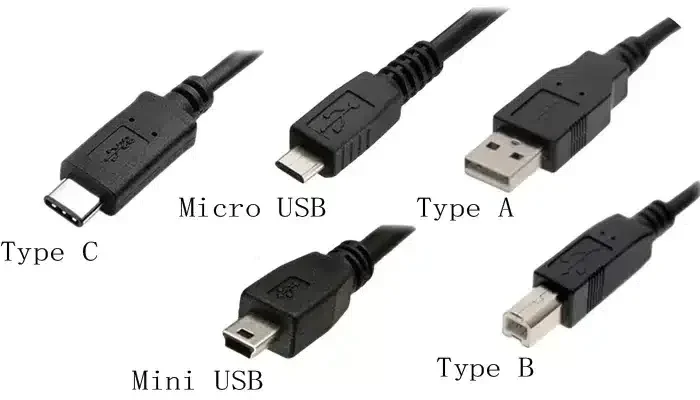
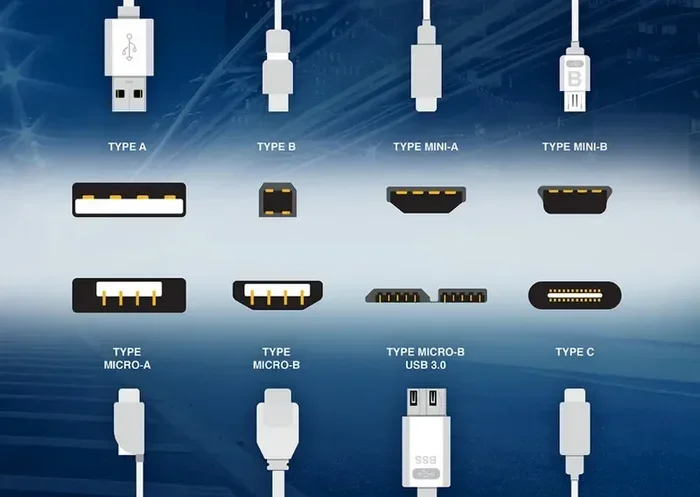
The USB-A to USB-B cable is the most traditional USB printer wire you will find. It has a rectangular USB-A plug on one end and a square USB-B plug on the other. This is the classic cable that comes with most desktop printers.
Here is what you need to know about this cable:
- USB-A end: This plugs into your computer or laptop.
- USB-B end: This plugs into the back of your printer.
- Common use: Desktop printers, office printers, and older models.
- Speed: Typically USB 2.0, which offers up to 480 Mbps.
This cable has been the standard for decades. If you have a basic home printer or an office printer, there is a good chance it uses a USB-A to USB-B connection. It is reliable and widely available.
USB-C Printer Cables
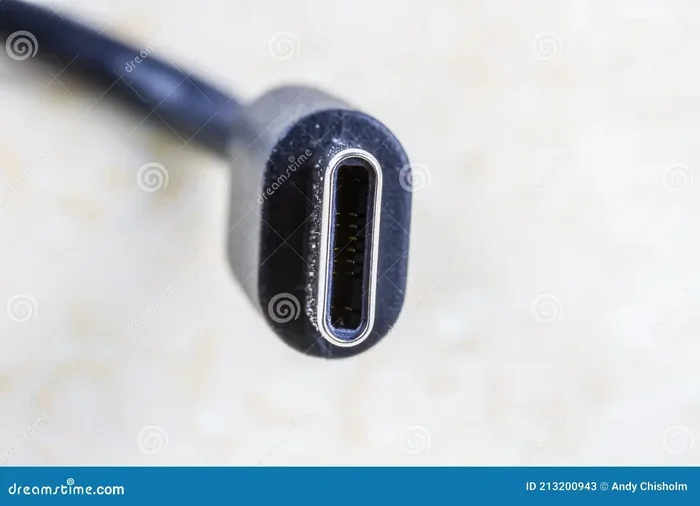
The USB-C printer cable is the newest option on the market. It features a small, reversible connector that works in either direction. You do not have to flip it around to plug it in, which is a nice convenience.
USB-C cables are becoming more popular in newer printers. They offer several advantages:
- Faster data transfer: USB 3.1 and USB 3.2 speeds can reach up to 10 Gbps or more.
- Reversible design: No more guessing which way to plug it in.
- Power delivery: Some USB-C cables can charge devices and transfer data at the same time.
- Future-proof: More printers and computers are adopting USB-C as the standard.
If you are buying a new printer, look for one with USB-C support. It is a smart investment for long-term use. For more on how cable choices affect your overall setup, you might also want to explore the advantages and disadvantages of access control systems if you manage shared printers in an office environment.
USB 2.0 vs USB 3.0 Printer Cables
Not all USB printer cables are built the same when it comes to speed. The two main versions you will see are USB 2.0 and USB 3.0. Here is a quick comparison:
| Feature | USB 2.0 | USB 3.0 |
|---|---|---|
| Max Speed | 480 Mbps | 5 Gbps |
| Connector Color | Black or white | Blue |
| Backward Compatible | Yes | Yes |
| Common Use | Basic printing | Large file printing |
| Price | Lower cost | Slightly higher cost |
USB 2.0 is still perfectly fine for everyday printing. If you mostly print text documents and simple photos, a USB 2.0 USB printer cable will do the job just fine. But if you regularly print large files, high-resolution images, or graphics-heavy documents, USB 3.0 is a better choice.
The speed difference is significant. USB 3.0 transfers data more than ten times faster than USB 2.0. This means your print jobs start faster and finish quicker. If you work in a busy office or run a creative business, this upgrade can make a real difference.
Mini-USB and Micro-USB Printer Cables
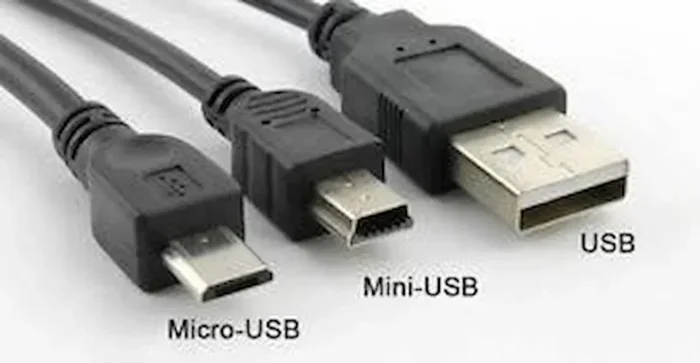
Some older or smaller printers use Mini-USB or Micro-USB connectors. You will find these in portable printers, label makers, and some older camera printers. These cable types are becoming less common, but you may still run into them.
Mini-USB has a smaller rectangular shape, while Micro-USB is even tinier. If you have an older device, check its port type before buying a replacement cable. Using the wrong size will not work, and you will end up needing a new cable anyway.
How To Choose The Right USB Printer Cable
With so many options out there, picking the right USB printer cable can feel overwhelming. But it does not have to be. Follow these simple steps to find the perfect match for your printer.
Check Your Printer Model
The first step is always to check your printer model. Look at the back of the printer or check the manual. You will find the port type listed there. Once you know the port type, you can narrow down your cable options.
Here is a quick checklist:
- Look at the printer port shape (rectangular, square, small round, or oval).
- Check your printer manual for the recommended cable type.
- Visit the manufacturer website if you cannot find the information in the manual.
- Match the cable to the port type exactly.
Getting the right printer cable compatibility is essential. A cable that does not fit will not work, no matter how good its quality is.
Consider Cable Length
Printer cable length matters more than most people think. A cable that is too short will not reach your desk. A cable that is too long can cause signal issues and slow down your printing.
Here are some general guidelines:
- Under 6 feet: Best for desk setups where the printer is nearby.
- 6 to 10 feet: Good for most home and office setups.
- Over 10 feet: Useful for large offices, but watch for signal loss.
If you need a longer cable, consider getting a high-quality one with shielding. This helps maintain a strong signal over longer distances. For tips on managing your workspace tech setup, you might also explore apps that help with productivity like 4 apps that are like Uber for finding dog walkers which show how app-based solutions can streamline everyday tasks.
Data Transfer Speed Matters
The data transfer speed of your cable affects how fast your printer receives and processes print jobs. If you are printing large PDFs, high-resolution images, or graphic-heavy documents, a faster cable makes a noticeable difference.
For basic text printing, USB 2.0 is more than enough. But for professional use, consider USB 3.0 or USB-C cables. These offer much higher speeds and better performance overall.
Common Problems With USB Printer Cables
Even the best cables can cause problems if they are damaged or incompatible. Here are the most common issues you might face.
Connection Drops and Intermittent Printing
If your printer keeps disconnecting or the print job stops mid-way, the cable might be to blame. Loose connections, frayed wires, or worn-out ports can all cause this problem. Try unplugging and replugging the cable to see if that fixes it.
Slow Printing Speeds
Slow printing can be frustrating. If your prints take forever to start, the cable might be limiting your data transfer speed. Check if you are using a USB 2.0 cable when your printer supports USB 3.0. Upgrading the cable can significantly improve your print speed.
Cable Does Not Fit
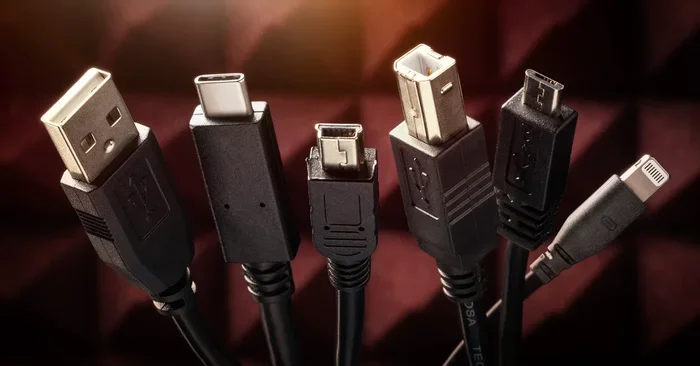
This sounds obvious, but it happens more often than you think. USB-A, USB-B, USB-C, Mini-USB, and Micro-USB all look different. Make sure you are using the correct cable type for your printer. Using the wrong cable will not damage anything, but it will not work either.
Tips For Maintaining Your USB Printer Cable
Taking care of your USB printer cord can extend its life and keep your printing running smoothly. Here are some simple tips that make a big difference.
Storage And Handling
How you store your cable matters. Avoid wrapping it too tightly or bending it at sharp angles. These habits can damage the internal wires over time. Instead, loosely coil the cable and store it in a drawer or cable organizer.
Keep your cable away from heat sources and sharp objects. Heat can melt the outer coating, and sharp edges can cut through the insulation. A little care goes a long way.
When To Replace Your Cable
No cable lasts forever. Here are signs that it is time to replace yours:
- The outer coating is frayed or cracked.
- The connector is loose or wobbly.
- Print jobs fail frequently.
- The cable does not fit snugly into the port.
- You notice visible damage to the wire.
Replacing a worn cable is cheap and easy. Do not wait until the cable completely fails. A new USB printer adapter or cable can solve most connection problems instantly.
Final Thoughts On USB Printer Cable Types
Now you know the answer to the question: yes, there are definitely different types of USB printer cables available. From the classic USB-A to USB-B cable to the modern USB-C option, each type has its own strengths and best use cases.
The key is to match your cable to your printer model and your needs. Check the port type, consider the cable length, and think about your data transfer requirements. A little research goes a long way in finding the right USB printer cable for your setup.
Whether you are printing homework at home or handling large documents in a busy office, the right cable makes all the difference. Take the time to choose wisely, and your printer will reward you with fast, reliable, and high-quality prints every time.
Keep this guide handy for your next cable purchase. And remember, the best printer cable type is the one that fits your device and meets your printing needs.
Frequently Asked Questions
Can I use any USB cable to connect my printer?
No, not every USB cable works with printers. You need a cable that matches the port type on your printer. Most printers use USB-A to USB-B, but newer models may use USB-C. Check your printer manual to confirm the correct cable type before buying.
What is the difference between USB 2.0 and USB 3.0 printer cables?
USB 3.0 cables transfer data much faster than USB 2.0 cables. USB 2.0 maxes out at 480 Mbps, while USB 3.0 can reach speeds up to 5 Gbps. For basic text printing, USB 2.0 is fine. But for large files or high-resolution images, USB 3.0 makes a big difference.
How long should my USB printer cable be?
A cable between 6 and 10 feet works well for most setups. If your printer is close to your desk, a shorter cable is fine. Just avoid cables longer than 10 feet unless you use a high-quality shielded cable, as longer cables can lose signal strength.
Can a USB-C cable replace a USB-A to USB-B cable?
It depends on your printer. If your printer has a USB-C port, then yes. But if your printer only has a USB-B port, a USB-C cable will not work directly. You may need an adapter in some cases, but always check compatibility first.
Why does my printer keep disconnecting from my computer?
Loose connections, damaged cables, or worn-out ports are the most common causes. Try unplugging the cable and plugging it back in firmly. If the problem continues, the cable may be damaged and need replacement. Also check for dust or debris in the printer port.
Are USB printer cables universal?
Not entirely. While USB standards are universal, the connector types vary by device. USB-A to USB-B is common for printers, USB-C is becoming standard in newer models, and Mini-USB or Micro-USB may be found in older or portable devices. Always match the cable to your printer’s port type.
=== CONCLUSION ===
Choosing the right USB printer cable is simpler than it seems. With the information in this guide, you now understand the main printer cable types and how to pick the best one. Whether you go with a classic USB-A to USB-B cable or upgrade to a modern USB-C connection, the right cable keeps your printing smooth and efficient.
Take a moment to check your printer’s port type and your printing needs. A small investment in the right USB printer cord can save you from headaches down the road. Happy printing!