Are All USB Plugs The Same Here Is What You Need To Know
No, not all USB plugs are the same. Different USB connector types serve different purposes, from charging your phone to transferring large files. Understanding USB plug types saves you time, money, and frustration when choosing the right cable for your devices.
Have you ever grabbed a USB cable from a drawer, plugged it in, and nothing happened? It is a frustrating moment that almost everyone has experienced. The truth is that not all USB plugs are the same. They come in different shapes, sizes, and versions, and each one is designed for a specific purpose.
Whether you are charging your phone, backing up photos from a camera, or connecting a printer, using the wrong USB plug can cause problems. It might not fit at all. Or worse, it might fit but charge slowly or fail to transfer data. This guide breaks down everything you need to know about USB plug types, how they differ, and how to choose the right one every time.
By the end of this article, you will understand the differences between USB-A, USB-C, USB-B, and more. You will also learn about USB standards, charging speeds, and data transfer rates. Let us dive in and clear up the confusion once and for all.
Key Takeaways
- Multiple USB plug types exist: USB-A, USB-B, USB-C, and micro USB are the most common, each with a unique shape and purpose.
- USB-C is the modern standard: It supports faster charging, higher data speeds, and reversible plug design for convenience.
- USB standards matter: USB 2.0, USB 3.0, and USB 4.0 determine how fast data moves and how much power a cable delivers.
- Not all plugs are compatible: Matching the right connector to your device prevents damage and ensures optimal performance.
- Adapters can help: When plugs don’t match, the right adapter bridges the gap without replacing your entire setup.
- Buying the wrong plug wastes money: Knowing what your device needs before you shop keeps you from buying the wrong cable.
📑 Table of Contents
Understanding the Different USB Plug Types
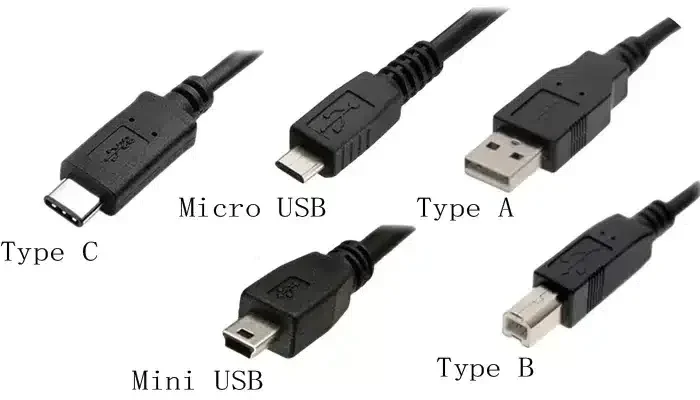
USB connectors come in several shapes and designs. Each type has a specific role, and knowing them helps you pick the right cable for the right job. Here is a look at the most common USB connector types you will encounter every day.
USB-A: The Classic Rectangular Plug
USB-A is the most recognizable plug type. It is the flat, rectangular connector that has been around for decades. You will find it on computers, wall chargers, power banks, and TVs.
USB-A plugs are used for charging and data transfer. They are not reversible, which means you have to plug them in the right way. Over the years, USB-A has evolved through different standards, but the plug shape has stayed largely the same.
- Common uses: Charging phones, connecting keyboards, linking external hard drives
- Shape: Flat and rectangular
- Reversible: No
- Speed: Varies by USB standard (see below)
USB-A is still widely used today. Many devices rely on it, even as newer connector types gain popularity. It is the workhorse of the USB plug world.
USB-C: The Modern All-in-One Connector
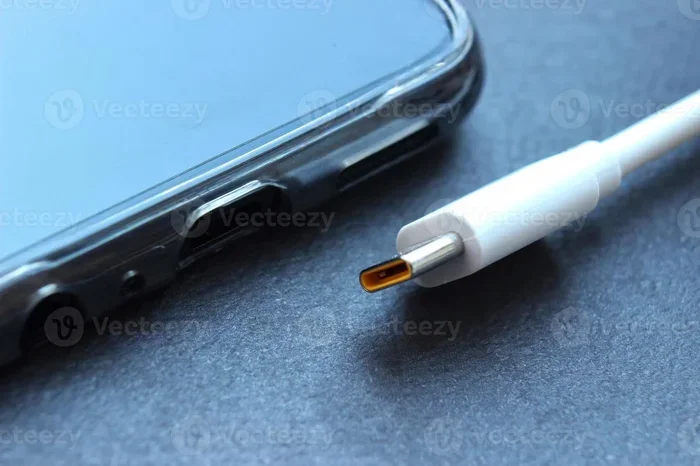
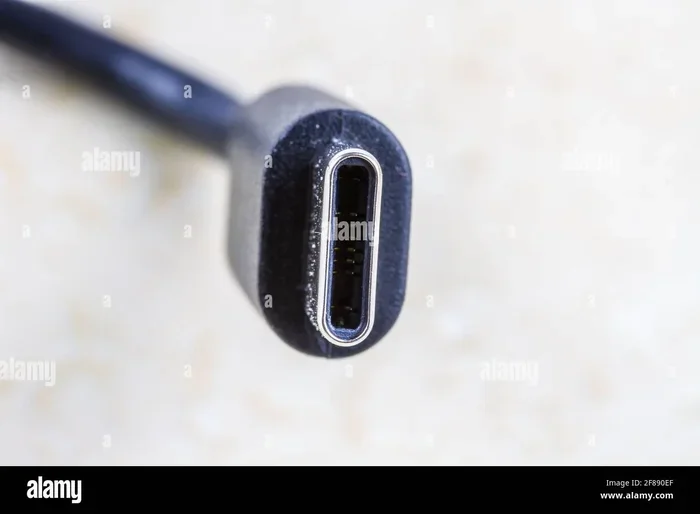
USB-C is the newest and most versatile USB connector type. It is small, oval-shaped, and reversible, meaning you can plug it in either way. This alone makes it a favorite among users who are tired of fumbling with cables.
USB-C supports USB Power Delivery, which allows for much faster charging than older standards. It also handles high-speed data transfer, video output, and even power delivery for larger devices like laptops.
- Common uses: Smartphones, laptops, tablets, gaming consoles
- Shape: Small and oval
- Reversible: Yes
- Speed: Up to 40 Gbps with USB4
If you bought a device in the last few years, there is a good chance it uses USB-C. It is quickly becoming the universal standard for device charging and data connections.
USB-B and Micro USB: The Older Standards
USB-B is a square-shaped plug commonly found on printers and external hard drives. It is not as common on consumer devices today, but it still plays an important role in certain setups.
Micro USB was once the go-to connector for Android phones and portable gadgets. It is smaller than USB-A and has a tapered shape. While it has been largely replaced by USB-C, many older devices still use it.
- USB-B common uses: Printers, scanners, large external storage
- Micro USB common uses: Older phones, fitness trackers, budget gadgets
- Reversible: No for both
If you have older devices lying around, you will likely need cables with these connectors. They are still widely available and affordable.
How USB Plugs Differ in Function
Not all USB plugs are created equal when it comes to what they can do. Two of the biggest differences are charging speed and data transfer rate. Let us break these down.
Power Delivery and Charging Speeds
Different USB plugs support different levels of USB power delivery. Older USB-A ports typically deliver 5 watts of power. That was fine for early smartphones, but modern devices need much more.
USB-C with USB Power Delivery (PD) can deliver up to 100 watts or more. This means laptops, tablets, and even some monitors can charge through a single USB-C cable. The charging speed depends on both the plug type and the USB standard it supports.
Here is a quick comparison of charging power across common plug types:
- USB-A (basic): 2.5 to 15 watts
- USB-A (with fast charging): Up to 18 watts
- USB-C (standard): Up to 100 watts with PD
- USB-C (with USB PD 3.1): Up to 240 watts
Using a low-power plug to charge a high-power device leads to slow charging. Always check what your device supports before choosing a charging cable.
Data Transfer Capabilities
Data transfer speed is another key difference between USB plugs. The plug type itself does not always determine the speed. Instead, the USB standard inside the cable and port matters most.
For example, a USB-C plug can support USB 2.0, USB 3.0, USB 3.1, or USB 4.0. Each version offers a big jump in speed. Here is a quick look:
- USB 2.0: Up to 480 Mbps
- USB 3.0: Up to 5 Gbps
- USB 3.1 (Gen 2): Up to 10 Gbps
- USB 4.0: Up to 40 Gbps
If you need to move large files like video recordings, a faster standard makes a huge difference. Always match your USB cable to the speed your devices support.
USB Standards and Versions Explained
The USB standard tells you how fast data moves and how much power flows through a cable. Over the years, USB has gone through several major updates. Each one brought better speed, more power, and new features.
USB 2.0: The Workhorse of Legacy Devices
USB 2.0 was introduced in the early 2000s and is still found in many devices today. It offers a maximum data speed of 480 Mbps. That is fine for keyboards, mice, and basic file transfers.
Most USB-A cables from older devices support USB 2.0. It is slow by today’s standards, but it still works well for simple tasks. If you are just charging a device or transferring small files, USB 2.0 gets the job done.
USB 3.0 and 3.1: Faster Speeds for Everyday Use
USB 3.0 (also called USB 3.2 Gen 1) brought a big leap in speed up to 5 Gbps. It is great for external hard drives, flash drives, and photo transfers. USB 3.0 ports are usually blue inside, making them easy to identify.
USB 3.1 (Gen 2) doubled the speed to 10 Gbps. This is ideal for professionals who work with large video files or need quick backups. Many modern USB-C cables support these faster standards.
USB4: The Future of Connectivity
USB4 is the latest standard and offers speeds up to 40 Gbps. It is based on the Thunderbolt 3 protocol and supports video output, data transfer, and power delivery all through a single USB-C cable.
USB4 is still relatively new, but it is gaining traction in laptops, monitors, and docking stations. If you want the best USB plug for future-proofing, USB-C with USB4 support is the way to go.
Are All USB Plugs Compatible with Every Device?
The short answer is no. USB plug compatibility depends on the shape of the connector and the standard it supports. A USB-A plug will not fit into a USB-C port without an adapter. A micro USB cable will not work with a USB-C-only device.
What Happens When You Mix and Match
Using the wrong plug can lead to several issues. The cable might not fit at all. Or it might fit loosely and keep disconnecting. In some cases, a mismatched cable can cause slow charging or no data transfer at all.
Using the wrong plug rarely damages modern devices. Most devices have built-in protection circuits. But using cheap, uncertified cables can be risky. They may overheat or fail to deliver the correct power levels.
Always check your device’s manual or look at the port shape before buying a USB cable. A few seconds of checking can save you from buying the wrong one.
Adapter Solutions for Different Plug Types
Adapters are a great way to bridge the gap between different USB connector types. You can use a USB-A to USB-C adapter to connect a modern device to an older charger. There are also adapters that convert USB-C to USB-B for printers.
Here are some common adapter types you might need:
- USB-A to USB-C: Connects newer devices to older chargers
- USB-C to USB-B: Links modern laptops to older printers
- Micro USB to USB-C: Helps transition from old to new devices
- USB-C to USB-A: Connects USB-C devices to USB-A ports
Adapters are affordable and widely available. They are a simple solution when you cannot replace a cable or device. Just make sure to buy adapters from reputable brands to ensure safety and reliability.
How to Choose the Right USB Plug
Picking the right USB plug does not have to be confusing. A few simple steps will help you make the best choice every time.
Quick Tips for Picking the Right Connector
- Check your device’s port type. Look at the shape of the port on your phone, laptop, or accessory. Is it USB-A, USB-C, or something else?
- Know what you need it for. Do you need fast charging, high-speed data transfer, or both? This determines the USB standard you should look for.
- Buy certified cables. Look for USB-IF certification or brands that meet USB Power Delivery standards. Certified cables are safer and perform better.
- Consider cable length. Longer cables can reduce charging speed slightly. For best results, keep cables under 6 feet for fast charging.
- Think about future needs. If you are buying cables for new devices, go with USB-C. It is the current and future standard for universal connectivity.
Following these tips ensures you get the right USB connector for your needs without wasting money on the wrong one.
Common Mistakes People Make With USB Plugs
Even tech-savvy people make mistakes when it comes to USB plugs. Here are the most common ones and how to avoid them.
Mistake 1: Assuming all USB-C cables are the same. Not all USB-C cables support the same speed or power. Some are only USB 2.0 and charge slowly. Always check the cable specifications before buying.
Mistake 2: Using cheap, uncertified cables. Bargain cables might seem like a good deal, but they can be unsafe. They may not deliver the correct power and can damage your devices over time.
Mistake 3: Forcing a plug into the wrong port. If a plug does not fit, do not force it. You might damage the port or the cable. Use the correct connector or an adapter instead.
Mistake 4: Ignoring cable wear and tear. Frayed or damaged cables are a fire hazard. Replace them as soon as you notice any damage to the outer coating or exposed wires.
Avoiding these simple mistakes keeps your devices safe and your cables working at their best.
Expert Insights on USB Plug Evolution
The USB plug has come a long way since its introduction in the mid-1990s. What started as a simple way to connect peripherals has evolved into a universal standard for power and data.
Experts predict that USB-C will eventually replace all other plug types. Its reversible design, high power delivery, and fast data speeds make it the clear winner. The industry is already moving in that direction, with most new devices shipping USB-C as the default port.
Another trend is the rise of USB Power Delivery as a universal charging standard. With PD, a single charger can power everything from earbuds to laptops. This reduces cable clutter and makes life simpler for users.
Thunderbolt technology, which uses the USB-C connector, is also gaining ground. It offers even faster speeds than standard USB-C and is popular among professionals who work with creative media.
The bottom line is that the USB ecosystem is becoming simpler and more unified. USB-C is leading the charge, and understanding it now will serve you well for years to come.
Key Takeaways
- USB plugs come in different shapes: USB-A, USB-B, USB-C, and micro USB each have a unique design and purpose.
- USB standards determine speed and power: USB 2.0 is slow, USB 3.0 is faster, and USB4 is the fastest.
- USB-C is the most versatile plug: It supports fast charging, high-speed data, video output, and more.
- Compatibility matters: Matching the right plug to your device ensures the best performance.
- Adapters solve compatibility issues: They let you connect devices with different port types without replacing cables.
- Buy certified cables: They are safer, more reliable, and deliver the speeds and power they promise.
Conclusion
The answer to whether all USB plugs are the same is a clear no. Each USB connector type serves a specific purpose, and understanding the differences helps you make smarter choices. From the classic USB-A to the modern USB-C, every plug has its place in the USB ecosystem.
Knowing which plug your device needs, which standard to look for, and how to avoid common mistakes saves you time and money. It also keeps your devices safe and performing at their best. The next time you reach for a cable, you will know exactly which one to grab.
USB plugs may look simple, but they carry a lot of technology inside. Take a moment to understand your devices, invest in the right cables, and enjoy a smoother, faster digital experience every day.
Frequently Asked Questions
Can I use a USB-A cable to charge a USB-C device?
Usually no, because the shapes do not match. You would need a USB-A to USB-C adapter or a cable with a USB-C connector on one end and USB-A on the other. Always check your device’s charging port before buying a cable.
Why is USB-C faster than USB-A?
USB-C itself is a connector shape, not a speed standard. However, USB-C ports often support newer USB standards like USB 3.0 or USB 4.0, which offer much faster data transfer and power delivery than older USB-A ports.
Are all USB-C cables the same?
No, not all USB-C cables are the same. Some support only USB 2.0 speeds, while others support USB 3.0, USB 3.1, or USB 4.0. The cable’s internal wiring and chip determine its capabilities, so always check the specifications.
Can I use a micro USB cable for a modern device?
Most modern devices have switched to USB-C and no longer use micro USB. If your device still has a micro USB port, you can use a micro USB cable, but consider upgrading to a USB-C device for better speed and compatibility.
What is USB Power Delivery and why does it matter?
USB Power Delivery (PD) is a standard that allows USB-C cables to deliver higher power levels, up to 100 watts or more. It matters because it enables fast charging for laptops, tablets, and other power-hungry devices through a single cable.
Do I need a special cable for fast charging?
Yes, fast charging requires a cable that supports USB Power Delivery and a device or charger that also supports PD. Using a basic USB 2.0 cable will result in much slower charging speeds, even if the charger is powerful.