Can You Use Any Filament In A Dremel 3d Printer Explained
Not all filaments work with every Dremel 3D printer. Using the wrong material can cause clogs, poor print quality, and even damage to your machine. This guide breaks down exactly which filaments are compatible with Dremel 3D printers, what to look for, and how to get the best results every time you print.
Key Takeaways
- Dremel 3D printers work best with specific filament types: PLA, ABS, PETG, and Dremel-branded filaments are the most reliable choices.
- Filament diameter matters: Always check that your filament matches the extruder specifications, typically 1.75mm for Dremel models.
- Wrong filament causes real problems: Using incompatible material leads to nozzle clogs, warping, and weak prints.
- Storage and handling affect print quality: Keeping your filament dry and clean makes a huge difference in every print.
- Always check your printer manual: Dremel provides a list of tested and approved filaments for each model.
- Third-party filaments can work well: Many non-Dremel brands offer great quality if they match your printer’s requirements.
📑 Table of Contents
- Can You Use Any Filament In A Dremel 3d Printer?
- Filament Types That Work With Dremel 3D Printers
- Filaments to Avoid With Dremel Printers
- How to Choose the Right Filament for Your Dremel Printer
- Common Mistakes When Using Filament in Dremel Printers
- Tips for Better 3D Prints With Your Dremel Printer
- Where to Buy Filament for Your Dremel Printer
- Final Thoughts on Filament Compatibility
Can You Use Any Filament In A Dremel 3d Printer?
If you own a Dremel 3D printer, you have probably wondered whether any filament will work. The short answer is no. Not every filament is created equal, and not every material plays nice with every machine. Dremel designs its 3D printers to work with specific filament types, and using the wrong one can lead to frustrating results.
Understanding which filaments your Dremel printer supports saves you time, money, and a lot of headaches. Whether you are a beginner just starting out or a seasoned maker looking to try new materials, this guide covers everything you need to know about filament compatibility with Dremel 3D printers.
Let us break it down. We will look at which filaments work, which ones to avoid, and how to get the best prints from your machine every single time.
Why Filament Compatibility Matters
Every 3D printer has specific hardware that determines what it can handle. The extruder, hot end, and print bed all have temperature limits and mechanical tolerances. When you feed a filament through your printer, the machine heats it to a precise temperature so it melts and flows smoothly through the nozzle.
If the filament requires a temperature your printer cannot reach, it will not melt properly. If it needs a higher temperature than your printer allows, it may not extrude at all. This is why 3D printer compatibility with specific materials is so important.
Dremel printers are engineered for certain filament profiles. These profiles include the right temperature ranges, bed adhesion settings, and cooling requirements. Sticking with compatible materials ensures your prints come out clean, strong, and looking great every time.
Filament Types That Work With Dremel 3D Printers
Dremel 3D printers support several popular filament types. Each material has its own strengths and ideal use cases. Let us go through them one by one so you know exactly what to reach for when you start a new project.
PLA Filament
PLA (Polylactic Acid) is the most popular filament for beginner and intermediate 3D printers. It is easy to print, has a low warping rate, and comes in a wide range of colors. Dremel printers handle PLA beautifully, and it is often the default material recommended in the user manual.
PLA is biodegradable and made from renewable resources like cornstarch. This makes it an eco-friendly choice for casual printing and prototyping. It prints at relatively low temperatures, usually between 190°C and 220°C, which puts less stress on your printer’s hardware.
One thing to keep in mind: PLA is not the strongest filament out there. It works great for display pieces, prototypes, and decorative items. But for functional parts that need to handle stress or heat, you may want to look at other options.
ABS Filament
ABS (Acrylonitrile Butadiene Styrene) is a tougher, more durable filament. It is the same material used to make LEGO bricks. ABS prints at higher temperatures, typically between 220°C and 250°C, and it requires a heated bed to prevent warping.
Dremel printers that support ABS give you access to stronger, more heat-resistant prints. This makes ABS ideal for functional parts, enclosures, and objects that will see real-world use. The tradeoff is that ABS can emit fumes during printing, so good ventilation is a must.
If you are printing something that needs to survive drops, heat, or daily wear and tear, ABS is a solid choice. Just make sure your Dremel model supports it before you commit to a spool.
PETG Filament
PETG (Polyethylene Terephthalate Glycol) strikes a nice balance between ease of use and durability. It is stronger than PLA and easier to print than ABS. PETG is resistant to heat, impact, and moisture, making it a versatile option for many projects.
Many Dremel printers handle PETG well. It prints at moderate temperatures, usually around 220°C to 245°C, and it adheres to the print bed without too much fuss. PETG is a great choice if you want something more durable than PLA but do not want the hassle of ABS.
One tip: PETG can be stringy during prints. Adjusting your retraction settings and cooling fan speed helps reduce this issue and gives you cleaner results.
Dremel-Branded Filaments
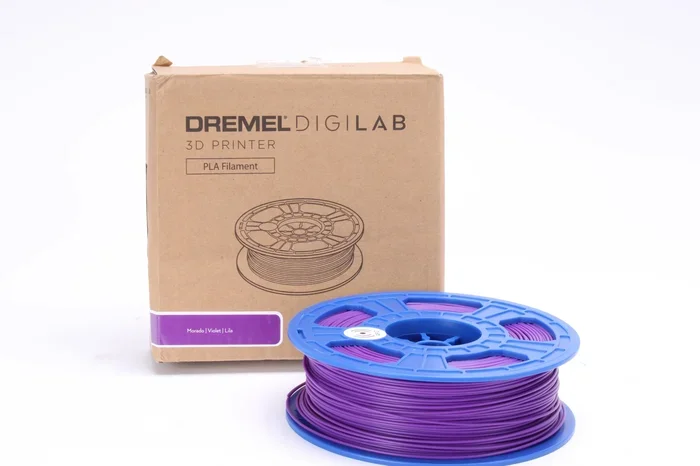
Dremel sells its own line of filaments designed specifically for its printers. These filaments are tested and guaranteed to work with Dremel 3D printer models. Using Dremel-branded filament takes the guesswork out of material selection.
The brand offers PLA, ABS, and PETG options in their filament lineup. Each spool comes with recommended print settings already dialed in. This is a great option if you want hassle-free printing and consistent results without spending time tweaking settings.
Filaments to Avoid With Dremel Printers
Not every filament on the market is suitable for Dremel 3D printers. Some materials require hardware upgrades, extreme temperatures, or specialized setups that standard Dremel models do not have. Here are the filaments you should generally avoid unless you have confirmed compatibility.
Nylon Filament
Nylon is a strong and flexible material, but it is also very demanding. It absorbs moisture from the air quickly, which affects print quality. Nylon requires high extrusion temperatures and a dry printing environment. Most standard Dremel printers are not equipped to handle nylon reliably.
If you really want to print with nylon, you would need a printer with an all-metal hot end and a well-controlled environment. For most Dremel users, sticking with PLA, ABS, or PETG is the smarter path.
TPU and Flexible Filaments
TPU (Thermoplastic Polyurethane) and other flexible filaments are tricky to print. They require specialized extruders that can handle the give-and-take of soft material. Standard Dremel printers use direct drive or bowden extruders that are not designed for flexible filaments.
Attempting to print with TPU on a Dremel printer not designed for it often leads to under-extrusion, clogged nozzles, and messy prints. If you need flexible parts, consider upgrading your printer or choosing a different machine built for flexible materials.
High-Temperature Filaments
Materials like polycarbonate, PEEK, and Ultem require extremely high printing temperatures, sometimes exceeding 260°C. These filaments also need heated chambers to prevent warping and cracking. Standard Dremel printers cannot reach these temperatures or maintain the stable environment these materials demand.
Stick with the filaments your printer is designed for. You will get much better results and avoid damaging your machine.
How to Choose the Right Filament for Your Dremel Printer
Choosing the right filament does not have to be complicated. Follow these simple steps to make sure you pick the best material for your project and your printer.
Check Your Printer Manual
The first step is always to consult your Dremel printer manual. The manual lists all tested and approved filament types for your specific model. It also provides recommended print settings, including temperature ranges and bed adhesion tips.
If you have lost your manual, you can usually find a digital version on the Dremel website. Search for your printer model number and look for the technical specifications section.
Match the Filament Diameter
Most Dremel 3D printers use 1.75mm filament. This is the industry standard and the most common diameter available. Always double-check the diameter listed on the filament spool before you buy. Using 2.85mm filament in a printer designed for 1.75mm will cause extrusion problems and ruined prints.
Even small differences in diameter can affect how the filament feeds through the extruder. Consistency in diameter is key to smooth, reliable printing.
Consider Your Project Needs
Think about what you are printing and what properties matter most. Here is a quick guide to help you decide:
- Prototyping and display pieces: Go with PLA. It is easy to print and comes in tons of colors.
- Functional parts and enclosures: Choose ABS or PETG for strength and heat resistance.
- Outdoor or moisture-exposed objects: PETG holds up better than PLA in humid conditions.
- Beginner-friendly printing: Stick with PLA or Dremel-branded filaments for the easiest experience.
Buy from Reputable Brands
Not all filament is created equal. Cheap, no-name filaments often have inconsistent diameters, impurities, and poor quality control. This leads to print failures and frustration. Stick with well-known brands or Dremel’s own filament line for the most reliable results.
If you are new to 3D printing, starting with a trusted brand saves you from troubleshooting issues that are really just material problems in disguise. Good filament makes a noticeable difference in print quality and ease of use.
Common Mistakes When Using Filament in Dremel Printers
Even experienced 3D printers make mistakes with filament selection and handling. Here are some of the most common errors and how to avoid them.
Using Filament Without Checking Compatibility
The biggest mistake is assuming any filament will work. Just because a spool says “1.75mm” does not mean it is compatible with your Dremel printer. Always verify the material type and print temperature requirements before you load a new spool.
Think of it like fuel for a car. You would not put diesel in a gasoline engine, right? The same logic applies here. Using the wrong filament can damage your printer and waste your material.
Ignoring Filament Storage
Filament absorbs moisture from the air over time. Wet filament prints poorly, causing bubbling, stringing, and weak layer adhesion. Always store your filament in a sealed bag or container with desiccant packets when you are not using it.
If your filament has been exposed to humidity, you can dry it in a food dehydrator or a dedicated filament dryer. Running wet filament through your printer is one of the fastest ways to ruin a print.
Skipping Bed Preparation
Even with the right filament, a poorly prepared print bed leads to failed prints. Always clean your bed surface before starting a print. Use isopropyl alcohol to remove oils and dust. For materials like ABS, apply a thin layer of glue stick to help the print adhere.
Taking two minutes to prepare your bed can save you hours of frustration. It is one of the simplest yet most overlooked steps in successful 3D printing.
Not Calibrating Your Printer
Every Dremel printer needs occasional calibration. The bed level, nozzle height, and extruder tension all affect print quality. If your prints are coming out inconsistent, recalibrate before blaming the filament.
Many modern Dremel printers have auto-calibration features. If yours does, use them. If not, a simple manual calibration with a piece of paper goes a long way.
Tips for Better 3D Prints With Your Dremel Printer
Getting great prints is about more than just picking the right filament. Here are some practical tips that will improve your results right away.
Start With Test Prints
Before you commit to a full print, run a small test piece. This lets you check the filament flow, bed adhesion, and temperature settings without wasting material. A simple calibration cube or small demo print takes just a few minutes but saves a lot of trouble later.
Keep Your Printer Clean
Dust, filament scraps, and residue build up inside your printer over time. Regularly clean the print bed, nozzle area, and extruder gears. A clean printer runs more smoothly and produces more consistent results.
Think of it like maintaining a computer mouse — regular cleaning keeps everything working smoothly and extends the life of your equipment.
Tune Your Settings for Each Filament
Every filament type has its own ideal print settings. Do not use the same temperature and speed for PLA that you use for ABS. Take the time to adjust your slicer settings for each new material. The small effort pays off in dramatically better print quality.
Monitor Your Prints
Especially when trying a new filament, watch your first few layers closely. Look for proper adhesion, smooth extrusion, and consistent layer lines. Catching problems early lets you pause and fix things before you waste an entire print.
Where to Buy Filament for Your Dremel Printer
You can find compatible filament from several sources. Dremel’s official website and authorized retailers carry their branded filaments. Online marketplaces like Amazon and specialty 3D printing stores also offer a wide selection of third-party filaments.
When shopping online, always check the product specifications against your printer’s requirements. Look for filaments that explicitly list compatibility with Dremel models or meet the 1.75mm diameter standard. Reading reviews from other Dremel printer owners gives you real-world insights into how well a filament performs.
If you run into any issues with filament feeding or print quality, troubleshooting the problem early helps. Sometimes a simple cleaning or nozzle check resolves what looks like a filament problem. For more tech-related troubleshooting tips, you might find useful information in guides about common device issues, similar to how people look up fixes for things like troubleshooting a stubborn line in Excel when simple fixes resolve the problem.
Final Thoughts on Filament Compatibility
The question “Can You Use Any Filament In A Dremel 3d Printer” has a clear answer: no, not any filament. But with the right knowledge and a little care, choosing the right material becomes second nature. Stick with PLA, ABS, PETG, or Dremel-branded filaments for the most reliable experience.
Your Dremel 3D printer is a capable tool that delivers great results when you feed it the right material. Take the time to understand your printer’s capabilities, match your filament to your projects, and follow proper handling and storage practices. The difference in print quality and consistency will be obvious from your very next print.
Remember, the best 3D printing experience comes from using compatible materials and treating your printer with care. Start with the basics, experiment with new filaments as you gain confidence, and enjoy the creative freedom that your Dremel printer provides.
Happy printing, and here is to many successful prints with the right filament in your Dremel machine!
Frequently Asked Questions
What filament types are safe to use in a Dremel 3D printer?
Dremel 3D printers are designed to work with PLA, ABS, PETG, and Dremel-branded filaments. These materials are tested and approved for compatibility with Dremel printer models. Always check your specific printer manual for the full list of supported materials.
Can I use third-party filament with my Dremel printer?
Yes, you can use third-party filament as long as it matches the specifications of your Dremel printer. Look for 1.75mm diameter filaments and verify the recommended print temperatures. Reputable third-party brands often work just as well as Dremel’s own filaments.
What happens if I use the wrong filament in my Dremel printer?
Using the wrong filament can cause nozzle clogs, poor layer adhesion, warping, and uneven extrusion. In some cases, it can also damage the extruder or hot end. Always verify filament compatibility before loading a new spool into your printer.
How do I store filament to keep it in good condition?
Store your filament in a cool, dry place in a sealed bag or container with desiccant packets. Moisture is the biggest enemy of filament quality. Keeping your filament dry ensures smooth extrusion and high-quality prints every time.
Does Dremel sell its own branded filament?
Yes, Dremel offers its own line of filaments designed specifically for its 3D printers. These include PLA, ABS, and PETG options. Dremel-branded filaments come with recommended settings, making them a great choice for hassle-free printing.
What filament diameter do Dremel 3D printers use?
Most Dremel 3D printers use 1.75mm filament, which is the industry standard. Always double-check the diameter on the filament spool and match it to your printer’s specifications to avoid feeding and extrusion issues.
=== CONCLUSION ===
Using the right filament in your Dremel 3D printer makes all the difference in the world. Not every material will work, and choosing the wrong one leads to wasted time, failed prints, and potential damage to your machine. Stick with compatible filaments like PLA, ABS, PETG, and Dremel-branded options for the best results.
Take a few minutes to check your printer manual, verify filament diameter, and match the material to your project needs. These small steps prevent big problems down the road. With the right filament and proper care, your Dremel printer will deliver consistent, high-quality prints for many projects to come.
Now that you know exactly what works and what does not, you are ready to make smarter choices with every spool you load. Happy printing, and enjoy the creative possibilities your Dremel 3D printer has to offer!