Can You Get A Good Gaming Laptop For Under 500 Dollars
Yes, you absolutely can get a good gaming laptop for under 500 dollars if you know what to look for. A budget gaming laptop can handle popular titles like Fortnite, Minecraft, and GTA V at decent settings. In this guide, we break down the best affordable gaming notebooks, key specs to watch, and expert tips to help you get the most value under 500 dollars.
Key Takeaways
- Budget gaming is real: You can find solid gaming laptops under 500 that handle popular games well.
- Focus on GPU and RAM: The graphics card and memory matter most for gaming performance on a budget.
- Refurbished options save big: Certified refurbished laptops can offer premium specs at budget prices.
- Avoid common pitfalls: Don’t let marketing gimmicks trick you into buying an overpowered-looking but underperforming machine.
- Upgrades help: Adding RAM or an SSD later can breathe new life into a cheap gaming laptop.
- Entry-level gaming is enough for most: You don’t need a $2000 machine to enjoy hundreds of great games.
- Compare deals year-round: Seasonal sales and clearance events are the best times to grab a budget gaming deal.
📑 Table of Contents
Why a Gaming Laptop Under 500 Is Worth It
Let’s be honest. Not everyone has a thousand-dollar budget for a gaming laptop. Maybe you are a student. Maybe you are just getting into PC gaming. Or maybe you want a solid backup machine without breaking the bank. Whatever your reason, gaming on a budget is totally doable in 2024.
The truth is, the gaming industry has changed a lot. Games today are more optimized than ever. Developers know most players are not running top-tier hardware. That means even a budget gaming laptop can deliver a great experience. You just need to know where to look and what to expect.
A laptop under 500 dollars is not going to run Cyberpunk 2077 on ultra settings. But it can handle Fortnite, League of Legends, Minecraft, and many other popular titles smoothly. And honestly, that is enough fun for most gamers out there.
Who Is a Budget Gaming Laptop For?
Here are some perfect use cases for a cheap laptop for games:
- Casual gamers who play a few hours a week
- Students who need a machine for school and light gaming
- Families looking for a shared entertainment device
- Beginners exploring PC gaming for the first time
- People who want a portable gaming setup on a budget
You do not need the latest RTX 4090 to have a blast. Some of the most fun gaming experiences happen on modest hardware. The key is setting realistic expectations and picking the right machine.
What to Look for in a Budget Gaming Laptop
Shopping for a low-cost gaming machine can feel overwhelming. There are so many options. So many brands. So many specs. But you really only need to focus on a few key areas. Let us simplify this for you.
The GPU: Your Most Important Spec
The graphics card is the heart of any affordable gaming notebook. Without a decent GPU, nothing else matters much. For under 500 dollars, look for these graphics options:
- NVIDIA GTX 1650: Great for 1080p gaming on medium settings
- NVIDIA RTX 3050: Better performance with ray tracing support
- AMD Radeon RX 6500M: A solid budget-friendly alternative
If you see a laptop under 500 with an RTX 3050, grab it. That is a sweet spot for budget-friendly gaming. The GTX 1650 is still decent but shows its age. Avoid laptops with only integrated graphics if you want real gaming power.
RAM: Don’t Skimp Here
Most entry-level gaming laptops come with 8GB of RAM. That is the minimum you should accept. Some budget models still ship with 4GB, and that is a big problem. 4GB will choke on modern games and even basic multitasking.
Here is a quick breakdown:
- 4GB RAM: Too low. Avoid unless you plan to upgrade immediately.
- 8GB RAM: The sweet spot for budget gaming.
- 16GB RAM: Excellent. You may find this under 500 during sales.
Pro tip: If the laptop has 8GB but uses single-channel memory, consider upgrading to dual-channel. It can boost gaming performance by 15-20% in some titles. That is a cheap upgrade that makes a real difference.
Storage: SSD Over HDD Every Time
Storage affects how fast your games load. A traditional HDD is slow. An SSD is dramatically faster. For a cost-effective gaming laptop, always choose an SSD if you can.
Most budget laptops now come with a 256GB or 512GB SSD. That is enough for several games and your operating system. If you find a model with a 512GB SSD under 500, that is a win.
Some laptops offer both an SSD for speed and an HDD for storage. That combo is nice but rare at this price point. You can always add an external drive later if you need more space.
Display and Build Quality
A good cheap gaming notebook should have at least a 1080p display. Anything lower and your gaming experience suffers. Look for these display specs:
- 1080p resolution: Standard and minimum for gaming
- 60Hz refresh rate: Fine for most casual games
- IPS panel: Better colors and viewing angles than TN panels
Higher refresh rates like 120Hz or 144Hz are nice but rare under 500. Do not worry about that too much. Focus on getting a clear, bright IPS screen.
Build quality matters too. Plastic bodies are common at this price. That is fine. Just avoid flimsy hinges and cheaply made keyboards. Read reviews to check if the laptop feels sturdy.
Battery Life and Portability
Gaming laptops are not known for long battery life. That is just the truth. But some affordable gaming PC options last longer than others. Look for at least 4-5 hours of normal use. That is enough for a few classes or a short trip.
Weight matters if you carry your laptop around. Most budget gaming laptops weigh between 4.5 and 5.5 pounds. That is manageable. Anything over 6 pounds gets old fast.
Best Gaming Laptops Under 500 in 2024
Now let us talk specific models. These are some of the best gaming laptop deals you can find right now under 500 dollars. Prices fluctuate, so always check current deals.
Acer Aspire 5
The Acer Aspire 5 is a fan favorite for a reason. It often appears under 500 with solid specs. You typically get an AMD Ryzen processor, 8GB RAM, and a dedicated GPU. It is not the flashiest machine. But it delivers reliable performance for the price.
It has a 1080p IPS display and decent battery life. Build quality is above average for this price range. Many gamers use this as their starter machine and are happy with it for years.
Lenovo IdeaPad Gaming 3
Lenovo makes some seriously value gaming laptops. The IdeaPad Gaming 3 is a great example. It offers Ryzen or Intel processors paired with a GTX 1650 or RTX 3050. The keyboard is comfortable for long sessions.
One thing to love is Lenovo’s customer service. They are usually responsive if something goes wrong. That matters more than people think when buying a budget machine.
HP Victus 15
The HP Victus 15 punches above its weight. It has a clean design that does not scream “gamer.” That is actually a plus if you want a machine that works for school or work too. Under 500, you can often find configurations with RTX 3050 graphics.
Thermal performance is decent. It does not run too hot during intense gaming sessions. The display is bright and sharp. Overall, it is one of the most balanced options in this price range.
ASUS VivoBook Series
ASUS offers some interesting low-price gaming options in the VivoBook line. These are lighter and thinner than traditional gaming laptops. They are great for portability. Just check the GPU specs carefully. Some models use integrated graphics only.
Comparison Table: Top Picks Under 500
| Laptop | GPU | RAM | Storage | Display | Best For |
|---|---|---|---|---|---|
| Acer Aspire 5 | GTX 1650 | 8GB | 512GB SSD | 1080p IPS | All-around value |
| Lenovo IdeaPad Gaming 3 | RTX 3050 | 8GB | 256GB SSD | 1080p IPS | Best gaming performance |
| HP Victus 15 | RTX 3050 | 8GB | 256GB SSD | 1080p IPS | Balanced design |
| ASUS VivoBook | GTX 1650 | 8GB | 512GB SSD | 1080p IPS | Portability |
Refurbished and Open-Box Options
Here is a secret many budget gamers know. Refurbished gaming laptops can offer incredible value. A laptop that was returned or lightly used can cost hundreds less. Many are essentially brand new with a warranty.
Check retailers like Amazon Renewed, Best Buy Outlet, or manufacturer refurbished stores. You might find an RTX 3060 laptop for under 500. That would normally cost over 800 dollars new.
Just make sure the seller offers a warranty. And check the return policy. Refurbished is a great path for inexpensive gaming computers if you do your research.
How to Maximize Performance on a Budget
Buying a gaming laptop for under 500 does not mean you are stuck forever. There are many ways to boost performance after purchase. Some are free. Some cost very little. Let me share some practical tips.
Keep Your Drivers Updated
GPU drivers get updated regularly. These updates often improve gaming performance. NVIDIA and AMD release optimizations for new games all the time. Set a reminder to check for updates monthly. It takes just a few minutes and makes a difference.
Optimize In-Game Settings
Not every game needs maxed-out settings. Here is a smart approach:
- Lower shadow quality first. It impacts performance the most.
- Keep anti-aliasing on. It makes the game look much better.
- Reduce draw distance if the game feels slow.
- Turn off motion blur. It rarely helps and uses resources.
- Set resolution to 1080p. Going lower is a sacrifice.
These small tweaks can push frame rates up by 30-40%. That is huge on a budget machine.
Use a Cooling Pad
Gaming laptops get hot. Heat throttles performance. A simple cooling pad can drop temperatures by 10-15 degrees. That means your laptop runs faster for longer. Good cooling pads cost between 20 and 40 dollars. It is one of the best investments you can make.
Upgrade When You Can
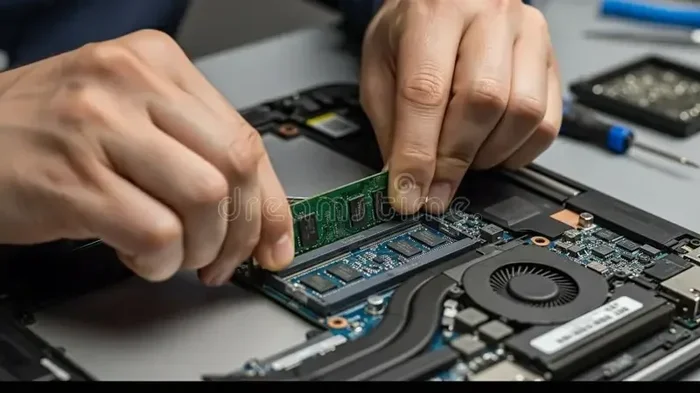
Many budget laptops allow RAM and storage upgrades. Start with 8GB and add another 8GB stick later. Swap a 256GB SSD for a 1TB one when prices drop. These upgrades keep your machine relevant for years.
Before buying, check if your specific model supports upgrades. Some thin laptops have soldered RAM and cannot be upgraded. But many budget models are fully upgradeable.
Use Game Boosters and Performance Tools
Software tools can help too. NVIDIA GeForce Experience has a game-ready driver and optimization settings. AMD has similar tools. Close background apps before gaming. Disable startup programs you do not need. These free steps add up.
Quick Tips for Budget Gaming Performance
- Always plug in your laptop while gaming. Battery mode limits performance significantly.
- Use a power plan set to “High Performance” or “Best Performance.”
- Keep your desktop clean. Too many files slow down the system.
- Reinstall Windows if things get sluggish after a couple of years.
- Consider a lightweight Linux distro for older hardware.
Common Mistakes When Buying a Cheap Gaming Laptop
Buying a budget laptop is tricky. Many people make avoidable mistakes. Let me save you some trouble. Here are the most common pitfalls when shopping for a low-cost gaming machine.
Chasing Specs on Paper
Some listings show impressive-sounding specs. But the details tell a different story. For example, “16GB RAM” sounds great. But if it is shared with integrated graphics, you only have 8GB for actual gaming. Always read the fine print.
Another trap is old processors marketed as “upgraded.” An Intel i7 from 2018 is not the same as a 2023 i7. Always check the exact model number and release date.
Ignoring Thermals
Some affordable gaming notebooks look great on paper but overheat constantly. Poor cooling means the GPU and CPU throttle. You get low scores on benchmarks but a bad real-world experience. Always check thermal reviews before buying.
YouTube reviewers are your best friends here. They test real-world temperatures and frame rates. Take reviews with a grain of salt, but patterns matter. If multiple reviewers say the same laptop runs hot, believe them.
Forgetting About the Keyboard and Trackpad
You will use these every day. A cheap keyboard with mushy keys ruins the experience. A tiny or inaccurate trackpad makes everything frustrating. If possible, try the laptop in a store first. Otherwise, read reviews that mention input quality.
Buying from Unreliable Sellers
Too-good-to-be-true deals exist for a reason. A laptop under 300 with an RTX 3060 is almost certainly a scam. Stick to reputable retailers and well-known brands. Your money is safer that way.
Watch out for gray market imports too. They may lack warranty support in your country. The savings are not worth the risk.
Not Checking Return Policies
Things go wrong. Your laptop might arrive with a dead pixel. The screen might flicker. Always buy from sellers with clear return policies. A 30-day return window is ideal. Some budget retailers only offer 14 days. That is often not enough time to fully test a machine.
Expert Insight: What Experienced Gamers Want You to Know
Most experienced gamers will tell you the same thing. A budget gaming laptop is a starting point, not a final destination. Buy what you can afford now. Upgrade later when your budget grows. The gaming community is huge and welcoming. No one judges you for playing on modest hardware.
One veteran gamer shared this advice: “I started with a 400-dollar laptop and played for three years before upgrading. Those three years were full of amazing games and memories. Do not let gear anxiety stop you from enjoying the hobby.” That perspective is refreshing and true.
Is a Gaming Laptop Under 500 Right for You?
So, can you get a good gaming laptop for under 500 dollars? Absolutely. But the real question is whether it is right for you. Let us break it down honestly.
It Is Right for You If:
- You enjoy casual or competitive games like Fortnite, Valorant, or Minecraft
- You want a portable machine for school and gaming
- You are new to PC gaming and want to test the waters
- You have a limited budget but still want quality
- You plan to upgrade components over time
It Might Not Be Enough If:
- You want to play demanding AAA titles on ultra settings
- You plan to stream and game at the same time
- You need heavy video editing or 3D rendering power
- You expect 1440p or 4K gaming performance
For most people, a gaming laptop under 500 hits a sweet spot. It gives you access to hundreds of great games. It is portable, practical, and affordable. And it leaves money in your pocket for other things.
Setting Realistic Expectations
Expect medium settings at 1080p for most games. Expect 60fps in competitive titles. Expect lower frame rates in demanding single-player games. That is perfectly fine. Millions of gamers enjoy their favorite titles on similar hardware every single day.
The gaming community is not about who has the best rig. It is about enjoying the experience. A cheap laptop for games can absolutely deliver that.
The Bottom Line
A gaming laptop for under 500 dollars is a smart, practical choice for most people. Focus on the GPU, get at least 8GB of RAM, and choose an SSD. Compare real reviews. Watch for deals. And do not fall for misleading specs. With the right approach, you can have a fantastic gaming machine without spending a fortune. The best gaming laptop is the one that lets you play the games you love. And that does not require a huge budget.
So go ahead. Explore the options. Read the reviews. And find your perfect affordable gaming PC. You might be surprised at just how much gaming power hides under the 500-dollar price tag.
Frequently Asked Questions
Can a gaming laptop under 500 run modern games?
Yes, but with limitations. A gaming laptop under 500 can run popular modern games like Fortnite, Valorant, and GTA V at medium settings with good frame rates. Demanding AAA titles will need lower settings. Focus on 1080p gaming for the best experience on a budget.
What is the most important spec in a budget gaming laptop?
The GPU is by far the most important spec. Look for a dedicated graphics card like the NVIDIA GTX 1650 or RTX 3050. A good graphics card matters more than CPU speed, RAM amount, or storage size when it comes to gaming performance on a low-cost gaming machine.
Should I buy refurbished or new for under 500?
Refurbished can be a great option if you find a refurbished gaming laptop from a reputable seller with a warranty. You often get better specs for the same price. However, buying new gives you peace of mind and a full manufacturer warranty. Weigh both options based on the specific deal.
How long will a 500-dollar gaming laptop last?
With proper care and upgrades, a budget gaming laptop can last 3 to 5 years for casual gaming. Adding more RAM or upgrading storage later can extend its life. It will not run the newest games forever, but it will serve you well for several solid years of play.
Is 8GB RAM enough for budget gaming?
Yes, 8GB RAM is the minimum and is sufficient for most gaming on a cheap laptop for games. Many titles run perfectly fine with 8GB. You can always upgrade to 16GB later if you start running into issues with multitasking or newer game releases.
What games can I play on a laptop under 500 dollars?
You can enjoy hundreds of great titles. Games like Fortnite, Minecraft, League of Legends, Rocket League, CS2, GTA V, and The Witcher 3 run well at medium to high settings. Indie games and older AAA titles will run even higher. A budget-friendly gaming laptop opens up a huge library of fun.
=== CONCLUSION ===
Final Thoughts on Getting a Gaming Laptop Under 500 Dollars
So there you have it. Can you get a good gaming laptop for under 500 dollars? The answer is a clear and confident yes. The gaming world has evolved to include players at every budget level. You no longer need thousands of dollars to enjoy hundreds of amazing games.
Focus on what matters most. A solid GPU, at least 8GB of RAM, and an SSD storage drive. Add smart upgrades over time. Watch for seasonal deals. And most importantly, set realistic expectations for what a budget gaming laptop can do.
The best gaming experience is the one you actually have. Not the one with the most expensive hardware. A cost-effective gaming setup under 500 dollars gives you access to an incredible world of entertainment. Take that first step. Do your research. Pick the right machine. And start playing. You will not regret it.