Can A Convertible Laptop Be Used As A Tablet For Work
Yes, a convertible laptop can absolutely be used as a tablet for work. These 2-in-1 hybrid devices give you the flexibility to switch between laptop and tablet modes in seconds. Whether you are typing reports or sketching ideas on a touchscreen, a convertible laptop tablet combo handles both tasks with ease. In this guide, we will walk you through everything you need to know about using a convertible laptop as a tablet for your daily work.
Can a convertible laptop be used as a tablet? The short answer is yes. But the real question is whether it can handle your work tasks just as well as a dedicated tablet or a traditional laptop. The truth is, convertible laptops have come a long way in recent years. They are no longer just gimmicky devices that try to do everything and excel at nothing. Today, a 2-in-1 hybrid device can genuinely replace both a laptop and a tablet for most professionals.
If you have ever sat in a coffee shop trying to type an email on a tablet or struggled to annotate a PDF on a clunky laptop, you know the struggle. A convertible laptop for work solves this problem. It gives you a full keyboard when you need to write reports, and a touchscreen tablet when you need to sketch, present, or read documents. The best part? You do not need to buy two separate devices to get both experiences.
In this article, we will explore everything you need to know about using a convertible laptop as a tablet for work. We will cover how they work, what to look for, the pros and cons, and practical tips to get the most out of your hybrid device. Whether you are a student, a freelancer, or a corporate professional, this guide will help you decide if a laptop tablet combo is the right choice for your workflow.
Key Takeaways
- Convertible laptops work as tablets: You can detach or fold the keyboard and use the screen as a standalone tablet for work tasks.
- They boost productivity on the go: A 2-in-1 hybrid device lets you work from anywhere without carrying two separate devices.
- Touchscreen and stylus support matter: Look for pen input and a responsive touch screen if you plan to use your device as a tablet.
- Battery life varies by mode: Using a convertible laptop in tablet mode often drains the battery faster than in laptop mode.
- OS and software compatibility count: Windows tablets and ChromeOS hybrids offer different app experiences compared to iPad-style devices.
- Keyboard attachment affects the experience: A well-built detachable keyboard makes the transition between modes smooth and practical.
- Not all convertibles are equal: Budget models may lag or lack pen support, so choose based on your mobile productivity needs.
📑 Table of Contents
- What Is a Convertible Laptop?
- How a Convertible Laptop Works as a Tablet
- Benefits of Using a Convertible Laptop as a Tablet for Work
- Drawbacks to Consider
- What to Look for in a Convertible Laptop for Work
- Top Convertible Laptops for Work in 2024
- Common Mistakes People Make with Convertible Laptops
- Expert Insights: Who Benefits Most from a Convertible Laptop?
- Key Takeaways
- Conclusion
What Is a Convertible Laptop?
A convertible laptop is a device that blends the features of a laptop and a tablet. It has a touchscreen display and a keyboard that can be folded back, detached, or rotated to transform the device into a tablet mode. These devices are often called 2-in-1 PCs or hybrid laptops. They run full operating systems like Windows or ChromeOS, which means you get the same software experience you would on a regular laptop.
The idea behind a convertible PC is simple. You get the power and typing comfort of a laptop. You also get the portability and touch interaction of a tablet. This makes mobile productivity much easier. Instead of carrying a heavy laptop bag and a separate tablet, you carry one device that does it all.
Types of Convertible Laptops
Not all convertible laptops are built the same way. There are two main types you should know about.
Detachable laptops have a keyboard that separates completely from the screen. The screen becomes a standalone Windows tablet or Android tablet once detached. Microsoft Surface devices are a great example of this design. You get a full tablet experience with no keyboard in the way.
360-degree hinge laptops keep the keyboard attached but allow the screen to rotate 360 degrees. You fold the laptop into a tent shape or a tablet shape while the keyboard stays behind the screen. Devices like the Lenovo Yoga series use this design. They are sturdy and do not have loose parts, but the keyboard is always present even in tablet mode.
How a Convertible Laptop Works as a Tablet
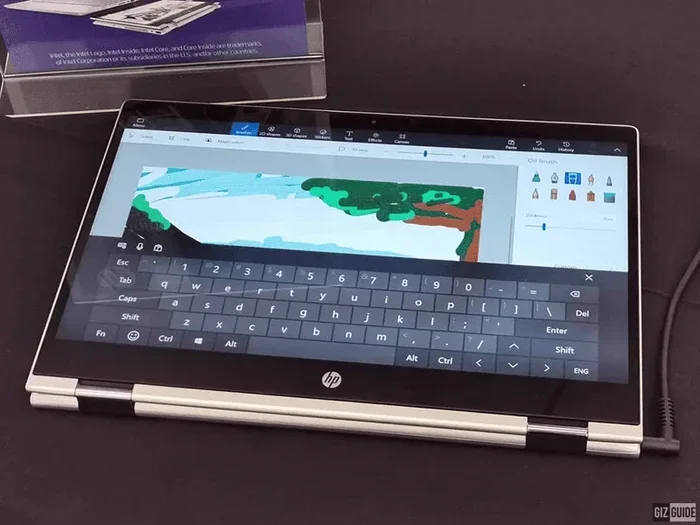
Using a convertible laptop as a tablet is straightforward. The operating system detects when you switch modes and adjusts the interface accordingly. In tablet mode, the start menu expands, touch controls become larger, and on-screen keyboards appear when you tap a text field.
Most convertible laptops come with stylus support. You can use a digital pen to write, draw, or navigate the screen. This is a huge advantage over regular laptops. If your job involves signing documents, taking notes, or marking up designs, a stylus-enabled convertible makes those tasks much more natural.
The touch screen is the key feature that makes a laptop tablet combo work. Without a responsive touchscreen, a convertible is just a regular laptop. So when shopping, always confirm that the device has a multi-touch display with good color accuracy and brightness.
Switching Between Modes
Switching between laptop and tablet mode usually takes just a few seconds. On a detachable model, you simply pull the keyboard away. On a 360-degree hinge model, you flip the screen back and fold it into a tablet shape. The device automatically detects the change and switches the interface.
Some devices let you lock a specific mode so the screen does not keep rotating as you move around. This is helpful when you are using the device as a portable tablet and do not want the display to flip unexpectedly. You can usually find this setting in the system preferences under display rotation or tablet mode settings.
Benefits of Using a Convertible Laptop as a Tablet for Work
There are many reasons why professionals are switching to convertible laptops for their daily work. Here are the biggest benefits.
Portability and Flexibility
A convertible laptop is lighter and more compact than carrying both a laptop and a tablet. You can slip it into a small bag, take it on a train, and use it however you need. When you need to type, flip it into laptop mode. When you need to read or sketch, switch to tablet mode. This flexible laptop design saves space and reduces clutter.
All-in-One Workflow
With a 2-in-1 hybrid device, you do not need to switch between apps or devices to complete a task. You can type a report in the morning, detach the keyboard, and present the same document on a touchscreen in the afternoon. Your files, settings, and apps stay the same across both modes. This creates a seamless work from anywhere experience.
Touch and Pen Input for Creativity
If your work involves design, brainstorming, or annotation, a convertible laptop with pen support is a game-changer. You can draw diagrams, sign contracts, highlight text, and take handwritten notes directly on the screen. This level of interaction is not possible with a standard laptop or a basic tablet without a keyboard.
Full Desktop Software
One major advantage of Windows-based convertible laptops is that they run full desktop applications. You can use Microsoft Office, Adobe Suite, and other professional software just like you would on a regular laptop. Many Android tablets and iPads cannot run these full applications, which limits their usefulness for certain types of work.
Drawbacks to Consider
While convertible laptops are impressive, they are not perfect. Here are some drawbacks you should be aware of before making a decision.
Battery Life in Tablet Mode
Using a convertible laptop in tablet mode typically drains the battery faster. The touchscreen uses more power, and the device may not be optimized for battery savings when the keyboard is detached or folded back. If you need all-day battery life, you may need to carry a charger or choose a model with a large battery.
Weight and Thickness
Even the lightest convertible laptops are heavier than most dedicated tablets. A laptop tablet combo usually weighs between 2 and 4 pounds. If you are used to holding an iPad for long periods, a convertible laptop might feel heavy after a while. This is especially true for 360-degree hinge models where the keyboard adds bulk even in tablet mode.
Touchscreen Quality Varies
Not every convertible laptop has a great touchscreen. Some budget models use low-resolution displays that look dull and feel unresponsive. If you plan to use your device mostly as a tablet for work, invest in a model with a high-quality IPS or OLED display with good touch sensitivity.
Stylus Sold Separately
Many convertible laptops do not include a stylus in the box. You may need to buy one separately, which adds to the cost. Before purchasing, check whether the pen input is included or sold as an accessory. Some brands like Microsoft include the Surface Pen with certain models, but others do not.
What to Look for in a Convertible Laptop for Work
Not all convertible laptops are created equal. If you want a device that truly works well as both a laptop and a tablet, here are the key features to prioritize.
Display Quality
The screen is the most important part of any convertible laptop. Look for a full HD or 4K touchscreen with good color accuracy and brightness. A 2-in-1 laptop with a dull, low-resolution display will feel frustrating to use in tablet mode. Aim for at least a 1080p resolution with a 10-point multitouch display.
Keyboard Quality
Since you will be typing in laptop mode, the keyboard matters a lot. Look for a detachable keyboard with good key travel and backlighting. A mushy or shallow keyboard will make long typing sessions uncomfortable. If you buy a 360-degree hinge model, the keyboard is always attached, so make sure it feels comfortable for extended use.
Processor and Performance
A convertible laptop should be fast enough to handle your daily work tasks. Look for at least an Intel Core i5 or AMD Ryzen 5 processor. If you run heavy applications like video editing software or complex spreadsheets, consider an Intel Core i7 or equivalent. RAM of at least 8 GB is recommended for smooth multitasking.
Stylus and Pen Support
If you plan to use your device as a tablet for note-taking or design work, make sure it supports a stylus. Check whether the pen is included and whether it offers pressure sensitivity and low latency. A good pen input experience makes a huge difference in how natural and productive the tablet mode feels.
Battery Life
Look for a convertible laptop with at least 8 to 10 hours of battery life. This ensures you can work through a full day without constantly searching for a charger. Keep in mind that battery life will be shorter in tablet mode compared to laptop mode, so plan accordingly.
Port Selection
Many thin and light convertibles sacrifice ports for slimness. Check that the device has enough USB ports, a headphone jack, and a charging port that work with your accessories. If you need to connect to projectors, external monitors, or USB drives regularly, port availability becomes even more important.
Top Convertible Laptops for Work in 2024
Here are some of the best convertible laptops that work well as tablets for professional use.
Microsoft Surface Pro 10
The Surface Pro 10 is one of the most popular 2-in-1 hybrid devices on the market. It is a detachable laptop that runs full Windows 11. The touchscreen is bright and responsive, and it supports the Surface Pen for natural writing and drawing. It is lightweight, powerful, and designed specifically for professionals who need a laptop replacement that doubles as a tablet.
Lenovo Yoga 9i
The Lenovo Yoga 9i is a premium 360-degree hinge convertible with a stunning OLED display. It is sleek, powerful, and offers excellent keyboard quality. The device flips easily into tablet mode and works well for both productivity and creative tasks. It is a great choice if you want a flexible laptop that looks and feels premium.
HP Spectre x360
The HP Spectre x360 combines strong performance with a beautiful design. It has a bright touch screen, a comfortable keyboard, and solid battery life. It works well as both a laptop for work and a tablet for presentations. The aluminum build gives it a professional look that suits corporate environments.
Acer Spin 7
The Acer Spin 7 is a more affordable convertible laptop that still delivers solid performance. It has a lightweight design, a good touchscreen, and long battery life. It is a great option for professionals who want a laptop tablet combo without spending a premium price.
Common Mistakes People Make with Convertible Laptops
Many users do not get the most out of their convertible laptops because of common mistakes. Here are a few to avoid.
Buying a Low-Quality Touchscreen
Not every convertible laptop has a good touchscreen. Some budget models use low-quality displays that are dim, blurry, or unresponsive. Always check the display specs before buying. A poor touchscreen makes the tablet mode experience frustrating and defeats the purpose of a hybrid device.
Ignoring Keyboard Comfort
It is easy to focus on the tablet features and forget about the keyboard. But if you type a lot for work, a bad keyboard will hurt your productivity. Test the keyboard in person if possible, or read reviews that specifically mention typing comfort.
Expecting Tablet Battery Life
A convertible laptop will not give you the same battery life as a dedicated tablet. The larger screen, more powerful processor, and full operating system use more energy. Set realistic expectations and carry a charger if you need all-day power.
Forgetting About Software Compatibility
Some convertible laptops run Windows, while others run ChromeOS or Android. Make sure the operating system supports the software you need for your work. If your job requires specific desktop applications, a Windows-based convertible is usually the safest choice.
Expert Insights: Who Benefits Most from a Convertible Laptop?
Convertible laptops are not for everyone, but they are a perfect fit for certain types of professionals. Here is who benefits the most.
Sales professionals who need to present to clients, take notes, and sign documents on the go will love the flexibility of a 2-in-1 hybrid device. Creative workers like designers and architects benefit from stylus support and a responsive touchscreen. Students and educators appreciate being able to take notes by hand and type essays with the same device. Executives and managers who travel frequently value the portability of a convertible laptop that replaces both a laptop and a tablet.
Even remote workers who work from home most of the time can benefit. A convertible laptop lets you switch between typing and watching meetings on a touchscreen without needing two devices on your desk.
Key Takeaways
- Convertible laptops work as tablets: You can detach or fold the keyboard and use the screen as a standalone tablet for work tasks.
- They boost productivity on the go: A 2-in-1 hybrid device lets you work from anywhere without carrying two separate devices.
- Touchscreen and stylus support matter: Look for pen input and a responsive touch screen if you plan to use your device as a tablet.
- Battery life varies by mode: Using a convertible laptop in tablet mode often drains the battery faster than in laptop mode.
- OS and software compatibility count: Windows tablets and ChromeOS hybrids offer different app experiences compared to iPad-style devices.
- Keyboard attachment affects the experience: A well-built detachable keyboard makes the transition between modes smooth and practical.
- Not all convertibles are equal: Budget models may lag or lack pen support, so choose based on your mobile productivity needs.
Conclusion
The answer to the question can a convertible laptop be used as a tablet for work is a clear and confident yes. A convertible laptop gives you the best of both worlds. You get a full keyboard and desktop software when you need to work seriously, and a responsive touchscreen with stylus support when you need flexibility and creativity.
These 2-in-1 hybrid devices have matured significantly. They are no longer compromises. They are genuine laptop replacements that also work as capable tablets for productivity. Whether you choose a detachable model like the Microsoft Surface Pro or a 360-degree hinge model like the Lenovo Yoga, you will find that a convertible laptop fits naturally into your work routine.
The key is to choose a model that matches your specific needs. Prioritize display quality, keyboard comfort, stylus support, and battery life. Avoid common mistakes like buying a low-quality touchscreen or ignoring software compatibility. With the right convertible laptop, you can simplify your workflow, reduce the gear you carry, and work more efficiently from anywhere.
So if you are still wondering whether a convertible laptop is worth it for your work, the answer is yes. Give it a try, and you will likely wonder how you ever managed with two separate devices.
Can A Convertible Laptop Be Used As A Tablet For Work?
Yes, a convertible laptop can be used as a tablet for work by switching to tablet mode and using the touchscreen for tasks like reading, presenting, sketching, and taking notes.
Is a Convertible Laptop Better Than a Regular Tablet for Work?
A convertible laptop is often better for work because it runs full desktop software, has a physical keyboard, and offers more processing power than most regular tablets.
Do You Need a Stylus to Use a Convertible Laptop as a Tablet?
No, a stylus is not required, but it greatly enhances the experience for note-taking, drawing, and precise annotations on the touch screen.
How Long Does the Battery Last in Tablet Mode?
Battery life in tablet mode is usually shorter than in laptop mode because the touchscreen uses more power. Most convertible laptops last between 5 and 8 hours in tablet mode depending on usage.
Can You Run Professional Software on a Convertible Laptop?
Yes, Windows-based convertible laptops can run full professional software like Microsoft Office, Adobe applications, and industry-specific tools just like a regular laptop.
What Is the Difference Between a Detachable and a 360-Degree Hinge Convertible?
A detachable convertible separates the keyboard from the screen completely, while a 360-degree hinge model keeps the keyboard attached and rotates the screen to switch between modes.
Frequently Asked Questions
What is Can A Convertible Laptop Be Used As A Tablet?
Can A Convertible Laptop Be Used As A Tablet is an important topic with many practical applications.