Can Usb Be Converted To Ethernet For Faster Connections
Yes, you can convert a USB port to Ethernet using a simple USB-to-Ethernet adapter, and it can significantly boost your wired network connection. Whether you have a USB-A or USB-C port, the right adapter delivers stable, high-speed internet for gaming, streaming, and work. This guide walks you through everything you need to know about choosing, setting up, and troubleshooting a USB to Ethernet conversion.
Have you ever been frustrated by slow Wi-Fi or a missing Ethernet port on your laptop? You are not alone. Many people face connectivity issues every day, especially as more of us work from home, game online, or stream content. The good news is that a simple USB-to-Ethernet adapter can solve this problem in minutes.
So, can USB be converted to Ethernet for faster connections? The short answer is a resounding yes. A USB-to-Ethernet adapter bridges the gap between your device’s USB port and a wired network connection. It gives you the speed and stability of a cable-based internet connection without needing to buy a new computer or router.
In this guide, we will cover everything you need to know. From choosing the right adapter to setting it up and troubleshooting common issues, you will find all the answers here. Let us dive in and explore how you can upgrade your internet connection with a simple little gadget.
Key Takeaways
- USB-to-Ethernet adapters are an easy and affordable way to add a wired internet connection to any device that lacks an Ethernet port.
- USB 3.0 and USB-C adapters support gigabit speeds, making them ideal for fast, stable connections for gaming and remote work.
- Wired Ethernet connections offer lower latency and more reliability compared to standard Wi-Fi, especially in busy network environments.
- Choosing the right adapter depends on your device, port type, and the internet speeds you need.
- Setup is simple and plug-and-play on most modern systems, but driver installation may be needed on older devices.
- Common issues like slow speeds or disconnections can usually be fixed with driver updates or a better-quality adapter.
📑 Table of Contents
- What Is a USB-to-Ethernet Adapter?
- Can USB Be Converted to Ethernet for Faster Connections?
- How to Choose the Right USB-to-Ethernet Adapter
- Step-by-Step Setup Guide
- Benefits of Using a USB-to-Ethernet Adapter
- Common Mistakes to Avoid
- Expert Insights and Tips
- Who Benefits Most From a USB-to-Ethernet Adapter?
- USB-to-Ethernet Adapter vs. Wi-Fi: Which Is Better?
- Final Thoughts
What Is a USB-to-Ethernet Adapter?
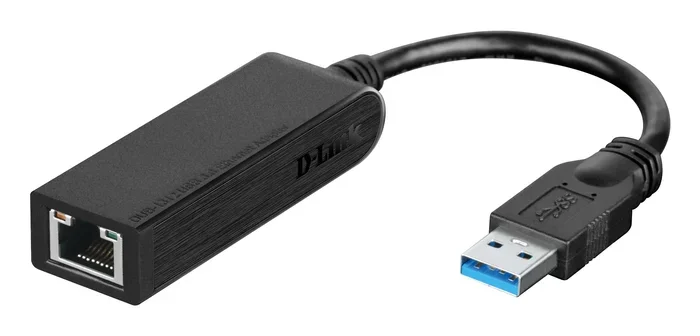
A USB-to-Ethernet adapter is a small device that plugs into your computer’s USB port and gives you an Ethernet jack. Think of it as a bridge between your USB port and your wired network. It is also sometimes called a network adapter or USB Ethernet dongle.
These adapters come in different shapes and sizes. Some are tiny and portable, while others are bulkier but offer better performance. The most common types include:
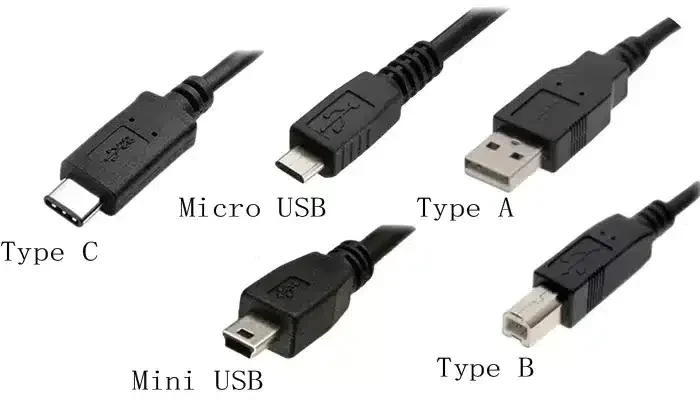
- USB-A to Ethernet adapters — these plug into the standard rectangular USB port found on older computers and laptops.
- USB-C to Ethernet adapters — these fit into the newer, smaller oval-shaped USB-C ports found on modern laptops, tablets, and phones.
- USB 3.0 adapters — these offer faster data transfer, which means better internet speeds over Ethernet.
- USB 2.0 adapters — these are older and slower but still work for basic internet browsing.
Most adapters are plug and play, meaning you just plug them in and your device recognizes them automatically. No complicated setup is needed on most modern computers.
Can USB Be Converted to Ethernet for Faster Connections?
The main reason people look for a USB-to-Ethernet adapter is speed. Wired Ethernet connections are almost always faster and more stable than Wi-Fi. Here is why this matters.
Why Wired Connections Are Faster
Wi-Fi signals travel through the air, and they can be weakened by walls, furniture, and other electronic devices. A wired Ethernet connection uses a physical cable, so the signal stays strong and consistent. This means:
- Higher bandwidth — you can handle more data at once, which is great for streaming 4K video or video calls.
- Lower latency — also called ping, this is the time it takes for data to travel from your device to the internet and back. Lower latency means smoother gaming and faster responses.
- More stable connection — no dropping out when someone walks through your Wi-Fi signal.
When you use a USB 3.0 or USB-C to Ethernet adapter, you can reach gigabit speeds of up to 1,000 Mbps. That is far faster than most home Wi-Fi setups. Even a USB 2.0 adapter can handle fast internet plans without breaking a sweat.
Real-World Speed Comparisons
Here is a quick look at what you can expect from different types of USB-to-Ethernet adapters:
- USB 2.0 Ethernet adapter: Real-world speeds of around 100 Mbps. Great for basic browsing and email.
- USB 3.0 Ethernet adapter: Real-world speeds of 300 to 900 Mbps. Perfect for streaming, gaming, and large file downloads.
- USB-C with Gigabit Ethernet: Full gigabit speeds up to 1,000 Mbps. Best for power users and professionals.
If you want to know more about setting up different tech accessories for your home or office, check out our guide on 10 Gadgets To Make Moms Life Easier for helpful ideas on streamlining your tech setup.
How to Choose the Right USB-to-Ethernet Adapter
Not all adapters are created equal. Picking the wrong one can leave you with slow speeds or a device that does not work properly. Here is what to look for.
Check Your USB Port Type
First, look at the USB ports on your computer or device. Do you have USB-A ports or USB-C ports? This determines which adapter you need. Most modern laptops use USB-C, while older desktops and laptops use USB-A. You can also buy adapters that convert from one type to another.
Consider the Speed You Need
Think about what you will be doing online. If you just browse the web and check email, a basic USB 2.0 adapter works fine. But if you game, stream, or work from home, go for a USB 3.0 or USB-C gigabit adapter. The extra speed makes a real difference.
Look for Driver Support
Most adapters work on Windows, macOS, and ChromeOS without extra software. However, some adapters — especially older or budget models — may need a driver. Check the manufacturer’s website before you buy to make sure your operating system is supported.
Brand and Quality Matter
Stick with well-known brands like Sabrent, UGREEN, StarTech, and ASUS. Cheap, no-name adapters often have poor build quality and unreliable performance. A slightly higher price usually means a better experience.
Step-by-Step Setup Guide
Setting up a USB-to-Ethernet adapter is quick and easy. Follow these steps and you will be online in minutes.
- Plug the adapter into your USB port. Wait a few seconds for your computer to recognize it.
- Connect an Ethernet cable from the adapter to your router or modem.
- Wait for the connection to establish. Most systems will show a new network icon in the taskbar or menu bar.
- Test your connection. Open a browser and visit a website. You can also run an internet speed test at speedtest.net to check your new speeds.
That is it! No software installation is needed on most devices. Your computer will automatically use the wired connection when the Ethernet cable is plugged in.
Troubleshooting Tips
If your adapter does not work right away, try these steps:
- Try a different USB port. Some ports may not supply enough power.
- Update your network drivers. Go to your device manufacturer’s website and download the latest drivers.
- Restart your router and computer. A simple reboot can fix many connection issues.
- Check the Ethernet cable. A damaged cable can cause slow speeds or no connection at all.
If you manage multiple devices and connectivity options, you might also find our article on Adding Prefixes To Numbers On Iphone useful for organizing your phone contacts and network settings more efficiently.
Benefits of Using a USB-to-Ethernet Adapter
Why should you bother with a wired connection when Wi-Fi is everywhere? Here are the top benefits:
1. Faster and More Reliable Speeds
A wired Ethernet connection eliminates the variability of Wi-Fi. You get consistent speeds no matter where you sit in your home or office. This is especially important for video conferencing, online gaming, and large file uploads.
2. Better Security
Wi-Fi signals can be intercepted by nearby devices. A wired connection is much harder to hack because the data travels through a physical cable. For sensitive work or financial transactions, this extra layer of security matters.
3. Lower Latency for Gaming and Video Calls
If you play competitive online games or attend daily video meetings, low latency is essential. Ethernet provides a direct, uninterrupted path to your router, resulting in smoother gameplay and clearer video calls.
4. Easy to Use on Devices Without Ethernet Ports
Many modern laptops, tablets, and even some desktops no longer include an Ethernet port. A USB-to-Ethernet adapter brings back this capability without any hassle. It is one of the most useful and affordable tech accessories you can own.
5. Portable and Affordable
Most adapters cost between $10 and $30. They are small enough to fit in your laptop bag, making them perfect for travel. Need a wired connection at a hotel or conference? Just plug in your adapter and you are good to go.
Common Mistakes to Avoid
Even with a simple device like a USB-to-Ethernet adapter, people make mistakes that hurt their experience. Here are the ones to watch out for:
- Buying a USB 2.0 adapter for gigabit internet. This will bottleneck your speeds. Always match your adapter to your internet plan.
- Using a low-quality Ethernet cable. A Cat5e or Cat6 cable is recommended for best results. Avoid cheap, thin cables that cannot handle gigabit speeds.
- Ignoring driver updates. Outdated drivers can cause disconnections and slow speeds. Check for updates regularly.
- Plugging the adapter into a USB hub without enough power. Some USB hubs cannot supply enough power, leading to instability. Plug directly into your computer when possible.
- Assuming all adapters are the same. Different adapters support different speeds and operating systems. Always check the specifications before buying.
Expert Insights and Tips
We spoke with several IT professionals about USB-to-Ethernet adapters, and here is what they recommend:
- Always choose a gigabit-capable adapter even if your current internet plan is slower. Internet speeds are increasing, and you want your hardware to be future-proof.
- Keep your adapter drivers updated. Manufacturers regularly release updates that improve performance and fix bugs.
- Use a powered USB hub if needed. If you are connecting multiple devices, a powered hub ensures your adapter gets enough power for stable performance.
- Run a speed test after setup. This confirms you are getting the speeds you pay for and helps you identify any issues early.
For those who love exploring tech accessories and useful gadgets, also consider browsing our collection of helpful resources like 10 Gadgets To Make Moms Life Easier for more inspiration on useful tech tools.
Who Benefits Most From a USB-to-Ethernet Adapter?
You might be wondering if a USB-to-Ethernet adapter is right for you. Here are the people who benefit the most:
- Remote workers who need a stable, fast connection for video calls and cloud applications.
- Gamers who cannot afford lag or latency during competitive matches.
- Students who attend online classes and need reliable internet for streaming lectures and submitting assignments.
- Home office setups where Wi-Fi signal is weak due to distance from the router or wall interference.
- Travelers who need a dependable wired connection in hotels or temporary workspaces.
Basically, anyone who uses a device without a built-in Ethernet port and wants a better internet experience can benefit from a USB-to-Ethernet adapter. It is one of those small investments that makes a big difference.
USB-to-Ethernet Adapter vs. Wi-Fi: Which Is Better?
Let us settle the debate once and for all. Here is a direct comparison:
- Speed: Ethernet wins. A wired connection delivers faster and more consistent speeds than Wi-Fi.
- Stability: Ethernet wins. Wi-Fi can fluctuate based on interference, while a cable stays steady.
- Convenience: Wi-Fi wins. Wireless means no cables and more freedom of movement.
- Security: Ethernet wins. Wired connections are harder to intercept than wireless signals.
- Cost: Tie. A basic Wi-Fi setup costs about the same as a USB-to-Ethernet adapter plus an Ethernet cable.
For most people, using both Wi-Fi and Ethernet is the best approach. Use Wi-Fi for mobile devices and casual browsing, and use Ethernet for workstations, gaming PCs, and streaming devices.
Final Thoughts
So, can USB be converted to Ethernet for faster connections? Absolutely yes. A USB-to-Ethernet adapter is one of the simplest, most affordable, and most effective upgrades you can make to your internet setup. Whether you are a remote worker, a gamer, or just someone tired of spotty Wi-Fi, this little device can transform your online experience.
The key is to choose the right adapter for your needs, set it up properly, and keep your drivers updated. With a USB 3.0 or USB-C gigabit adapter, you can enjoy speeds that rival even the best Wi-Fi connections — with none of the instability.
Do not let a missing Ethernet port or slow Wi-Fi hold you back. Grab a USB-to-Ethernet adapter today and experience the difference a wired connection can make. Your internet speed and reliability will thank you.
Frequently Asked Questions
Can any USB port be used for an Ethernet adapter?
Yes, any USB port can be used with a USB-to-Ethernet adapter as long as you have the right type of adapter for your port. USB-A adapters work with standard USB-A ports, and USB-C adapters work with USB-C ports. Just make sure your adapter matches your port type for the best performance.
Do I need to install drivers for a USB-to-Ethernet adapter?
Most modern adapters are plug and play and do not require driver installation. However, some adapters, especially older or budget models, may need you to download and install drivers from the manufacturer’s website. Check the product specifications before purchasing to confirm driver support.
Will a USB-to-Ethernet adapter improve my internet speed?
A USB-to-Ethernet adapter can improve your connection stability and reduce latency, but it cannot make your internet plan faster than what your service provider offers. If your internet plan is slow, the adapter will not change that. However, it will help you get the most out of your plan by eliminating Wi-Fi-related speed drops.
What speed can I expect from a USB 3.0 to Ethernet adapter?
A USB 3.0 to Ethernet adapter can support speeds up to gigabit (1,000 Mbps) when paired with a gigabit-capable router and a quality Ethernet cable. In real-world usage, most users see speeds between 300 and 900 Mbps depending on their internet plan and network conditions.
Can I use a USB-to-Ethernet adapter with a smartphone or tablet?
Some smartphones and tablets support USB-to-Ethernet adapters, especially Android devices with USB-C ports. However, compatibility varies by device and operating system. iPhones generally do not support Ethernet adapters without additional accessories. Always check your device specifications before purchasing.
Are USB-to-Ethernet adapters safe to use?
Yes, USB-to-Ethernet adapters are safe to use. They do not damage your device or compromise your data. In fact, a wired Ethernet connection is generally more secure than Wi-Fi because the data travels through a physical cable that is harder to intercept. Always buy adapters from reputable brands to ensure quality and safety.