Can You Boost Hdmi Signal With These Easy Methods Today
Yes, you can boost your HDMI signal using simple and affordable methods. Whether you are dealing with signal loss, flickering, or no picture at all, there are practical solutions that work. This guide covers HDMI signal boosters, extenders, cable upgrades, and expert tips to restore your HDMI connection fast.
Have you ever settled in for a movie night only to find your screen flickering or going completely black? That frustrating moment happens when your HDMI signal drops or weakens. The good news is that you do not have to live with it. There are several straightforward ways to boost HDMI signal and get your display working perfectly again.
Whether you are setting up a home theater, connecting a gaming console, or running a cable across a large room, signal problems are more common than you might think. The distance between your source device and your TV or monitor plays a big role. So does the quality of your cable and the environment around it. This guide walks you through every practical method to boost HDMI signal strength and enjoy a clean, reliable picture every time.
We will cover HDMI signal boosters, extenders, cable upgrades, and simple fixes you can try right now. Each method is easy to follow and does not require expensive equipment or technical skills. By the end of this article, you will know exactly what is causing your signal issues and how to fix them for good.
Key Takeaways
- Use an HDMI signal booster: A dedicated booster or repeater can amplify your signal over long cable runs.
- Upgrade your cable: High-quality, certified HDMI cables reduce signal loss dramatically.
- Try an HDMI extender: Extenders using Ethernet or fiber optic technology push signals much farther.
- Check your ports and connections: Loose or damaged ports are a common cause of weak signals.
- Avoid cable runs over 50 feet: Standard HDMI cables lose signal quality past this distance.
- Fix signal interference: Keep HDMI cables away from power cords and electronic devices.
- Match your HDMI version: Using the right HDMI version ensures full resolution and audio support.
📑 Table of Contents
- Understanding Why HDMI Signals Weaken
- How to Boost HDMI Signal Using a Signal Booster
- HDMI Extenders: Push Your Signal Much Farther
- Upgrade Your HDMI Cable for Better Signal
- Fix Signal Interference and Port Issues
- Match Your HDMI Version for Full Performance
- Quick Fixes and Pro Tips for Stronger HDMI Signals
- Conclusion
Understanding Why HDMI Signals Weaken
Before you fix a problem, it helps to understand what causes it. HDMI signals travel through copper wires inside a cable. Over distance, that signal loses strength. This is called signal degradation. The farther the cable runs, the weaker the signal becomes at the other end.
Common Causes of HDMI Signal Loss
Several factors lead to a weak or dropped HDMI signal. Here are the most common ones:
- Cable length: Standard HDMI cables work well up to about 25 feet. Beyond 50 feet, signal loss becomes a real problem.
- Low-quality cables: Cheap, unbranded cables often have thin copper wiring that cannot carry a strong signal.
- Signal interference: Running HDMI cables near power cords or microwaves can introduce electromagnetic interference.
- Bent or damaged connectors: A bent pin inside the HDMI port disrupts the signal path.
- Old HDMI versions: Older HDMI standards may not support the resolution or refresh rate you need.
- HDCP errors: High-bandwidth Digital Content Protection can block signals if the handshake between devices fails.
Understanding these causes helps you choose the right fix. Sometimes the solution is as simple as replacing a cable. Other times, you need a HDMI signal booster or an active HDMI extender to push the signal further.
Quick Tip
If your HDMI cable runs longer than 25 feet, consider using a HDMI repeater or upgrading to a fiber optic HDMI cable. These options maintain strong signal quality over much greater distances.
How to Boost HDMI Signal Using a Signal Booster
The most direct way to boost HDMI signal is by using a dedicated HDMI signal booster. Also called an HDMI repeater, this small device sits between two HDMI cable segments and amplifies the signal as it passes through.
How HDMI Signal Boosters Work
A HDMI repeater receives the incoming signal, cleans it up, and sends a fresh, stronger signal down the next cable segment. Think of it like a relay runner passing a baton. The runner does not run the whole race, but each segment stays strong because of the handoff.
Most boosters are plug-and-play. You do not need drivers or software. You simply connect one HDMI cable to the input side and another cable to the output side. The booster powers itself through the HDMI connection in most cases.
When to Use an HDMI Signal Booster
Signal boosters shine in specific situations:
- Long cable runs: When you need to send an HDMI signal over 50 feet or more, a booster restores quality.
- 4K and 8K setups: High-resolution signals are more fragile and lose strength faster over distance.
- Home theater installations: When your AV receiver or projector is far from the source device.
- Commercial displays: Digital signage and conference room setups often require extended cable runs.
Look for a booster that supports your needed resolution. If you watch content in 4K at 60Hz, make sure the booster handles that bandwidth. Many affordable options support HDMI 2.0 and even HDMI 2.1 standards.
HDMI Extenders: Push Your Signal Much Farther
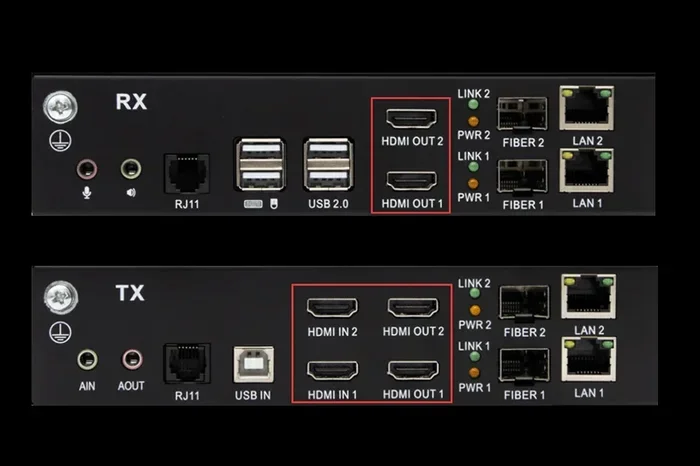
When a simple booster is not enough, an HDMI extender takes signal transmission to the next level. Extenders use different technologies to carry HDMI signals over much longer distances than standard cables allow.
Types of HDMI Extenders
There are several types of extenders available. Each has its own strengths:
- HDMI over Ethernet: These extenders use Cat5e or Cat6 network cables to carry HDMI signals up to 300 feet or more. They are affordable and widely available.
- HDMI over HDBaseT: HDBaseT technology sends HDMI signals along with power and control signals through a single CAT cable. This is popular in professional installations.
- Fiber optic HDMI cables: These cables use light to transmit the signal, allowing runs of 100 feet or more without any signal loss. They are thin and flexible but cost more.
- Wireless HDMI extenders: These send the HDMI signal through the air using a transmitter and receiver pair. They eliminate cables entirely but can suffer from interference.
Comparison Table: HDMI Extender Types
| Extender Type | Max Distance | Signal Quality | Ease of Setup | Price Range |
|---|---|---|---|---|
| HDMI over Ethernet | Up to 300 ft | Excellent | Easy | $30-$80 |
| HDBaseT Extender | Up to 330 ft | Excellent | Moderate | $80-$200 |
| Fiber Optic HDMI | Up to 100+ ft | Outstanding | Very Easy | $40-$150 |
| Wireless HDMI | Up to 100 ft | Good | Very Easy | $50-$200 |
For most home users, an HDMI over Ethernet extender offers the best balance of distance, quality, and price. If you want a clean setup with no cables at all, a wireless HDMI extender works well in rooms with minimal wireless interference.
Upgrade Your HDMI Cable for Better Signal
Sometimes the simplest fix is also the most overlooked. Your HDMI cable itself might be the problem. A cheap or damaged cable can cause signal loss even over short distances.
What to Look for in an HDMI Cable
Not all HDMI cables are created equal. Here is what matters when choosing a cable to boost HDMI signal quality:
- Certification: Look for cables certified by HDMI Licensing. Premium High Speed HDMI cables support 4K and beyond.
- Bandwidth rating: Higher bandwidth means the cable can carry more data. For 4K at 120Hz, you need at least 48 Gbps bandwidth.
- Cable construction: Braided outer jackets are more durable. Thicker copper conductors carry stronger signals.
- Gold-plated connectors: These resist corrosion and provide a more reliable connection over time.
- Length matters: Shorter cables maintain stronger signals. If you can keep runs under 25 feet, your signal will be much stronger.
Replacing an old cable with a certified High Speed HDMI cable can solve many signal problems instantly. It is the first step anyone should take before investing in boosters or extenders.
Common Mistakes to Avoid
Do not buy the cheapest HDMI cable you find online. Ultra-thin, unbranded cables often fail to carry high-resolution signals reliably. Also, avoid running HDMI cables alongside power cords for long stretches. This causes signal interference that leads to flickering or audio dropouts.
Fix Signal Interference and Port Issues
Even with the best cable and booster, interference and port problems can sabotage your HDMI connection. These issues are often easy to fix once you know what to look for.
Reduce Electromagnetic Interference
Electromagnetic interference (EMI) comes from nearby electronics. Power cords, fluorescent lights, and even routers can disrupt your HDMI signal. Here is how to reduce it:
- Route HDMI cables away from power cords: Keep at least 6 inches of separation when possible.
- Use shielded HDMI cables: These cables have extra layers of shielding that block outside interference.
- Avoid sharp bends: Bending an HDMI cable at a sharp angle can damage internal conductors and weaken the signal.
- Keep cables away from microwaves and wireless routers: These devices emit strong electromagnetic fields.
Clean and Inspect Your HDMI Ports
Dust and debris inside HDMI ports cause poor contact and intermittent signal loss. Use a can of compressed air to blow out any dust from your ports. If the pins inside the port look bent or corroded, you may need to replace the device or use a different port.
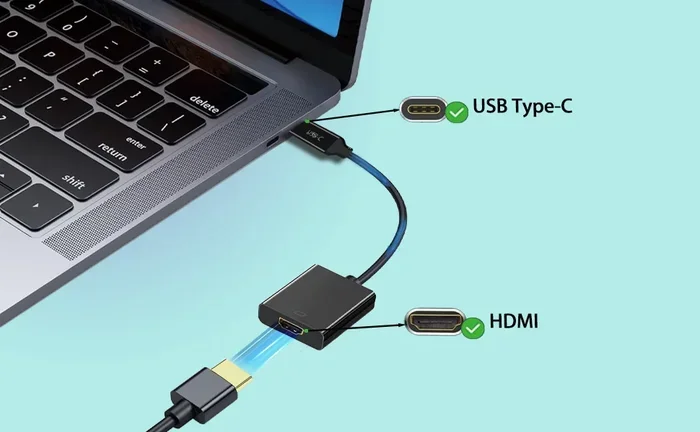
A quick fix for loose connections is to use HDMI port adapters or HDMI couplers. These create a tighter fit and reduce the chance of the cable working its way loose over time.
Expert Insight
Professional AV installers often recommend using active HDMI cables for runs over 15 feet. These cables have built-in amplification chips that boost the signal as it travels through the cable. They eliminate the need for a separate booster in many setups.
Match Your HDMI Version for Full Performance
HDMI technology has evolved significantly over the years. Using the right HDMI version ensures your devices communicate at their full potential. An outdated standard can limit your resolution, refresh rate, and even audio quality.
HDMI Version Quick Guide
Here is a quick look at the major HDMI versions and what they support:
- HDMI 1.4: Supports 4K at 30Hz. Good for basic 4K content but not ideal for gaming.
- HDMI 2.0: Supports 4K at 60Hz. This is the current sweet spot for most home entertainment.
- HDMI 2.0a: Adds support for High Dynamic Range (HDR) content.
- HDMI 2.0b: Includes Dynamic HDR metadata support.
- HDMI 2.1: Supports 4K at 120Hz, 8K at 60Hz, and Variable Refresh Rate (VRR). Ideal for next-gen gaming.
When you boost HDMI signal, make sure all devices in your chain support the same HDMI version. If your source device outputs HDMI 2.1 but your cable or display only supports HDMI 2.0, you will not get the full benefit. Check the specifications on all your gear before purchasing new cables or boosters.
The Role of HDCP in Signal Quality
HDCP (High-bandwidth Digital Content Protection) is a copy protection system built into HDMI. It can sometimes cause signal issues if the HDCP handshake between devices fails. This often shows up as a black screen or an error message on your TV.
To avoid HDCP problems, make sure all devices in your chain are HDCP-compliant. This includes your source device, any splitters or switches, and your display. Using certified, branded equipment reduces HDCP handshake failures significantly.
Quick Fixes and Pro Tips for Stronger HDMI Signals
Not every signal problem requires buying new equipment. Sometimes a few simple adjustments make a huge difference. Here are quick fixes you can try right now:
- Unplug and replug all HDMI connections: This refreshes the HDCP handshake and often resolves temporary signal drops.
- Try a different HDMI port on your TV: Some ports are more sensitive than others. Switching ports can solve mysterious signal issues.
- Power cycle your devices: Turn off your source device, TV, and any boosters or switches. Wait 30 seconds and power them back on.
- Update your device firmware: TV and source device manufacturers regularly release firmware updates that fix HDMI compatibility issues.
- Use a shorter cable: If you have a 30-foot cable and your devices are only 10 feet apart, swap it for a shorter one.
- Add a powered HDMI hub: A powered hub provides a clean signal boost and can connect multiple devices to one display.
These simple steps cost nothing and often solve the problem before you need to buy anything. Keep them in mind the next time your HDMI connection acts up.
When to Call a Professional
Most HDMI signal problems are easy to fix at home. But if you have tried everything and still experience issues, it may be time to consult a professional AV installer. Complex setups with multiple devices, long cable runs, and custom wall installations benefit from expert planning and equipment selection.
Key Takeaways
- A HDMI signal booster is the most effective way to amplify weak signals over long distances.
- HDMI extenders using Ethernet or fiber optic technology can push signals 100 to 300 feet.
- Upgrading to a certified High Speed HDMI cable solves many signal quality issues.
- Keep HDMI cables away from power cords and other sources of electromagnetic interference.
- Match your HDMI version across all devices for the best picture and sound quality.
- Simple fixes like replugging cables and power cycling devices resolve many problems instantly.
Conclusion
Dealing with a weak or dropped HDMI signal does not have to ruin your viewing experience. As we have covered, there are multiple proven ways to boost HDMI signal strength and enjoy reliable, high-quality picture and sound. From simple cable upgrades to HDMI signal boosters, extenders, and interference fixes, you have plenty of options to choose from.
Start with the basics. Check your cable quality, inspect your ports, and try the quick fixes listed in this guide. If those do not solve the problem, invest in a HDMI repeater or an HDMI extender that fits your setup. Always make sure your devices and cables support the right HDMI version for your resolution and refresh rate needs.
The methods in this article work for home theaters, gaming setups, office displays, and commercial installations alike. You do not need to be a tech expert to apply them. With the right approach, you can boost HDMI signal today and enjoy your content without interruptions. Try these methods now and experience the difference a strong, clean HDMI connection makes.
Frequently Asked Questions
What is the best way to boost HDMI signal?
The best way to boost HDMI signal depends on your setup. For most users, an HDMI signal booster or repeater works great for cable runs up to 100 feet. For longer distances, an HDMI extender using Ethernet or fiber optic technology is the most reliable option.
Can a bad HDMI cable cause signal loss?
Yes, a bad or low-quality HDMI cable is one of the most common causes of signal loss. Thin, unbranded cables often cannot carry high-resolution signals reliably. Replacing it with a certified High Speed HDMI cable can resolve many issues immediately.
How long can an HDMI cable be before signal loss occurs?
Standard HDMI cables maintain good signal quality up to about 25 feet. Beyond 50 feet, signal loss becomes significant. Using a HDMI repeater or switching to a fiber optic HDMI cable helps maintain signal strength over longer runs.
Does an HDMI splitter boost signal?
No, a standard HDMI splitter divides the signal and can actually weaken it. If you need to split and boost, look for a powered HDMI splitter with built-in signal amplification. These actively boost the output on each port.
How do I fix HDMI signal interference?
To fix HDMI signal interference, route your cables away from power cords and other electronics. Use shielded HDMI cables that block electromagnetic noise. Avoid sharp bends in the cable and keep connectors clean and free of dust.
Is HDMI 2.1 better for signal quality?
HDMI 2.1 does not inherently boost signal quality, but it supports much higher bandwidth. This means it can carry 4K at 120Hz and 8K signals without compression. Using HDMI 2.1 cables and devices ensures your setup is ready for the latest high-resolution content.