Disadvantages And Advantages Of Network Operating Systems
A network operating system (NOS) manages shared resources, files, and users across a network. Understanding the disadvantages and advantages of network operating systems helps businesses make smarter tech choices. We break down the benefits like centralized control and file sharing alongside drawbacks such as cost and complexity. This guide gives you everything you need to evaluate NOS for your setup.
Every business that runs multiple computers needs a way to keep them connected, secure, and running smoothly. That is where a network operating system comes in. It is the software that runs on a server and manages all the devices, files, and users on a network. But like any technology, it comes with trade-offs. In this article, we explore the disadvantages and advantages of network operating systems in plain, simple language. Whether you are a small business owner or an IT student, this guide will help you understand what a NOS really does and whether it is right for you.
The advantages of a network operating system include centralized management, better security, and easy file sharing. On the flip side, the disadvantages of a network operating system involve high costs, technical complexity, and the risk of a single point of failure. We will walk through each of these points in detail. By the end, you will have a clear picture of how a NOS can help or hurt your organization.
Key Takeaways
- Centralized Management: A network operating system lets admins control resources from one place, saving time and reducing errors.
- Enhanced Security: NOS provides built-in tools for user authentication, access control, and data protection across the network.
- Cost and Complexity: The disadvantages and advantages of network operating systems include high setup costs and steep learning curves alongside powerful resource-sharing features.
- Scalability and Performance: NOS supports growing networks but can face bottlenecks if not properly managed.
- Single Point of Failure: Server dependency means downtime affects the entire network, which is a major drawback to consider.
- Better Collaboration: File sharing, printer access, and communication tools improve teamwork across organizations.
- Right Fit Matters: Choosing a NOS depends on your network size, budget, security needs, and technical expertise.
📑 Table of Contents
- What Is a Network Operating System?
- Advantages Of Network Operating Systems
- Disadvantages Of Network Operating Systems
- How Network Operating Systems Work
- Comparing NOS With Other Operating Systems
- Common Mistakes When Choosing a Network Operating System
- Expert Tips for Getting the Most From Your NOS
- Conclusion
What Is a Network Operating System?
A network operating system (NOS) is specialized software that runs on a server computer. It controls how devices communicate, share files, and access resources on a network. Unlike a regular desktop operating system like Windows 10, a NOS is built to handle many users at once. Think of it as the traffic controller for your entire digital office.
Popular examples of network operating systems include Windows Server, Linux distributions like Ubuntu Server, and Novell NetWare. These systems use a client-server architecture where the server handles all the heavy lifting and client devices connect to it. This setup gives organizations a way to manage network resources from one central location.
Understanding what a NOS does is the first step to seeing its value. Once you know the basics, it is easier to weigh the disadvantages and advantages of network operating systems for your own situation. Let us start with the good stuff.
Advantages Of Network Operating Systems
Centralized Management and Control
One of the biggest advantages of a network operating system is centralized management. Instead of configuring each computer one by one, an admin can manage all devices from a single dashboard. This saves a ton of time, especially in large organizations.
With a NOS, administrators can:
- Create and manage user accounts from one place
- Set permissions for who can access which files
- Push software updates to all connected devices at once
- Monitor network activity in real time
- Troubleshoot issues remotely without visiting each desk
This level of control makes life much easier for IT teams. It also reduces human error because changes happen consistently across the board.
Enhanced Security Features
Network security is a top priority for every organization. A NOS comes with powerful built-in security tools that protect your data. These include user authentication, firewall integration, and encryption protocols. You can set up access control lists to decide exactly who sees what.
For example, a hospital might use a NOS to make sure only doctors and nurses can access patient records. The system can log every login attempt and flag suspicious activity. This kind of centralized security is much harder to achieve with standalone computers.
Easy File and Resource Sharing
Sharing is one of the core strengths of a network operating system. Users can access shared files, folders, printers, and applications from any device on the network. No more emailing documents back and forth or waiting your turn at the printer.
Here are some real-world benefits of resource sharing:
- Multiple users can work on the same document simultaneously
- One printer can serve an entire office
- Centralized storage means no lost files
- Shared applications reduce software costs
- Team collaboration improves with easy access to shared folders
This makes a NOS a natural fit for offices, schools, and any environment where people need to work together.
Scalability for Growing Networks
As your business grows, your network needs to grow with it. A network operating system is designed to scale. You can add new users, devices, and servers without starting from scratch. This scalability is a huge advantage over peer-to-peer networks, which struggle when the number of devices increases.
Whether you are adding ten new computers or a thousand, a NOS can handle the load. You simply add the new devices to the network and configure their permissions. The centralized management features make this process smooth and efficient.
Improved Network Performance and Reliability
A well-configured NOS optimizes network performance by efficiently managing traffic and resources. It uses network protocols like TCP/IP to ensure data moves quickly and accurately between devices. Load balancing features help distribute work evenly across servers.
Plus, most NOS platforms offer redundancy features like RAID storage and backup systems. These tools help keep your network running even if a hardware component fails. For businesses that cannot afford downtime, this reliability is invaluable.
Better Data Backup and Recovery
Data loss can be catastrophic for any organization. A network operating system makes data backup easier and more reliable. Admins can set up automatic backup schedules that run every night. If something goes wrong, restoring data is just a few clicks away.
Cloud-based NOS solutions take this a step further by storing backups offsite. This means your data stays safe even if the physical server room is damaged. For many businesses, this peace of mind alone justifies the investment.
Disadvantages Of Network Operating Systems
High Setup and Maintenance Costs
The disadvantages of a network operating system start with cost. Setting up a NOS requires powerful server hardware, specialized software licenses, and skilled IT staff. For small businesses, these upfront costs can be significant.
Ongoing expenses add up too. You need to pay for:
- Server hardware upgrades and replacements
- Software licenses and renewals
- IT personnel or managed service contracts
- Energy costs for running servers 24/7
- Training for staff who use the system
For a startup or a very small team, these costs may outweigh the benefits. A simpler peer-to-peer network might be a more budget-friendly option.
Complexity and Steep Learning Curve
Managing a network operating system is not simple. It requires technical knowledge that not every team member has. Server configuration, network protocols, and security settings can be overwhelming for beginners.
This complexity means organizations often need to hire specialized IT staff or pay for external support. Training existing employees also takes time and money. If your team is small and non-technical, the learning curve of a NOS could slow you down instead of helping you.
Single Point of Failure
Here is a big one: if your NOS server goes down, the entire network can go down with it. This single point of failure is one of the most serious disadvantages of a network operating system. When the server crashes, users cannot access files, printers, or applications.
Downtime costs businesses money. Every minute the network is offline is a minute of lost productivity. While redundancy solutions can mitigate this risk, they add more cost and complexity to the setup.
Security Risks When Misconfigured
A NOS can be very secure, but only if it is set up correctly. A misconfigured network operating system can actually create more security holes than a standalone computer. Open ports, weak passwords, and unpatched software can all be exploited by hackers.
This means you need a skilled administrator who understands network security best practices. Without proper care, the very tools designed to protect your data can become the source of your biggest vulnerabilities.
Vendor Lock-In
Choosing a specific network operating system can lock you into a particular vendor’s ecosystem. If you build your entire network around Windows Server, switching to Linux later can be painful and expensive. The same applies to proprietary NOS platforms.
This vendor lock-in limits your flexibility. If the vendor raises prices or discontinues a product, you may have few alternatives. Open-source NOS options like Linux can reduce this risk, but they come with their own learning curve.
Performance Bottlenecks
When many users access the same server simultaneously, network performance can suffer. The server becomes a bottleneck if it does not have enough processing power, memory, or bandwidth. This is especially true for resource-intensive applications like video editing or large database queries.
Proper planning and hardware investment can prevent most bottlenecks. But for organizations with limited budgets, performance issues are a real concern when running a centralized network.
How Network Operating Systems Work
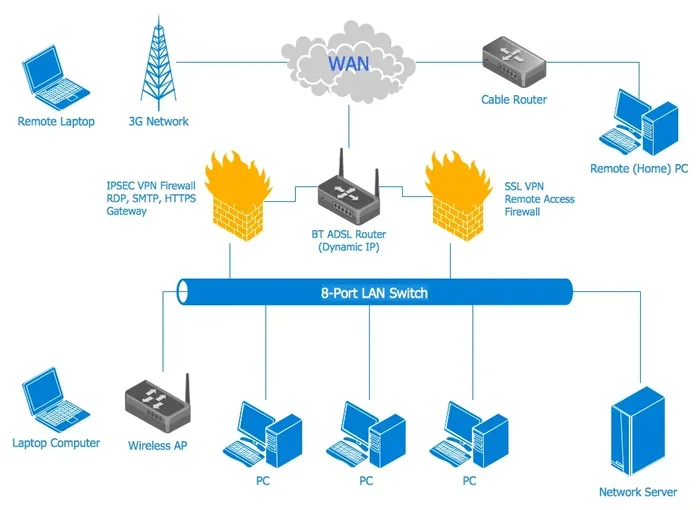
A network operating system works by managing communication between devices on a network. It sits on the server and listens for requests from client computers. When a user wants to open a file or print a document, the client sends a request to the server, and the server processes it and sends back the result.
This process relies on network protocols like TCP/IP, DNS, and DHCP. These protocols are the rules that govern how data travels across the network. A NOS uses these protocols to ensure every device can find and talk to every other device.
The client-server model is the backbone of most NOS setups. The server holds all the data and applications, while the clients are just the devices users work on. This separation of duties is what gives a NOS its power and its centralized control capabilities.
Understanding how a NOS works helps you appreciate both its strengths and weaknesses. The centralized model is powerful but also creates dependencies that can become problems if not managed well.
Comparing NOS With Other Operating Systems
Network Operating System vs. Desktop Operating System
A desktop operating system like Windows 10 or macOS is designed for a single user on a single machine. A network operating system is built to serve many users across many devices. The key difference is the scope of management and resource sharing.
Desktop OSs are cheaper and easier to set up. But they lack the centralized control, security features, and scalability of a NOS. For a home user or a very small office, a desktop OS might be all you need.
Network Operating System vs. Peer-to-Peer Network
A peer-to-peer network connects computers directly without a central server. Each computer shares its own resources. This setup is simple and inexpensive but does not scale well.
Here is a quick comparison:
- Peer-to-peer: Easy to set up, low cost, but lacks security and management tools
- Client-server (NOS): More complex and expensive, but offers centralized control and better performance
Most medium to large organizations choose a network operating system over peer-to-peer because the benefits outweigh the costs. Small teams with basic needs might do fine with peer-to-peer.
Common Mistakes When Choosing a Network Operating System
Many organizations make avoidable mistakes when selecting a NOS. One common error is choosing based on brand recognition alone. Just because a system is popular does not mean it fits your needs. Another mistake is ignoring future growth. A NOS that works for ten users may crumble under a hundred.
Some organizations also underestimate the cost of training and maintenance. The software license is only part of the equation. You also need to invest in staff training, ongoing support, and regular updates. Skipping these steps leads to a poorly managed network that is more vulnerable to attacks.
Here are some tips to avoid these pitfalls:
- Assess your needs before choosing a NOS
- Plan for growth and scalability
- Budget for training and ongoing support
- Test the system before full deployment
- Consider open-source options to reduce costs
Learning from others’ mistakes is one of the best ways to make a smart choice. Take the time to evaluate all the disadvantages and advantages of network operating systems before you commit.
Expert Tips for Getting the Most From Your NOS
Want to maximize the benefits and minimize the drawbacks? Here are some expert tips:
- Keep your system updated. Regular patches fix security holes and improve performance.
- Monitor your network daily. Early detection of problems prevents major outages.
- Invest in good hardware. A weak server will bottleneck your entire network.
- Train your staff. A well-trained team uses the NOS more effectively and safely.
- Back up everything. Automated backups protect you from data loss and ransomware.
- Document your setup. Clear documentation helps new admins get up to speed fast.
These practices apply whether you run Windows Server, Linux, or any other NOS. They are the foundation of a healthy, reliable network infrastructure.
Conclusion
The disadvantages and advantages of network operating systems are clear. On the positive side, a NOS offers centralized management, enhanced security, easy file sharing, scalability, and reliable backups. These benefits make it a powerful tool for organizations of all sizes. On the negative side, the costs, complexity, single point of failure, and performance risks are real concerns that every organization must consider.
The right choice depends on your specific needs, budget, and technical expertise. A network operating system is not a one-size-fits-all solution. But with careful planning and proper management, the advantages can far outweigh the disadvantages. Take the time to evaluate your options, plan for the future, and invest in the right support. Your network will thank you for it.
Now that you understand the full picture of the advantages and disadvantages of a network operating system, you are better equipped to make a confident decision. Whether you are setting up a new network or upgrading an existing one, the knowledge you gained here will serve you well.
Frequently Asked Questions
What is a network operating system in simple terms?
A network operating system is software that runs on a server and manages all the devices, files, and users on a network. It acts as the central control hub for shared resources like files, printers, and applications across multiple computers.
What are the main advantages of a network operating system?
The top advantages of a network operating system include centralized management, better security, easy file and printer sharing, scalability, and improved data backup. These features make it ideal for businesses and organizations with multiple users and devices.
What are the biggest disadvantages of a network operating system?
The main disadvantages of a network operating system are high setup and maintenance costs, technical complexity, the risk of a single point of failure, and potential performance bottlenecks. Misconfiguration can also create security vulnerabilities.
Is a network operating system necessary for small businesses?
It depends on your needs. A small business with fewer than ten users might do fine with a peer-to-peer network. But if you need centralized security, shared resources, or plan to grow, a network operating system is a smart investment.
Can I use a free network operating system?
Yes, open-source options like Linux distributions offer free network operating system solutions. They reduce licensing costs but may require more technical expertise to set up and maintain. Popular free NOS options include Ubuntu Server and CentOS.
How does a network operating system improve security?
A NOS improves network security through centralized user authentication, access control lists, firewall integration, and encrypted communication. Administrators can monitor the entire network from one dashboard and respond to threats quickly.
=== SEO Title ===
Disadvantages And Advantages Of Network Operating Systems
=== META TITLE ===
Disadvantages And Advantages Of Network Operating Systems
=== URL SLUG ===
/disadvantages-and-advantages-of-network-operating-systems