Are Hdmi 2 0 And 2 1 Cables Really That Much Different
Are HDMI 2.0 and 2.1 cables really that different? The short answer is yes. HDMI 2.1 brings bigger bandwidth, higher refresh rates, and new gaming features that 2.0 simply cannot match. Whether you are upgrading your gaming setup or buying a new TV, knowing the difference saves you money and frustration. This guide breaks down everything you need to know in plain English.
Let us talk about HDMI cables. You probably have a few lying around your house right now. Some are old. Some are newer. But do you really know what makes an HDMI 2.0 cable different from an HDMI 2.1 cable?
If you have been shopping for a new TV, gaming console, or home theater setup, you have probably seen these version numbers thrown around. They sound technical. They sound confusing. But they do not have to be.
Here is the truth. HDMI 2.0 and 2.1 cables are different, and the differences matter more than most people realize. Whether you are a casual movie watcher or a serious gamer, understanding these differences helps you make smarter buying decisions. So let us break it all down in a way that actually makes sense.
Key Takeaways
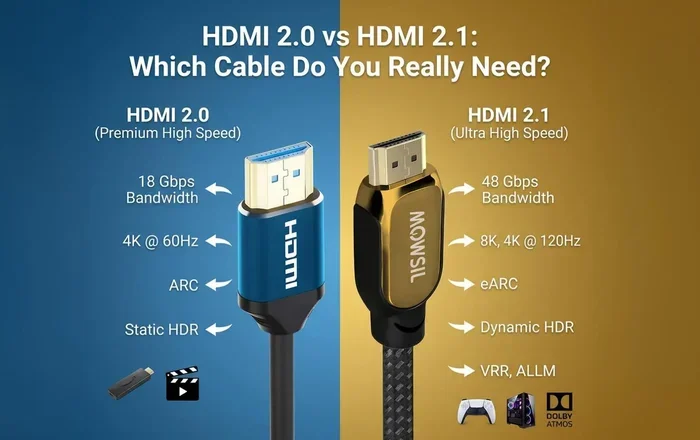
- HDMI 2.1 offers up to 48 Gbps bandwidth compared to HDMI 2.0’s 18 Gbps, which is a massive jump in data transfer capability.
- HDMI 2.1 supports 4K at 120Hz and 8K at 60Hz, while HDMI 2.0 maxes out at 4K 60Hz for most setups.
- Gamers benefit greatly from HDMI 2.1 features like VRR, ALLM, and eARC that reduce lag and improve audio.
- HDMI 2.1 cables are backward compatible with older devices, so you can use them with HDMI 2.0 equipment too.
- You do not always need HDMI 2.1 if you watch regular content or use older displays and consoles.
- Cable length and quality matter more with HDMI 2.1 because higher bandwidth is more sensitive to signal loss.
📑 Table of Contents
- What Is HDMI and Why Does the Version Number Matter?
- HDMI 2.0 vs HDMI 2.1: The Key Differences
- What HDMI 2.1 Brings to the Table
- Do You Really Need HDMI 2.1?
- Common Mistakes When Choosing HDMI Cables
- Expert Tips for Getting the Most Out of Your HDMI Setup
- The Future of HDMI: What Comes After 2.1?
- Final Thoughts
What Is HDMI and Why Does the Version Number Matter?
HDMI stands for High-Definition Multimedia Interface. It is the cable that carries both video and audio from one device to another. Think of your Blu-ray player, gaming console, or cable box. They all use an HDMI cable to send picture and sound to your TV or monitor.
The version number tells you what the cable can handle. Think of it like a highway. A higher version number means a wider road. More data can travel at the same time. This directly affects the picture quality, refresh rate, and audio features you get.
A Quick History of HDMI
HDMI has been around since 2003. Over the years, new versions brought better features. HDMI 1.4 introduced 3D support. HDMI 2.0 arrived in 2013 with 4K support at 60Hz. Then HDMI 2.1 showed up in 2017 and changed the game completely. Each version built on the last one. But not all cables are created equal.
When you buy a cable today, you need to know which version it supports. This is where things get important. Not every cable labeled “HDMI” is the same under the hood.
HDMI 2.0 vs HDMI 2.1: The Key Differences
This is the heart of the discussion. When people ask, are HDMI 2.0 and 2.1 cables really that different, this section has the answer. Let us look at the big differences side by side.
Bandwidth: The Big Differentiator
Bandwidth is how much data a cable can carry per second. Think of it like water pressure in a hose. More bandwidth means more data flowing through. And more data means better picture and sound quality.
- HDMI 2.0 bandwidth: 18 Gbps (gigabits per second)
- HDMI 2.1 bandwidth: 48 Gbps (gigabits per second)
That is a huge jump. HDMI 2.1 carries nearly three times the data of HDMI 2.0. This extra bandwidth unlocks features that were simply impossible before.
Resolution and Refresh Rate Support
This is where most people notice the difference. Resolution is how sharp the picture is. Refresh rate is how many times per second the screen updates. Higher numbers mean smoother motion.
Here is what each version supports:
- HDMI 2.0: 4K at 60Hz, 1080p at 240Hz
- HDMI 2.1: 4K at 120Hz, 8K at 60Hz, and even 10K at 120Hz
If you watch regular TV shows or movies, 4K at 60Hz from HDMI 2.0 is plenty. But if you play video games or watch fast sports, the jump to 4K at 120Hz with HDMI 2.1 is noticeable. The motion looks smoother. The picture feels more alive.
Dynamic HDR and Color Depth
HDR stands for High Dynamic Range. It makes colors pop and gives you brighter highlights and deeper shadows. HDMI 2.1 supports dynamic HDR, which adjusts the picture frame by frame. HDMI 2.0 handles HDR too, but it does not adjust as precisely.
Color depth is another factor. HDMI 2.1 supports 12-bit and 16-bit color depths, while HDMI 2.0 maxes out at 10-bit. For most viewers, the difference is subtle. But for professional editors or serious home theater fans, it matters.
| Feature | HDMI 2.0 | HDMI 2.1 |
|---|---|---|
| Maximum Bandwidth | 18 Gbps | 48 Gbps |
| Max 4K Refresh Rate | 60Hz | 120Hz |
| Max 8K Support | No | Yes (60Hz) |
| Dynamic HDR | No | Yes |
| eARC Support | No | Yes |
| VRR Support | No | Yes |
| ALLM Support | No | Yes |
| Audio Channels | Up to 15.1 | Up to 32 |
What HDMI 2.1 Brings to the Table
HDMI 2.1 is not just about bigger numbers on a spec sheet. It introduces real-world features that change how you use your devices. Let us explore what makes HDMI 2.1 special.
Gaming Features That Make a Difference
If you game, HDMI 2.1 is a game-changer. No pun intended. Here are the features that matter most for gamers:
- Variable Refresh Rate (VRR): This syncs your TV’s refresh rate with your console or PC. It reduces screen tearing and stuttering. The result is a much smoother gaming experience.
- Auto Low Latency Mode (ALLM): This automatically switches your TV to game mode. You get the lowest possible input lag without pressing any buttons.
- Quick Frame Transport (QFT): This reduces the time it takes for frames to travel from your device to your screen. Less delay means more responsive gameplay.
- Quick Media Switching (QMS): This eliminates black screens when switching between content sources. No more waiting for the picture to come back.
These features are especially important for next-gen consoles like the PlayStation 5 and Xbox Series X. If you own one of these and want the best experience, an HDMI 2.1 cable is essential.
Enhanced Audio Return Channel (eARC)
eARC is a big deal for home theater setups. It lets you send high-quality audio from your TV to your soundbar or receiver. HDMI 2.0 supports ARC, but it has limitations. eARC supports uncompressed audio formats like Dolby Atmos and DTS:X.
If you care about sound quality, eARC through HDMI 2.1 makes a real difference. You get cinema-quality audio without extra cables or complicated setups.
For those interested in broader smart home setups, HDMI cables often connect to security monitors and access control systems that use video feeds for monitoring. To learn more about how access control systems work and their pros and cons, check out our guide on the advantages and disadvantages of access control systems.
Backward Compatibility: Will HDMI 2.1 Work With Your Old Devices?
Yes. HDMI 2.1 cables are backward compatible. You can plug an HDMI 2.1 cable into an HDMI 2.0 port and it will work just fine. The connection will simply default to the lower version’s capabilities.
This is great news if you are upgrading gradually. You can buy HDMI 2.1 cables now and use them with your current TV. When you eventually upgrade to an HDMI 2.1-compatible display, you are already ready to go.
However, there is one catch. Not all HDMI 2.1 cables are created equal. Some are certified Ultra High Speed HDMI cables. Others are just labeled as HDMI 2.1 without meeting the full specification. Always look for the Ultra High Speed certification mark.
Do You Really Need HDMI 2.1?
This is the question most people want answered. And the honest answer is: it depends on what you do.
When HDMI 2.0 Is Still Enough
HDMI 2.0 is still perfectly fine for many people. Here are situations where you do not need to upgrade:
- You watch regular TV shows and movies: Most streaming content is 4K at 30Hz or 60Hz. HDMI 2.0 handles this without any issues.
- You have an older TV or monitor: If your display only supports 4K at 60Hz, an HDMI 2.1 cable will not give you better quality than HDMI 2.0.
- You use older gaming consoles: PS4 and Xbox One work fine with HDMI 2.0 cables.
- You are on a budget: HDMI 2.0 cables are cheaper. If you do not need the extra features, there is no reason to spend more.
When HDMI 2.1 Makes Sense
On the other hand, here is when you should make the switch:
- You own a PS5, Xbox Series X, or high-end PC: These devices support 4K at 120Hz. You need HDMI 2.1 to unlock that performance.
- You have an 8K TV: HDMI 2.1 is the only way to get 8K resolution from your source device.
- You want the smoothest gaming experience: VRR, ALLM, and low latency features require HDMI 2.1.
- You have a premium home theater setup: eARC and dynamic HDR are worth it for serious movie lovers.
Think of it this way. You do not need a sports car to go to the grocery store. But if you want to race, you need the right vehicle. The same logic applies to HDMI cables.
Beyond HDMI cables, there are many other tech accessories that can improve your digital lifestyle. For example, if you are into smart home gadgets and convenience tech, you might enjoy our article on apps that are like Uber for finding dog walkers, which explores how technology makes everyday tasks easier.
Common Mistakes When Choosing HDMI Cables
People make mistakes when buying HDMI cables all the time. Here are the most common ones and how to avoid them.
Assuming All Cables Are the Same
This is the biggest mistake. Not all HDMI cables support the same features. A cheap cable might work for basic video, but it may not handle 4K at 120Hz or eARC audio. Always check the cable’s certification and specifications before buying.
Overpaying for “Premium” Cables
Some brands charge outrageous prices for HDMI cables. The truth is, a properly certified cable does not need to cost a fortune. You do not need a $100 HDMI cable. A $15 Ultra High Speed certified cable performs just as well.
Ignoring Cable Length
Longer cables can cause signal loss, especially with high-bandwidth HDMI 2.1 signals. If you need a cable longer than 6 feet, invest in a quality one with good shielding. Active HDMI cables with built-in signal boosters are a great option for longer runs.
Buying HDMI 2.1 for an HDMI 2.0 Setup
This wastes money. If your TV and devices only support HDMI 2.0, there is no benefit to using an HDMI 2.1 cable. You will not get better picture or sound quality. Save your money for an upgrade when the time is right.
Expert Tips for Getting the Most Out of Your HDMI Setup
Want to make sure you are getting the best experience from your HDMI connections? Here are some tips from the pros.
- Check your devices first: Before buying any cable, check what your TV, console, and source devices support. This tells you exactly what cable version you need.
- Look for the Ultra High Speed label: This is the official HDMI certification for HDMI 2.1 cables. It guarantees the cable can handle 48 Gbps of bandwidth.
- Keep cables short when possible: Shorter cables maintain better signal quality. For runs over 10 feet, consider active or fiber optic HDMI cables.
- Update your device firmware: Sometimes HDMI issues are fixed through software updates. Always keep your TV and console firmware current.
- Use separate cables for audio and video if needed: If you experience audio sync issues, try using a dedicated audio cable alongside your HDMI connection.
- Test before you commit: If possible, test the cable with your setup before buying. Return policies are your friend here.
The Future of HDMI: What Comes After 2.1?
HDMI technology keeps evolving. The HDMI Forum has already announced HDMI 2.2, which promises even higher bandwidth and support for emerging display technologies. As 8K becomes more common and 16K starts to appear in professional displays, the demand for higher bandwidth will only grow.
For now, HDMI 2.1 is the current standard and it will remain relevant for years to come. Most content today has not even reached 8K resolution yet. An HDMI 2.1 cable you buy today will likely serve you well into the future.
The bottom line is this. Technology moves fast. But the fundamentals of a good HDMI connection stay the same. You need sufficient bandwidth, proper certification, and a cable that matches your devices’ capabilities.
Final Thoughts
So, are HDMI 2.0 and 2.1 cables really that different? Yes, they are. HDMI 2.1 offers significantly more bandwidth, better resolution support, and features designed specifically for modern gaming and home theater setups. If you have a PS5, Xbox Series X, or an 8K TV, upgrading to HDMI 2.1 is a smart move.
But if you are watching regular content on an older setup, HDMI 2.0 will still serve you well. There is no need to rush out and spend money you do not need to spend.
The best approach is to assess your current setup. Know what your devices support. Then choose the cable that matches your needs. This saves you money and ensures you get the best possible experience from your gear.
Technology should work for you, not the other way around. Take the time to understand your cables. Your eyes and ears will thank you.
Frequently Asked Questions
Can I use an HDMI 2.1 cable with an HDMI 2.0 port?
Yes, HDMI 2.1 cables are backward compatible. When you plug an HDMI 2.1 cable into an HDMI 2.0 port, it will work normally. The connection will simply operate at HDMI 2.0 speeds and features. You will not get any HDMI 2.1 benefits unless both the cable and the port support it.
Do I need a special TV for HDMI 2.1?
Yes, to take full advantage of HDMI 2.1 features, your TV needs to support HDMI 2.1. This means it must have HDMI 2.1 ports and be capable of handling 4K at 120Hz or 8K resolution. Check your TV’s specifications to confirm its HDMI version support before buying an HDMI 2.1 cable.
Is there a noticeable difference between HDMI 2.0 and 2.1 for gaming?
Absolutely. HDMI 2.1 supports 4K at 120Hz, VRR, and ALLM, which all contribute to a smoother and more responsive gaming experience. If you play fast-paced games on a PS5 or Xbox Series X, the difference is very noticeable compared to HDMI 2.0’s 4K at 60Hz limit.
Are all HDMI 2.1 cables the same?
No, not all HDMI 2.1 cables are equal. Only cables certified as Ultra High Speed HDMI cables guarantee full HDMI 2.1 bandwidth of 48 Gbps. Some cables may be marketed as HDMI 2.1 but do not meet the official certification standards. Always look for the Ultra High Speed certification mark on the packaging.
Does HDMI 2.1 improve audio quality?
Yes, HDMI 2.1 supports eARC, which allows uncompressed audio formats like Dolby Atmos and DTS:X to pass through to your sound system. This results in significantly better audio quality compared to HDMI 2.0’s standard ARC, which compresses audio signals and limits supported formats.
How much should I spend on an HDMI 2.1 cable?
A good quality Ultra High Speed HDMI 2.1 cable typically costs between $10 and $30. You do not need to spend more than that. Expensive cables do not offer better performance than properly certified budget options. Focus on the certification mark rather than the price tag.
=== CONCLUSION ===
HDMI 2.0 and HDMI 2.1 cables are genuinely different, and understanding those differences empowers you to make better tech decisions. HDMI 2.1 brings bigger bandwidth, higher refresh rates, and gaming features that make a real difference in your daily entertainment.
But more features do not always mean you need to upgrade. If your current setup works well and you do not game at high refresh rates, HDMI 2.0 is perfectly fine. Spend your money where it matters most to you.
The next time you shop for cables, you will know exactly what to look for. Check your devices. Match the cable to your needs. And enjoy the best picture and sound your setup can deliver. That is the real win here.