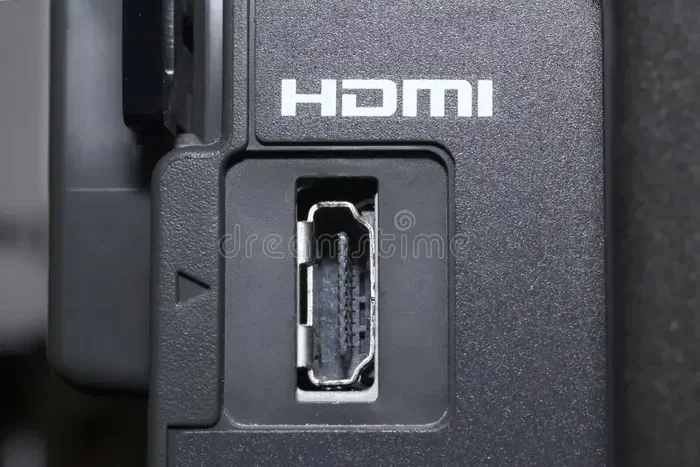
Are HDMI Ports Both Input And Output On Your Devices
Are HDMI ports both input and output? The answer depends on your device and the type of HDMI port you have. Most HDMI ports are designed for either sending or receiving signals, but some ports like HDMI ARC can work in both directions. Understanding this difference helps you set up your devices correctly and avoid frustrating connection problems.
Have you ever plugged something into your TV and wondered if that HDMI port can go both ways? It is a question many people ask, especially when they are setting up a new home theater or connecting multiple devices. The truth is that not all HDMI ports are created equal. Some are built to receive signals, others to send them, and a few can handle both directions.
This guide breaks it all down in simple terms. We will look at how HDMI ports work, what the differences are between input and output, and how to figure out what your specific ports can do. Whether you are connecting a gaming console, a soundbar, or a laptop, you will find clear answers here.
Key Takeaways
- HDMI ports are not always both input and output: Most ports on devices are designed for one direction only.
- HDMI ARC and eARC ports can send and receive signals: These special ports support bidirectional communication between devices.
- TVs typically have HDMI input ports: They receive signals from source devices like streaming boxes and gaming consoles.
- Laptops and phones usually have HDMI output ports: They send video and audio to external displays.
- HDMI splitters and switches change port direction: These accessories let you route signals between multiple devices.
- Check your device manual: The fastest way to know what your HDMI port does is to read the specifications.
- HDMI version matters: Newer versions like HDMI 2.1 support more features and higher bandwidth.
📑 Table of Contents
- What Are HDMI Ports and How Do They Work
- HDMI Input vs Output: What Is the Difference
- Can HDMI Ports Work as Both Input and Output
- Common Devices and Their HDMI Port Functions
- How to Identify If Your HDMI Port Supports Both Directions
- Quick Tips for Managing HDMI Connections
- Common HDMI Mistakes and How to Avoid Them
- Expert Insights on HDMI Port Direction
- Conclusion
What Are HDMI Ports and How Do They Work
HDMI stands for High-Definition Multimedia Interface. It is the standard cable connection used to carry both video and audio from one device to another. A single HDMI cable replaces the messy bundle of old audio and video cables. This is one reason why HDMI became so popular so fast.
When you connect two devices with an HDMI cable, one device sends the signal and the other receives it. Think of it like a water pipe. Water flows in one direction. Similarly, the HDMI signal flows from the source device to the display device. The port on the sending side is the output. The port on the receiving side is the input.
Types of HDMI Ports
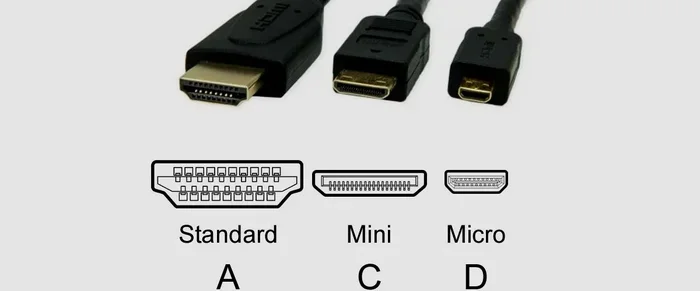
There are several types of HDMI ports you might find on your devices. Each type has a different shape and purpose.
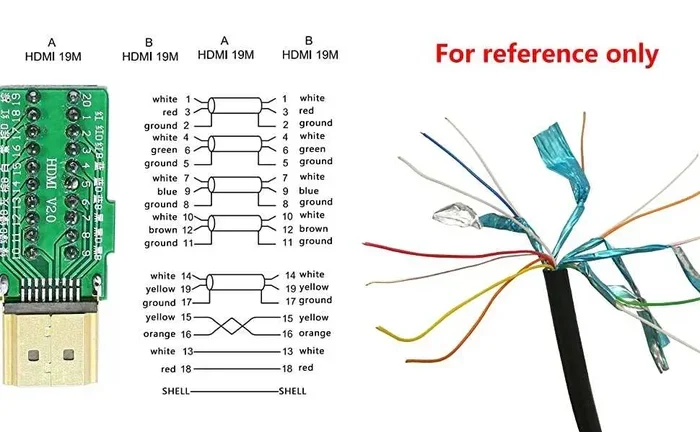
- Standard HDMI (Type A): This is the most common HDMI port. You will find it on almost every TV, monitor, and Blu-ray player. It has 19 pins and supports most versions of HDMI.
- Mini HDMI (Type C): This smaller version is found on some tablets and cameras. It has the same 19 pins but in a more compact design.
- Micro HDMI (Type D): Even smaller than the Mini HDMI. You will find this on some smartphones and action cameras.
- Type B (Dual Link): This was designed for higher-resolution displays but is rarely used in consumer devices today.
No matter the physical shape, the basic function stays the same. The port either sends a signal, receives a signal, or in some cases does both.
How HDMI Signal Transmission Works
HDMI cables transmit digital signals. These signals carry uncompressed video and audio data. The speed and quality of this transmission depend on the HDMI version your cable and port support.
Older versions like HDMI 1.4 can handle up to 4K at 30Hz. Newer versions like HDMI 2.1 can handle 4K at 120Hz or even 8K at 60Hz. The version matters because it determines what kind of content you can watch and how smooth the picture looks.
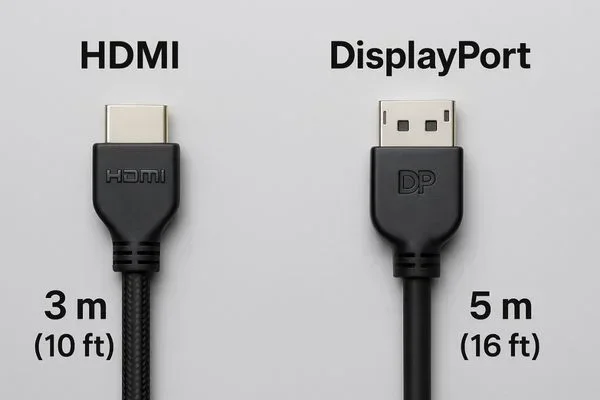
Signal quality can also be affected by cable length and build quality. A cheap, short cable works fine for most setups. But if you need a longer run, you may need a higher-quality cable or a signal booster.
HDMI Input vs Output: What Is the Difference
The difference between HDMI input and output is simple but important. An HDMI input port receives signals from another device. An HDMI output port sends signals to another device.
Let us look at this more closely.
What Is an HDMI Input Port
An HDMI input port is designed to receive video and audio from an external source. Your TV has HDMI input ports. When you plug your streaming stick into the TV, the TV receives the signal through the input port.
Common devices that use HDMI input include:
- Televisions
- Projectors
- Monitor screens
- Soundbars with HDMI pass-through
These devices sit in the “receiving” role. They take the signal and show it on screen or play it through speakers.
What Is an HDMI Output Port
An HDMI output port sends video and audio to another device. Your laptop has an HDMI output port. When you connect it to a monitor, the laptop sends its screen content to the display.
Common devices with HDMI output include:
- Laptops and desktop computers
- Gaming consoles like the PlayStation and Xbox
- Streaming devices like Apple TV and Roku
- Blu-ray players
These devices are the “source.” They create the content and push it out through the output port.
Can HDMI Ports Work as Both Input and Output
This is the big question. Can a single HDMI port act as both input and output at the same time? The answer is usually no, but there are important exceptions.
In most cases, an HDMI port on a device is fixed as either input or output. Your TV’s HDMI port is an input. Your laptop’s HDMI port is an output. They do not switch roles on their own.
HDMI ARC and eARC: The Exception
HDMI ARC stands for Audio Return Channel. This is a special feature found on certain HDMI ports, usually labeled as ARC or eARC on your TV or soundbar.
HDMI ARC allows a TV to send audio back to a soundbar or AV receiver through the same HDMI cable that receives video. This means the port works in both directions at different times. It receives video from a cable box and sends audio to a soundbar.
eARC, or Enhanced Audio Return Channel, is an upgraded version. It supports higher-quality audio formats like Dolby Atmos. If you have a modern sound system, eARC gives you the best audio experience.
So while HDMI ARC ports are not truly bidirectional all the time, they do handle both input and output functions. This is the closest thing to a port that works both ways.
HDMI Bidirectional Adapters and Converters
If you need a single HDMI port to switch between input and output, you can use external hardware. HDMI bidirectional adapters allow you to change the direction of the signal.
These adapters are useful in situations like:
- Setting up a monitor that sometimes acts as a display and sometimes as a source
- Connecting a PC to a TV where the TV also needs to send data back
- Building custom home theater setups with limited ports
Keep in mind that these adapters add cost and complexity. They are not always necessary, but they solve real problems when you need them.
Common Devices and Their HDMI Port Functions
Different devices use HDMI ports in different ways. Here is a look at some common devices and what their HDMI ports typically do.
Televisions
TVs are the most common display devices in homes. Almost all HDMI ports on a TV are inputs. They receive signals from cable boxes, gaming consoles, and streaming sticks.
However, many modern TVs also have at least one HDMI ARC port. This port can send audio back out to a sound system. So while the TV’s HDMI ports are mostly inputs, the ARC port adds a small output capability.
Laptops and Computers
Most laptops and desktop computers have HDMI output ports. They send video and audio to external monitors or projectors. Some laptops also have USB-C ports that support DisplayPort Alt Mode, which works similarly to HDMI output.
A few high-end workstations have HDMI input ports. These are designed for video editors who need to preview footage on an external monitor while working. But this is rare in everyday laptops.
Gaming Consoles
Gaming consoles like PlayStation and Xbox have HDMI output ports. They send game visuals and sound to your TV or monitor. Your TV receives this signal through an HDMI input port.
Some newer consoles also support HDMI eARC for sending high-quality audio to sound systems. This makes the gaming experience more immersive.
Soundbars and AV Receivers
Soundbars and AV receivers often have multiple HDMI ports. Some are inputs that receive audio from your TV. Others are outputs that send audio to speakers. The HDMI ARC port on these devices handles both directions.
How to Identify If Your HDMI Port Supports Both Directions
If you are not sure whether your HDMI port can handle both input and output, there are a few ways to find out.
Check the Device Manual
The fastest and most reliable method is to check your device manual. Look up the model number online and search for the HDMI specifications. The manual will clearly state whether each port is an input, output, or supports ARC.
Look for Labels on the Device
Many TVs and soundbars have labels printed right next to the HDMI ports. Look for words like “ARC,” “eARC,” “OUT,” or “IN.” These labels tell you the port’s direction at a glance.
Use Your Device Settings
Some devices let you check port configurations in the settings menu. Go to your TV or monitor settings and look for HDMI or display options. The system may show you which ports are active and what role they play.
Test with Different Devices
Sometimes the best way to learn is to just try it. Connect a known source device like a laptop to the port and see if it displays. Then try connecting a known display and see if the source device recognizes it. This hands-on test gives you real answers.
Quick Tips for Managing HDMI Connections
Getting the most out of your HDMI setup does not have to be complicated. Here are some practical tips that make a big difference.
- Label your cables: Use colored tape or tags to mark which cable goes where. This saves time when troubleshooting.
- Use high-quality cables: Cheap cables can cause signal drops, especially with HDMI 2.1 features like 4K 120Hz.
- Keep cables short when possible: Longer cables can degrade signal quality. Stay under 15 feet for best results.
- Check for firmware updates: Many devices receive HDMI-related updates that improve compatibility and performance.
- Use an HDMI switch if you run out of ports: A good HDMI switch lets you connect multiple devices to one input port.
- Power cycle your devices: If HDMI connections are not working, unplug everything, wait 30 seconds, and plug it back in. This simple step fixes many issues.
These small habits keep your HDMI setup running smoothly and help you avoid common headaches.
Common HDMI Mistakes and How to Avoid Them
Even experienced users make mistakes with HDMI connections. Here are a few to watch out for.
- Assuming all ports are the same: Not every HDMI port on your TV supports ARC or 4K. Check which port does what before you set up your system.
- Using the wrong HDMI version: If you want 4K at 120Hz, you need HDMI 2.1 cables and ports. Using an older HDMI 1.4 cable will limit your experience.
- Forgetting to enable ARC: Even if your TV has an ARC port, you may need to enable it in the settings menu. Check your TV’s audio output settings.
- Buying cables that are too long: Longer HDMI cables can lose signal strength. Buy the shortest cable that fits your setup.
- Ignoring audio settings: Sometimes video works but audio does not. This often happens when the audio output is set to the wrong device. Check your source device audio settings.
Avoiding these mistakes saves time, money, and frustration.
Expert Insights on HDMI Port Direction
Industry experts agree that understanding HDMI port direction is essential for any modern setup. As display technology evolves, the role of HDMI continues to expand.
“Most consumers do not realize that their HDMI ports have a fixed direction unless they have an ARC or eARC port,” says a senior display engineer at a leading TV manufacturer. “Taking a few minutes to understand your ports can save hours of troubleshooting.”
Another expert adds, “The rise of USB-C and DisplayPort has not made HDMI obsolete. HDMI still dominates the TV and home theater market. Knowing how it works gives you an edge when setting up any display system.”
These insights highlight why taking the time to understand your HDMI ports pays off in the long run.
Conclusion
Are HDMI ports both input and output on your devices? The answer is mostly no, with a few important exceptions. Most HDMI ports are designed for one direction only. TVs have input ports, laptops have output ports, and each serves a specific purpose.
However, HDMI ARC and eARC ports break this rule by allowing bidirectional audio flow. And external adapters can also change the direction of an HDMI connection when needed.
Understanding how your HDMI ports work helps you set up devices faster, troubleshoot problems quicker, and get the best performance from your equipment. Take a few minutes to check your device specifications and label your ports. This small effort makes a big difference.
Now that you know the basics, you can confidently connect any device to any display. Your home entertainment setup will run smoother than ever before.
Frequently Asked Questions
Can I use an HDMI port as both input and output at the same time?
In most cases, no. Standard HDMI ports on devices like TVs and laptops are designed for one direction only. However, HDMI ARC ports can handle both input and output at different times. If you need true bidirectional functionality, you may need an HDMI bidirectional adapter or switch.
What is the difference between HDMI ARC and regular HDMI ports?
HDMI ARC (Audio Return Channel) allows audio to travel in both directions through a single HDMI cable. A regular HDMI port only sends or receives signals one way. ARC ports are usually labeled on the TV or soundbar and are essential for simplified audio setups with soundbars and AV receivers.
Do all TVs have HDMI input ports?
Yes, virtually all modern TVs have multiple HDMI input ports. These ports receive video and audio from external devices like cable boxes, gaming consoles, and streaming sticks. Some TVs also include at least one HDMI ARC port for audio return functionality.
Can I connect two laptops directly with an HDMI cable?
Not directly in a useful way. Both laptops have HDMI output ports, so connecting them would not create a proper display connection. To connect two laptops, you would need an HDMI capture card or a USB docking station that supports display input on one end.
Does HDMI 2.1 support bidirectional communication?
HDMI 2.1 supports higher bandwidth and features like eARC, but it does not make standard HDMI ports bidirectional. The direction of the port is determined by the device design, not the HDMI version. However, HDMI 2.1 eARC ports do support enhanced bidirectional audio features.
What should I do if my HDMI port is not working?
Start by checking the cable and trying a different one. Make sure the port is not physically damaged. Check your device settings to confirm the correct input or output is selected. If the problem persists, try power cycling your devices. If none of these steps work, the port may need professional repair or replacement.
=== INTERNAL LINKS ===
If you are setting up a home security system with monitors, you might also want to explore the advantages and disadvantages of access control systems that rely on similar connectivity principles for managing multiple devices.
For those interested in smart home automation and device integration, learning more about how apps connect devices can also be valuable. Check out apps that work like Uber for finding dog walkers to see how modern connectivity solutions simplify everyday tasks.