A Comparison of Fingerprint Scanners and Their Differences
Fingerprint scanners are biometric devices that verify identity using unique finger patterns. This guide compares optical, capacitive, and ultrasonic scanners to help you choose the right one. You will learn how each type works, their pros and cons, and where they perform best.
Key Takeaways
- Optical scanners use light to capture fingerprint images and are budget-friendly.
- Capacitive scanners detect fingerprints through electrical signals and are common in phones.
- Ultrasonic scanners use sound waves for deep, 3D fingerprint mapping.
- Fingerprint scanners vary in speed, accuracy, and security levels.
- Access control systems benefit greatly from the right fingerprint scanner choice.
- Understanding biometric authentication helps you make informed decisions.
📑 Table of Contents
- What Are Fingerprint Scanners?
- Types of Fingerprint Scanners
- How Fingerprint Scanners Work
- Key Differences Between Fingerprint Scanner Types
- Factors to Consider When Choosing a Fingerprint Scanner
- Applications of Fingerprint Scanners
- Common Mistakes to Avoid
- Expert Insights
- Quick Tips for Getting the Most Out of Your Fingerprint Scanner
- Conclusion
What Are Fingerprint Scanners?
A fingerprint scanner is a device that reads and verifies the unique patterns on your fingertip. These devices have become a cornerstone of modern biometric authentication. They replace passwords, PINs, and keys with your own body.
The idea is simple. No two fingers have the same ridge and valley pattern. Fingerprint recognition technology captures these patterns and matches them against stored data. This makes identity verification fast and secure.
Today, you find fingerprint scanners in phones, laptops, doors, and even time clocks. They serve as a reliable fingerprint reader in countless settings. Whether you are unlocking your phone or entering a secure building, this technology is everywhere.
The core purpose of a fingerprint scanner is to confirm that you are who you say you are. It does this by comparing live fingerprints with saved templates. This process happens in seconds, making it one of the most convenient forms of biometric security.
Types of Fingerprint Scanners
Not all fingerprint scanners work the same way. Different technologies use different methods to capture and read your fingerprint. Let us break down the three main types you will encounter.
Optical Fingerprint Scanners
Optical scanners use light to take a picture of your fingerprint. A light source illuminates the finger, and a sensor captures the reflected image. Think of it like taking a photo of your finger’s ridges.
These scanners have been around for decades. They are commonly found in older access control systems and law enforcement devices. Because they rely on images, they are often called optical fingerprint sensors.
Here are some key traits of optical scanners:
- They capture a 2D image of the fingerprint.
- They are generally affordable and widely available.
- They can be fooled by high-quality fake fingerprints.
- They work well in controlled lighting environments.
One major drawback is their vulnerability to spoofing. A detailed replica of a fingerprint can trick an optical sensor. This makes them less secure than newer technologies.
Capacitive Fingerprint Scanners
Capacitive scanners use electrical current to map your fingerprint. When you place your finger on the sensor, tiny plates measure the conductivity of your skin. The ridges and valleys create different electrical signals, forming a detailed map.
This is the technology inside most smartphones today. Apple’s Touch ID and many Android fingerprint sensors use capacitive technology. They are compact, fast, and highly accurate.
Key features of capacitive scanners include:
- They read fingerprints through electrical properties, not light.
- They are small enough to fit inside mobile devices.
- They offer strong resistance to fake fingerprints.
- They work quickly and require very little pressure.
Capacitive scanners are harder to fool than optical ones. However, extremely sophisticated fake fingers can still sometimes bypass them. Overall, they strike a great balance between cost and security.
Ultrasonic Fingerprint Scanners
Ultrasonic scanners use high-frequency sound waves to create a 3D map of your fingerprint. Instead of light or electricity, they send sound pulses and measure the returning echoes. This creates a very detailed image of the ridges and valleys.
Qualcomm’s Sense ID technology popularized this approach. Samsung also uses ultrasonic sensors in some of its flagship devices. The result is a fingerprint scanner that reads beneath the surface of the skin.
Here is what makes ultrasonic scanners stand out:
- They create a 3D image, not just a 2D picture.
- They can read through sweat, dirt, and light moisture.
- They offer the highest level of spoof resistance.
- They work well under glass or protective covers.
The main downside is cost. Ultrasonic sensors are more expensive to manufacture. They are also less common in budget devices. But for top-tier security, they are hard to beat.
How Fingerprint Scanners Work
Understanding how a fingerprint scanner works helps you appreciate the technology. The process involves several steps, from capturing the image to confirming a match.
Step 1: Capture. You place your finger on the sensor. The scanner records the fingerprint pattern using its specific technology — light, electricity, or sound waves.
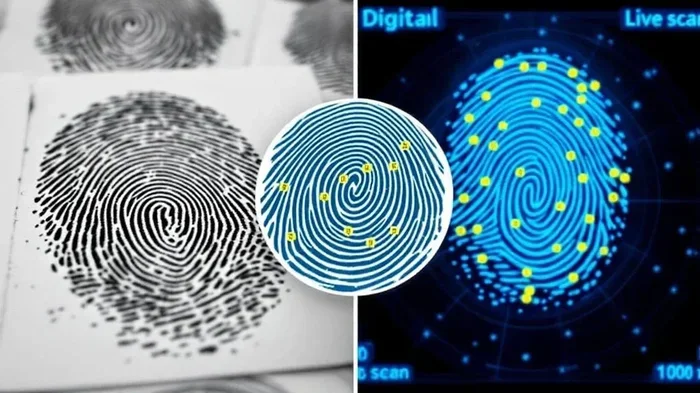
Step 2: Extract. The device identifies key points on the fingerprint. These are called minutiae. They include ridge endings and bifurcations. The scanner maps these points to create a digital template.
Step 3: Store. The template is saved securely. Good systems never store the actual fingerprint image. They store only the mathematical template. This protects your privacy.
Step 4: Match. When you scan your finger again, the device compares the new template with stored ones. If there is a match above a set threshold, access is granted. This is called fingerprint matching.
Step 5: Verify. Some advanced scanners also check for “liveness.” This means they confirm the finger is real and attached to a living person. This step is critical for access control systems where security is paramount. You can learn more about the benefits and challenges of such systems in our guide on advantages and disadvantages of access control systems.
Key Differences Between Fingerprint Scanner Types
Each type of fingerprint scanner has its own strengths and weaknesses. The table below compares them across important factors.
| Feature | Optical | Capacitive | Ultrasonic |
|---|---|---|---|
| Technology | Light imaging | Electrical signals | Sound waves |
| Image Type | 2D | 2D/3D | 3D |
| Security Level | Medium | High | Very High |
| Cost | Low | Medium | High |
| Spoof Resistance | Low | Medium-High | Very High |
| Common Use | Doors, gates | Smartphones | Premium phones |
| Speed | Fast | Very Fast | Fast |
| Environmental Sensitivity | High | Low | Low |
The table shows clear differences. Optical scanners win on price but lose on security. Capacitive scanners offer the best balance for everyday use. Ultrasonic scanners lead in security and detail but cost more.
For access control systems, the choice depends on your needs. A small office might be fine with an optical scanner. A high-security facility should consider capacitive or ultrasonic options. You can read more about how access control systems integrate with biometric technology in our detailed article on the topic.
Speed and Accuracy Comparison
Speed matters when you are in a rush. Capacitive scanners are generally the fastest. They read your fingerprint almost instantly. Ultrasonic scanners are also very quick, though they take a fraction more time to build the 3D map.
Accuracy depends on the sensor quality and the algorithm used. All three types can achieve high accuracy rates. However, ultrasonic scanners tend to have the lowest false acceptance rate. This means fewer chances of letting the wrong person in.
Durability and Lifespan
Optical sensors can degrade over time. The light source and image sensor wear out with heavy use. Capacitive sensors are more durable because they have fewer moving parts. Ultrasonic sensors are built to last, but their cost makes replacement more significant.
Factors to Consider When Choosing a Fingerprint Scanner
Not every fingerprint scanner is right for every situation. Before you buy, consider these important factors.
Security Requirements
How secure does your setup need to be? If you are protecting a front door, you want strong biometric security. Capacitive or ultrasonic scanners are better choices. If you are tracking employee attendance, an optical scanner might suffice.
Think about the threat level. Are you worried about spoofing? Do you need live finger detection? These questions guide your choice. Higher security demands more advanced sensor technology.
Budget
Cost varies widely. Optical scanners can cost as little as $50. Capacitive sensors range from $100 to $500. Ultrasonic scanners can exceed $1,000 for enterprise-grade units.
Set a realistic budget before shopping. Remember that cheaper does not always mean better. Consider the total cost of ownership, including maintenance and replacement.
Environment
Where will the scanner live? Outdoor or harsh environments need durable sensors. Capacitive and ultrasonic scanners handle moisture and dirt better than optical ones. If your setting is clean and indoor, optical scanners work fine.
Temperature and humidity also matter. Some sensors struggle in extreme cold or heat. Check the specifications before you commit. A fingerprint device that works well in a lab may fail in a warehouse.
Integration and Compatibility
Will the scanner work with your existing setup? Many modern scanners connect via USB, Wi-Fi, or Bluetooth. Check compatibility with your access control systems or software platform. Integration headaches can cost more than the scanner itself.
Also consider scalability. If you plan to add more scanners later, choose a system that supports expansion. This saves time and money down the road.
User Experience
How easy is it for people to use the scanner? A fingerprint reader that is hard to use will frustrate people. They will avoid it or find workarounds. Look for scanners with large sensor areas and clear feedback lights.
Enrollment speed matters too. A good fingerprint enrollment process takes less than a minute per user. If setup is slow, productivity drops.
Applications of Fingerprint Scanners
Fingerprint scanners serve many industries. Their versatility makes them valuable in both consumer and enterprise settings.
Smartphones and Personal Devices
Most modern phones include a capacitive fingerprint sensor. You use it to unlock your device, authorize payments, and access apps. This is one of the most common uses of biometric authentication in daily life.
Workplace Security
Many offices use fingerprint scanners for door access. Employees scan their finger instead of using a keycard. This adds a layer of identity verification that is hard to share or steal. It ties directly into broader access control systems that manage who enters which areas.
Time and Attendance Tracking
Companies use fingerprint scanners to clock in and out. This prevents buddy punching, where one employee signs in for another. The biometric scanner ensures the person is actually present. This improves payroll accuracy and accountability.
Healthcare and Hospitals
Hospitals use fingerprint scanners for patient identification. This reduces medical errors and prevents fraud. Nurses and doctors quickly verify patient identity before administering treatment. The fingerprint sensor adds a reliable layer of safety.
Law Enforcement and Border Control
Police and border agents rely on fingerprint scanners for identification. These devices help match suspects to criminal databases. At border crossings, they verify traveler identities quickly and accurately.
Common Mistakes to Avoid
Even with a great fingerprint scanner, mistakes can happen. Here are pitfalls to watch out for.
- Ignoring environmental factors. Placing an optical scanner in a dusty or wet area will cause failures. Choose the right sensor for the environment.
- Skipping regular maintenance. Sensors collect dust and oils over time. Clean them regularly for best performance.
- Choosing price over security. The cheapest option is not always the best. A breach costs far more than a better scanner.
- Neglecting software updates. Firmware updates fix bugs and improve fingerprint matching algorithms. Keep your devices current.
- Overlooking enrollment quality. Poorly enrolled fingerprints lead to rejections. Train users to enroll correctly for the best results.
Expert Insights
Biometric security is evolving fast. Experts predict that multimodal systems will become standard. These combine fingerprint scanning with facial recognition or iris scanning for even stronger identity verification.
Another trend is AI-powered fingerprint recognition. Machine learning algorithms improve matching accuracy over time. They adapt to changes in your fingerprint caused by aging or minor injuries.
Industry leaders also emphasize the importance of encryption. Stored fingerprint templates must be encrypted and protected. A breach of biometric data is far more serious than a leaked password. You cannot change your fingerprint like you can change a PIN.
Quick Tips for Getting the Most Out of Your Fingerprint Scanner
- Clean the sensor regularly. Use a soft, lint-free cloth to remove oils and dust.
- Enroll multiple fingers. This gives you backup options if one finger is injured.
- Keep firmware updated. Manufacturers release improvements that boost accuracy and speed.
- Place your finger correctly. Follow the on-screen guide for the best read.
- Use a protective cover. For outdoor sensors, a weatherproof housing extends lifespan.
Conclusion
A comparison of fingerprint scanners reveals clear differences in technology, cost, and security. Optical scanners are affordable and simple. Capacitive scanners offer the best balance for most users. Ultrasonic scanners deliver top-tier security and detail.
Your choice depends on your specific needs. Consider security level, budget, environment, and intended use. A well-chosen fingerprint scanner improves both convenience and safety. It is a smart investment in biometric authentication.
Take the time to evaluate your options. Whether you are securing a home, office, or facility, the right fingerprint reader makes all the difference. Apply what you have learned here, and you will make a confident, informed decision.
Frequently Asked Questions
What is the most secure type of fingerprint scanner?
Ultrasonic fingerprint scanners are the most secure. They create a detailed 3D map of your fingerprint using sound waves. This makes them very difficult to spoof with fake fingerprints.
Can fingerprint scanners be hacked?
No system is 100% hack-proof. However, capacitive and ultrasonic scanners are very hard to fool. Optical scanners are more vulnerable to high-quality replicas. Using biometric security best practices greatly reduces risk.
How long does fingerprint enrollment take?
Most scanners enroll a finger in under one minute. The process involves scanning your finger multiple times to build a complete template. Good fingerprint enrollment ensures accurate matching later.
Do fingerprint scanners work with wet fingers?
It depends on the type. Ultrasonic scanners handle moisture well. Capacitive scanners also work in most wet conditions. Optical scanners struggle with wet fingers because the water distorts the light image.
Are fingerprint scanners safe for storing personal data?
Yes, reputable scanners store only encrypted mathematical templates. They do not save actual fingerprint images. This protects your privacy and makes it very hard for anyone to reconstruct your fingerprint from stored data.
What is the lifespan of a fingerprint scanner?
Capacitive and ultrasonic scanners can last 5 to 10 years with proper care. Optical sensors may wear out faster, especially in heavy-use environments. Regular cleaning and firmware updates help extend the life of any fingerprint device.