How Can I Get Wi Fi All Over My Property Once And For All
Getting Wi-Fi all over your property is easier than you think. Whether you have a large home, a multi-story building, or a sprawling yard, the right Wi-Fi coverage solution can eliminate dead zones for good. This guide walks you through every option, from mesh networks to outdoor access points, so you can choose the best fix for your space.
Key Takeaways
- Mesh Wi-Fi systems are the most reliable way to cover large properties with seamless connectivity.
- Wi-Fi extenders and repeaters offer a budget-friendly fix but may reduce speed.
- Outdoor access points are essential for covering yards, garages, and detached buildings.
- Router placement matters a lot — moving your router to a central location can dramatically improve signal strength.
- Powerline adapters use your home’s existing wiring to extend your network without new cables.
- Professional installation may be worth it for very large or complex properties.
📑 Table of Contents
- How Can I Get Wi Fi All Over My Property Once And For All
- Why Your Wi-Fi Signal Doesn’t Reach Every Corner
- Mesh Wi-Fi Systems: The Best Full-Property Solution
- Wi-Fi Extenders and Repeaters: A Budget-Friendly Fix
- Powerline Adapters: Use Your Home’s Wiring
- Outdoor Wi-Fi: Covering Your Yard and Beyond
- How to Choose the Right Solution for Your Property
- Common Mistakes That Kill Your Wi-Fi Signal
- Quick Tips to Boost Your Current Wi-Fi Signal Today
- When to Call a Professional
- Final Thoughts
How Can I Get Wi Fi All Over My Property Once And For All
Dead zones are frustrating. You walk from your living room to the backyard, and suddenly your phone shows no signal. Your laptop drops connection in the bedroom upstairs. It feels like your wireless router is playing hide-and-seek with you.
The good news? You do not have to live with patchy wireless connectivity anymore. There are real, proven ways to blanket your entire property with strong, reliable internet coverage. Whether you live in a small apartment or a large estate, this guide covers every solution that actually works.
We will walk through mesh networks, Wi-Fi extenders, outdoor access points, and more. By the end, you will know exactly which option fits your home, your budget, and your needs. No guesswork. No fluff. Just clear, actionable steps to get Wi-Fi all over your property once and for all.
Why Your Wi-Fi Signal Doesn’t Reach Every Corner
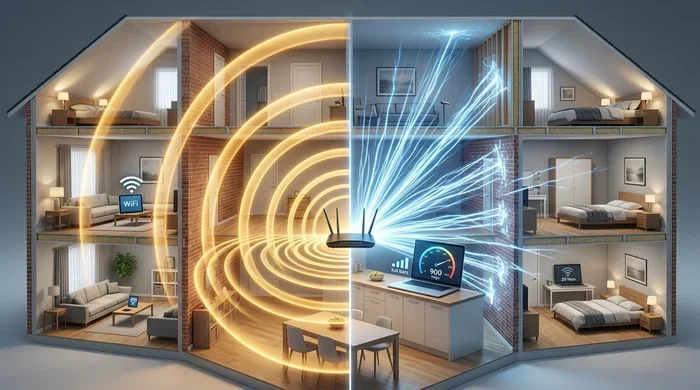
Before jumping into solutions, it helps to understand why your signal struggles in the first place. Wi-Fi signals are radio waves. They travel through the air, but they weaken when they hit walls, floors, and large objects. A typical home router sends signal in all directions, but the further it travels, the weaker it gets.
Common Culprits Behind Weak Coverage
- Thick walls and concrete block signals easily. Older homes with brick or stone walls are especially tough.
- Multiple floors create vertical distance that signals must travel through ceilings and stairwells.
- Distance from the router is the simplest cause. If your router sits in one corner, the far end of the house will suffer.
- Interference from other devices like microwaves, baby monitors, and cordless phones can disrupt your wireless signal.
- Old or outdated routers may not have the power or technology to push signal far enough.
Once you know what is causing the problem, you can pick the right fix. And that is exactly what the next sections cover.
Mesh Wi-Fi Systems: The Best Full-Property Solution
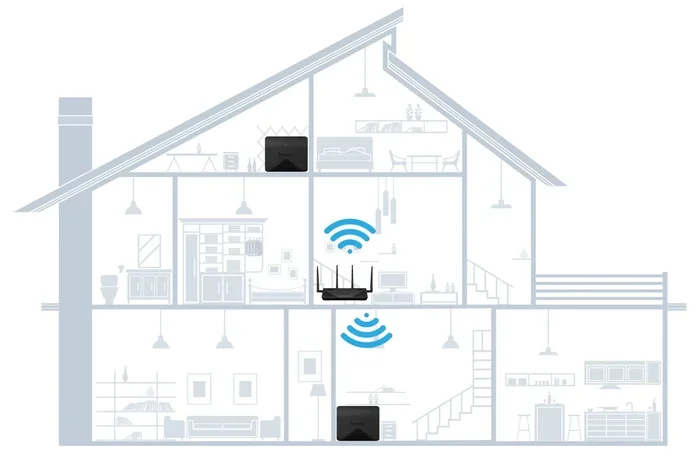
If you want a clean, seamless solution, a mesh Wi-Fi system is the gold standard. Instead of one router doing all the work, a mesh system uses multiple units (called nodes or satellites) placed around your property. Each node talks to the others and to your devices, creating one unified network.
How Mesh Systems Work
You place the main node near your modem. Then you add satellite nodes in rooms or areas where the signal is weak. The nodes communicate with each other automatically. Your phone or laptop stays connected to the strongest node as you move around. You do not need to switch networks manually. It just works.
Top Benefits of Mesh Wi-Fi
- Seamless roaming — your device switches between nodes without dropping connection.
- Easy setup — most mesh systems use simple phone apps.
- Scalable — you can add more nodes if your property grows.
- Single network name — no need to manage multiple SSIDs.
- Smart management — many systems let you prioritize devices, set parental controls, and more.
Popular mesh systems include Google Nest Wi-Fi, Eero, Netgear Orbi, and TP-Link Deco. They range in price from about $100 for a two-pack to $400+ for larger setups. If you have a large property, investing in a mesh system is one of the best decisions you can make for home network performance.
Wi-Fi Extenders and Repeaters: A Budget-Friendly Fix
Not everyone wants to spend hundreds of dollars on a mesh system. That is where Wi-Fi extenders come in. An extender plugs into a wall outlet and rebroadcasts your existing wireless signal to areas that are too far from the router.
When to Use an Extender
Extenders work best when your main router has a decent signal in the area where you place the extender. Think of it like a relay race. The extender receives the signal and passes it further. If the original signal is already very weak, the extender will just amplify a weak connection.
Pros and Cons
- Pros: Inexpensive, easy to set up, no new wiring needed.
- Cons: Can cut your speed in half, creates a separate network name on some models, may cause latency.
If you just need to cover one or two extra rooms, an extender can do the job. But for full-property coverage, mesh systems are usually a better long-term choice.
Powerline Adapters: Use Your Home’s Wiring
Here is a clever option that many people overlook. Powerline adapters use your home’s existing electrical wiring to carry your internet signal. You plug one adapter near your router and connect it with an Ethernet cable. Then you plug the second adapter in the room that needs better coverage and connect a router or access point there.
Why Powerline Works Well
Powerline adapters bypass the problems that Wi-Fi signals face. Walls and distance do not weaken the connection the same way because the signal travels through copper wiring. This makes powerline a great option for basements, garages, or detached buildings where wireless connectivity struggles.
Some powerline kits also include built-in Wi-Fi, so you get both a wired backhaul and a new wireless access point in one device. Brands like TP-Link and Netgear offer reliable kits starting around $60-$100.
Outdoor Wi-Fi: Covering Your Yard and Beyond
Getting Wi-Fi inside your home is one thing. But what about the backyard, the patio, or the detached garage? Outdoor Wi-Fi coverage requires special equipment because regular indoor routers are not built to handle weather, dust, or temperature extremes.
Options for Outdoor Coverage
- Outdoor access points — weatherproof devices that mount to your home’s exterior or under eaves.
- Mesh satellite nodes rated for outdoor use — some mesh systems offer outdoor-compatible units.
- Point-to-point wireless bridges — these send a signal from one building to another, great for detached workshops or guest houses.
If you have a large yard or multiple structures on your property, an outdoor access point can make a huge difference. You can stream music on the patio, work from the garage, or even set up a security camera system without worrying about signal loss. Just make sure any outdoor equipment is rated for the elements in your area.
How to Choose the Right Solution for Your Property
Every property is different. The best solution depends on the size of your home, the number of floors, building materials, and your budget. Here is a simple way to think about it.
Small to Medium Homes (Under 2,000 Sq Ft)
A single high-quality router placed in the center of your home may be enough. If you still have a few dead zones, a single Wi-Fi extender or one mesh satellite node can fill the gap. You do not need a full mesh system for a smaller space.
Large Homes (2,000-4,000 Sq Ft)
A mesh Wi-Fi system with two or three nodes is ideal. This gives you strong coverage on every floor and in every room without the speed loss that comes with extenders. Brands like Eero and Netgear Orbi make systems specifically designed for larger homes.
Very Large Properties (4,000+ Sq Ft or Multiple Buildings)
For really big properties, you may need a combination of solutions. A mesh system for the main house, powerline adapters for the basement, and outdoor access points for the yard or detached buildings. This layered approach ensures every inch of your property has solid Wi-Fi coverage.
| Solution | Best For | Cost Range | Ease of Setup |
|---|---|---|---|
| Mesh Wi-Fi System | Large homes, seamless coverage | $100 – $500+ | Very Easy |
| Wi-Fi Extender | Small dead zones, budget fixes | $20 – $80 | Easy |
| Powerline Adapter | Basements, garages, thick walls | $60 – $150 | Moderate |
| Outdoor Access Point | Yards, patios, detached buildings | $80 – $300 | Moderate |
| Professional Installation | Complex properties, enterprise needs | $200 – $1,000+ | Hands-Off |
Common Mistakes That Kill Your Wi-Fi Signal
Even with the best equipment, poor setup can ruin your internet coverage. Here are mistakes to avoid.
- Hiding your router in a closet or cabinet. Walls and doors block signal. Keep it in an open, central location.
- Placing the router near the floor. Signals spread outward and downward. Elevating the router helps reach upper floors.
- Ignoring interference. Microwaves, baby monitors, and even neighboring Wi-Fi networks can cause congestion. Switch to a less crowded channel if needed.
- Using outdated equipment. Old routers lack the technology to push strong signals over long distances. If your router is more than five years old, consider an upgrade.
- Buying the wrong type of extender. Not all extenders are equal. Look for dual-band or tri-band models to avoid speed loss.
Quick Tips to Boost Your Current Wi-Fi Signal Today
Before you buy anything, try these free and fast tips to improve your wireless signal right now.
- Move your router to a central, elevated location. Even a few feet can make a big difference.
- Restart your router regularly. A simple reboot can clear congestion and improve performance.
- Update your router’s firmware. Manufacturers release updates that improve range and stability.
- Switch your Wi-Fi channel. Use a free app like Wi-Fi Analyzer to find the least crowded channel.
- Remove physical obstacles near the router. Metal objects, mirrors, and large appliances can block signal.
These tips cost nothing and can often solve minor coverage issues. But if your property is large or has stubborn dead zones, you will likely need one of the solutions discussed earlier.
When to Call a Professional
Some situations call for expert help. If you have a very large property, complex building layouts, or need enterprise-grade network coverage, a professional installer can design a custom solution. They can run Ethernet cables through walls, mount access points in optimal locations, and configure a network that performs at its best.
Professional installation typically costs between $200 and $1,000 or more depending on the complexity. It is a worthwhile investment if you rely on strong, uninterrupted wireless connectivity for work, smart home devices, or entertainment. Many companies also offer ongoing support and maintenance plans.
Final Thoughts
Getting Wi-Fi all over your property is absolutely achievable. You do not have to settle for slow, spotty connections ever again. Whether you choose a mesh system, a powerline adapter, an outdoor access point, or a combination of solutions, the key is to match your setup to your property’s unique needs.
Start by identifying your dead zones and understanding what causes them. Then pick the solution that fits your budget and your space. With the right approach, every room, every floor, and every corner of your property can enjoy fast, reliable wireless internet.
Take action today. Your perfect Wi-Fi coverage plan is waiting.
Frequently Asked Questions
What is the best mesh Wi-Fi system for large properties?
Systems like Netgear Orbi, Eero Pro, and TP-Link Deco XE75 are excellent for large properties. They offer multiple nodes, strong range, and easy management through phone apps. Choose a system with at least three nodes for properties over 3,000 square feet.
Can I use a Wi-Fi extender and a mesh system together?
Yes, but it is not always recommended. Extenders can sometimes cause speed loss or create network conflicts with mesh systems. If you must use both, place the extender where the mesh signal is already strong for the best results.
How many access points do I need for full property coverage?
It depends on your property size and layout. A general rule is one access point for every 1,000 to 1,500 square feet. For multi-story homes, add one access point per floor. Outdoor areas may need a dedicated outdoor access point.
Does a Wi-Fi extender reduce internet speed?
Many extenders do reduce speed because they receive and rebroadcast the signal on the same channel. Look for dual-band or tri-band extenders to minimize speed loss. Mesh systems handle this much better because they use dedicated backhaul channels.
Can I run Ethernet cables myself for better coverage?
Absolutely. Running Ethernet cables to access points in different rooms gives you the strongest possible connection. You do not need to be a professional — basic tools and a little patience are all you need. Just be sure to check local building codes before drilling through walls.
How do I know if my router is outdated?
If your router is more than five years old, it likely uses older Wi-Fi standards like 802.11n or 802.11ac. Newer routers support Wi-Fi 6 and Wi-Fi 6E, which offer faster speeds, better range, and improved handling of multiple devices. Check your router’s model number online to see its specifications.