Do I Need Internet If I Have A Hotspot Or Not Today
Do I Need Internet If I Have A Hotspot is an essential topic that provides valuable insights.
Key Takeaways
- Understanding Do I Need Internet If I Have A Hotspot: Provides essential knowledge
📑 Table of Contents
What Is a Hotspot and How Does It Work?
A hotspot is a physical location or a device that shares internet access over a short range. When people say “hotspot,” they usually mean one of two things. Either a Wi-Fi hotspot at a café or airport, or a personal hotspot on your phone. Both serve the same basic purpose. They let your devices connect to the web without a wired connection.
How a Mobile Hotspot Works
A mobile hotspot turns your smartphone into a router. It takes your cellular data signal and broadcasts it as a Wi-Fi network. Other devices like laptops, tablets, and e-readers can then connect. Think of it like a bridge. Your phone connects to the cell tower. Then it shares that bridge with your other gadgets.
The process is called Wi-Fi tethering. Your phone uses a small amount of its own data plan to create a local wireless network. The signal strength depends on how close you are to a cell tower. If the tower is far away, your hotspot will be slow or drop entirely.
Types of Hotspots You Should Know About
Not all hotspots are the same. Here are the main types you will encounter:
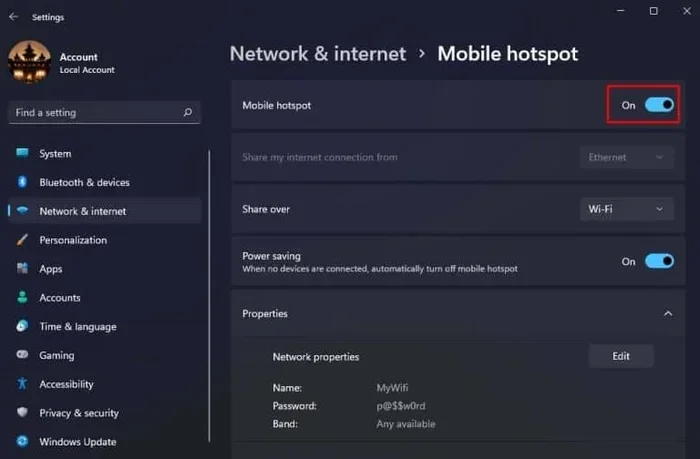
- Phone-based hotspots: You turn on the hotspot feature in your phone settings. This is the most common type. It uses your phone’s cellular data to create a shared connection.
- Dedicated hotspot devices: These are small gadgets made by companies like Verizon or T-Mobile. They are built solely for internet access. They often have better batteries and stronger antennas than phones.
- Public hotspots: These are free networks at coffee shops, hotels, and airports. They connect to the internet through a wired or fiber connection behind the scenes.
- Travel routers: These devices create your own private network from a public or cellular source. They add security when you are on the go.
Do You Actually Need Internet for a Hotspot to Work?
This is the core question, and the answer might surprise you. The short version is yes, you need internet. But let us dig deeper into why.
The “No Internet” Hotspot Myth
Some people believe that a hotspot works like a local network. They think devices can share files or play games without any real internet. In some very limited cases, this is true. Two phones connected to the same hotspot can share files directly. But for anything that requires the web, you need a live internet connection.
A hotspot without internet is like an empty pipe. It has the shape of a connection, but nothing flows through it. Your devices will show that they are connected to the hotspot. But when you open a browser, you will get an error. No pages load. No videos play. No emails come in.
What Happens When You Use a Hotspot Offline?
When you turn on your hotspot and there is no internet source, several things happen. Your phone still creates a Wi-Fi network. Other devices can see it and connect to it. But none of those devices can reach the internet. You are essentially building a local network in a vacuum.
Here is what you can still do without internet:
- Share files between devices on the same network
- Play local multiplayer games
- Use offline apps that do not need a connection
- Mirror your screen to another device
But anything that requires loading a webpage, streaming, or sending data to a server will fail. The hotspot is just the delivery vehicle. The internet connection is the cargo.
When Do You Need a Data Plan for Your Hotspot?
Using a hotspot eats up data fast. This is the number one reason people ask about data plans. Let us break down exactly how much data different activities use and what you need to know.
How Much Data Does a Hotspot Use?
Your data usage depends on what you do. Here is a rough breakdown:
- Web browsing: About 60 MB per hour
- Email checking: About 10 MB per hour
- Music streaming: About 60 MB per hour
- Video streaming (SD): About 1 GB per hour
- Video streaming (HD): About 3 GB per hour
- Video calls: About 1.5 GB per hour
- Social media scrolling: About 100 MB per hour
As you can see, video is the biggest data hog. If you plan to stream movies through your hotspot device, you will burn through a data plan quickly. Light browsing and email use much less. But even so, a few hours of hotspot use can add up.
Do You Need a Separate Data Plan?
Most phone plans include some amount of cellular data. You can use that data for tethering. However, some carriers limit how much data you can share. Others charge extra for hotspot data. Check your plan details before you rely on your phone as a router.
If you travel often, a dedicated portable hotspot with a separate plan might be better. These devices often have unlimited or high-data plans. They also keep your phone battery from draining. A dedicated hotspot device is a smart investment for frequent travelers and remote workers.
Can You Get Internet Without a Traditional ISP?
Many people assume you need a home internet provider to get online. That is not always true. There are several ways to get internet access without signing up for a traditional internet provider.
Cellular Data as Your Only Internet
For many people, their phone plan is their only internet connection. This works well if you are light to moderate user. You can tether your laptop to your phone when you need to work on the go. You can also use a portable hotspot device for better range and battery life.
The key is to monitor your data usage. Most phones have a data tracker built in. You can also set alerts to warn you when you are close to your limit. Going over your data cap can lead to slow speeds or extra charges.
Other Ways to Get Online Without a Home ISP
Beyond cellular data, there are other options:
- Satellite internet: Services like Starbeam or HughesNet beam internet from space. They work almost anywhere on Earth. The internet speed is decent, though latency can be higher.
- Community networks: Some neighborhoods share a single internet connection. Everyone chips in for cost. This is a great option in rural areas.
- Public Wi-Fi: Libraries, cafes, and parks often offer free internet. You can use your phone as a hotspot to share that connection with your laptop.
- Fixed wireless: Some companies provide internet through radio towers. No cables or phone lines needed. This is growing fast in rural areas.
Common Hotspot Mistakes and How to Avoid Them
Even experienced users make mistakes with their hotspot connection. Here are the most common ones and how to fix them.
Mistake 1: Ignoring Data Limits
The most common mistake is not tracking your data. People connect their laptop to a phone hotspot and forget they are using cellular data. A single video call or a few hours of browsing can blow past a small data limit. Set a data warning on your phone and check your usage daily when using a hotspot.
Mistake 2: Leaving Your Hotspot On All the Time
Leaving your Wi-Fi hotspot on drains your battery fast. It also makes your phone visible to nearby strangers. Turn it off when you are not using it. This protects your security and saves power. Most phones let you set a timer or auto-turn-off for the hotspot.
Mistake 3: Not Securing Your Hotspot
An open hotspot is a security risk. Anyone within range can connect to it. Always use a strong password. Use WPA2 or WPA3 encryption if your phone supports it. Never leave your hotspot open in public places.
Mistake 4: Expecting Fast Speeds Anywhere
Signal strength varies wildly depending on your location. A hotspot in a city center will be fast. The same hotspot in a remote area might be painfully slow. Do not expect your internet speed to be the same everywhere. Test your connection before you start an important video call.
Expert Tips for Getting the Most From Your Hotspot
Want your hotspot connection to work better? These expert tips will help you squeeze more performance out of your setup.
Tip 1: Use a External Antenna
Some hotspot devices support external antennas. These boost your signal strength significantly. They are especially helpful in rural areas or buildings with thick walls. A small investment can make a big difference in connection quality.
Tip 2: Keep Your Phone Charged
Running a hotspot drains your phone battery fast. Keep a portable charger handy. Better yet, plug your phone into a power bank while using it as a shared connection. This keeps the hotspot running longer and prevents your phone from shutting down.
Tip 3: Limit the Number of Connected Devices
The more devices connected, the slower the bandwidth gets for each one. If you are working, limit your hotspot to just your laptop. Disconnect devices you are not using. This keeps your internet speed as high as possible.
Tip 4: Choose the Right Frequency Band
Most phones let you choose between 2.4 GHz and 5 GHz bands for your hotspot. The 2.4 GHz band reaches farther but is slower. The 5 GHz band is faster but has shorter range. Choose 5 GHz when you are close to the hotspot. Use 2.4 GHz when you need more distance.
Tip 5: Update Your Phone’s Software
Software updates often include improvements to Wi-Fi tethering performance. Keeping your phone updated ensures you get the best hotspot connection possible. It also patches security flaws that could expose your network.
Key Takeaways
- You need internet for a hotspot to work: A hotspot without an internet source is just an empty network. It cannot deliver web content to your devices.
- Your phone hotspot uses cellular data: Every device connected to your hotspot shares your phone’s data plan. Monitor your usage closely.
- Offline tasks are possible on a hotspot: File sharing, local gaming, and offline apps still work without a live internet connection.
- A data plan is essential for regular hotspot use: Check your carrier’s tethering limits and consider a dedicated hotspot device for heavy use.
- Security matters: Always use a strong password and encryption on your hotspot. An open network invites unwanted guests.
- Signal strength affects everything: Your internet speed depends on proximity to cell towers. Move closer to a window or outdoor area for better performance.
- Alternative internet options exist: Satellite, fixed wireless, and public Wi-Fi can all power a hotspot when a traditional ISP is not available.
Frequently Asked Questions
Can I use my phone as a hotspot without a data plan?
Technically yes, but it will not give you internet access. Your phone can create a local network, but without a data source, connected devices cannot browse the web. Some carriers offer very small free data allowances that might work for basic tasks. But for real internet access, you need an active data plan.
How much data does a hotspot use per day?
It depends entirely on what you do. Light browsing might use 100 to 200 MB per day. Streaming video can use 3 GB or more per hour. Email and messaging use very little data. Check your phone’s data usage tracker to get a clear picture of your personal habits.
Is it safe to use a public hotspot?
Public hotspots can be risky. They are often unsecured, which means others on the same network could potentially see your activity. Use a VPN if you must connect to a public hotspot. Avoid accessing banking sites or entering passwords on unsecured networks. A portable hotspot from your own device is always safer.
Can I connect more than five devices to my phone hotspot?
Most phones allow up to 10 devices to connect. But the more devices you add, the slower the connection gets for everyone. The bandwidth is shared among all connected devices. For best performance, keep the number of connected devices to a minimum.
What is the difference between tethering and a hotspot?
Tethering is a broad term for sharing your phone’s internet connection. It can happen over USB, Bluetooth, or Wi-Fi. A Wi-Fi hotspot is a specific type of tethering that uses wireless Wi-Fi to share the connection. So all hotspots are tethering, but not all tethering is a hotspot.
Will using a hotspot drain my phone battery?
Yes, running a hotspot uses a lot of battery power. Your phone has to maintain a cellular data connection and broadcast a Wi-Fi signal at the same time. To save battery, plug your phone into a charger while using the hotspot. You can also reduce the number of connected devices and lower the screen brightness.
=== CONCLUSION ===
So, do you need internet if you have a hotspot? The answer is a clear yes. A hotspot is a delivery method, not an internet source on its own. Without a live internet connection, your hotspot is just an empty signal broadcasting to the air. Your devices will connect to it, but they will not get anywhere online.
That said, the world of internet access is more flexible than ever. You do not need a traditional home ISP to get online. A strong data plan, a portable hotspot device, or even a clever use of public Wi-Fi can keep you connected wherever you go. The key is understanding how your hotspot connection works and planning accordingly.
Track your data usage, secure your network, and choose the right setup for your needs. Whether you are a remote worker, a traveler, or just someone who needs backup internet, a hotspot can be a powerful tool. Use it wisely, and it will keep you connected when you need it most.