Do You Still Need A Modem With A Mesh System In 2024
Do you still need a modem with a mesh system? The short answer is yes, in most cases. A mesh Wi-Fi system replaces your router but still relies on a modem to connect to your internet service provider. You only skip the modem if your ISP provides a gateway device or you use a modem-free setup.
Let’s clear up a common question that trips up many homeowners. When you buy a mesh Wi-Fi system, the box promises seamless coverage everywhere. But what about the little box from your internet provider? Do you still need a modem with a mesh system? The answer depends on your setup, but in most homes, the modem stays.
A mesh system handles the job of a router. It spreads Wi-Fi signals through multiple nodes. However, it cannot connect directly to the outside world. That connection still comes from your internet service provider, and the modem translates that signal. Think of the modem as the bridge between the street and your home network. Without it, your mesh nodes have nothing to distribute.
In this guide, we will walk through exactly when you need a modem, when you can skip it, and how to set up your mesh system for the best performance. We will also look at common mistakes and expert tips. By the end, you will know exactly what gear you need for your home in 2024.
Key Takeaways
- A modem is still required: Your mesh system needs a modem to translate the signal from your ISP into a usable network.
- Mesh systems replace routers, not modems: The mesh nodes act as a smart router, distributing Wi-Fi throughout your home.
- ISP gateways combine both: Many providers offer a single device that handles modem and router duties, simplifying setup.
- Wired backhaul improves performance: Connecting mesh nodes with an Ethernet cable delivers the best speeds and stability.
- You can skip a separate modem: If your ISP gateway has a built-in router, you can connect your mesh system directly to it.
- Placement matters: Central hub positioning and avoiding obstructions maximize whole-home coverage.
📑 Table of Contents
What Is a Mesh Wi-Fi System and How Does It Work?
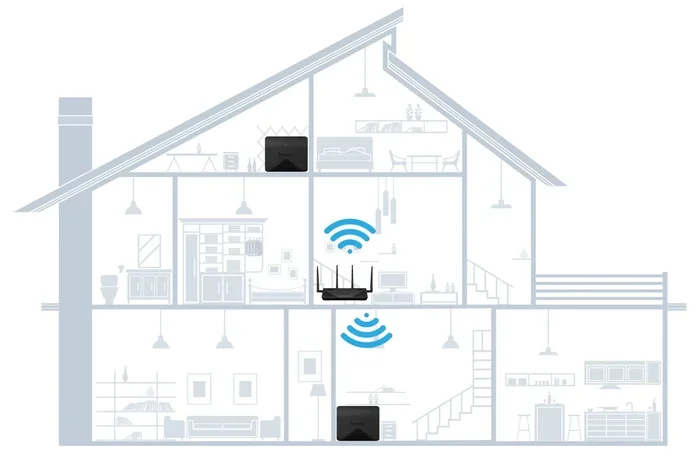
A mesh Wi-Fi system is a set of devices that work together to blanket your home with a single Wi-Fi network. Instead of one router broadcasting from a single spot, you get a main hub and satellite nodes. These nodes talk to each other and to your devices. The result is a strong signal in every room, even in dead zones.
How Mesh Nodes Communicate
Each node acts like a mini router. The main hub connects to your modem. It then sends the internet signal to the other nodes wirelessly or through cables. The nodes share the same network name and password. Your phone or laptop automatically connects to the strongest node as you move around the house.
Most modern mesh systems use a dedicated backhaul band. This is a separate wireless lane just for node-to-node communication. It keeps your internet speed fast, even when many devices are connected. Some systems also support wired backhaul, which we will cover later.
Mesh vs. Traditional Router
A traditional router sends Wi-Fi from one point. If your home is large or has thick walls, the signal weakens. You might need extenders, which often create separate networks. A mesh system solves this by using multiple nodes that act as one unified network. It is simpler to manage and offers a smoother experience.
But a mesh system does not replace your modem. The modem is the device that receives the signal from your ISP. The mesh router then takes that signal and shares it. You still need both pieces to get online.
Do You Still Need a Modem with a Mesh System?
The short answer is yes, you usually do. A modem connects your home to the internet. Your ISP sends a signal through a coaxial cable, phone line, or fiber. The modem turns that signal into data your devices can use. The mesh system then takes that data and broadcasts it as Wi-Fi.
The Role of a Modem in Your Network
Think of the modem as the door to the internet. Without it, your mesh nodes are just fancy radios. They have no source of data to share. The modem talks to your ISP, gets the internet, and passes it to the mesh router. The router then splits that connection among all the nodes.
Some people confuse a modem with a router. A modem brings the internet in. A router sends it out to your devices. A mesh system replaces the router part, not the modem. If you have a separate modem and router today, you keep the modem and swap the router for a mesh hub.
When a Modem Is Still Required
You need a separate modem if your ISP does not provide a gateway device. Most cable and DSL providers require a modem. Fiber-optic services sometimes use an optical network terminal, which acts like a modem. In all these cases, your mesh system connects to that device first.
Even if your ISP gives you a combo unit, you might still need a modem. Many gateways have a built-in router. If you want to use a mesh system, you can often put the gateway in bridge mode. This turns off its router functions and lets your mesh system take over. But the modem part of the gateway still works, so you still have a modem in the setup.
Mesh System vs. Modem-Router Combo
Many ISPs offer a single device that does both jobs. It is a modem-router combo, sometimes called a gateway. You plug it in, and it gives you internet and Wi-Fi. But how does that compare to a separate mesh system?
Pros and Cons of Each Setup
A modem-router combo is simple. You have one device, one power cord, and one set of cables. It works fine for small apartments. But for larger homes, the Wi-Fi range is often weak. The built-in router usually cannot match the power of a dedicated mesh system.
A mesh system gives you better coverage and faster speeds. You can add nodes to fill dead zones. The main downside is cost. Mesh systems are more expensive upfront. You also still need a modem, unless your combo device is in bridge mode.
Comparison Table
- Setup Simplicity: Modem-router combo wins with one device. Mesh requires a hub and nodes.
- Coverage: Mesh systems spread Wi-Fi far better with multiple nodes.
- Speed: Mesh systems often deliver faster speeds, especially with wired backhaul.
- Cost: Combos are cheaper upfront. Mesh systems cost more but offer better long-term value.
- ISP Lock-in: Combos often tie you to your ISP. Mesh systems work with any ISP.
If you want the best of both worlds, you can use your ISP gateway in bridge mode and connect your mesh system to it. This way you keep the modem function but get mesh-level Wi-Fi performance.
How to Set Up a Mesh System With Your Modem
Setting up a mesh system is easier than you might think. You do not need to be a tech expert. Follow these steps to get your network running smoothly.
Step-by-Step Setup
- Place your modem: Connect your modem to the ISP line. Plug it into power and wait for the lights to stabilize.
- Connect the mesh hub: Use an Ethernet cable to link the modem to the mesh hub. Plug the cable into the modem’s output port and the hub’s WAN port.
- Power on the hub: Turn on the mesh hub and wait for it to boot. Most hubs have a setup light that blinks until ready.
- Add satellite nodes: Place the nodes in rooms where you need more coverage. Keep them within range of the hub. Follow the app instructions to pair them.
- Test your connection: Walk around your home with a phone or laptop. Check the signal strength in each room. Run a speed test to confirm performance.
Common Mistakes to Avoid
One big mistake is placing the hub in a corner or behind furniture. The hub needs a clear line of sight to the nodes. Another mistake is using old Ethernet cables. If you want the best speeds, use Cat5e or Cat6 cables. Also, do not put nodes near microwaves or cordless phones, which cause interference.
Some users try to connect the mesh system directly to a wall outlet without a modem. This will not work unless your ISP uses a fiber jack with a built-in modem. Always check with your provider first.
Can You Use a Mesh System Without a Modem?
In rare cases, you can skip a separate modem. Some ISPs provide a fiber jack that acts as a modem. Others let you connect a mesh system directly to their network. But for most people, a modem is still part of the equation.
Using a Modem-Free Setup
If you live in an apartment with shared wiring, your building might provide internet through a wall jack. In that case, the building’s equipment acts as a modem. You can plug your mesh system directly into that jack. However, this is not common in single-family homes.
Another modem-free option is using a cellular hotspot. You can get a mobile data plan and plug a hotspot into your mesh hub. But this is expensive and often slower than a home broadband connection. Most people are better off with a standard modem and ISP plan.
ISP Gateway Devices
Many providers give you a gateway that combines a modem and router. If you use a mesh system, you can put the gateway in bridge mode. This disables its Wi-Fi and router functions. The gateway still acts as a modem, passing the signal to your mesh hub. You get the best of both worlds without buying a separate modem.
Some people ask if they can get a hotspot instead of Wi-Fi for their home network. While a mobile hotspot works in a pinch, it is not a replacement for a proper modem and mesh setup. A hotspot uses cellular data, which has limits and can be slower than a home broadband connection.
Expert Tips for Optimizing Your Mesh Network
Once your mesh system is up and running, a few tweaks can make a big difference. These tips help you get the most out of your setup.
Placement Tips for Maximum Coverage
Place the main hub in a central location. Avoid closets, cabinets, and corners. The hub should be on the same floor as most of your usage. For satellite nodes, place them halfway between the hub and the dead zone. Do not place them too far apart, or the signal will weaken.
Keep nodes away from thick walls and metal objects. Water tanks and fish tanks can also block signals. A little planning goes a long way in achieving whole-home coverage.
Firmware Updates and Maintenance
Check for firmware updates regularly. Most mesh systems update automatically, but it is good to verify. Updates fix bugs and improve security. They can also boost performance and add new features.
Reboot your nodes once a month. This clears the memory and keeps the system running smoothly. If you notice slow speeds, try moving a node closer to the hub or adding a new one.
Wired Backhaul for the Best Speeds
If your nodes support Ethernet backhaul, use it. Running a cable between the hub and a node gives you the fastest connection. It is perfect for home offices or gaming setups. You can also use existing Ethernet wiring in your walls, if available.
For most homes, wireless backhaul is fine. But if you need top speeds, wired backhaul is the way to go. It takes the pressure off the wireless bands and leaves more capacity for your devices.
Key Takeaways
- A modem is still required: Your mesh system needs a modem to connect to your ISP and bring the internet into your home.
- Mesh systems replace routers, not modems: The mesh nodes act as a smart router, distributing Wi-Fi throughout your home.
- ISP gateways combine both: Many providers offer a single device that handles modem and router duties, simplifying setup.
- Wired backhaul improves performance: Connecting mesh nodes with an Ethernet cable delivers the best speeds and stability.
- You can skip a separate modem: If your ISP gateway has a built-in router, you can connect your mesh system directly to it.
- Placement matters: Central hub positioning and avoiding obstructions maximize whole-home coverage.
So, do you still need a modem with a mesh system? In almost every case, yes. The modem brings the internet in, and the mesh system spreads it out. You can simplify your setup by using an ISP gateway in bridge mode, but the modem function remains essential. With the right placement and a few tweaks, your mesh network will deliver fast, reliable Wi-Fi to every corner of your home.
If you are unsure about your current setup, check with your ISP. They can tell you whether your gateway is in bridge mode or if you need a separate modem. Once you have the right gear, a mesh system will transform your home Wi-Fi experience. You will enjoy seamless streaming, smooth video calls, and fast gaming without any dead zones.
Frequently Asked Questions
Can I use a mesh system if I already have a modem-router combo from my ISP?
Yes, you can. Put your ISP gateway into bridge mode first. This turns off its router functions and lets your mesh system take over. The gateway still acts as a modem, so your internet connection stays active.
Do I need a separate modem if my mesh system comes with a built-in modem?
Most mesh systems do not have a built-in modem. They are routers only. You will still need a separate modem to connect to your ISP. Check the product specs to be sure.
What happens if I connect my mesh system directly to a wall outlet without a modem?
It will not work unless the wall outlet is a fiber jack with a built-in modem. In most homes, you need a modem to translate the ISP signal. Without it, your mesh nodes have no internet source.
Can I extend my mesh network using an Ethernet cable?
Yes, you can extend Wi-Fi with an Ethernet cable to your mesh nodes. This wired backhaul method delivers the fastest and most stable connection between nodes.
Is a modem required for a wireless mesh system?
Yes, a wireless mesh system still needs a modem to receive the internet signal from your provider. The mesh nodes then distribute that signal wirelessly throughout your home.
What is the difference between a modem and a mesh router?
A modem connects your home to the internet. A mesh router takes that connection and spreads it as Wi-Fi. A mesh system replaces your traditional router but does not replace the modem.