How Can I Increase My Wifi Range For Better Coverage
Boosting your wifi range is easier than you think. You can start with free fixes like repositioning your router and changing channels, then move to hardware upgrades like wifi extenders or a mesh wifi system. This guide walks you through every option so you can enjoy strong, reliable internet in every room.
Staring at a buffering screen in the bedroom while your living room enjoys blazing fast speeds is frustrating. Weak wifi signal in certain rooms ruins movie nights, work calls, and even simple browsing. The good news is that you don’t need to be a tech expert to fix this problem.
There are many practical ways to increase your wifi range and get better coverage throughout your home. Some solutions cost nothing at all. Others involve small investments that pay off fast. This guide covers every method, from simple free fixes to hardware upgrades that transform your home network.
Whether you live in a small apartment or a large house with thick walls, you will find actionable steps here. Let’s dive into the best strategies for expanding your wireless range and killing those annoying dead zones for good.
Key Takeaways
- Router placement matters: Moving your router to a central, elevated spot can dramatically improve your wifi range.
- Free fixes work: Changing your wifi channel, updating firmware, and reducing interference costs nothing but boosts signal strength.
- Wifi extenders and boosters are affordable: These devices repeat your signal and fill in dead zones without replacing your router.
- Mesh wifi systems offer the best whole-home coverage: They create a seamless network that handles large homes with ease.
- Hardware upgrades make a big difference: Upgrading to a dual band router or better antenna can transform your wireless range.
- Ethernet backhaul gives you the fastest extended connection: Running a cable to your extender ensures speed doesn’t drop off.
- Know when to replace: If your router is more than five years old, a new model with modern standards will outperform any workaround.
📑 Table of Contents
Why Your Wifi Range Matters
A strong wifi signal means more than just fast internet. It means reliability. It means your smart home devices stay connected. It means your kids can video call grandma from any room without freezing.
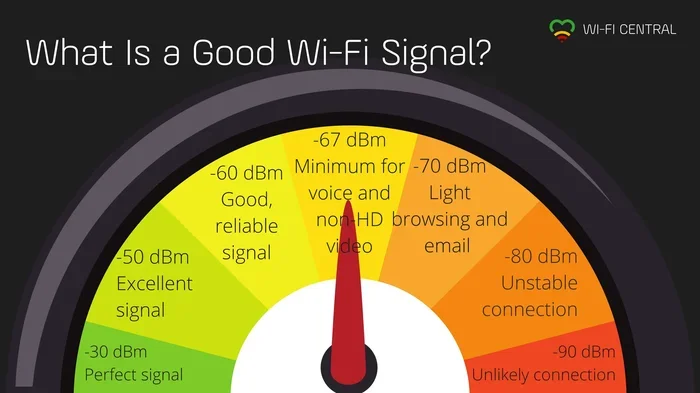
When your wifi coverage falls short, you experience slow downloads, dropped connections, and frustration. Many people accept weak signal as a fact of life. But it doesn’t have to be that way. Understanding why range suffers is the first step toward fixing it.
Common Causes Of Poor Wifi Range
Several factors shrink your wireless range more than you might expect:
- Router placement: Hiding your router in a closet or behind furniture blocks the signal.
- Thick walls and floors: Concrete, brick, and metal studs absorb wifi signals.
- Electronic interference: Microwaves, baby monitors, and Bluetooth devices compete for the same frequencies.
- Outdated hardware: Older routers lack the power and technology of modern models.
- Too many connected devices: Each device shares your bandwidth, which can slow things down.
- Wrong wifi channel: Neighboring networks on the same channel create congestion.
Once you identify the cause, you can pick the right fix. Let’s explore the best methods to boost your wireless router range.
Best Ways To Increase Your Wifi Range
You don’t need expensive equipment to start. Many effective methods are completely free. Here are the top strategies ranked by impact and ease.
Optimize Your Router Placement
Where you put your router has a huge effect on your wifi signal strength. Many people tuck it away in a corner or behind a TV. That blocks the signal from reaching every room.
Follow these placement tips for better wifi coverage:
- Place your router in a central location: This gives the signal equal distance to every room.
- Keep it elevated: Put it on a shelf or mount it on a wall. Signals spread downward and outward better.
- Keep it away from walls and metal objects: These block the signal.
- Avoid corners and closets: The signal gets trapped and can’t reach outward.
- Stay away from other electronics: Keep it at least three feet from microwaves, cordless phones, and TVs.
Try moving your router to a more central, open spot for a week. You might be surprised at how much better your wireless range becomes. This single change often solves half the problem.
Use A Wifi Extender Or Booster
A wifi extender or wifi booster picks up your existing signal and repeats it to areas that need more coverage. These devices are affordable and easy to set up.
Here is what you should know before buying one:
- Wifi extenders are budget-friendly: Most cost between $20 and $60.
- They work by repeating your signal: Think of them as a relay station for your router.
- Placement matters a lot: Put the extender halfway between your router and the weak spot.
- Speed may drop slightly: Extenders cut your bandwidth roughly in half because they use the same radio to receive and send.
- Some models work better than others: Look for dual-band extenders for the best results.
If you want a quick and cheap fix, a wifi extender is a great starting point. Just remember that it works best for basic tasks like browsing and email. For heavy streaming, you may want a stronger solution.
Switch To A Mesh Wifi System
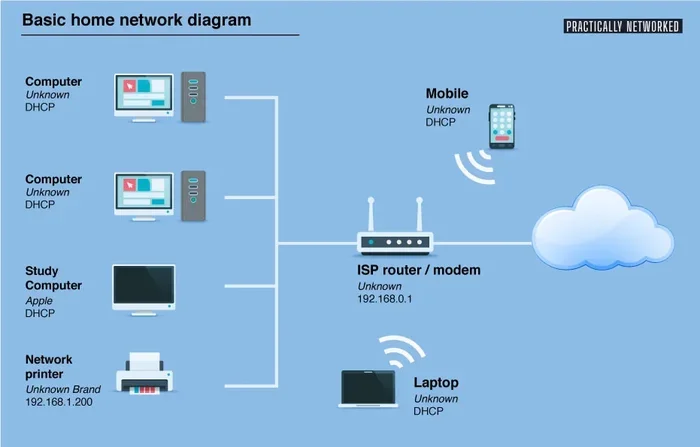
A mesh wifi system replaces your single router with multiple nodes that work together. Each node spreads the signal, creating seamless wifi coverage across your entire home.
Mesh systems are the gold standard for whole-home coverage. Here is why they are so effective:
- Seamless roaming: Your devices switch between nodes without dropping the connection.
- One network name: You don’t have to manually switch between networks as you walk around the house.
- Easy to expand: Add more nodes if your home is larger than the initial setup covers.
- Smart management: Most mesh systems come with apps that let you monitor and control your network.
Many people who want to add mesh wifi to existing router setups find that mesh systems give them the flexibility to keep their current equipment while upgrading coverage. You can also explore options to get just wifi at home without a modem-router combo if you want a dedicated mesh setup. Mesh systems typically cost more than extenders but deliver far better performance and reliability.
Update Your Router Firmware
This is one of the simplest and most overlooked ways to improve your wifi range. Router manufacturers release firmware updates that improve performance, fix bugs, and sometimes add new features.
To update your firmware:
- Log into your router’s admin panel through your web browser.
- Look for a section called “Firmware Update” or “Advanced Settings.”
- Check for available updates and install them.
- Restart your router after the update completes.
Some newer routers update automatically. If yours doesn’t, check for updates once a month. A simple firmware update can improve your signal strength and fix connection issues you didn’t even know you had.
Change Your Wifi Channel
Your neighbors’ wifi networks can interfere with yours. When multiple networks operate on the same wifi channel, they compete for space and slow everyone down.
Switching to a less crowded channel can boost your range and speed. Here is how:
- Use a wifi analyzer app: These free apps show which channels are least congested in your area.
- Log into your router settings: Find the wireless channel option in the admin panel.
- Switch to a less crowded channel: For 2.4 GHz, channels 1, 6, and 11 are the standard non-overlapping options.
- Try the 5 GHz band: It has more channels and less congestion than 2.4 GHz.
Changing your channel takes just a few minutes and can make a noticeable difference. This is especially helpful if you live in an apartment building or dense neighborhood with many nearby networks.
Hardware Upgrades That Boost Signal
Sometimes free fixes aren’t enough. If your router is outdated or your home is large, a hardware upgrade may be the best investment. Here are the most effective options.
Upgrade Your Router Antenna
Many routers come with small, low-gain antennas that limit your wireless range. Replacing them with high-gain antennas can significantly boost your signal.
Here is what to look for:
- High-gain antennas: These focus the signal in a specific direction for better reach.
- Omni-directional antennas: These spread the signal evenly in all directions.
- Check compatibility: Make sure the antenna matches your router’s connector type.
- External antennas outperform internal ones: Most modern routers with internal antennas cannot be upgraded this way, but many older models can.
If your router has detachable antennas, this is one of the cheapest ways to improve your wifi coverage. A quality high-gain antenna costs $15 to $30 and can make a real difference.
Get A Dual Band Router
A dual band router broadcasts on both 2.4 GHz and 5 GHz frequencies. This gives you more flexibility and better performance overall.
Here is the difference between the two bands:
- 2.4 GHz: Longer range but slower speeds. Better for devices far from the router.
- 5 GHz: Shorter range but faster speeds. Best for devices close to the router.
By using both bands, you can spread your devices across frequencies and reduce congestion. If your current router is single-band, upgrading to a dual band model is one of the best ways to increase your wifi range and improve overall performance.
Consider Powerline Adapters
Powerline adapters use your home’s electrical wiring to carry internet to rooms where wifi struggles. You plug one adapter near your router and another in the room that needs better coverage.
They are a great option when walls block wifi signals. Powerline adapters are easy to set up and provide a stable connection. They work especially well for devices that need consistent speed, like gaming consoles or desktop computers.
Simple Fixes That Make A Big Difference
Before you spend any money, try these quick fixes. They cost nothing and often surprise people with how much they help.
Reduce Interference From Other Devices
Many household devices emit signals that interfere with your wifi signal. The biggest culprits include:
- Microwaves
- Baby monitors
- Cordless phones
- Bluetooth speakers
- Security cameras
Move your router away from these devices. Even a few feet of distance can reduce interference and improve your wireless range. If you notice your wifi slows down when you use the microwave, interference is likely the cause.
Use Ethernet Cable For The Backhaul
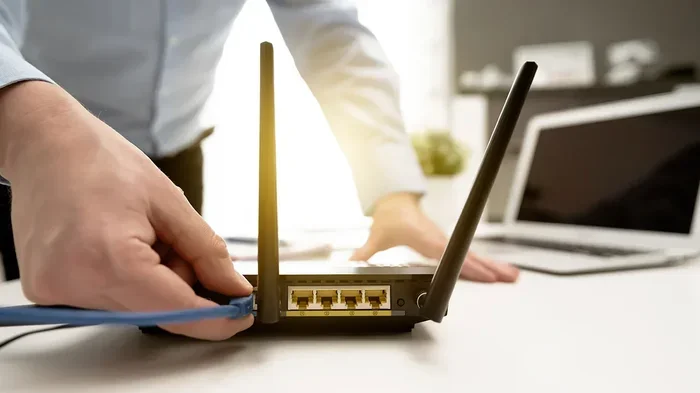
If you use a wifi extender, connecting it to your router with an ethernet cable gives you the best results. This is called wired backhaul, and it preserves speed on the extended network.
Running an ethernet cable to your extender ensures that the repeated signal stays fast. You can also extend wifi with an ethernet cable to reach far corners of your property where wireless signals struggle. This approach gives you the strongest possible extended connection without speed loss.
Restart Your Router Regularly
Just like any computer, your router benefits from a fresh start. Restarting it once a week clears memory, refreshes connections, and can resolve slow speeds.
Set a reminder to restart your router every Sunday morning. It takes about 30 seconds and keeps your network running smoothly. Many modern routers also support scheduled restarts in their settings.
When To Replace Your Router Entirely
Sometimes no amount of tweaking saves an old router. If your device is more than five years old, it likely lacks the technology needed for strong, reliable wifi coverage in today’s homes.
Consider replacing your router if you notice these signs:
- Your internet is slow even when you are close to the router.
- Your router overheats frequently.
- It does not support modern wifi standards like Wi-Fi 5 or Wi-Fi 6.
- You have more devices than it can handle smoothly.
- Firmware updates are no longer available.
When you do replace your router, look for models that support the latest wifi standards. Wi-Fi 6 routers offer better range, faster speeds, and improved handling of multiple devices. If you work with a provider like Spectrum, you can also explore options to change out your router with their equipment or bring your own compatible model.
A new router is an investment that pays for itself in better performance and fewer headaches. Do not let an outdated device hold back your home network.
Final Thoughts
Improving your wifi range does not have to be complicated or expensive. Start with the free fixes like better router placement, channel changes, and firmware updates. If those do not solve the problem, try a wifi extender or consider a mesh wifi system for whole-home coverage.
Hardware upgrades like dual band routers and high-gain antennas offer longer-term solutions. And when your router is truly outdated, replacing it with a modern model gives you the best possible foundation for a strong home network.
The key is to take action. Every weak signal zone in your home is a problem you can fix. Use the tips in this guide, test your results, and adjust as needed. Soon you will enjoy better wifi coverage in every room without frustration.
Frequently Asked Questions
What is the easiest way to increase wifi range at home?
The easiest way is to move your router to a more central, elevated location. This free fix often improves signal strength immediately. You can also change your wifi channel to avoid interference from neighbors’ networks.
Do wifi extenders really work?
Yes, wifi extenders do work. They repeat your existing signal to areas with weak coverage. However, they may reduce speed slightly because they use the same radio to receive and send data. Place the extender halfway between your router and the weak spot for the best results.
How can I improve my wifi range without buying new equipment?
You can optimize router placement, update firmware, change your wifi channel, and reduce electronic interference. Restarting your router regularly also helps. These free methods often make a noticeable difference without any cost.
Is mesh wifi better than a wifi extender?
Mesh wifi systems are generally better than extenders. They create a seamless network with multiple nodes, so your devices switch smoothly as you move around the house. Mesh systems also maintain better speeds compared to traditional extenders.
How often should I replace my router?
Most routers perform best for about five years. After that, they may struggle with newer devices and higher bandwidth demands. If you notice slow speeds or frequent disconnections, it may be time for a replacement.
Can thick walls block my wifi signal?
Yes, thick walls made of concrete, brick, or metal can significantly block wifi signals. This is one of the most common causes of weak coverage in certain rooms. Using a mesh system or powerline adapter can help bypass these obstacles.