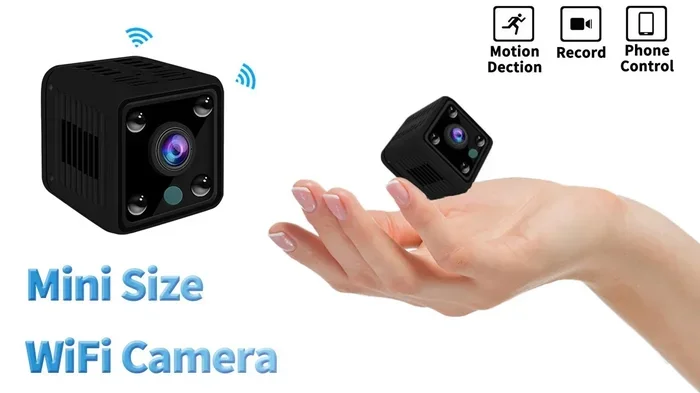
Do You Need Wifi For Mini Camera Discover The Truth
Not all mini cameras need wifi to work. Some mini cameras record locally on SD cards, while others rely on wireless connectivity for live streaming and remote viewing. Whether you need wifi depends on your goals, setup, and how you plan to use the camera. This guide breaks down everything you need to know about mini camera wifi requirements and helps you choose the right option for your situation.
Do you need wifi for mini camera? This is one of the most common questions people ask when shopping for small surveillance devices. The short answer is no, not always. But the full answer is more interesting than that.
Mini cameras come in many shapes and sizes. Some rely entirely on wireless technology to send footage to your phone or computer. Others work completely offline, storing everything on a tiny memory card inside the device. Understanding the difference matters a lot. It affects where you can place the camera, how long it runs, and what you can do with the footage.
In this guide, we will walk through everything you need to know. We will cover how mini cameras work, when wifi is actually necessary, and what alternatives exist. By the end, you will know exactly what kind of camera fits your needs.
Let us dive in.
Key Takeaways
- WiFi is not always required: Many mini cameras can record footage locally without any wireless connection at all.
- WiFi enables remote viewing: If you want to watch live feeds from your phone or computer, you will need a wifi connection.
- Offline mini cameras use SD cards: These cameras store footage directly on a memory card for later review.
- Battery-powered options exist: You can find portable mini cameras that work without being plugged into a power outlet.
- Hybrid cameras offer both options: Some mini cameras support both wifi streaming and offline local recording.
- Your use case determines the need: Hidden surveillance, baby monitoring, and pet watching all have different wifi requirements.
📑 Table of Contents
- What Is a Mini Camera and How Does It Work?
- Do You Actually Need Wifi for a Mini Camera?
- How Mini Cameras Connect Without Wifi
- Comparing WiFi vs Non-WiFi Mini Cameras
- Can You Extend Your WiFi Range for Better Mini Camera Coverage?
- Expert Tips for Choosing the Right Mini Camera
- Common Mistakes People Make with Mini Cameras
- How to Set Up a Mini Camera With and Without Wifi
- Can You Connect a Mini Camera to Your Phone Without Wifi?
- Final Thoughts: Do You Really Need Wifi for Your Mini Camera?
What Is a Mini Camera and How Does It Work?
A mini camera is a small, compact surveillance device designed to capture video and sometimes audio. These cameras are often no bigger than a coin or a small fist. People use them for home security, pet monitoring, baby watching, and even hidden recording purposes.
At their core, mini cameras use a tiny lens and an image sensor. The lens captures light, and the sensor converts that light into digital video. From there, the camera either stores the footage locally or transmits it wirelessly.
How Mini Cameras Capture and Store Footage
Mini cameras handle footage in two main ways. The first way is local storage. The camera saves video directly onto a memory card, usually a microSD card. You then remove the card and plug it into a computer to review the footage.
The second way is wireless transmission. The camera sends video over a wifi network to a cloud server or directly to your phone. This lets you watch live feeds from anywhere with an internet connection.
Some cameras do both. They can record to a card and stream over wifi at the same time. This gives you the best of both worlds.
Common Types of Mini Cameras
There are several types of mini cameras on the market today. Here are the most popular ones:
- Hidden mini cameras: These are disguised as everyday objects like clocks, smoke detectors, or USB chargers. They are often used for surveillance and security monitoring.
- Wearable mini cameras: These clip onto clothing or fit in your pocket. They are great for on-the-go recording.
- Indoor mini cameras: Small cameras designed for home use. They often sit on shelves or desks and monitor rooms.
- Outdoor mini cameras: Weather-resistant small cameras that can handle rain, dust, and temperature changes.
- Battery-powered mini cameras: These run on rechargeable batteries and do not need a constant power source.
Each type has its own strengths. But the one thing they all share is the question of connectivity. Do they need wifi? That depends entirely on what you want them to do.
Do You Actually Need Wifi for a Mini Camera?
This is the big question. And the answer depends on what you want from your camera. Let us break it down clearly.
When You Do NOT Need Wifi
You do not need wifi if you only want to record footage for later viewing. Many mini cameras come with built-in local storage. They record onto a memory card, and you download the files when you want to watch them.
This approach works well for several situations:
- Home surveillance when you are away for days: The camera records continuously and you check the footage when you return.
- Hidden recording for evidence: If you suspect something is happening in your home or office, a local-recording mini camera captures everything without needing internet.
- Off-grid locations: Places without wifi access, like cabins, garages, or outdoor sheds, are perfect for offline cameras.
- Privacy-focused recording: Some people prefer not to send footage over the internet. Local storage keeps everything on the device.
One great example is a hidden camera that works without internet. These devices store everything on a memory card and do not transmit any data. This makes them ideal for discreet surveillance in areas without network coverage.
When You DO Need Wifi
You need wifi if you want real-time access to your camera feed. Without a wireless connection, you cannot view live video from your phone or computer.
Here are the situations where wifi becomes essential:
- Remote monitoring: Want to check on your home while you are at work? Wifi lets you stream live footage from anywhere.
- Instant alerts: Many wifi cameras send push notifications when they detect motion. You get alerted the moment something happens.
- Cloud backup: With wifi, footage uploads to a cloud server. This protects your videos even if someone steals the camera.
- Two-way audio: Wifi enables you to speak through the camera and listen to what is happening in real time.
If you are setting up a wireless security system, wifi is the backbone. It connects your camera to your phone, your apps, and your cloud storage.
How Mini Cameras Connect Without Wifi
Not having wifi does not mean you are stuck with no options. Mini cameras have several ways to work offline. Let us look at each one.
SD Card Recording
This is the most common offline method. The camera records video directly onto a microSD card. Most mini cameras support cards ranging from 8GB to 256GB. The larger the card, the more footage you can store.
To use this method, you simply insert the card, turn on the camera, and start recording. When the card is full, the camera either stops or overwrites the oldest footage. This is simple, reliable, and does not depend on any network.
USB Direct Transfer
Some mini cameras let you plug them directly into a computer using a USB cable. The camera acts like a flash drive, and you can pull the video files right off the device. No wifi needed, no app required.
This method is especially useful for cameras that do not have a removable SD card. You just connect the camera to your laptop and download the files.
Bluetooth-Enabled Mini Cameras
A few mini cameras use Bluetooth to connect to your phone. Bluetooth has a shorter range than wifi, but it works well for close-proximity viewing. You can stream live video to your phone within about 30 feet of the camera.
Bluetooth does not require internet access either. It creates a direct device-to-device connection. This is handy for quick checks without setting up a full wireless network.
Comparing WiFi vs Non-WiFi Mini Cameras
Not sure which type of camera is right for you? Let us compare the two main options side by side.
| Feature | WiFi Mini Camera | Non-WiFi Mini Camera |
|---|---|---|
| Live Remote Viewing | Yes | No |
| Local Storage | Usually yes (SD card or cloud) | Yes (SD card or USB) |
| Internet Required | Yes | No |
| Real-Time Alerts | Yes | No |
| Setup Complexity | Moderate | Simple |
| Power Source | Usually needs constant power | Often battery-powered |
| Privacy Level | Lower (data transmitted online) | Higher (data stays local) |
| Range | Unlimited with internet | Limited to storage capacity |
As you can see, both types have clear advantages. Your choice depends on what matters most to you. If remote access is important, go with a wifi mini camera. If simplicity and privacy matter more, an offline option works great.
Can You Extend Your WiFi Range for Better Mini Camera Coverage?
If you decide to go with a wifi mini camera, you might run into a common problem. The wifi signal does not reach where you want to place the camera. This is especially true for larger homes or buildings with thick walls.
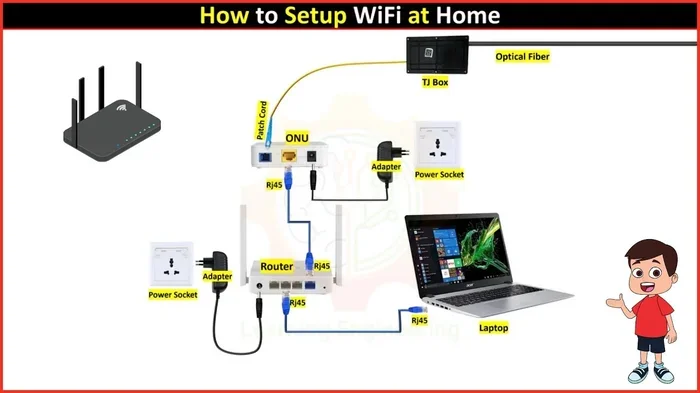
The good news is you can extend your wifi range. One effective method is using an ethernet cable to connect a wifi extender closer to the camera location. This boosts the signal in areas where it is weak.
Another option is to use a mesh wifi system. Mesh systems use multiple nodes placed around your home. They create a strong, seamless network that covers every room. This is ideal for keeping your mini camera connected no matter where you place it.
Just remember that thick walls, metal objects, and even microwaves can interfere with your wireless signal. Place your router and extenders thoughtfully for the best results.
Expert Tips for Choosing the Right Mini Camera
Shopping for a mini camera can feel overwhelming. There are so many options, and the marketing can be confusing. Here are some expert tips to help you make the right choice.
Tip 1: Define Your Purpose First
Before you buy anything, ask yourself what you need the camera for. Are you monitoring your home while you are away? Watching your pet during the day? Recording evidence in case of a break-in? Your purpose determines whether you need wireless connectivity or offline recording.
Tip 2: Check the Storage Options
Make sure the camera supports the storage method you prefer. If you want local recording, check that it has an SD card slot or USB port. If you want cloud backup, confirm it connects to a wifi network and supports cloud services.
Tip 3: Consider Battery Life
Mini cameras run on small batteries, and they drain faster when transmitting over wifi. If you want a camera that lasts for weeks without charging, look for one with a long-lasting battery and motion-activated recording. This saves power by only recording when something happens.
Tip 4: Think About Placement
Where will you put the camera? If it is in a spot without wifi coverage, you need a non-wifi model or a way to extend your network. A hidden camera that works without internet is perfect for spots far from your router.
Tip 5: Read Reviews and Test Before Committing
Not all mini cameras are created equal. Some have excellent video quality but poor battery life. Others connect easily but overheat quickly. Read real user reviews and, if possible, test the camera before committing to a long-term setup.
Common Mistakes People Make with Mini Cameras
Avoid these common pitfalls when buying and using your mini camera:
- Assuming all mini cameras need wifi: Many people buy a wifi-only camera and then cannot use it in locations without internet access. Always check the connectivity options before purchasing.
- Ignoring storage limits: A full memory card stops recording. Set a reminder to check and clear your storage regularly.
- Placing the camera too far from the router: This leads to weak signals, dropped connections, and poor video quality. Use a wifi extender if needed.
- Forgetting about legal issues: Recording people without their consent can be illegal in many areas. Always check local laws before using a mini camera, especially hidden ones.
- Overlooking power requirements: Some mini cameras need to stay plugged in. If you want portability, choose a battery-powered model.
How to Set Up a Mini Camera With and Without Wifi
Setting Up a WiFi Mini Camera
Setting up a wifi mini camera is straightforward. Here is a quick step-by-step process:
- Download the camera’s companion app on your phone.
- Plug in the camera and wait for it to power on.
- Open the app and select “Add New Device.”
- The app will search for the camera’s wifi signal.
- Enter your home wifi password when prompted.
- Wait for the connection to complete.
- Test the live feed on your phone to confirm it works.
Most apps walk you through the process with on-screen instructions. If you run into trouble, restarting both the camera and your router usually fixes the issue.
Setting Up an Offline Mini Camera
Setting up an offline mini camera is even simpler:
- Insert a formatted microSD card into the camera.
- Place the camera in your desired location.
- Turn the camera on using the power button.
- The camera will start recording automatically.
- When you want to review footage, remove the SD card and plug it into a computer or card reader.
No app, no wifi, no cloud account. Just point, record, and review when you are ready. This simplicity is why many people prefer offline mini cameras for basic surveillance tasks.
Can You Connect a Mini Camera to Your Phone Without Wifi?
Yes, you can. Some mini cameras connect directly to your phone using Bluetooth or a USB cable. This creates a direct device connection that does not rely on a wireless network.
For example, you can plug a mini camera into your phone using a USB OTG adapter. The phone recognizes the camera as a storage device, and you can access the recorded files immediately. This is a great option when you are in an area without internet access.
Another option is to connect your camera to your phone through a dedicated app using Bluetooth. The app receives the video feed directly from the camera. This works well for quick, short-range monitoring tasks.
However, for longer-range or more advanced features like cloud backup and real-time alerts, you will eventually need some form of network connectivity.
Final Thoughts: Do You Really Need Wifi for Your Mini Camera?
The answer comes down to your specific needs. If you want live streaming, remote access, and instant alerts, then yes, you need wifi. A wifi-connected mini camera gives you powerful tools to monitor your home or business from anywhere in the world.
But if you just need to record footage for later review, a non-wifi mini camera is simpler, more affordable, and more private. You do not need to worry about signal strength, internet outages, or monthly cloud subscriptions.
There is also a middle ground. Many modern mini cameras offer both options. They can record locally on an SD card and connect to wifi when it is available. This gives you flexibility and peace of mind.
Take a moment to think about what you really need. Consider where you will place the camera, how long you need it to run, and what you plan to do with the footage. Once you answer those questions, the right choice becomes clear.
Whether you choose a wifi mini camera or an offline model, the most important thing is that it fits your situation. The best camera is the one that works for you.
Remember, technology should serve your needs, not the other way around. Choose wisely, set up properly, and enjoy the security and convenience that a mini camera can bring to your life.
For more information on how mini cameras work without internet, check out our guide on hidden cameras that work without internet. You can also learn about connecting cameras to your phone for remote viewing in our article can a camera be connected to a phone. If you are dealing with weak wifi signals, our piece on extending wifi with ethernet cable offers practical solutions.
Frequently Asked Questions
Can a mini camera record without wifi?
Yes, many mini cameras can record without wifi. These cameras store footage directly onto a memory card or internal storage. You simply remove the card later to review the videos. This makes them perfect for locations without internet access.
How far can a wifi mini camera transmit?
A wifi mini camera can transmit as far as your wireless network reaches. With a strong router, this can be 100 feet or more indoors. Using a wifi extender or mesh system can increase that range significantly. The key is a stable and strong signal at the camera’s location.
Do all mini cameras need a subscription?
No, not all mini cameras require a subscription. Cameras that record to SD cards do not need any monthly fees. Some wifi cameras offer free basic apps but charge for cloud storage upgrades. Always check the pricing details before buying.
Can I use a mini camera outdoors without wifi?
Yes, you can. Many outdoor mini cameras are designed to work offline. They record to an SD card and are built to handle weather conditions. Just make sure the camera is rated for outdoor use and has enough battery life for your needs.
Is it legal to use a hidden mini camera?
The legality depends on your location and how you use the camera. In most places, recording in your own home is legal. However, recording in private spaces like bathrooms or bedrooms without consent is often illegal. Always research your local laws before using a hidden camera.
What is the best battery life for a wifi mini camera?
Battery life varies widely. Some wifi mini cameras last only 1-2 hours of continuous recording. Others, especially those with motion detection, can last several weeks on a single charge. Look for cameras with large battery capacity and efficient power management for the best results.
=== CONCLUSION ===
Do you need wifi for mini camera? The truth is, it depends entirely on what you want to accomplish. If remote access and live streaming matter to you, wifi is essential. If simple, private, local recording is your goal, you can skip wifi entirely.
Mini cameras are versatile tools that fit many different needs. They offer flexibility in how you monitor your home, office, or property. The key is understanding your options and choosing the right setup for your situation.
Take what you have learned here and apply it. Evaluate your needs, compare your options, and pick the mini camera that works best for you. With the right choice, you will have reliable surveillance and peace of mind, whether you are at home or miles away.