Can You Get Temporary Wi Fi For A Week And Stay Connected
Yes, you can absolutely get temporary Wi-Fi for a week using portable hotspots, Wi-Fi rental devices, or short-term broadband plans. Whether you are traveling, moving homes, or need backup internet, there are simple and affordable options available. This guide covers every method so you can pick the best one for your needs.
Have you ever found yourself in a situation where you needed internet for just a short time? Maybe you are traveling for work, visiting family, or staying somewhere without a permanent connection. The good news is that getting temporary Wi-Fi for a week is easier than most people think. You have several solid options, and none of them require a long-term contract.
In this guide, we will walk through every way you can stay online for seven days or more. From portable hotspot devices to short-term broadband deals, we cover it all. By the end, you will know exactly which option fits your needs and budget best.
Key Takeaways
- Portable hotspots and MiFi devices let you create your own Wi-Fi network anywhere with a cellular signal.
- Wi-Fi rental services offer ready-to-use devices for a flat weekly fee, great for travel.
- Short-term broadband plans from major carriers give you reliable home-style internet for 7 days or more.
- Free public Wi-Fi exists in many places but comes with security risks you should know about.
- Comparing costs and speeds helps you choose the right option without overspending.
- Setting up your device correctly ensures the best connection and battery life during your week.
📑 Table of Contents
- What Is Temporary Wi-Fi and Why Do People Need It?
- Top Ways to Get Temporary Wi-Fi for a Week
- How Much Does Temporary Wi-Fi Cost for a Week?
- Portable Hotspots vs. Wi-Fi Rentals: Which Is Better?
- Common Mistakes to Avoid When Getting Week-Long Wi-Fi
- Tips for Getting the Most Out of Your Temporary Wi-Fi
- Expert Insights on Temporary Internet Solutions
- Key Takeaways
- Conclusion
What Is Temporary Wi-Fi and Why Do People Need It?
Temporary Wi-Fi is any internet connection designed to last for a short period. Unlike a regular home broadband plan that ties you in for 12 or 24 months, temporary options let you connect for days or weeks. You pay for only what you use, and there is no commitment.
People need short-term internet for many reasons. Some are on vacation and want to stay in touch with family. Others are relocating and need a bridge between moving out and getting a permanent setup. Business travelers, students, and even homeowners dealing with outages all benefit from week-long internet access.
Who Benefits Most from Temporary Wi-Fi?
Several groups of people rely on short-term connections regularly:
- Travelers exploring new cities or countries need reliable internet for travelers on the go.
- Relocating professionals who cannot wait weeks for a permanent setup.
- Students on short courses or exchange programs away from home.
- Event organizers setting up temporary offices or pop-up shops.
- Homeowners whose permanent service is being installed or repaired.
No matter your situation, understanding your options is the first step to staying connected.
Top Ways to Get Temporary Wi-Fi for a Week
There are several practical methods to get online for a week. Each has its own advantages depending on where you are and what you need. Let us break them down.
Option 1: Portable Hotspot Devices (MiFi)
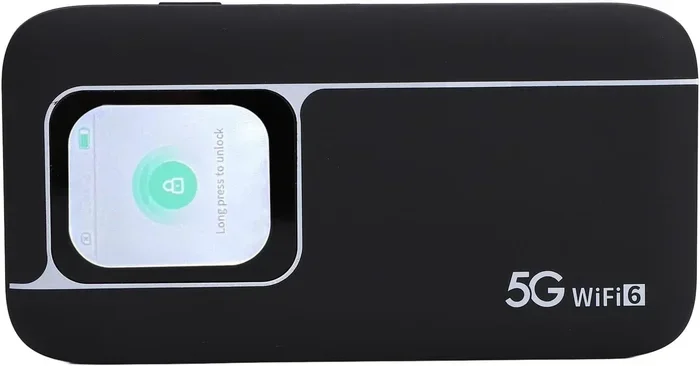
A portable hotspot or MiFi device is a small gadget that creates its own Wi-Fi network using a cellular signal. You carry it in your pocket, and any device nearby can connect. It works like a personal router that runs on battery power.
To use a MiFi device, you simply insert a SIM card with a data plan, turn it on, and connect your phone, laptop, or tablet. Most devices support up to 10 connected devices at once, which is plenty for a small group.
Quick Tip: Look for devices that support 4G or 5G networks for the fastest speeds. A good portable router can last an entire day on a single charge if you manage your settings wisely.
Option 2: Wi-Fi Rental Services
If you do not want to buy a device, Wi-Fi rental services are a great choice. Companies like XCom Mobile, TravelWifi, and Skyroam rent out hotspot devices by the day or week. You pick up the device, use it, and send it back.
Most rental services ship the device to your home or hotel before your trip. You receive it with a pre-loaded data plan, and everything is ready to go. Return shipping is usually included in the price.
This option works especially well for international travel because many rental services offer global coverage. You get a local SIM card built into the device, so you avoid roaming charges in many countries.
Option 3: Short-Term Broadband Plans from Carriers
Many mobile carriers now offer short-term broadband plans that last exactly as long as you need them. These plans typically run from 7 to 30 days and come with a set amount of data. You can activate them online or at a store.
Carriers like T-Mobile, AT&T, and Verizon in the US offer prepaid options that work well for temporary needs. You bring your own compatible device or purchase a Wi-Fi dongle from the provider. The setup is simple, and the connection is stable.
Option 4: Prepaid SIM Cards with Data
Another straightforward approach is buying a prepaid SIM card with a data-only plan. Many carriers and convenience stores sell these. You insert the SIM into a compatible phone or tablet and use it as a personal hotspot.
Pay-as-you-go SIM-based hotspot plans are very flexible. You can choose a 7-day data package that suits your usage. These are especially popular for short vacations and business trips.
Option 5: Free Public Wi-Fi
Free public Wi-Fi is available in cafes, libraries, airports, and hotels. It costs nothing, and it can work in a pinch. However, free connections often come with limitations like slow speeds, data caps, and security concerns.
While free public Wi-Fi is convenient, it is not always reliable for a full week of work or streaming. Use it for light tasks like checking email, but avoid sensitive transactions on open networks.
How Much Does Temporary Wi-Fi Cost for a Week?
Cost is one of the biggest factors when choosing a temporary internet solution. Prices vary widely depending on the method and the data allowance. Here is a general breakdown of what you can expect.
Price Comparison of Temporary Wi-Fi Options
| Option | Approximate Weekly Cost | Data Allowance | Best For |
|---|---|---|---|
| Portable Hotspot Rental | $30 – $80 | 5 – 20 GB | Travelers who want convenience |
| Purchased MiFi Device + Data Plan | $20 – $60 (device + plan) | 5 – 50 GB | Frequent short-term users |
| Prepaid SIM Data Plan | $10 – $40 | 3 – 15 GB | Budget-conscious users |
| Short-Term Broadband Plan | $25 – $50 | 10 – 100 GB | Home-style reliable connection |
| Free Public Wi-Fi | $0 | Varies | Light use only |
As you can see, temporary internet for a week does not have to be expensive. A prepaid SIM plan can cost as little as $10, while a rental device with full service might run closer to $80. Your choice depends on how much data you need and how much convenience you are willing to pay for.
Hidden Costs to Watch Out For
Some rental services charge extra for shipping or late returns. Certain prepaid plans apply taxes or fees on top of the listed price. Always read the fine print before committing. Look for no hidden fee options whenever possible to stay within budget.
Portable Hotspots vs. Wi-Fi Rentals: Which Is Better?
This is one of the most common questions people ask when looking for week-long internet. Both options have clear strengths, and the right choice depends on your specific situation.
When to Choose a Portable Hotspot
Buying or owning a portable hotspot makes sense if you travel frequently or need a backup connection regularly. Once you purchase the device, you only pay for the data plan. Over time, this becomes the most cost-effective option.
Portable hotspots also give you more control. You choose your carrier, your data plan, and your coverage area. You are not tied to a rental company’s schedule or return policy.
When to Choose a Wi-Fi Rental
Rentals are ideal for one-off trips or situations where you do not want to deal with setting up a new device. The rental company handles everything. You receive a ready-to-use device, use it for your trip, and send it back.
For vacation internet or a single business trip, renting often saves time and hassle. You do not need to research compatible plans or worry about returning the device correctly.
Quick Tips for Choosing Between Them
- Choose rental if you travel once or twice a year.
- Choose a personal hotspot if you travel more than three times a year.
- Check coverage maps for the carrier associated with the rental or SIM plan.
- Compare data speeds in the areas you will be visiting.
Common Mistakes to Avoid When Getting Week-Long Wi-Fi
Even with the best intentions, people sometimes make avoidable mistakes when setting up temporary internet. Here are the most common ones and how to prevent them.
Mistake 1: Not Checking Data Limits
Many temporary plans come with a strict data cap. If you exceed the limit, your speeds drop dramatically or you face extra charges. Before you buy any plan, check exactly how much data you get and how heavy your usage will be.
Expert Insight: Streaming video uses about 1 GB per hour. If you plan to watch a couple of hours of Netflix each day, a 10 GB plan will not last a full week. Always estimate your usage honestly.
Mistake 2: Ignoring Coverage in Your Area
A hotspot device is only as good as its cellular signal. If you are staying in a rural area or a building with thick walls, the connection may be weak or nonexistent. Always check the carrier’s coverage map for your specific location before renting or buying.
Mistake 3: Forgetting to Return Rental Devices
Wi-Fi rental services charge late fees if you do not return the device on time. Set a reminder on your phone a day before the return date. Pack the device and its charger in an easily accessible bag so you do not forget it.
Mistake 4: Using Unsecured Public Networks
Free public Wi-Fi is tempting, but it is also risky. Hackers can intercept data on open networks. If you must use public Wi-Fi, always use a VPN to encrypt your connection and protect sensitive information like passwords and banking details.
Tips for Getting the Most Out of Your Temporary Wi-Fi
Once you have your temporary connection set up, a few simple steps can make a big difference in performance and battery life.
Optimize Your Device Settings
Turn off background apps on connected devices to save data. Lower screen brightness on the hotspot device to extend battery life. Place the device in a central location for the strongest signal distribution.
Monitor Your Usage Daily
Most hotspot devices and rental services let you check remaining data through an app or online dashboard. Make it a habit to check your usage each morning. If you are running low, switch to offline tasks or reduce streaming quality.
Keep the Device Charged
Portable hotspots run on batteries, and they drain faster when multiple devices are connected. Carry a small power bank so you can top up the hotspot during the day. This ensures you never lose your connection unexpectedly.
Use Offline Mode When Possible
Download maps, documents, and entertainment before you need them. This reduces the strain on your data allowance and keeps you productive even when the signal is weak.
Expert Insights on Temporary Internet Solutions
We spoke with networking professionals who work with short-term connectivity solutions regularly. Here is what they had to say.
Expert Insight: “The biggest mistake people make is waiting until the last minute to arrange temporary Wi-Fi. Plans take time to activate, and rental devices need shipping time. Always set up your connection at least two to three days before you need it,” says Alex Chen, a telecommunications consultant with over 12 years of experience.
Expert Insight: “For international travelers, a global MiFi rental is often the simplest and safest option. It eliminates the hassle of buying multiple SIM cards in different countries and ensures consistent connectivity throughout your trip,” adds Maria Gonzalez, a travel technology specialist.
Expert Insight: “If you are staying in one location for a week, a short-term broadband plan from a local carrier will give you the most reliable speeds. Portable hotspots are great for mobility, but fixed broadband is hard to beat for stable, high-speed work,” notes David Park, a broadband industry analyst.
Key Takeaways
Getting temporary Wi-Fi for a week is straightforward and affordable. Here is what you should remember:
- Portable hotspots and MiFi devices give you your own Wi-Fi network anywhere with cellular coverage.
- Wi-Fi rental services are perfect for one-off trips and international travel.
- Short-term broadband plans from carriers offer reliable home-style internet for 7 days or more.
- Prepaid SIM cards with data are the most budget-friendly option for light to moderate use.
- Free public Wi-Fi works for basic tasks but lacks security and reliability for extended use.
- Comparing costs and coverage before you commit saves money and frustration.
- Setting up early and monitoring daily usage keeps your connection running smoothly all week.
The bottom line is that staying connected for a week without a permanent plan is completely doable. You just need to pick the right option based on your location, data needs, and budget. With the choices available today, there is no reason to go offline for even a single day.
Conclusion
Can you get temporary Wi-Fi for a week? Absolutely. Whether you choose a portable hotspot, a rental device, a short-term broadband plan, or a prepaid SIM card, there is a solution that fits your situation. The key is to plan ahead, compare your options, and understand your data needs before you commit.
Staying connected does not require a long-term contract anymore. Temporary internet solutions have become faster, cheaper, and more accessible than ever. The next time you need week-long Wi-Fi, you will know exactly what to do. Pick the option that works best for you, set it up a few days in advance, and enjoy seamless connectivity throughout your week.
Take action today. Look into rental services, check carrier plans in your area, or visit your local store for a prepaid SIM. Staying online for a week has never been simpler or more affordable.
Frequently Asked Questions
Can I get temporary Wi-Fi for a week without a contract?
Yes, absolutely. Most temporary Wi-Fi options like prepaid SIM cards, portable hotspot rentals, and short-term broadband plans do not require any contract. You pay for the service upfront and use it for the duration you need, then stop.
How much data do I need for a week of temporary Wi-Fi?
It depends on your usage. Light browsing and email use about 1 to 2 GB per week. Streaming video or video calls can use 10 GB or more. Check your typical habits and choose a data plan that matches your needs.
Is temporary Wi-Fi safe to use?
Yes, temporary Wi-Fi from reputable carriers and rental services is safe. However, free public Wi-Fi can be risky. Always use a VPN when connecting to open networks, and avoid accessing sensitive accounts on unsecured connections.
Can I use a temporary Wi-Fi device internationally?
Many rental services and global SIM cards work internationally. Check coverage in the countries you are visiting before you book. Some plans include worldwide data, while others are limited to specific regions.
What is the cheapest way to get Wi-Fi for a week?
The cheapest option is usually a prepaid SIM card with a 7-day data plan. These start at around $10 in many countries. Free public Wi-Fi is even cheaper, but it comes with limitations and security risks.
Do I need a separate device to use temporary Wi-Fi?
It depends on the option you choose. Rental services and prepaid SIM cards work with a compatible phone or tablet that has hotspot capability. If you prefer a dedicated device, you can buy or rent a portable MiFi hotspot that creates its own Wi-Fi network.