Does Intel Ax201 Support Wifi 6 Here Is the Full Answer
Yes, the Intel AX201 does support WiFi 6 (also known as 802.11ax). This compact wireless card delivers fast speeds, low latency, and reliable connectivity for laptops and desktops. Let us break down everything you need to know about this popular wireless adapter.
If you have been building or upgrading a PC, you might have come across the Intel AX201 wireless card. Maybe your laptop manufacturer listed it in the specs, or perhaps you are shopping for a replacement wireless adapter. Either way, the big question is simple: does Intel AX201 support WiFi 6? The short answer is yes. But there is a lot more to know about this little card that can make a big difference in your wireless experience.
In this guide, we will cover everything you need to know about the Intel AX201. We will look at its WiFi 6 capabilities, key features, how it compares to other cards, and how to set it up properly. Whether you are a casual user or a tech enthusiast, this article has you covered. Let us dive in.
Key Takeaways
- The Intel AX201 fully supports WiFi 6: It is built on the 802.11ax standard with speeds up to 2.4 Gbps.
- It supports both 2.4GHz and 5GHz bands: This gives you flexibility for range or speed depending on your needs.
- The card includes Bluetooth 5.0: You get wireless audio and peripheral support built in.
- It is a low-profile PCIe card: Easy to install in most laptops and desktops with an available M.2 slot.
- Driver support is available from Intel: You need to install the latest drivers for the best performance.
- The Intel AX201 is not WiFi 6E: It does not support the 6GHz band, which is reserved for WiFi 6E.
- It works with most modern routers: As long as your router supports WiFi 6, you will get the full benefits.
📑 Table of Contents
What Exactly Is the Intel AX201?
The Intel AX201 is a wireless network card made by Intel. It is part of Intel’s AX series of wireless adapters. The “AX” in the name stands for WiFi 6, which is the latest mainstream wireless standard at the time of writing. This card is designed to be compact and efficient. It fits into an M.2 slot on your motherboard, much like a small SSD.
One of the reasons the Intel AX201 is so popular is because of its size. It is a low-profile card that fits into thin laptops and small desktops without taking up much space. Despite its small size, it packs a punch when it comes to wireless performance.
Key Specs at a Glance
- WiFi Standard: 802.11ax (WiFi 6)
- Max Speed: Up to 2.4 Gbps
- Bands: 2.4GHz and 5GHz
- Bluetooth: Version 5.0
- Form Factor: M.2 Key E
- Interface: PCIe 3.0
These specs tell you that the Intel AX201 is a modern card built for today’s needs. It handles streaming, gaming, video calls, and large file transfers with ease. Now let us answer the main question in more detail.
Does Intel AX201 Support WiFi 6?
Yes, the Intel AX201 fully supports WiFi 6. This is its primary purpose. WiFi 6, also known as 802.11ax, is the newest wireless standard that offers faster speeds, better efficiency, and improved performance in crowded areas. The Intel AX201 was built from the ground up to take advantage of these improvements.
So what does WiFi 6 actually mean for you in real life? Here are the main benefits:
- Faster speeds: WiFi 6 can deliver speeds up to 2.4 Gbps on the Intel AX201. That is plenty for 4K streaming, large downloads, and online gaming.
- Better performance in crowded areas: If you live in an apartment building or work in a busy office, WiFi 6 handles multiple devices much better than older standards.
- Lower latency: This means less lag when gaming or video calling.
- Improved battery life on devices: WiFi 6 includes features that help your device use less power when connected.
The Intel AX201 supports both the 2.4GHz band and the 5GHz band. The 2.4GHz band gives you longer range but slower speeds. The 5GHz band gives you faster speeds but shorter range. Most modern routers let you switch between them or use both at the same time.
It is worth noting that the Intel AX201 does not support WiFi 6E. WiFi 6E adds the 6GHz band, which is a newer and less crowded frequency. If you need that 6GHz support, you would need a different card, such as the Intel AX210. But for most users, WiFi 6 is more than enough.
How Does WiFi 6 Work on the Intel AX201?
WiFi 6 uses a few key technologies that make it faster and smarter than older standards. The Intel AX201 supports both of the main ones:
OFDMA (Orthogonal Frequency Division Multiple Access): This technology lets your router talk to multiple devices at the same time. Without OFDMA, your router has to check in with each device one at a time. With OFDMA, it can send data to several devices in a single transmission. This is a huge improvement when you have many devices connected to your network.
MU-MIMO (Multi-User Multiple Input Multiple Output): This allows your router to communicate with multiple devices simultaneously rather than one at a time. The Intel AX201 supports uplink and downlink MU-MIMO, which means it can both send and receive data from multiple devices at once.
These technologies work together to make your wireless network faster and more efficient. Even if you only have a few devices at home, you will notice the difference in speed and responsiveness.
Intel AX201 vs Other WiFi Cards
The Intel AX201 is not the only WiFi 6 card out there. Let us compare it to a few other popular options so you can see where it stands.
Intel AX201 vs Intel AX200
The Intel AX200 was the predecessor to the AX201. Both cards support WiFi 6, but the AX201 is a refined version. The main differences include better power efficiency and improved driver support. If you are choosing between the two, the AX201 is the better option in most cases.
Intel AX201 vs Intel AX210
The Intel AX210 is the next step up. It supports WiFi 6E, which includes the 6GHz band. The AX210 also offers slightly faster speeds and Bluetooth 5.2 instead of 5.0. If you want the latest and greatest, the AX210 is worth the extra cost. But if you just need solid WiFi 6 performance, the AX201 does the job perfectly.
Intel AX201 vs Generic WiFi 6 Cards
There are many third-party WiFi 6 cards on the market from brands like TP-Link, ASUS, and Killer. These cards can work well, but Intel cards tend to have better driver support and reliability. The Intel AX201 is widely supported across different laptop brands and motherboard manufacturers.
| Feature | Intel AX201 | Intel AX200 | Intel AX210 |
|---|---|---|---|
| WiFi Standard | WiFi 6 (802.11ax) | WiFi 6 (802.11ax) | WiFi 6E (802.11ax) |
| Max Speed | 2.4 Gbps | 2.4 Gbps | 2.4 Gbps |
| Bands | 2.4GHz, 5GHz | 2.4GHz, 5GHz | 2.4GHz, 5GHz, 6GHz |
| Bluetooth | 5.0 | 5.0 | 5.2 |
| WiFi 6E Support | No | No | Yes |
| Interface | PCIe 3.0 | PCIe 3.0 | PCIe 3.0 |
As you can see, the Intel AX201 holds its own well against other Intel wireless cards. It offers the core WiFi 6 experience without the premium price tag of the AX210.
How to Check If You Have the Intel AX201
If you are not sure whether your device has the Intel AX201, checking is easy. Here is how to do it on Windows:
- Right-click the Start button and select Device Manager.
- Expand the Network adapters section.
- Look for a card that says Intel Wireless AX201 or Intel AX201.
- If you see it, your device has the card.
On Linux systems, you can open a terminal and type lspci | grep Network to see your wireless card details. On macOS, click the Apple menu, choose About This Mac, then System Report, and look under the Network section.
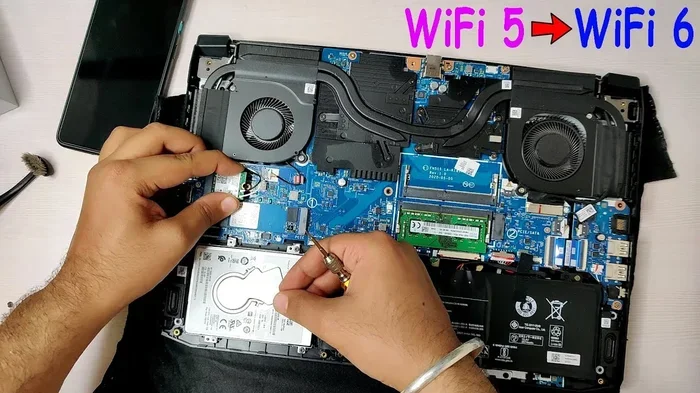
Knowing which card you have helps you troubleshoot issues and plan upgrades. For example, if you find out you have an older WiFi 5 card, you might want to upgrade to WiFi 6 for better speeds and efficiency.
Setting Up and Getting the Best Performance from the Intel AX201
Once you know you have the Intel AX201, you want to make sure it is running at its best. Here are some tips to get the most out of your wireless card.
Install the Latest Drivers
Intel regularly releases driver updates for its wireless cards. These updates can improve performance, fix bugs, and add new features. To get the latest drivers:
- Visit the Intel Download Center and search for Intel AX201.
- Download the latest driver for your operating system.
- Run the installer and follow the on-screen instructions.
- Restart your computer after installation.
You can also use Intel’s Driver & Support Assistant tool to automatically find and install the right drivers. This is the easiest method if you are not comfortable manually searching for drivers.
Optimize Your Router Settings
To get the full WiFi 6 speed from your Intel AX201, your router needs to support WiFi 6 as well. Check your router’s settings and make sure:
- WiFi 6 (802.11ax) mode is enabled.
- The 5GHz band is turned on and set to the widest channel width available (160MHz if supported).
- Your router firmware is up to date.
- WPA3 security is enabled if your devices support it.
Many people do not realize that their router settings can limit their wireless speeds. Even with a top-tier card like the Intel AX201, you will not get the best performance if your router is not configured properly.
Placement Matters
Where your laptop or desktop is placed can affect your wireless signal strength. Try to keep your device in the same room as your router for the best speeds. Walls, floors, and large metal objects can weaken your signal. If you have a desktop PC in a different room, you might want to consider adding a mesh network or an ethernet cable to extend your connection. You can also explore options like extending your WiFi with an ethernet cable for a more stable setup.
If you are dealing with a weak signal in certain areas of your home, a mesh WiFi system can help. You can even add mesh WiFi to your existing router to extend coverage without losing speed.
Quick Tips for Best Performance
- Keep your laptop plugged in when doing speed tests, as some systems throttle wireless performance on battery.
- Close unnecessary background apps that may be using bandwidth.
- Restart your router periodically to clear its memory and refresh connections.
- Use a WiFi analyzer app to find the least congested channel for your router.
Common Issues and How to Fix Them
The Intel AX201 is a reliable card, but like any hardware, it can sometimes have issues. Here are a few common problems and their solutions.
Slow WiFi Speeds
If your speeds are lower than expected, try these steps:
- Make sure you are on the 5GHz band, not the 2.4GHz band.
- Check that your router is set to WiFi 6 mode.
- Update your Intel wireless drivers.
- Move closer to your router to rule out signal issues.
Intermittent Disconnections
If your connection drops frequently, it could be a driver issue or interference. Try updating your drivers first. If that does not help, check for sources of interference like microwaves, cordless phones, or neighboring WiFi networks.
Bluetooth Not Working
The Intel AX201 handles both WiFi and Bluetooth. If Bluetooth stops working, make sure Bluetooth is enabled in your device settings. You may also need to reinstall the Bluetooth driver through Device Manager.
Is the Intel AX201 Worth It?
The Intel AX201 is an excellent wireless card for most users. It supports WiFi 6, offers fast speeds, and works well with a wide range of devices. Whether you are upgrading an older laptop or building a new PC, this card delivers solid performance at a reasonable price.
If you do not need WiFi 6E or Bluetooth 5.2, there is no reason to spend more on a higher-end card. The Intel AX201 gives you everything you need for a fast, reliable wireless connection. It is a smart choice for students, professionals, gamers, and everyday users alike.
For those who are curious about other WiFi-related topics, you might want to check out whether you can connect to WiFi without a WiFi adapter or learn about buying your own WiFi box for better control over your home network. These are great companion topics if you are looking to improve your overall wireless setup.
Another useful read is whether you can extend your WiFi with an ethernet cable. This can help you get the best of both worlds: the reliability of a wired connection and the convenience of wireless devices throughout your home.
Final Thoughts
So, does Intel AX201 support WiFi 6? Absolutely. The Intel AX201 is a capable, compact, and reliable WiFi 6 wireless card that delivers fast speeds and strong performance. It supports both the 2.4GHz and 5GHz bands, includes Bluetooth 5.0, and works with most modern routers that support WiFi 6.
Whether you are streaming movies, playing games, or just browsing the web, the Intel AX201 has you covered. Keep your drivers up to date, optimize your router settings, and you will enjoy a fast and stable wireless connection for years to come.
If you are still shopping for a wireless card or planning a network upgrade, the Intel AX201 is one of the best choices you can make. It balances performance, compatibility, and price in a way that few other cards can match. Upgrade with confidence and enjoy the benefits of WiFi 6 today.
Frequently Asked Questions
Is the Intel AX201 the same as WiFi 6?
The Intel AX201 is a wireless card that supports the WiFi 6 standard. WiFi 6 is the standard itself (802.11ax), and the AX201 is one of the cards built to work with that standard. Think of WiFi 6 as the language and the AX201 as one of the devices that speaks it fluently.
Can I use the Intel AX201 with an older router?
Yes, you can. The Intel AX201 is backward compatible with older WiFi standards like WiFi 5 (802.11ac) and WiFi 4 (802.11n). However, you will only get the full WiFi 6 speed benefits when connected to a WiFi 6 router. With older routers, the card will automatically fall back to the highest supported standard.
Does the Intel AX201 support Bluetooth?
Yes, the Intel AX201 includes built-in Bluetooth 5.0 support. This lets you connect wireless headphones, keyboards, mice, and other Bluetooth peripherals without needing a separate Bluetooth card. Bluetooth 5.0 offers improved range and speed over older versions.
What is the difference between WiFi 6 and WiFi 6E?
WiFi 6E is an extension of WiFi 6 that adds support for the 6GHz frequency band. The Intel AX201 supports WiFi 6 only, which means it works on the 2.4GHz and 5GHz bands. WiFi 6E cards like the Intel AX210 add the 6GHz band, which is less crowded and can offer even faster speeds in compatible environments.
How do I update the drivers for my Intel AX201?
You can update your Intel AX201 drivers by visiting the Intel Download Center, searching for “Intel AX201,” and downloading the latest driver for your operating system. Alternatively, you can use Intel’s Driver & Support Assistant tool, which automatically detects your hardware and installs the correct drivers. Windows Update may also provide driver updates, but they are not always the latest version.
Can I use the Intel AX201 in a desktop PC?
Yes, the Intel AX201 works in both laptops and desktop PCs. It uses an M.2 Key E slot, which is found on many modern motherboards. If your desktop motherboard has an available M.2 slot, you can install the AX201 just like you would install an M.2 SSD. Just make sure your motherboard supports PCIe connectivity through that slot.
=== CONCLUSION ===
The Intel AX201 is a solid WiFi 6 wireless card that delivers excellent performance for everyday use. It supports the latest WiFi 6 standard, offers speeds up to 2.4 Gbps, and includes Bluetooth 5.0 for all your wireless peripheral needs. Whether you are upgrading an existing system or building a new one, the Intel AX201 is a reliable choice that gets the job done.
Remember to keep your drivers updated, pair it with a WiFi 6 router, and place your device in a good location for the best results. With the right setup, you will enjoy fast, stable, and efficient wireless connectivity every day. The Intel AX201 proves that you do not need to spend a fortune to get top-notch WiFi 6 performance.