Does Eero Replace My Internet Provider Or Just Boost It
An Eero mesh Wi-Fi system does not replace your internet provider. It works as a powerful router and extender that boosts your existing broadband connection throughout your home. Think of Eero as a way to improve your Wi-Fi coverage and speed, not as a substitute for your ISP. Whether you use Comcast, AT&T, Spectrum, or any other provider, Eero connects to your modem and spreads the signal evenly across every room.
If you have been struggling with slow internet in certain rooms, you are not alone. Many households deal with Wi-Fi dead zones and weak signal strength every single day. That is where mesh systems like Eero come into the picture. But a common question keeps popping up: does Eero replace my internet provider, or does it simply make your current connection better?
The short answer is that Eero does not replace your internet service provider. It is a mesh Wi-Fi system designed to boost and spread the signal you already pay for. Think of it like buying a better speaker for your stereo. The music still comes from the same source. Eero just delivers it more evenly and powerfully throughout your home.
In this guide, we will walk through everything you need to know. We will cover what Eero is, how it works with your current ISP, and when you might actually need to switch providers. By the end, you will have a clear picture of whether Eero is the right choice for your home network.
Key Takeaways
- Eero is a mesh Wi-Fi system: It enhances your current internet connection but does not replace your ISP.
- You still need an internet provider: Eero requires an active broadband connection from an ISP to function.
- Mesh networks eliminate dead zones: Eero nodes spread Wi-Fi evenly across large homes.
- Setup is simple: You connect Eero to your existing modem and use the app to configure it.
- Eero works with most ISPs: Whether you have Xfinity, Spectrum, AT&T, or Verizon, Eero is compatible.
- You can buy your own Eero: It is not tied to any specific internet provider or rental plan.
📑 Table of Contents
- What Is Eero and How Does It Work?
- Does Eero Replace Your Internet Provider?
- How Eero Boosts Your Existing Internet
- Setting Up Eero With Your Current ISP
- When Should You Consider Changing Your Internet Provider?
- Eero vs. Traditional Routers and ISP Equipment
- Final Thoughts on Eero and Your Internet Provider
What Is Eero and How Does It Work?
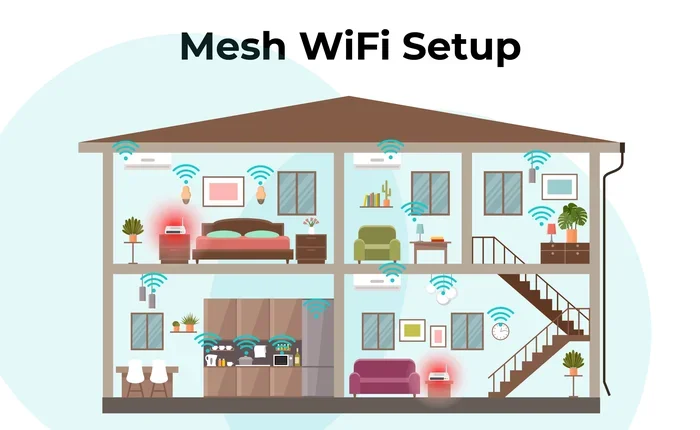
Eero is a mesh Wi-Fi system made by Amazon. Unlike a traditional single router, Eero uses multiple units called nodes. You place these nodes around your home. They work together to create one unified wireless network. This is what people call a mesh network.
How a Mesh Network Differs from a Traditional Router
A traditional wireless router sends signal from one point. That signal has to travel through walls, floors, and furniture. By the time it reaches the far end of your house, it can be weak. A mesh system like Eero solves this problem. Each node acts as a relay point. The signal jumps from one node to the next. This keeps your Wi-Fi signal strength strong no matter where you are.
Here is a simple way to think about it. Imagine you are in a large office building. One person shouting can only reach so far. But if you line up people and pass the message along, everyone hears it clearly. That is exactly how a mesh network works.
What Comes in an Eero Kit
When you buy an Eero kit, you typically get one to three nodes. The basic kit includes one Eero unit. Larger kits include two or three. You place the main Eero unit near your modem. Then you add extra nodes in other rooms. The Eero app walks you through the entire Eero setup process. It takes about 15 to 20 minutes from start to finish.
Does Eero Replace Your Internet Provider?
This is the big question, and the answer is no. Eero does not provide internet service. It does not replace your internet service provider. You still need an active broadband connection from a company like Xfinity, AT&T, Spectrum, or Verizon. Eero simply takes that connection and distributes it more effectively.
Why People Confuse Eero with an ISP
There is a reason for this confusion. Eero looks like a router. It connects directly to your modem. Some people even unplug their old router and use Eero as the only networking device. Because of this, it feels like Eero is doing everything. But underneath it all, Eero still needs that incoming broadband connection from an ISP. Without it, Eero is just an expensive box.
Think of it this way. A network gateway is the door to the internet. Your ISP provides that door. Eero is the hallway inside your home that makes sure every room has access. You cannot skip the door and still get to the hallway.
Can Eero Work Without an ISP?
No, it cannot. Eero needs an active internet source to create a home network. If you cancel your internet service, Eero will still create a local network. You can connect devices to it. But none of those devices will have access to the internet. You need an ISP to make the whole system work.
How Eero Boosts Your Existing Internet
Now that we know Eero does not replace your ISP, let us talk about what it actually does. Eero boosts your internet speed and Wi-Fi coverage in several important ways.
Eliminating Wi-Fi Dead Zones
One of the biggest complaints people have is weak Wi-Fi in certain areas of the house. This is especially true in larger homes or homes with thick walls. Eero nodes work together to cover every square foot. You no longer have to sit in one room to get a good connection. Every room gets strong, reliable signal.
Improving Network Performance
Eero uses dual-band Wi-Fi technology. This means it sends data on two different frequencies. The 2.4 GHz band covers more distance. The 5 GHz band offers faster speeds. Eero automatically directs your devices to the best band. This smart switching improves overall network performance without you lifting a finger.
Managing Connected Devices
Modern homes have many connected devices. Smart TVs, phones, tablets, smart speakers, security cameras, and game consoles all compete for bandwidth. Eero handles this traffic intelligently. It prioritizes the devices that need the most speed. This means your video calls stay clear and your streaming does not buffer.
You can manage all of this through the Eero app. The app gives you real-time insights into your network. You can see which devices are using the most bandwidth and pause them if needed. This level of control is hard to find in standard ISP-provided routers.
Setting Up Eero With Your Current ISP
Setting up Eero with your existing internet provider is straightforward. You do not need to call your ISP or schedule a technician visit. Here is how the process works.
Step-by-Step Eero Setup
- Unplug your current router. Keep your modem powered on and connected to the wall outlet.
- Connect the main Eero node to your modem. Use the Ethernet cable that comes in the box. Plug one end into the modem and the other into the Eero unit.
- Download the Eero app. It is available for both iOS and Android. Follow the on-screen prompts to set up your network name and password.
- Add extra nodes if needed. Place them in rooms where you need better coverage. The app will guide you through this process.
- Connect your devices. Your phones, laptops, and smart home devices will automatically connect to the new Eero network.
Once your Eero system is running, you can also block a device from using your Wi-Fi if needed. This is helpful if a guest is hogging your bandwidth or if you want to limit screen time for certain devices.
Does Eero Replace Your ISP Router?
Yes, Eero replaces the router that your ISP gave you. Most ISPs provide a combo modem-router unit. You can bypass that device entirely. Connect your modem directly to the Eero main unit. This gives you much better performance than the average ISP-provided equipment. If you are unsure whether to keep or replace your ISP gear, you might want to explore whether you can change out your router with Spectrum or your provider’s equivalent. Many people find that swapping out the ISP router for a mesh system like Eero transforms their home network experience.
When Should You Consider Changing Your Internet Provider?
Eero is a great tool, but it is not a magic fix for everything. Sometimes the problem is not your router. It is your internet plan or provider. Here are some signs that you might need to look into switching ISPs.
Slow Speeds Even With a Strong Signal
If your Eero system shows a strong signal but your internet speed is still slow, the problem is likely your ISP. Run a speed test directly on your modem. If the speeds are low, contact your provider. If they do not resolve the issue, it may be time to consider a different internet service provider.
Frequent Outages
No mesh system can fix an unreliable ISP. If your internet goes down multiple times a week, Eero will not help. You need a more stable connection from your provider. Research local alternatives and compare plans. Sometimes a simple switch can solve chronic connectivity problems.
Data Caps and Throttling
Some ISPs impose strict data caps. They may also slow down your connection after you hit a certain usage threshold. If you regularly stream, game, or work from home, these caps can be frustrating. In these cases, you may want to explore whether you can buy your own Wi-Fi box and pair it with a provider that offers better terms and no throttling.
No Available Faster Plans
If your ISP does not offer plans fast enough for your household, no router will fix that. A family of five streaming, gaming, and working remotely needs serious bandwidth. Check what providers are available in your area. Upgrade to a plan that matches your usage habits.
Eero vs. Traditional Routers and ISP Equipment
Let us compare Eero to the standard options most people use. This will help you understand the value it brings to your home network.
Eero vs. ISP Router
ISP-provided routers are often basic and outdated. They handle a limited number of devices. They also have weaker range and fewer features. Eero, on the other hand, is designed for modern homes with many connected devices. It offers better range, faster speeds, and a much more intuitive user experience through its app.
Eero vs. Standalone Wi-Fi Extenders
Traditional Wi-Fi extenders create a separate network. Your devices have to switch between networks as you move around the house. Eero creates one seamless network. Your devices stay connected as you walk from room to room. This is a huge advantage for smart home connectivity and everyday use.
Another benefit is that Eero uses a dedicated backhaul channel. This means the nodes communicate with each other without slowing down your main connection. Standard extenders often cut your speed in half because they share the same channel for both sending and receiving data.
Final Thoughts on Eero and Your Internet Provider
To answer the question directly: does Eero replace my internet provider? No, it does not. Eero is a mesh Wi-Fi system that enhances your existing connection. It takes the signal from your ISP and distributes it more effectively throughout your home. It eliminates dead zones, improves speed, and makes managing your network simple.
However, Eero is not a replacement for a good internet plan. If your ISP is slow or unreliable, no amount of mesh nodes will fix that. You still need a solid broadband connection from a quality provider. Think of Eero as the best delivery truck on the road. It can only deliver what the warehouse has in stock.
If you are happy with your current internet speed and just want better coverage, Eero is an excellent investment. It is easy to set up, works with most ISPs, and gives you professional-grade network performance at home. Whether you are a casual internet user or a heavy streamer, Eero can make a real difference in your daily experience.
Before you buy, make sure you have an active internet plan from a provider. Then unbox your Eero kit, follow the simple setup steps, and enjoy seamless Wi-Fi from every corner of your home. You will wonder how you ever lived without it.
Frequently Asked Questions
Can I use Eero without an internet service provider?
No, Eero requires an active broadband connection from an ISP to provide internet access. Without an ISP, Eero will create a local network, but your devices will not be able to reach the internet. You still need to pay for an internet plan from a provider like Xfinity, AT&T, or Spectrum.
Will Eero work with my current ISP?
Yes, Eero is compatible with virtually all internet service providers. It works with cable, fiber, DSL, and satellite connections. As long as your ISP provides a modem or gateway, Eero can connect to it and boost your signal across your home.
Do I need to return my ISP router after getting Eero?
Check with your ISP first. Some providers require you to return their equipment if you switch to your own router. You can also explore whether you can change out your router with Spectrum or your specific provider to avoid monthly rental fees. Once confirmed, simply connect your modem to the Eero main unit and you are good to go.
How many Eero nodes do I need for my home?
It depends on the size of your home. A single Eero unit works well for small apartments or condos up to about 1,000 square feet. For larger homes, you will need two or three nodes. Eero recommends one node for every 1,000 to 1,500 square feet for optimal Wi-Fi coverage.
Can I add Eero to my existing Wi-Fi network?
Eero works best as a standalone system. It replaces your current router rather than adding to it. However, you can place it in bridge mode if you need to keep another router. For most users, a clean setup with Eero as the primary router gives the best network performance and simplest management experience.
Does Eero improve my internet speed?
Eero does not increase the speed your ISP provides. What it does is distribute that speed more efficiently across your home. It eliminates weak spots and ensures all your devices get the best possible connection. If your ISP plan is slow, Eero will not make it faster. But if you have a decent plan and poor coverage, Eero can make a noticeable difference.