Do You Need Phone Reception For Bluetooth To Work Now
You do not need phone reception for Bluetooth to work. Bluetooth is a short-range wireless technology that operates independently of cellular networks, meaning your devices can pair and communicate even in areas with zero signal. Understanding how Bluetooth actually functions helps you use your wireless headphones, speakers, and other gadgets anywhere, whether you have a strong cellular connection or none at all.
Bluetooth technology has become a part of our daily lives. We use it to connect wireless headphones, speakers, keyboards, and even car stereo systems. But here is a question many people ask: do you need phone reception for Bluetooth to work? The short answer is no. Bluetooth operates on its own radio frequency, completely separate from your cellular network. You can pair devices, stream music, and transfer files without ever having a single bar of cellular signal.
Understanding how Bluetooth connectivity actually works can save you a lot of frustration. Maybe you are in a basement, a remote cabin, or a dead zone with no cell service. You might worry that your wireless headphones or speaker will stop working. They will not. Bluetooth uses short-range radio waves to communicate between devices, and it does not need the internet or a cellular tower to function. Let us dive deep into how this technology works and what it means for you.
Key Takeaways
- Bluetooth works without cellular reception: It uses its own radio frequency and does not depend on phone signal or Wi-Fi.
- Bluetooth range is typically 30 feet: You can pair devices within this distance regardless of your phone’s signal strength.
- Many Bluetooth devices work fully offline: Wireless headphones, speakers, and keyboards function without any internet or cellular connection.
- Bluetooth and cellular are completely different technologies: One handles wireless audio and data transfer, while the other handles voice calls and mobile internet.
- Signal interference can affect Bluetooth: Walls, distance, and other wireless devices may weaken your Bluetooth connection, but not phone reception.
- You can use Bluetooth in airplane mode: Turning off cellular service does not disable Bluetooth functionality on your phone.
📑 Table of Contents
- What Is Bluetooth and How Does It Work?
- Does Bluetooth Need Phone Signal to Pair Devices?
- Can You Use Bluetooth Devices Offline?
- When Does Phone Reception Matter for Bluetooth?
- Common Myths About Bluetooth and Phone Reception
- Tips for Getting the Best Bluetooth Performance
- Can You Use Bluetooth in Different Scenarios?
- Expert Insights on Bluetooth and Cellular Independence
- Conclusion
What Is Bluetooth and How Does It Work?
The Basics of Bluetooth Technology
Bluetooth is a wireless communication standard that lets devices exchange data over short distances. It uses radio waves in the 2.4 GHz frequency band. This is the same general frequency range used by Wi-Fi, but Bluetooth operates on a different channel. Think of it like two people speaking different languages in the same room. They are in the same space, but they are not interfering with each other.
When you pair two Bluetooth devices, they create a small personal network called a piconet. One device acts as the master, and the other acts as the slave. This connection is temporary and specific to those two devices. Once paired, they can share audio, files, or commands without needing any external network. No cell tower. No Wi-Fi router. No internet connection required.
Bluetooth vs. Cellular: What Is the Difference?
People often confuse Bluetooth with cellular connectivity, but they are entirely different. Cellular networks let your phone make calls, send texts, and access the internet through towers spread across your area. Bluetooth is a local, device-to-device connection that covers a much shorter range. Here is a quick comparison:
- Range: Bluetooth works within about 30 feet. Cellular covers miles through tower networks.
- Network dependency: Bluetooth needs no network. Cellular requires a service provider and active towers.
- Purpose: Bluetooth connects peripherals like headphones and speakers. Cellular handles calls, texts, and mobile data.
- Power usage: Bluetooth uses very little power. Cellular drains your battery much faster.
- Offline capability: Bluetooth works fully offline. Cellular needs a service plan and active reception.
This distinction is important. When you are wondering whether you need phone reception for Bluetooth to work, remember that they serve completely different purposes. Your Bluetooth headphones will play music whether you have signal or not.
Does Bluetooth Need Phone Signal to Pair Devices?
The Pairing Process Explained
When you pair a new device, your phone searches for nearby Bluetooth signals. It does not check your cellular reception to do this. The pairing process relies entirely on local radio communication. Your phone broadcasts a signal, and the other device picks it up. They exchange pairing codes, and then they are connected.
You can pair Bluetooth headphones to your phone in a parking garage with no cell service. You can connect a wireless speaker in the woods. The process works the same way every time because Bluetooth does not touch your cellular network at all.
What Happens When You Have No Signal?
Some people worry that losing cell signal means losing all wireless capabilities. That is not true. If you are in a dead zone or a remote area, your Bluetooth devices will continue working exactly as they did before. You can still stream audio from your phone to your wireless headphones or Bluetooth speaker. You can still use a wireless keyboard or mouse. None of these require cellular reception.
Here is a real-world example. Imagine you are hiking in the mountains. You have no cell signal, but you want to listen to music. If you have already paired your Bluetooth headphones to your phone, you can play downloaded music and enjoy it without any issue. The Bluetooth connection stays strong as long as you are within range.
Similarly, you can turn your phone into a Bluetooth speaker for a group gathering even if you have zero cellular signal. The technology is built to work independently of your phone plan or network coverage.
Can You Use Bluetooth Devices Offline?
Wireless Headphones Without Signal
Wireless headphones are one of the most popular Bluetooth devices. People use them for workouts, commutes, gaming, and quiet time. A common misconception is that these headphones need an internet connection or cellular signal to produce sound. They do not. Once paired, your headphones receive audio directly from your phone through the Bluetooth radio signal.
If you download music or podcasts to your device ahead of time, you can listen to them offline through your Bluetooth headphones. This is great for flights, road trips through remote areas, or simply being in a place with poor reception. Your audio experience does not depend on cell service at all.
Bluetooth Speakers in Any Location
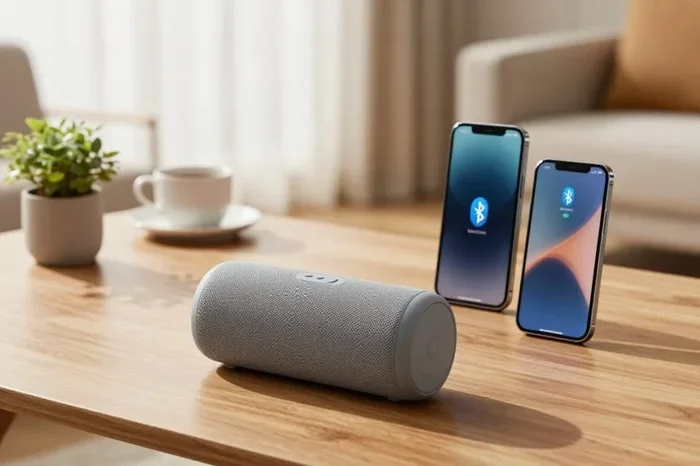
Bluetooth speakers work the same way. You can take a portable speaker to the beach, the backyard, or a cabin in the woods. As long as your phone and speaker are within Bluetooth range, you can play music. You do not need Wi-Fi or cellular data. Some speakers even allow you to pair multiple speakers together for a richer sound, and none of that requires phone reception.
If you want to use your speaker for something beyond music, like amplifying your voice during an outdoor event, a Bluetooth speaker can amplify your voice using its built-in microphone. This works completely offline and does not rely on any cellular network.
Other Bluetooth Devices That Work Offline
Many other devices rely on Bluetooth and work without any phone signal:
- Wireless keyboards and mice: Great for working in areas with no reception.
- Fitness trackers: They sync data to your phone when in range, even without signal.
- Game controllers: Many modern controllers connect via Bluetooth for a wireless gaming experience.
- Car audio systems: You can stream music through your car stereo via Bluetooth without needing a signal booster.
- Smartwatches: Many smartwatches use Bluetooth to notify you of calls and messages, even offline.
All of these devices function independently of your cellular reception. They rely solely on the local Bluetooth connection between your devices.
When Does Phone Reception Matter for Bluetooth?
Bluetooth and Streaming Services
Here is where things get a little tricky. While Bluetooth itself does not need phone reception, the content you stream through Bluetooth might. If you want to listen to Spotify, Apple Music, or YouTube, you need an internet connection to load and stream that content. Without cellular signal or Wi-Fi, you cannot stream online music.
But here is the key distinction: the Bluetooth connection is still working fine. The problem is that there is no content to send through it. If you download music or podcasts ahead of time, you can listen offline through Bluetooth without any issues. The Bluetooth link between your phone and your headphones or speaker remains strong regardless of your signal.
Bluetooth and Phone Calls
If you use Bluetooth headphones for phone calls, you do need some form of connectivity to make or receive calls. However, this is about your cellular service or a VoIP app, not about Bluetooth itself. Bluetooth simply transmits the audio. If you are using a service like WhatsApp or Skype over Wi-Fi, Bluetooth handles the audio output. But if you have no cellular signal and no Wi-Fi, you cannot make calls, even though your Bluetooth is perfectly functional.
Bluetooth Range Limitations
While Bluetooth does not need phone reception, it does have range limitations. Standard Bluetooth works within about 30 feet. Bluetooth Low Energy (BLE) can reach slightly farther in ideal conditions. Walls, furniture, and other electronic devices can weaken the signal. But none of these limitations are related to your cellular reception. A strong cell signal does not extend your Bluetooth range, and a weak cell signal does not shorten it.
If you find that your Bluetooth connection drops frequently, the issue is likely distance or interference, not your phone signal. Moving closer to the paired device usually fixes the problem.
Common Myths About Bluetooth and Phone Reception
Myth 1: No Cell Signal Means No Bluetooth
This is probably the biggest myth. People assume that if their phone has no bars, all wireless features stop working. That is simply not true. Bluetooth uses its own dedicated radio chip and frequency. It does not borrow from or depend on your cellular radio. You can have full Bluetooth functionality with zero bars of cellular signal.
Myth 2: Bluetooth Needs Wi-Fi to Work
Another common misconception. Bluetooth and Wi-Fi are separate technologies. Wi-Fi lets your devices connect to the internet. Bluetooth lets your devices talk to each other directly. You can use Bluetooth without ever connecting to a Wi-Fi network. Many people use Bluetooth daily without realizing they have never needed Wi-Fi for it.
Myth 3: Airplane Mode Kills Bluetooth
Many people put their phones in airplane mode during flights and assume all wireless features are off. That is not entirely accurate. Airplane mode disables cellular, Wi-Fi, and Bluetooth by default on most phones. But you can manually turn Bluetooth back on while in airplane mode. This lets you use your wireless headphones or speaker during a flight. Airplane mode does not kill Bluetooth permanently.
Myth 4: More Cell Bars Means Better Bluetooth
Some users notice that their Bluetooth works well when they have strong cell signal and assume the two are connected. They are not. Your Bluetooth performance depends on the proximity of the paired device, not the number of bars on your phone. A phone with one bar of signal can have excellent Bluetooth performance if the paired device is nearby.
Tips for Getting the Best Bluetooth Performance
Keep Devices Close Together
The simplest way to ensure a strong Bluetooth connection is to keep your devices within range. For most devices, this means staying within 30 feet of each other. If you are using wireless headphones, keep your phone in your pocket or nearby bag rather than in another room.
Reduce Interference
Other wireless devices can interfere with Bluetooth signals. Wi-Fi routers, microwaves, and even other Bluetooth devices can cause interference. If you notice connection issues, try moving away from other wireless devices or switching to a different Bluetooth channel if your device supports it.
Keep Your Devices Updated
Firmware and software updates often include improvements to Bluetooth performance. Make sure your phone and your Bluetooth peripherals are running the latest software. Updates can fix connection drops, improve range, and add new features.
Turn Off Unused Bluetooth Devices
If you have many Bluetooth devices nearby, your phone might struggle to maintain a stable connection. Turn off Bluetooth on devices you are not actively using. This reduces interference and helps your primary device maintain a strong connection.
Use Bluetooth 5.0 or Newer When Possible
Newer versions of Bluetooth offer better range, faster data transfer, and improved stability. If you are buying new wireless headphones or speakers, look for devices that support Bluetooth 5.0 or later. You can also check if your phone supports the latest Bluetooth version for the best experience.
Can You Use Bluetooth in Different Scenarios?
Bluetooth at Home
At home, Bluetooth works flawlessly regardless of your cellular reception. You can connect wireless speakers, headphones, smart home devices, and more. Your Bluetooth experience at home depends on your router placement and device proximity, not your phone signal.
Bluetooth While Traveling
Traveling often takes you to places with weak or no cellular signal. Airplanes, remote areas, and international destinations can all have spotty reception. But your Bluetooth devices will continue working. You can listen to downloaded content on flights, use wireless speakers at campsites, and connect peripherals in hotels. Bluetooth travel reliability is one of its greatest strengths.
Bluetooth at Work or School
Many workplaces and schools have areas with poor cellular coverage due to building materials or network congestion. Bluetooth still works perfectly in these environments. You can use wireless headphones, keyboards, and presentation remotes without any issues. Your Bluetooth connection stays strong even when your cellular signal drops.
Expert Insights on Bluetooth and Cellular Independence
Technology experts consistently emphasize that Bluetooth and cellular networks are independent systems. According to the Bluetooth Special Interest Group, which oversees Bluetooth technology standards, Bluetooth was designed from the start to work without any external network infrastructure. It is a peer-to-peer wireless technology that operates on its own frequency band.
This independence is exactly why Bluetooth has become so ubiquitous. You can use it in airplanes, submarines, hospitals, and remote locations where cellular service is unavailable or restricted. The beauty of Bluetooth is its self-sufficiency. It does not need your phone plan, your carrier, or a cell tower to function.
If you are using Bluetooth for gaming, many wireless gaming headsets connect via Bluetooth or proprietary wireless protocols. Pairing Bluetooth headphones to Xbox One is a great example of Bluetooth working independently of cellular service. Your gaming experience depends on your console and headset, not your phone signal.
Conclusion
So, do you need phone reception for Bluetooth to work? The answer is a clear and definitive no. Bluetooth is a self-contained wireless technology that operates independently of your cellular network. You can pair devices, stream audio, transfer files, and use all your favorite wireless peripherals without ever having a cellular signal. Bluetooth works through its own radio frequency, creating direct device-to-device connections that do not rely on phone towers or internet service.
The next time you find yourself in a dead zone or a remote location, do not worry about your Bluetooth devices. Your wireless headphones, speakers, keyboards, and other peripherals will continue working exactly as they should. Just keep your devices within range of each other, and you are good to go.
Understanding how Bluetooth works gives you confidence to use your devices anywhere, anytime. Whether you are at home, traveling, hiking, or in a building with poor reception, Bluetooth has you covered. Embrace the freedom of wireless connectivity without worrying about cell signal ever again.
Frequently Asked Questions
Can I use Bluetooth headphones without any phone signal?
Yes, absolutely. Bluetooth headphones connect directly to your phone using radio waves, not cellular networks. As long as the headphones are paired and within range, they will work perfectly even with zero cell signal. You can listen to downloaded music, podcasts, or audiobooks without any issues.
Does Bluetooth work in airplane mode?
Yes, Bluetooth works in airplane mode. Airplane mode disables cellular, Wi-Fi, and Bluetooth by default, but you can manually turn Bluetooth back on. This lets you use wireless headphones and speakers during flights without affecting the airplane’s communication systems.
How far can Bluetooth work without phone reception?
Bluetooth range is typically about 30 feet for standard Bluetooth. This range does not depend on phone reception at all. It depends on the Bluetooth version, device power, and physical obstacles like walls and furniture. Keep your devices within range for the best connection.
Can I connect Bluetooth devices in a remote cabin with no cell service?
Yes, you can connect Bluetooth devices in remote locations without any cell service. Bluetooth creates its own local network between devices. As long as both devices are powered on and within range, they will pair and communicate without needing any cellular tower or internet connection.
Why does my Bluetooth connection drop even though I have good cell signal?
Bluetooth connection drops are usually caused by distance, interference, or outdated firmware, not by your cell signal. Walls, other wireless devices, and even microwaves can interfere with Bluetooth. Try moving closer to the paired device and reducing wireless interference to improve stability.
Do Bluetooth speakers need Wi-Fi or cellular data to play music?
No, Bluetooth speakers do not need Wi-Fi or cellular data to play music. Once paired with your phone, they receive audio directly through the Bluetooth connection. If you have downloaded music on your phone, you can play it through a Bluetooth speaker anywhere, even without any internet or cell service.