Can Phone Cameras Detect Hidden Cameras In Your Home
Yes, your phone camera can help you find hidden cameras in your home. Using simple techniques like scanning for infrared light, checking for RF signals, and using free detection apps, you can uncover covert surveillance devices. This guide walks you through every method, tool, and tip you need to protect your privacy and feel safe at home.
Have you ever felt like someone might be watching you through a hidden camera? It is a scary thought. The idea that a spy camera could be hiding in your bedroom or bathroom is unsettling. You might wonder if your own phone can help you find these devices.
The good news is that phone cameras can detect hidden cameras in many cases. You do not need expensive equipment to get started. With the right knowledge and a few simple tools, you can scan your home for covert surveillance devices. This article will show you exactly how.
We will cover every method you can use. We will talk about apps, infrared detection, RF scanning, and more. By the end, you will know exactly what to do to protect your privacy. Let us get started.
Key Takeaways
- Phone cameras can detect hidden cameras: Most smartphone cameras can spot IR-emitting hidden devices by looking for purple or white glows.
- Multiple detection methods work: You can use RF scanning, lens reflection checks, and infrared mode to find spy devices.
- Free apps make it easy: Apps like Hidden Camera Detector and Glint Finder simplify the scanning process for everyday users.
- Phone detection has limits: Some hidden cameras use advanced tech that phone cameras cannot pick up easily.
- Professional tools are more reliable: Dedicated RF detectors and thermal cameras offer stronger detection than phones alone.
- Prevention is key: Regular privacy sweeps and smart home habits help you avoid covert surveillance altogether.
📑 Table of Contents
- How Hidden Cameras Work in Modern Homes
- Can Your Phone Camera Really Find Hidden Cameras
- Step-by-Step Methods to Detect Hidden Cameras with Your Phone
- Best Phone Apps for Finding Hidden Cameras
- Limitations of Using Phone Cameras for Detection
- Professional Tools vs Phone Detection
- How to Protect Your Privacy at Home
- Expert Insights on Hidden Camera Detection
- Conclusion
How Hidden Cameras Work in Modern Homes
Before we dive into detection, it helps to understand what you are looking for. Hidden cameras come in many shapes and sizes. Some look like everyday objects. Others are tiny and almost invisible.
Most modern hidden cameras use WiFi connectivity to transmit footage. They send video to a phone app or cloud storage. Some cameras store footage on a local SD card. Others stream live to a remote server.
These devices often use infrared technology for night vision. This is a key detail because it becomes our biggest clue during detection. Many spy cameras also emit small amounts of radio frequency (RF) signals. These signals help them transmit data wirelessly.
Common hiding spots include smoke detectors, clock radios, USB chargers, and even stuffed animals. The smaller the device, the harder it is to spot. But every camera has a weakness. And we can exploit those weaknesses to find them.
Types of Hidden Cameras You Might Find
There are several common types of covert surveillance devices. Knowing them helps you scan smarter.
- Pinhole cameras: These are tiny cameras with a small lens. They can hide inside buttons or vents.
- WiFi spy cameras: These connect to your wireless network. They are easy to set up and hard to detect visually.
- Battery-powered hidden cameras: These run on small batteries. They can stay hidden for weeks without needing a charge.
- Wired cameras: These need a power source. They often hide near electrical outlets or wiring.
- IR night vision cameras: These use infrared LEDs to see in the dark. This is their biggest detection vulnerability.
Can Your Phone Camera Really Find Hidden Cameras
The short answer is yes. But it is not magic. Your phone has built-in tools that can help you spot hidden surveillance devices. Let us look at exactly how this works.
Most phone cameras have a sensor that can see light beyond what our eyes can see. This includes ultraviolet light and infrared light. When a hidden camera uses IR LEDs for night vision, those LEDs often glow. Your phone camera can pick up this glow, even when you cannot see it with your naked eye.
This is the most reliable and simplest method. You do not need any extra tools. You just need your phone and a dark room. More on that soon.
Why Phone Cameras Work for Detection
Phone cameras use CMOS or CCD sensors. These sensors are sensitive to a wider light spectrum than human eyes. They can detect wavelengths that are invisible to us. This includes near-infrared light, which many hidden cameras use.
When you point your phone camera at a hidden camera with active IR LEDs, you will often see a purple or white glow. This glow is the IR light reflecting off the lens. It is like a tiny beacon that gives away the device’s location.
However, not all hidden cameras use IR LEDs. Some newer models use ambient light amplification instead. These cameras are harder to detect with a phone camera. But they are also less common in consumer spy devices.
Step-by-Step Methods to Detect Hidden Cameras with Your Phone
Now let us get practical. Here are the most effective methods you can use right now with your phone.
Method 1: The Infrared Scan
This is the easiest and most popular method. It takes just a few minutes.
- Turn off all the lights in the room. Make it as dark as possible.
- Open your phone camera app. Use the rear-facing camera if possible.
- Do not use the front-facing selfie camera. It often has an IR filter that blocks the glow.
- Slowly scan the room. Look at your phone screen as you move the camera around.
- Watch for any purple, white, or bright dots. These could be IR LEDs from a hidden camera.
- Check common hiding spots. Look at smoke detectors, picture frames, and electronic devices.
This method works well for most infrared hidden cameras. It is fast and requires no extra apps or tools.
Method 2: The RF Signal Scan
Some hidden cameras transmit signals wirelessly. Your phone might be able to detect these signals. However, this method is less reliable than the IR scan.
You can use an app that scans for radio frequencies. If the app picks up an unusual signal near a specific object, there might be a hidden camera nearby. This method works best for WiFi spy cameras that are actively transmitting.
Method 3: The Lens Reflection Check
This method uses your phone flashlight. It is simple but effective.
- Turn off the lights in the room.
- Turn on your phone flashlight.
- Shine the light slowly across walls, mirrors, and reflective surfaces.
- Look for any small reflections that seem out of place.
- A camera lens will reflect the light differently than a regular surface. Look for a tiny glint or dot.
This method works best for finding pinhole cameras. The lens is so small that it can catch even a tiny beam of light.
Method 4: Use a Hidden Camera Detection App
Several apps are designed specifically to help you find hidden cameras. These apps use your phone’s sensors to scan for signals and lens reflections. We will talk more about these apps in the next section.
Best Phone Apps for Finding Hidden Cameras
If you want a more thorough scan, apps can help. Here are some of the best options available right now.
Hidden Camera Detector (Android and iOS)
This app uses both RF detection and IR scanning. It is one of the most popular options on the market. The app is easy to use. You simply point your phone at the area you want to scan and wait for results.
The free version offers basic scanning. The paid version gives you more advanced features. Overall, it is a solid choice for everyday users.
Glint Finder (Android)
Glint Finder uses your phone camera to detect camera lens reflections. It looks for the telltale glint that a camera lens makes when light hits it. The app is simple and free. It works well in dark environments.
One downside is that it can produce false positives. Shiny surfaces like glass or metal can trigger the detector. You will need to use your judgment when reviewing results.
Fing (Android and iOS)
Fing is primarily a network scanner. But it can also help you find hidden WiFi cameras. It scans your network for connected devices. If you see an unknown device, it could be a spy camera.
This method is great for finding WiFi-enabled hidden cameras. It does not work for cameras that store footage locally without connecting to a network.
Spy Hidden Camera Detector (iOS)
This app is designed specifically for iPhone users. It uses magnetometer readings to detect electromagnetic fields from electronic devices. If you get a strong reading near an object, it could contain a hidden camera or listening device.
The app is not perfect. But it adds another layer of detection to your scanning toolkit.
Quick Tips for Using Detection Apps
- Always use the rear camera: The front camera often has an IR filter that blocks detection.
- Scan slowly: Rushing through a room will cause you to miss hidden devices.
- Check multiple angles: A camera might only glow from certain positions.
- Use the app in a dark room: IR detection works best with no ambient light.
- Do not rely on just one app: Use multiple methods for a thorough scan.
Limitations of Using Phone Cameras for Detection
While phone cameras are helpful, they are not perfect. It is important to understand their limitations so you do not get a false sense of security.
Cameras Without IR LEDs
Some hidden cameras do not use infrared LEDs at all. These cameras rely on ambient light or image enhancement software. They will not glow when you scan with your phone camera. This makes them nearly invisible to IR detection.
Advanced Hidden Cameras
High-end spy cameras used by professionals are harder to detect. They may use ultra-low-light sensors instead of IR LEDs. Some cameras are completely passive and do not emit any signals. These are very difficult to find with a phone alone.
Phone Camera Quality Varies
Not all phone cameras are the same. Older phones or budget models may have weaker sensors. They might not pick up IR light as effectively. Newer flagship phones generally have better detection capabilities.
Environmental Interference
Other electronic devices can interfere with RF scanning. Microwaves, Bluetooth devices, and WiFi routers all emit radio signals. This can make it harder to isolate the signal from a hidden camera.
Because of these limitations, phone cameras should be one tool in your toolkit. They are great for a quick check. But for thorough detection, you may need additional tools.
Professional Tools vs Phone Detection
If you want to go beyond what your phone can do, professional tools are the way to go. Let us compare the two approaches.
| Feature | Phone Camera | Professional Detector |
|---|---|---|
| IR Detection | Yes | Yes, with better accuracy |
| RF Scanning | Limited | Full spectrum scanning |
| Price | Free | $50 to $500+ |
| Portability | Excellent | Good |
| Ease of Use | Very easy | Moderate learning curve |
| Detection Range | Short range | Long range |
| False Positives | Moderate | Low |
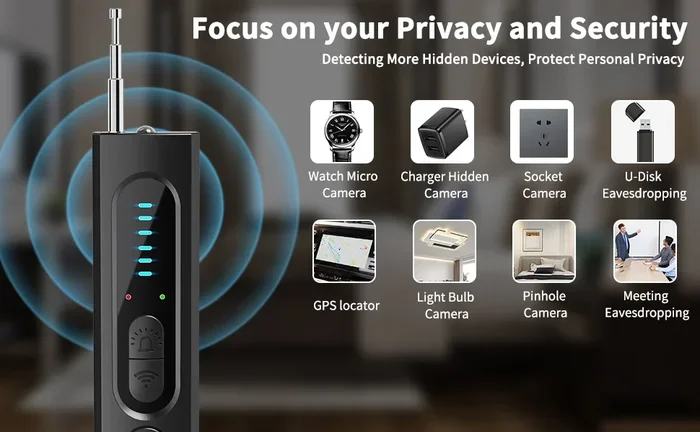
Professional tools like the K18 RF Detector or the T10 Spy Camera Finder offer much stronger detection. They can pick up signals from farther away. They also filter out false signals better than phone apps.
That said, most people do not need professional tools. A thorough phone scan covers 90% of home detection needs. Professional tools are best for rental properties, hotel rooms, or high-risk situations.
How to Protect Your Privacy at Home
Detection is only half the battle. Prevention is just as important. Here are some steps you can take to protect your privacy.
Regular Privacy Sweeps
Make it a habit to scan your home for hidden cameras regularly. A quick scan once a month can give you peace of mind. Focus on private areas like bathrooms, bedrooms, and living rooms.
Cover Camera Lenses When Not in Use
If you have smart home cameras, use physical lens covers when they are not needed. This prevents anyone from using them for covert surveillance.
Check Your WiFi Network
Regularly review the devices connected to your WiFi network. Use apps like Fing to scan for unknown devices. If you see something you do not recognize, investigate it.
Be Cautious in Rental Properties
Rental homes and Airbnb properties are higher risk for hidden cameras. Always do a thorough scan when you check in. Pay extra attention to bedrooms and bathrooms.
Use Signal Blockers If Needed
If you suspect a hidden camera, a signal blocker can stop it from transmitting. These devices jam WiFi and RF signals in a small area. They are legal in most places for personal use.
Know Your Legal Rights
In most places, recording someone without consent is illegal. If you find a hidden camera, document it. Contact local law enforcement if necessary. You have the right to privacy in your own home.
Common Mistakes to Avoid
- Relying only on one method: Use multiple detection techniques for the best results.
- Ignoring everyday objects: Hidden cameras hide in plain sight. Check items like clocks, chargers, and smoke detectors.
- Not scanning in the dark: Many hidden cameras use IR light. Darkness makes them visible.
- Using the front camera: The front camera often has an IR filter that blocks detection.
- Assuming no signal means no camera: Some cameras store footage locally and do not transmit signals.
Expert Insights on Hidden Camera Detection
Security professionals recommend a layered approach to detection. No single method catches every hidden camera. By combining phone scanning with physical checks and professional tools, you cover all your bases.
Experts also stress the importance of staying calm. Finding a hidden camera is scary. But taking action quickly helps you regain control of your privacy. Document what you find. Report it to the proper authorities. And take steps to prevent it from happening again.
The technology behind hidden cameras is always evolving. But so is the technology to detect them. Staying informed is your best defense. Keep learning about new detection methods and tools. The more you know, the safer you will be.
Conclusion
So, can phone cameras detect hidden cameras? Yes, they can. Your phone is a powerful tool for finding hidden surveillance devices in your home. With the right methods and a little patience, you can uncover covert cameras and protect your privacy.
Start with the infrared scan. It is the easiest and most effective method. Then try the RF scan and lens reflection check. Use free apps to enhance your detection capabilities. And remember that phone cameras work best as part of a broader detection strategy.
Stay proactive. Scan regularly. Know your rights. And never let your guard down when it comes to your personal privacy. Your home should be a safe place. And with the right knowledge, you can keep it that way.
Take action today. Grab your phone and start scanning. You might be surprised at what you find. And more importantly, you will feel empowered to protect yourself and your loved ones from unwanted surveillance.
Frequently Asked Questions
Can I use my iPhone camera to find hidden cameras?
Yes, you can use an iPhone camera to detect hidden cameras. Use the rear-facing camera and scan in a dark room. Look for purple or white glowing dots that indicate IR LEDs. Avoid using the front-facing camera because it has an IR filter that blocks detection.
Are hidden camera detection apps worth downloading?
Yes, detection apps are a helpful addition to your toolkit. They use your phone’s sensors to scan for RF signals and camera lenses. Free apps like Glint Finder and Fing work well for basic scanning. Paid apps offer more advanced features for thorough checks.
What should I do if I find a hidden camera in my home?
Document the camera with photos and videos. Do not touch or move it. Contact local law enforcement immediately. In most places, recording someone without consent is illegal. You may also want to consult a lawyer about your rights and next steps.
Can hidden cameras work without WiFi?
Yes, some hidden cameras store footage on a local SD card instead of transmitting over WiFi. These cameras do not emit wireless signals, making them harder to detect with RF scanning. You will need to rely on visual inspection and IR scanning to find them.
How often should I scan my home for hidden cameras?
A monthly scan is a good habit for most homes. If you rent your home or stay in hotels frequently, consider scanning more often. Always do a thorough check when you move into a new place or when someone new has access to your home.
Do all hidden cameras glow under infrared scanning?
No, not all hidden cameras glow. Cameras that use IR LEDs for night vision will typically show a glow. However, cameras that use ambient light sensors or advanced low-light technology may not emit visible IR light. This is why using multiple detection methods is important.