Can Led Lights Be Connected To Bluetooth Wirelessly
Yes, you can connect led lights to Bluetooth and control them wirelessly from your phone or tablet. Bluetooth LED lights offer a simple way to change colors, set moods, and automate your home lighting without extra hubs. This guide covers everything from setup to troubleshooting so you can get started right away.
Key Takeaways
- Bluetooth LED lights work with most smartphones: You do not need a special hub to get started.
- Setup is simple and fast: Most lights pair in under two minutes.
- Multiple types support Bluetooth: From strip lights to smart bulbs, options are everywhere.
- Range matters: Bluetooth typically works within 30 feet for best performance.
- Troubleshooting is easy: Most connection issues have quick fixes.
- Smart home integration is possible: Many Bluetooth lights work with Alexa and Google Home too.
📑 Table of Contents
- Can Led Lights Be Connected To Bluetooth Wirelessly?
- How Do Bluetooth LED Lights Work?
- Types of LED Lights That Support Bluetooth
- How to Connect LED Lights to Bluetooth
- Benefits of Using Bluetooth LED Lights
- Common Bluetooth LED Light Problems and How to Fix Them
- Expert Tips for Getting the Best Bluetooth LED Experience
- Quick Tips for Bluetooth LED Light Success
- Frequently Asked Questions
- Conclusion
Can Led Lights Be Connected To Bluetooth Wirelessly?
The short answer is yes. Can led lights be connected to Bluetooth? Absolutely. Bluetooth technology has made it incredibly easy to control your lighting without wires, hubs, or complicated setup. You can change colors, adjust brightness, and even set schedules right from your phone.
Whether you want to set up Bluetooth LED lights in your bedroom, living room, or workspace, the process is straightforward. Most modern LED products come with built-in Bluetooth support. This means you just download an app, pair your device, and you are good to go. No extra equipment needed.
Many people are switching to wireless LED lighting because it saves time and adds convenience. Imagine walking into a room and changing the entire vibe with a single tap on your phone. That is the power of Bluetooth connectivity in LED lights.
In this guide, we will walk you through everything you need to know. From how these lights work to the best types available, you will find all the answers here. Let us dive in.
How Do Bluetooth LED Lights Work?
The Basics of Bluetooth Lighting
Bluetooth LED lights use a short-range wireless signal to communicate with your device. Think of Bluetooth as a tiny invisible bridge between your phone and your lights. When you send a command through the app, the signal travels through the air and tells the light what to do.
Bluetooth uses low-energy radio waves. This means it does not drain your phone battery quickly. It also means the lights use very little power themselves. That is great news for your electricity bill.
Most Bluetooth LED lights use Bluetooth 4.0 or newer. This version is fast and reliable. It also supports something called BLE, or Bluetooth Low Energy. BLE keeps the connection stable while using minimal power. So your lights stay connected without wasting energy.
How Pairing Works
Pairing your lights is simple. First, you turn on your LED lights. Next, you open the companion app on your phone. The app searches for available devices nearby. Once it finds your lights, you tap to connect.
The whole process takes less than two minutes. You do not need any technical skills. If you have ever paired headphones with your phone, the process is very similar. Here is a quick look at the steps:
- Step 1: Plug in your LED lights and turn them on.
- Step 2: Download the manufacturer’s app from the App Store or Google Play.
- Step 3: Open the app and allow Bluetooth permissions.
- Step 4: Wait for the app to find your lights.
- Step 5: Tap to pair and start controlling.
Once paired, your phone remembers the connection. So next time you turn the lights on, they reconnect automatically. This makes daily use seamless and hassle-free.
Types of LED Lights That Support Bluetooth
Not all LED lights use Bluetooth, but many do now. The market has grown fast, and there are tons of options. Here are the most common types of Bluetooth-enabled LED lights you will find.
LED Strip Lights
LED strip lights are the most popular Bluetooth option. They are flexible, adhesive-backed, and easy to install. You can stick them behind your TV, under your kitchen cabinets, or along your bedroom ceiling.
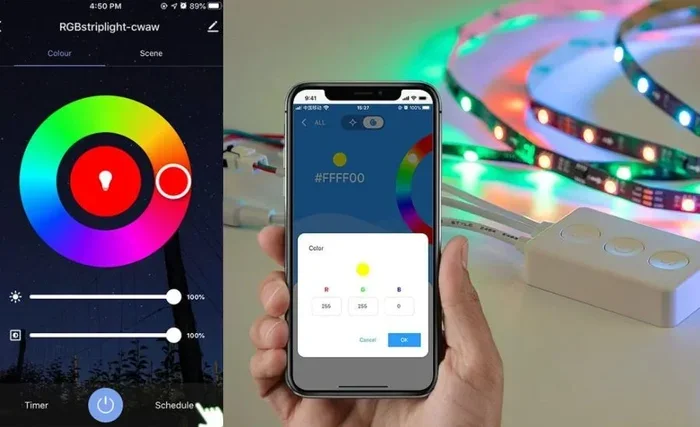
Most Bluetooth strip lights come with a remote control too. But the real fun starts when you use the app. You can choose from millions of colors, set dynamic patterns, and even sync the lights to music. The wireless LED controller inside each strip handles all of this without any wires.
These lights are perfect for creating LED ambiance lighting. Want a cozy movie night? Set a warm glow. Hosting a party? Go wild with color-changing effects. The app gives you full creative control.
Smart LED Bulbs
Smart LED bulbs with Bluetooth are another great choice. You screw them into any standard lamp or fixture. Then you control them from your phone. These bulbs often support dimming and color temperature changes.
Some smart bulbs also support Wi-Fi alongside Bluetooth. This gives you more flexibility. You can control them nearby via Bluetooth or from anywhere using Wi-Fi. Brands like Philips Hue, LIFX, and Wyze offer excellent options.
Bluetooth Speaker Lights
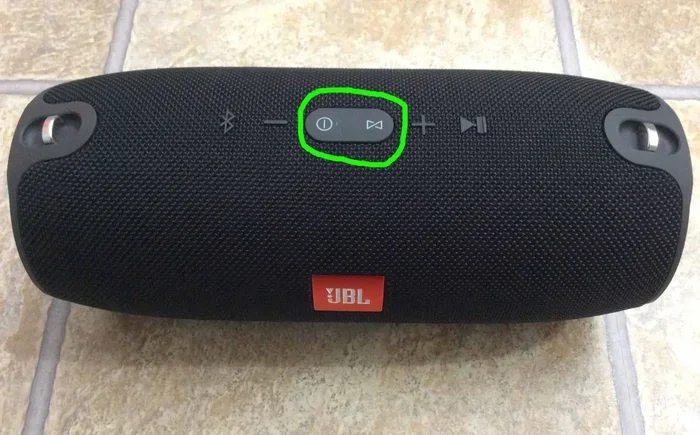
Want lighting and music in one device? Bluetooth speaker lights combine both. These fun gadgets play your favorite tunes and light up your room at the same time. They are great for dorm rooms, small apartments, or outdoor gatherings.
Many speaker lights also support RGB modes. You can change the light color to match your mood or the music beat. They are affordable and add a cool vibe to any space.
LED Light Panels
LED light panels are larger surface lights used for streaming, gaming, or room lighting. Many now include Bluetooth for wireless control. You can adjust colors and effects from across the room without getting up.
These panels are popular among streamers and gamers. They create an immersive backdrop for setups. And with Bluetooth, setup is cleaner because you do not need extra cables for control.
How to Connect LED Lights to Bluetooth
Setting up led lights bluetooth is easier than most people think. Follow these steps for a smooth connection. Whether you are setting up strip lights or smart bulbs, the process is similar.
Step-by-Step Setup Guide
- Unbox and install your lights. Peel off the adhesive backing or screw in the bulb. Make sure they are plugged in or powered on.
- Download the app. Check the packaging or manual for the app name. Search for it in your phone’s app store.
- Enable Bluetooth on your phone. Go to your phone settings and turn Bluetooth on. Make sure it is set to “Discoverable” or “Visible.”
- Open the app and pair. Tap the “Add Device” or “Pair” button. Wait for the app to scan and find your lights.
- Confirm the connection. Once paired, try changing a color or brightness level. If it works, you are all set.
Tips for a Smooth Connection
Sometimes the first pairing attempt does not work. Do not worry. Here are a few quick tips to help:
- Keep your phone close. Bluetooth works best within 30 feet. Move closer to the lights if the app cannot find them.
- Restart Bluetooth. Turn Bluetooth off and back on. This simple trick fixes many connection issues.
- Check for interference. Other wireless devices nearby can sometimes cause problems. Move away from Wi-Fi routers or other Bluetooth devices.
- Update the app. Make sure you have the latest version. Updates often fix bugs and improve pairing.
- Reset the lights. If nothing works, try resetting the lights to factory settings. Check the manual for instructions.
If you are using an iPhone and managing multiple smart devices, you might also want to explore adding prefixes to numbers on iPhone for better organization of your smart home contacts and device labels.
Benefits of Using Bluetooth LED Lights
Why should you choose Bluetooth LED lights over traditional lighting? There are many reasons. Let us look at the biggest benefits.
Easy Installation
Bluetooth lights do not need extra hubs or gateways. You just pair them directly with your phone. This makes installation a breeze. No electrician needed. No complex wiring. You can set up a whole room in under an hour.
Full Control From Your Phone
With the app, you have complete control. You can change colors, set brightness levels, and create custom scenes. Some apps even let you schedule when lights turn on or off. This level of control is hard to beat.
Music Sync and Sound Activation
Many Bluetooth LED lights sync to music. The lights pulse and change color with the beat. This creates an amazing atmosphere for parties, workouts, or just relaxing. The built-in microphone on most lights picks up sound and responds in real time.
Energy Efficiency
LED lights already use less energy than traditional bulbs. Adding Bluetooth does not change that. In fact, Bluetooth LED lights are very efficient. They use minimal power for the wireless connection. Over time, this saves you money on electricity.
Portability
Because they are wireless, Bluetooth LED lights are portable. You can move them from room to room easily. Take them to a dorm, an apartment, or even outdoors for a backyard party. No need to rewire anything.
For those looking to build a complete smart home setup with fun gadgets, check out 10 Gadgets To Make Moms Life Easier for inspiration on integrating smart lighting into everyday life.
Common Bluetooth LED Light Problems and How to Fix Them
Even the best Bluetooth LED lights can sometimes have issues. Most problems are easy to fix. Here are the most common ones and their solutions.
Lights Not Showing Up in the App
This is the most common issue. Usually, it happens because Bluetooth is turned off or the lights are too far away. Try these steps:
- Make sure Bluetooth is on and your phone is within range.
- Restart the app and try scanning again.
- Turn the lights off and on again.
- Check if the lights are in pairing mode.
Connection Drops Frequently
If your lights keep disconnecting, the Bluetooth signal may be weak. Walls, furniture, and other electronics can interfere. Try moving your lights closer to your phone. Also, make sure no other devices are hogging the Bluetooth connection.
App Crashes or Freezes
Sometimes the app itself causes problems. Close the app completely and reopen it. If that does not work, uninstall and reinstall the app. Also, make sure your phone operating system is up to date. Old software can cause compatibility issues.
Colors Do Not Match What You Select
This can happen with older or cheaper LED strips. The LEDs may have slight color variations. Try calibrating the colors in the app if the option is available. If the problem persists, the lights may need to be replaced.
Lights Will Not Turn Off
If the lights stay on after you turn them off in the app, try force-closing the app. Also check if the physical power switch on the light controller is in the off position. A simple power cycle often fixes this.
Expert Tips for Getting the Best Bluetooth LED Experience
Want to get the most out of your Bluetooth LED lights? Here are some expert tips that make a big difference.
Keep Your Lights Within Range
Bluetooth works best within about 30 feet. If you place lights too far from your phone, the signal may weaken. For large rooms, consider placing your phone closer to the lights or using a Bluetooth extender if one is available.
Use the App for Advanced Features
The remote that comes with the lights is fine for basic use. But the app unlocks advanced features. You can create custom color palettes, set timers, and sync to music. Take the time to explore all the app features.
Group Your Lights
If you have multiple Bluetooth lights, group them in the app. This lets you control all of them at once. You can set the whole room to the same color or brightness with a single tap.
Keep Firmware Updated
Manufacturers release updates that improve performance and fix bugs. Check the app regularly for firmware updates. Keeping your lights updated ensures the best experience.
Combine with Voice Assistants
Many Bluetooth LED lights now work with Alexa, Google Assistant, or Siri. You can control them with voice commands. This adds another layer of convenience. Just say “Turn off the lights” and they respond.
Quick Tips for Bluetooth LED Light Success
- Always read the setup guide before installing.
- Place your phone near the lights during first pairing.
- Use the app, not just the remote, for full control.
- Keep your firmware updated for the best performance.
- Group multiple lights for easier room control.
- Test the music sync feature at a party for maximum fun.
- Check the Bluetooth range before placing lights in far corners.
Frequently Asked Questions
Can all LED lights connect to Bluetooth?
No, not all LED lights support Bluetooth. Only lights that are specifically designed with built-in Bluetooth modules can connect wirelessly. Check the product description before buying to confirm Bluetooth support.
How far can Bluetooth LED lights be from your phone?
Most Bluetooth LED lights work within 30 feet in open space. Walls and obstacles can reduce this range. For best results, keep your phone within 20 to 25 feet of the lights.
Do I need Wi-Fi to use Bluetooth LED lights?
No, Bluetooth LED lights do not need Wi-Fi. They connect directly to your phone using Bluetooth. However, some models offer Wi-Fi support for remote control when you are away from home.
Can I connect Bluetooth LED lights to multiple phones?
Yes, most Bluetooth LED lights can be paired with multiple phones. However, only one phone can control the lights at a time. If another phone tries to connect, the first phone will usually disconnect.
Are Bluetooth LED lights safe to use?
Yes, Bluetooth LED lights are very safe. They use low-energy radio waves that are well within safety standards. They also produce very little heat, making them safe for long-term use in any room.
Can I control Bluetooth LED lights without the app?
Many Bluetooth LED lights come with a physical remote as a backup. You can use the remote to change colors and brightness without the app. However, the app offers many more features and customization options.
Conclusion
Can led lights be connected to Bluetooth? The answer is a clear yes. Bluetooth LED lights offer a simple, affordable, and fun way to upgrade your home lighting. Whether you choose strip lights, smart bulbs, or speaker lights, the setup is quick and the results are impressive.
You get full control from your phone, music sync for parties, and energy-efficient lighting that saves money. The benefits far outweigh any minor setup steps. With the tips and troubleshooting advice in this guide, you are ready to get started today.
Explore your options, pick the right lights for your space, and enjoy the magic of wireless LED control. Your home will never look the same again.