Do Bluetooth Aux Adapters Work
Do Bluetooth aux adapters work? Yes, they work reliably and are one of the easiest ways to add wireless audio to any device with an AUX port. They support multiple Bluetooth codecs, work in cars, homes, and offices, and deliver solid audio quality when you choose a quality model. Just pick the right adapter, avoid common mistakes, and enjoy seamless Bluetooth streaming every day.
Key Takeaways
- Understanding Do Bluetooth Aux Adapters Work: Provides essential knowledge
📑 Table of Contents
- How Do Bluetooth Aux Adapters Work?
- Do Bluetooth Aux Adapters Really Work Well?
- Best Uses for Bluetooth Aux Adapters
- How to Choose the Right Bluetooth Aux Adapter
- Common Mistakes to Avoid
- Quick Tips for the Best Experience
- Bluetooth Aux Adapters vs. FM Transmitters
- Expert Insights
- Key Takeaways
- Conclusion
How Do Bluetooth Aux Adapters Work?
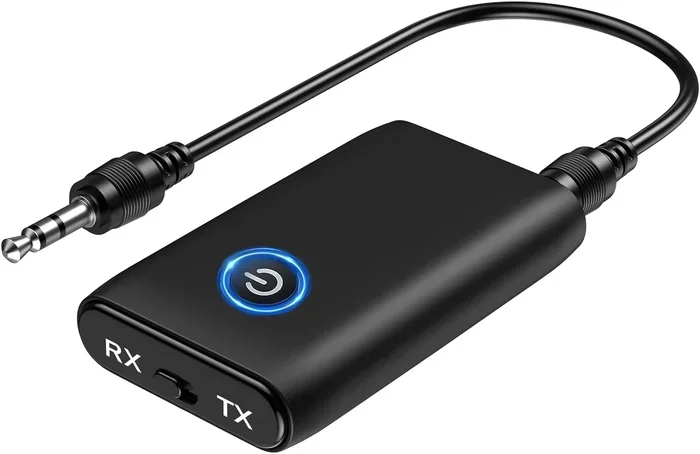
A Bluetooth aux adapter is a small device that receives a wireless Bluetooth signal and converts it into an analog audio signal. That signal then travels through a standard AUX cable or 3.5mm jack into your speaker, car stereo, or headphones. Think of it as a translator between your phone and your older audio equipment.
Here is a simple breakdown of how the process works:
- Your phone sends a wireless audio signal via Bluetooth.
- The adapter receives that signal and decodes it.
- The decoded audio travels through a cable into your speaker or stereo.
- You hear the sound through your speakers or headphones.
Most adapters use Bluetooth 4.0 or Bluetooth 5.0 technology. Newer versions offer better range, stronger connections, and lower latency. If you want smooth audio with no annoying delays, look for an adapter that supports Bluetooth 5.0 or higher.
What Is an AUX Port?
An AUX port is a standard 3.5mm audio input found on most speakers, car stereos, and older audio devices. It has been around for decades and is still widely used today. A Bluetooth aux adapter plugs right into this port and gives your device the ability to receive wireless audio. It is one of the simplest ways to add Bluetooth capability to any gear with an AUX input.
What Is a Bluetooth Receiver?
People often use the terms Bluetooth adapter and Bluetooth receiver interchangeably. They are essentially the same thing. A receiver takes a Bluetooth signal and turns it into sound you can hear. Some receivers are built into speakers or car stereos. Others are standalone devices that you plug in separately. Either way, the job is the same — make your audio wireless.
Do Bluetooth Aux Adapters Really Work Well?
The honest answer is that it depends on the adapter and your setup. Most quality Bluetooth aux adapters work very well for everyday listening. But there are some situations where performance can vary. Let us look at what makes them work — and what can hold them back.
Audio Quality Expectations
One of the biggest concerns people have is audio quality. Will a Bluetooth adapter sound as good as a wired connection? In most cases, yes — especially with modern adapters that support aptX or LDAC codecs. These codecs compress and transmit audio in a way that preserves most of the original sound quality.
However, cheaper adapters that only support basic SBC codec may not sound as crisp. If you are an audiophile or someone who really cares about sound, choose an adapter that supports high-quality codecs. The difference is noticeable, especially on good speakers or headphones.
Bluetooth Range and Stability
Bluetooth range typically extends about 30 feet (10 meters) in open spaces. Walls, furniture, and other obstacles can reduce that distance. A good Bluetooth receiver will maintain a stable connection within this range. If you walk too far away, you may hear dropouts or static.
For car use, range is usually not a problem since your phone stays in your pocket or on the seat. For home use, keep your phone within the same room as the adapter for the best experience.
Latency: Is There a Delay?
Latency is the small delay between when audio plays on your phone and when you hear it through the speakers. Some Bluetooth aux adapters have noticeable latency, especially with video content. This can make it feel like the audio is slightly out of sync.
Adapters that support low-latency codecs like aptX Low Latency reduce this problem significantly. If you plan to watch videos or play games through your adapter, look for this feature. It makes a big difference in the overall experience.
Best Uses for Bluetooth Aux Adapters
Bluetooth aux adapters are incredibly versatile. Here are some of the most popular ways people use them in real life.
In the Car
This is hands-down the most popular use case. A car Bluetooth adapter lets you stream music, take calls, and use navigation apps without cutting into your car’s wiring. You simply plug the adapter into your car’s AUX port, pair your phone, and you are good to go. Many adapters also support hands-free calling, so you can answer calls through your car’s speakers safely.
With Home Speakers
Do you have a pair of old bookshelf speakers that only have an AUX input? A Bluetooth adapter can breathe new life into them. Plug it in, pair your phone, and suddenly your vintage speakers can stream music from Spotify, Apple Music, or any other app. It is a simple upgrade that costs a fraction of buying new speakers.
With Headphones
Some people prefer wired headphones for better sound quality but want the convenience of wireless streaming. A Bluetooth receiver plugged into your wired headphones gives you the best of both worlds. You get the sound quality of wired headphones with the freedom of wireless audio.
With TVs and Computers
Older TVs and desktop computers often lack Bluetooth support. A Bluetooth aux adapter can add that capability easily. Plug it into the 3.5mm output on your TV or PC, pair your Bluetooth headphones or speakers, and enjoy wireless sound without replacing your entire setup.
How to Choose the Right Bluetooth Aux Adapter
Not all adapters are created equal. Here are the key features to look for when shopping.
Bluetooth Version
Always check the Bluetooth version. Bluetooth 5.0 offers the best range, speed, and stability. Bluetooth 4.2 works fine for basic use but may have shorter range and more connection drops. If you can, go with 5.0 or newer.
Codec Support
Codec support determines audio quality. Look for adapters that support aptX, aptX HD, or LDAC. These deliver much better sound than basic SBC codec adapters. If audio quality matters to you, this is the most important spec to check.
Battery Life
Most Bluetooth adapters run on rechargeable batteries. Battery life varies widely — some last 4 hours, others last 15 hours or more. For car use, pick one with long battery life or one that charges through your car’s USB port. For home use, battery life matters less since you can keep it plugged in.
Build Quality and Portability
Choose an adapter that feels sturdy and well-built. Cheap plastic casings may break after a few months. If you travel often, a compact and portable design is a big plus. Some adapters are so small they fit right in your pocket.
Ease of Pairing
A good Bluetooth receiver should pair quickly and easily. Look for adapters with simple one-button pairing. Avoid adapters that require complicated setup steps or specific apps. The easier the pairing process, the better your daily experience will be.
Common Mistakes to Avoid
Even with a great adapter, mistakes can ruin your experience. Here are the most common ones to watch out for.
- Buying the cheapest adapter: Budget adapters often have poor audio quality, short range, and unreliable connections. Spending a little more upfront saves frustration later.
- Ignoring codec support: If you care about sound quality, do not buy an adapter that only supports basic SBC codec. Check for aptX or LDAC support.
- Placing the adapter too far away: Stay within the Bluetooth range for a stable connection. Walls and obstacles weaken the signal.
- Forgetting to charge the adapter: Nothing is worse than a dead battery in the middle of a road trip. Keep it charged and top it off regularly.
- Pairing in a crowded area: In busy places with lots of Bluetooth devices, connections can get unstable. Pair in a quiet environment first for the best results.
Quick Tips for the Best Experience
Follow these simple tips to get the most out of your Bluetooth aux adapter:
- Keep your adapter firmware updated if the manufacturer offers updates.
- Place the adapter in a clear line of sight from your phone when possible.
- Use a high-quality AUX cable to connect the adapter to your speaker or stereo.
- Turn off other Bluetooth devices nearby to reduce interference.
- Restart both the adapter and your phone if you experience connection issues.
- Store the adapter in a protective case when traveling to prevent damage.
Bluetooth Aux Adapters vs. FM Transmitters
Many people wonder whether a Bluetooth aux adapter is better than an FM transmitter. Here is a quick comparison.
| Feature | Bluetooth Aux Adapter | FM Transmitter |
|---|---|---|
| Audio Quality | Better — direct digital connection | Good but can have static |
| Setup | Plug and play | Requires finding an open FM frequency |
| Interference | Very low | Can pick up radio interference |
| Stability | Very stable connection | Signal can fluctuate |
| Price | Slightly higher | Usually cheaper |
Overall, a Bluetooth aux adapter delivers a cleaner, more reliable connection. FM transmitters work well in a pinch but are more prone to interference and lower audio quality. If you have an AUX port in your car, the adapter is the clear winner.
Expert Insights
Audio engineers and tech reviewers agree that Bluetooth aux adapters have come a long way in recent years. The biggest improvements have come from Bluetooth 5.0 and better audio codecs. Today’s adapters can deliver sound quality that is nearly indistinguishable from a wired connection for most listeners.
One expert tip from audio professionals is to always check the bitrate support of your adapter. Higher bitrate support means more detailed and richer audio. Another tip is to avoid ultra-cheap no-name brands. Reputable brands like TaoTronics, 1Mii, and Mpow consistently offer better performance and customer support.
Key Takeaways
- Bluetooth aux adapters work reliably: They convert wireless Bluetooth signals into audio that plays through any device with an AUX input.
- Audio quality depends on codec support: Adapters with aptX or LDAC deliver much better sound than basic SBC-only models.
- Bluetooth 5.0 is the best choice: It offers longer range, stronger connections, and lower latency than older versions.
- They work in many settings: Cars, home speakers, headphones, TVs, and computers all benefit from a Bluetooth adapter.
- Avoid common mistakes: Don’t buy the cheapest option, ignore codec support, or forget to charge the adapter.
- They beat FM transmitters: For most users, a Bluetooth aux adapter provides cleaner, more stable audio than an FM transmitter.
- Setup is simple: Most adapters pair in seconds and require no apps or complicated configuration.
Conclusion
So, do Bluetooth aux adapters work? Absolutely. They are one of the simplest and most affordable ways to add wireless audio capability to almost any device with an AUX port. Whether you want to stream music in your car, breathe new life into old speakers, or go wireless with your headphones, a quality Bluetooth adapter gets the job done.
The key is to choose the right adapter for your needs. Pay attention to Bluetooth version, codec support, battery life, and build quality. Avoid the cheapest options and invest in a reputable brand. Follow the tips in this guide, and you will enjoy a seamless wireless audio experience every single day.
Once you make the switch to a Bluetooth aux adapter, going back to cables feels like a step backward. The convenience and flexibility of wireless audio are hard to beat. Try one today and see the difference for yourself.
Frequently Asked Questions
Can I use a Bluetooth aux adapter in any car?
Yes, as long as your car has an AUX port. Most cars made after 2010 include one. If your car has a cassette player, you can also find adapters that fit inside the cassette slot. Check your dashboard or center console for the 3.5mm jack input.
Does a Bluetooth aux adapter affect audio quality?
It can, but usually for the better. A good adapter with aptX or LDAC codec support delivers high-quality wireless audio. Cheap adapters with basic SBC codec may not sound as rich. The quality also depends on your speaker or stereo system.
How far can I be from the Bluetooth aux adapter?
Most adapters work within a 30-foot range (about 10 meters) in open spaces. Walls and obstacles reduce this distance. For car use, range is not a concern since your phone stays close. For home use, keep your phone in the same room for best results.
Can I use a Bluetooth aux adapter for phone calls?
Yes, many Bluetooth adapters support hands-free calling. Your voice travels through the adapter to your car or speaker’s microphone. This lets you take calls wirelessly through your audio system. Check the product specs to confirm call support before buying.
Do Bluetooth aux adapters work with all smartphones?
Yes, they work with virtually all smartphones, including iPhone and Android devices. The adapter does not depend on your phone’s operating system. As long as your phone has Bluetooth, it will pair with the adapter. Some adapters also work with tablets and laptops.
How long does the battery last on a Bluetooth aux adapter?
Battery life varies by model. Most adapters last between 4 and 15 hours on a single charge. Adapters that charge through a car’s USB port can run indefinitely while driving. For best results, charge your adapter fully before each trip and keep a charging cable handy.
=== QUICK SUMMARY ===
Do Bluetooth aux adapters work? Yes, they work reliably and are one of the easiest ways to add wireless audio to any device with an AUX port. They support multiple Bluetooth codecs, work in cars, homes, and offices, and deliver solid audio quality when you choose a quality model. Just pick the right adapter, avoid common mistakes, and enjoy seamless Bluetooth streaming every day.