Can A USB Port Be Converted To Ethernet In Seconds
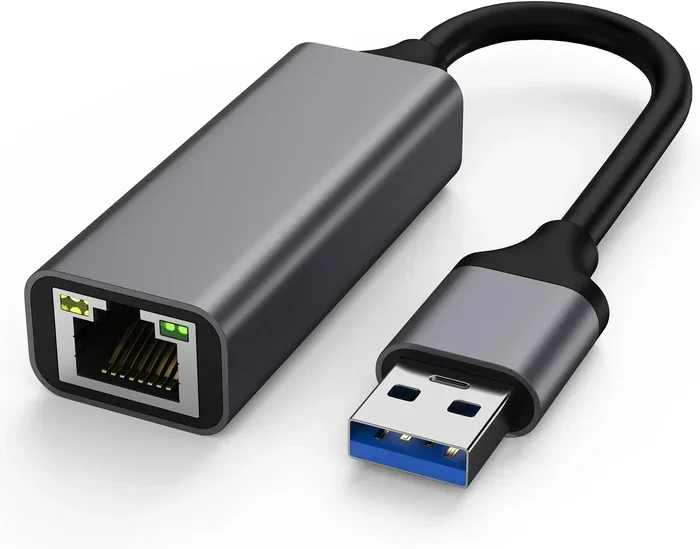
Yes, you can convert a USB port to Ethernet in seconds using a simple USB-to-Ethernet adapter. These small devices plug directly into your USB port and give you a reliable wired internet connection in minutes. Whether you use a laptop, desktop, or tablet, a USB to Ethernet adapter can restore fast, stable network connectivity without any technical expertise.
Have you ever been stuck with a laptop that only has USB ports but no Ethernet jack? Maybe your Wi-Fi keeps dropping, or your office network requires a wired connection for the best internet speed. Whatever the reason, the question can a USB port be converted to Ethernet comes up more often than you might think.
The short answer is yes. You can absolutely turn a USB port into an Ethernet port. It is quick, easy, and does not require any expensive equipment or advanced technical skills. In this guide, we will walk you through everything you need to know about USB to Ethernet conversion. You will learn how these adapters work, which type to buy, and how to set everything up in just a few minutes.
If you have ever wanted a wired internet connection but only had a USB port available, this article is for you. Let us dive right in and explore the world of USB-to-Ethernet adapters together.
Key Takeaways
- USB to Ethernet conversion is simple: A small adapter plug gives any device with a USB port a wired internet connection in seconds.
- Multiple adapter types exist: USB-A, USB-C, and Thunderbolt options all support Ethernet conversion for different devices.
- Wired connections are faster and more stable: Ethernet delivers lower latency and higher speeds compared to Wi-Fi in most cases.
- Setup takes under two minutes: Plug in the adapter, install drivers if needed, and connect your Ethernet cable.
- Compatibility matters: Always check that your adapter matches your USB port type and operating system.
- Driver updates keep things running smooth: Regularly update your network adapter drivers to avoid connectivity issues.
- These adapters are affordable: Most USB-to-Ethernet adapters cost between $10 and $30, making them a budget-friendly solution.
📑 Table of Contents
- What Is a USB to Ethernet Conversion?
- How Does a USB to Ethernet Adapter Work?
- Types of USB to Ethernet Adapters
- How to Convert USB to Ethernet in Seconds
- Benefits of Using a USB to Ethernet Adapter
- Common Mistakes to Avoid When Using USB to Ethernet Adapters
- Expert Tips for Getting the Best Performance
- Who Should Use a USB to Ethernet Adapter?
- How to Choose the Right USB to Ethernet Adapter
- Final Thoughts
What Is a USB to Ethernet Conversion?
A USB to Ethernet conversion means using a small adapter device to turn a USB port into a functional Ethernet port. This adapter acts as a network bridge between your device and a wired network. Instead of relying on Wi-Fi, you get a direct, cable-based connection to your router or modem.
Think of it like a translator. Your device speaks USB, and your network speaks Ethernet. The adapter makes them understand each other. It is a simple concept that solves a very real problem for many users.
These adapters come in different shapes and sizes. Some are tiny and portable, perfect for travel. Others are larger and offer faster speeds. Regardless of the size, they all serve the same core purpose: giving you a wired network connection through a USB port.
Why Do People Need This Conversion?
Many modern laptops and tablets have dropped the Ethernet port entirely. They rely solely on Wi-Fi for internet connectivity. But Wi-Fi is not always the best option. Here are some common reasons people need to convert USB to Ethernet:
- Unstable Wi-Fi signals: If your Wi-Fi keeps disconnecting, a wired connection solves this instantly.
- Faster speeds: Ethernet often delivers higher and more consistent speeds than wireless.
- Low latency: Gamers and video callers benefit from the reduced lag of a wired connection.
- Office requirements: Some workplaces mandate wired connections for security and performance.
- Smart home setups: Connecting a desktop or media PC to the network via Ethernet improves stability.
No matter your reason, a USB to Ethernet adapter is a simple and effective solution. It is one of those essential tech tools that everyone should have in their bag, much like the useful gadgets that simplify everyday life — these adapters make tech tasks far less frustrating.
How Does a USB to Ethernet Adapter Work?
Understanding how a USB to Ethernet adapter works helps you appreciate why it is such a clever little device. At its core, the adapter contains two key components: a USB controller and an Ethernet chipset. These two parts work together to translate data between the USB and Ethernet protocols.
When you plug the adapter into your USB port, the operating system recognizes it as a network interface card (NIC). The adapter then takes the digital data from your device and converts it into signals that can travel through an Ethernet cable. On the other end, your router or modem sends data back through the cable, and the adapter converts it back into a format your device understands.
This process happens in milliseconds. You barely notice any delay. The entire network connection feels seamless, just like a built-in Ethernet port would.
Do You Need to Install Drivers?
Most modern adapters work on a plug-and-play basis. This means you plug them in, and your operating system automatically installs the necessary drivers. Windows, macOS, and even some Linux distributions support common adapter chipsets out of the box.
However, some adapters may require you to download a driver from the manufacturer’s website. This is more common with older adapters or specialized models. Always check the product description before purchasing to confirm driver support for your operating system.
Types of USB to Ethernet Adapters
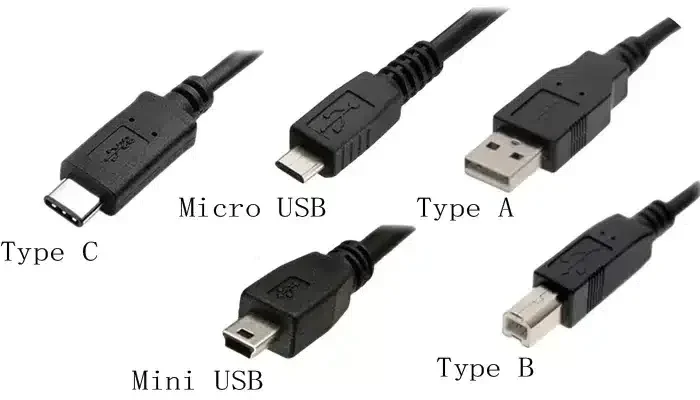
Not all USB ports are the same, and neither are Ethernet adapters. Choosing the right type is important for compatibility and performance. Here are the main types you will encounter:
USB-A to Ethernet Adapters
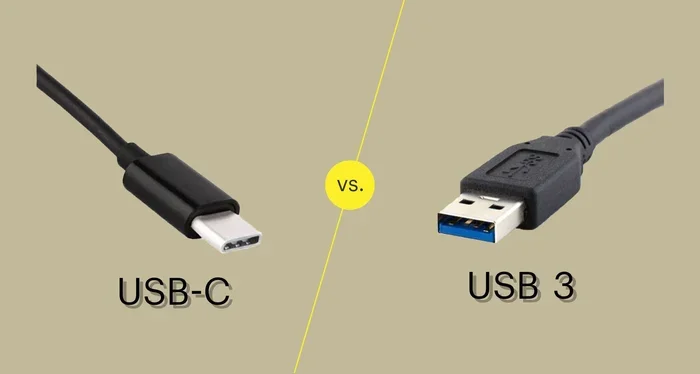
This is the most common type. The USB-A end plugs into the rectangular port found on almost every desktop and older laptop. These adapters typically support speeds of 100 Mbps or 1 Gbps. They are affordable and widely available.
A USB-A to Ethernet adapter is perfect for desktops, older laptops, and USB hubs. If your device has a standard USB-A port, this is the adapter you need.
USB-C to Ethernet Adapters
USB-C is the newer, smaller, reversible connector found on modern laptops, tablets, and smartphones. A USB-C to Ethernet adapter gives these devices wired network access. Many of these adapters also support data transfer and charging through the same port.
USB-C adapters come in various speed tiers. Some support Gigabit Ethernet, while others are limited to 100 Mbps. Check the specifications carefully to ensure you get the speed you need.
Thunderbolt to Ethernet Adapters
Thunderbolt adapters offer the fastest Ethernet speeds available. They are ideal for professionals who need maximum network performance. These adapters work with both Thunderbolt 3 and Thunderbolt 4 ports. They tend to be more expensive but deliver exceptional speed and reliability.
Comparison Table: USB to Ethernet Adapter Types
| Adapter Type | Port Shape | Max Speed | Best For | Price Range |
|---|---|---|---|---|
| USB-A to Ethernet | Rectangular USB | 1 Gbps | Desktops, older laptops | $8 – $20 |
| USB-C to Ethernet | Small oval USB | 1 Gbps | Modern laptops, tablets | $10 – $30 |
| Thunderbolt to Ethernet | Thunderbolt port | 10 Gbps | Professionals, creators | $30 – $80 |
How to Convert USB to Ethernet in Seconds
The setup process is incredibly simple. You can have a working wired internet connection in under two minutes. Follow these steps:
- Plug in the adapter: Insert the USB end of the adapter into an available USB port on your device.
- Wait for recognition: Your operating system should detect the adapter within seconds. You may see a notification.
- Install drivers (if needed): If the system does not automatically install drivers, visit the manufacturer’s website and download them.
- Connect the Ethernet cable: Plug one end of your Ethernet cable into the adapter and the other end into your router or modem.
- Verify the connection: Check your network settings to confirm you are connected. You should see a wired network icon in your taskbar or menu bar.
That is it. No software installations (in most cases), no technical wizardry, no waiting. Just plug and connect. If you have ever struggled with network settings, you will appreciate how effortless this process is.
Troubleshooting Tips
Sometimes things do not work perfectly the first time. Here are quick fixes for common issues:
- Adapter not recognized: Try a different USB port. Avoid USB hubs and plug directly into the device.
- No internet access: Check that the Ethernet cable is firmly connected at both ends. Restart your router if needed.
- Slow speeds: Update your network adapter drivers. A driver update can significantly improve performance.
- Intermittent connection: Try a different Ethernet cable. Faulty cables are a common cause of unstable connections.
Benefits of Using a USB to Ethernet Adapter
Switching from Wi-Fi to a wired connection through a USB to Ethernet adapter offers several real advantages. Let us look at the key benefits:
Faster and More Stable Speeds
Wi-Fi is convenient, but it is not always fast or stable. Walls, distance, and interference from other devices can all weaken your wireless signal. A wired Ethernet connection eliminates these problems. You get consistent, reliable internet speeds every time you connect.
Lower Latency
Latency is the delay between sending a request and receiving a response. For online gaming, video calls, and real-time applications, lower latency is critical. Ethernet connections typically have much lower latency than Wi-Fi, making them ideal for gaming and streaming.
Enhanced Security
A wired connection is harder to intercept than a wireless one. If you handle sensitive data or work in a corporate environment, using a wired network connection adds an extra layer of security. Your data travels directly through the cable, not through the air where it could be intercepted.
Portability and Convenience
Modern USB-to-Ethernet adapters are tiny and lightweight. You can carry one in your laptop bag or pocket. This makes them perfect for travel, remote work, or any situation where you need a reliable connection on the go. It is one of those small accessories that makes a big difference.
Common Mistakes to Avoid When Using USB to Ethernet Adapters
Even though the setup is simple, there are a few mistakes that can cause frustration. Here is what to watch out for:
- Buying the wrong adapter type: Always match your adapter to your USB port type. A USB-A adapter will not fit in a USB-C port.
- Ignoring speed ratings: A 100 Mbps adapter will bottleneck your gigabit internet. Check the speed rating before you buy.
- Using a faulty cable: A bad Ethernet cable can cause all sorts of problems. Always use a certified, high-quality cable.
- Skipping driver updates: Outdated drivers can cause connectivity issues and poor performance. Keep them up to date.
- Plugging into a powered USB hub: Some adapters need direct power from the device. Plugging into a hub can cause instability.
Avoiding these mistakes will save you time and frustration. A little preparation goes a long way with USB to Ethernet adapters.
Expert Tips for Getting the Best Performance
Want to squeeze every bit of speed out of your wired connection? Here are some expert tips:
- Use a USB 3.0 or higher port: USB 2.0 ports have a maximum data transfer rate of 480 Mbps, which can limit your Ethernet speed. USB 3.0 and above support much higher throughput.
- Keep drivers updated: Manufacturers regularly release driver updates that improve performance and fix bugs. Check for updates periodically.
- Choose a quality adapter: Cheap adapters may save money upfront but often deliver poor performance. Invest in a reputable brand for the best results.
- Use Cat6 or Cat6a Ethernet cables: These cables support Gigabit speeds and reduce interference. They make a noticeable difference in network performance.
- Disable Wi-Fi when using Ethernet: This prevents your device from switching between connections and ensures a stable wired link.
These small steps can make a big difference. Your wired internet connection will feel faster and more reliable than ever before.
For those managing network settings across multiple devices, keeping your configurations organized matters. If you ever need to adjust settings on your iPhone, understanding how to manage network details is useful — something similar to how you would handle customizing number formats on iPhone. Similarly, when working with large files over your new wired connection, reliability matters just as much as having stable access to tools like Excel without issues such as a stubborn line that won’t delete in Microsoft Excel. A stable network makes all of these tasks smoother.
Who Should Use a USB to Ethernet Adapter?
USB-to-Ethernet adapters are not just for tech enthusiasts. A wide range of users benefit from them:
- Remote workers: A stable wired connection ensures your video calls and uploads never drop.
- Gamers: Lower latency means smoother gameplay and faster response times.
- Students: Reliable internet for online classes and research without Wi-Fi interruptions.
- Content creators: Fast, stable uploads for large video and audio files.
- Business professionals: Secure, consistent connections for work-related tasks.
- Travelers: A portable adapter lets you connect to wired hotel or office networks on the go.
Anyone who values a reliable internet connection should consider adding a USB-to-Ethernet adapter to their toolkit. It is one of the most affordable and practical tech accessories you can own.
How to Choose the Right USB to Ethernet Adapter
With so many options on the market, choosing the right adapter can feel overwhelming. Here is a simple guide to help you decide:
Step 1: Check Your USB Port Type
Look at the USB ports on your device. Are they USB-A or USB-C? This determines which adapter you need. If you have both, you can choose either type based on your preference.
Step 2: Determine Your Speed Needs
If you have gigabit internet, get a Gigabit adapter. If your internet plan is slower, a 100 Mbps adapter may be sufficient. Matching your adapter speed to your internet plan ensures you get the most out of your connection.
Step 3: Consider Build Quality
Look for adapters with sturdy construction and good build quality. Metal-bodied adapters tend to last longer and dissipate heat better than plastic ones. A well-built adapter also provides better shielding against electromagnetic interference.
Step 4: Check Operating System Compatibility
Make sure the adapter supports your operating system. Most adapters work with Windows and macOS. Some also support Linux and ChromeOS. Always verify compatibility before purchasing.
Step 5: Read Reviews
Before buying, read user reviews to learn about real-world performance. Look for feedback on speed, reliability, and driver support. Reviews give you honest insights that product descriptions often miss.
Following these steps ensures you find the right adapter for your needs without overspending or buying the wrong product.
Final Thoughts
The answer to can a USB port be converted to Ethernet is a resounding yes. With a simple USB to Ethernet adapter, you can turn any USB port into a reliable wired network connection in seconds. These adapters are affordable, easy to use, and deliver better performance than Wi-Fi in most situations.
Whether you are a remote worker, a gamer, a student, or just someone tired of spotty Wi-Fi, a USB-to-Ethernet adapter is a worthwhile investment. It solves real problems and makes your daily tech life smoother and more productive.
So the next time you find yourself without an Ethernet port, do not worry. Just grab a USB to Ethernet adapter, plug it in, and enjoy the benefits of a fast, stable, wired internet connection. It really is that simple.
Take a few minutes today to explore your options. Find the right adapter for your device, and experience the difference a wired connection can make. Your internet experience will never be the same.
Frequently Asked Questions
Can any USB port be converted to Ethernet?
Yes, any USB port can be converted to Ethernet using a compatible adapter. Just make sure the adapter matches your USB port type, whether it is USB-A, USB-C, or Thunderbolt. The adapter will handle the conversion automatically.
Do USB to Ethernet adapters slow down internet speed?
No, quality adapters do not slow down your internet speed. In fact, a wired Ethernet connection is often faster and more stable than Wi-Fi. The key is to choose an adapter that matches your internet plan speed and uses a USB 3.0 or higher port for best results.
Is it hard to set up a USB to Ethernet adapter?
Not at all. Most adapters are plug-and-play and require no technical knowledge. Simply plug the adapter into your USB port, connect an Ethernet cable, and your device will recognize the connection within seconds.
Can I use a USB to Ethernet adapter with a smartphone or tablet?
Yes, some USB-C adapters work with smartphones and tablets that support USB-On-The-Go (OTG). However, compatibility varies by device. Check your device specifications before purchasing an adapter for mobile use.
How much does a USB to Ethernet adapter cost?
Most USB to Ethernet adapters cost between $8 and $30. Thunderbolt adapters are more expensive, typically ranging from $30 to $80. The price depends on the adapter type, speed rating, and build quality.
Will a USB to Ethernet adapter work with any router?
Yes, USB to Ethernet adapters work with any standard router or modem that has an Ethernet port. The adapter creates a wired bridge between your device and the router, regardless of the router brand or model.