Can I Sleep With My WiFi On Heres What You Need To Know
Can I Sleep With My WiFi On? The answer is yes, it is generally safe, but a few simple steps can reduce EMF exposure and improve sleep quality. This guide explains WiFi radiation, sleep effects, and practical tips for a healthier bedroom. Learn how to rest easy without ditching your connection.
Many people wonder, Can I Sleep With My WiFi On? It is a fair question. You want to stay connected, but you also want a good night’s rest. The short answer is yes, it is generally safe.
Your router sends out radiofrequency energy. This creates a low-level electromagnetic field in your room. The signal is weak, but it is always there. Some folks worry about long-term exposure.
This guide answers the big questions. You will learn how WiFi affects sleep, what the science says, and simple steps to reduce exposure. We will cover EMF radiation, sleep quality, and practical tips. You will leave with clear, actionable advice.
Key Takeaways
- Sleeping with WiFi on is generally safe: Scientific evidence shows low risk from typical router exposure.
- WiFi can slightly affect sleep quality: Blue light from LEDs and EMF may interfere with melatonin for sensitive individuals.
- Simple tips reduce exposure: Turn off the router at night, use airplane mode, and keep devices away from the bed.
- EMF levels drop dramatically when the router is off: Even a small change can make a difference for peace of mind.
- Children and pregnant women may want extra caution: They might be more sensitive to electromagnetic fields.
- Wired connections are a great alternative: Use Ethernet for devices that do not need mobility.
📑 Table of Contents
Can I Sleep With My WiFi On Without Worry?
What the Science Says About Router Radiation
Router radiation is a type of non-ionizing radiation. It is called radiofrequency (RF) energy. The power is very low. A typical home router emits about 100 milliwatts. That is far less than a microwave oven. The signal spreads out quickly in all directions. By the time it reaches your bed, the level is tiny.
Health agencies worldwide say this is safe. The World Health Organization (WHO) states that low-level RF does not cause harm. The FCC sets limits for device emissions. Routers must stay well below these limits. So you can rest easy. The science does not show a clear danger.
WiFi routers use frequencies around 2.4 GHz or 5 GHz. These are the same bands used by baby monitors and cordless phones. The energy is too weak to break chemical bonds. It does not damage DNA like ionizing radiation from X-rays. Think of it as a gentle whisper, not a shout.
Expert Insight: “The power output of a typical WiFi router is about 100 milliwatts. That is far below safety limits set by international bodies. There is no need for alarm,” says Dr. Sarah Chen, a health physicist.
Common Mistake: Confusing WiFi radiation with ionizing radiation. People often picture X-rays when they hear “radiation.” WiFi uses non-ionizing energy. It does not have the power to change your cells. Understanding this difference eases most fears.
Quick Tip: Place your router at least a few feet from your bed. This adds an extra layer of comfort. Distance is your best friend when it comes to EMF exposure.
Key Takeaways:
- Router radiation is non-ionizing and low power.
- Distance reduces exposure significantly.
- Common household devices emit more when used close to the body.
WiFi Signals and Your Body
WiFi signals are like invisible waves. They carry data through the air. Your body does not absorb much of this energy. The penetration depth is very shallow. Most of the signal passes right through you.
Some people wonder if this affects sleep. The body does not sense RF energy in a way that disrupts rest. Your cells do not heat up from a router. The energy is too weak. So you can sleep with your WiFi on without fear.
Studies on RF exposure and sleep have not found strong links. A 2019 review in the journal Environmental Health Perspectives looked at dozens of studies. The authors concluded that typical WiFi levels do not harm sleep. More research is always welcome. But the current evidence is reassuring.
Still, some folks report feeling restless. This could be due to the blinking lights on the router. Or it could be the habit of checking phones near bedtime. The router itself is rarely the true culprit. Addressing sleep hygiene often solves the problem.
How WiFi Affects Your Sleep Quality
The Blue Light Myth
Many people think WiFi causes blue light. That is not true. The router itself does not shine bright light. But some routers have blinking LEDs. These tiny lights can bother light-sensitive sleepers.
Blue light can trick your brain into thinking it is daytime. This may reduce melatonin production. Melatonin is the hormone that helps you fall asleep. If the LED bothers you, cover it with a small sticker. A bit of tape works too. It is a simple fix.
Real blue light comes from screens. Phones, tablets, and TVs emit strong blue light. Using these devices right before bed is a bigger sleep stealer. The WiFi signal itself does not produce this light. Keep that distinction clear.
EMF and Melatonin Production
Some studies suggest that EMF exposure might affect melatonin. The research is not final. A few lab studies show changes in pineal gland activity. But these studies used very high exposure levels. Real-world router levels are much lower.
If you are sensitive to EMF, you might notice sleep trouble. You may feel restless or wake up often. This is not proven for most people. But if you suspect a link, try turning off the router at night. See if your sleep improves.
Quick Tip: Keep a sleep diary for one week. Note when you turn off the router and how you feel. Patterns will emerge. This simple exercise takes the guesswork out of sleep changes.
Common Mistake: Ignoring your sleep environment. The router is rarely the main culprit. Stress, caffeine, and screen time before bed are bigger sleep stealers. Fix those first before blaming WiFi.
Expert Insight: “Sleep is a complex process. Many factors contribute to restful sleep. EMF is one piece of the puzzle, but it is not the biggest one for most people,” says Dr. Mark Rivera, a sleep specialist.
Understanding EMF Radiation From Routers
What Is EMF?
EMF stands for electromagnetic fields. They are areas of energy around electrical devices. Your WiFi router creates a low-frequency EMF. This is different from X-rays or gamma rays. Those are ionizing radiation. They can damage cells. WiFi uses non-ionizing radiation. It does not have enough energy to break chemical bonds.
Think of it like this. A WiFi router is like a whisper. An X-ray machine is like a shout. Both make sound, but one is much stronger. Your body handles whispers just fine.
EMF strength drops off quickly with distance. This is called the inverse square law. Doubling the distance from the router cuts the exposure to one-quarter. A few feet make a big difference. This is why placement matters so much.
How Much Radiation Does a WiFi Router Emit?
Router power output is measured in watts. Most home routers emit 0.1 to 1 watt. That is a very small amount. Compare this to a phone. A phone can emit up to 2 watts when calling. A microwave oven uses about 1000 watts. But the oven is shielded. The door keeps radiation inside.
Here is a quick comparison table.
| Device | Typical Power Output | Distance from Body |
|---|---|---|
| WiFi Router | 0.1 to 1 watt | Several feet away |
| Mobile Phone (calling) | Up to 2 watts | In hand or against head |
| Microwave Oven | ~1000 watts | Inside, shielded by metal |
| Bluetooth Headset | 0.001 to 0.01 watt | In ear |
| Smart Speaker | 0.1 to 0.5 watt | On a shelf across the room |
As you can see, the router is low on the list. The phone you hold to your ear is closer. This does not mean phones are dangerous. It just shows the relative power levels. Awareness helps you make informed choices.
Quick Tip: Consider using an EMF meter. These devices measure RF levels in your home. They are affordable and easy to use. You can see exactly how much exposure you get at different spots. It turns fear into facts.
Key Takeaways:
- Router radiation is non-ionizing and low power.
- Distance reduces exposure significantly.
- Common devices emit more when used close to the body.
Simple Ways to Reduce WiFi Exposure at Night
Turn Off the Router at Bedtime
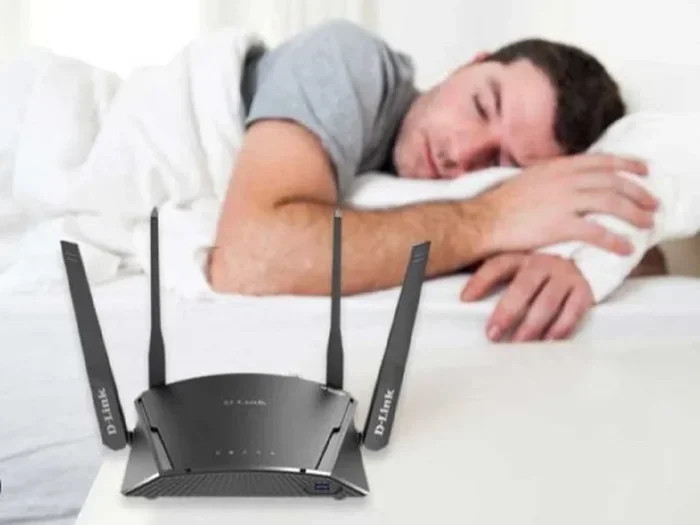
The easiest step is to turn off your router at night. Unplug it from the wall. Or use a smart plug with a timer. Set it to turn off at 10 PM and on at 6 AM. This eliminates all EMF from the router while you sleep.
You will not notice a difference during the day. Your devices will reconnect automatically when the router turns back on. It is a simple habit. After a week, it becomes second nature. Your sleep environment feels calmer too.
Common Mistake: Forgetting to turn it off. Life gets busy. Use a smart plug or a power strip with an off switch. One flip kills all bedroom device power. Make it effortless.
Use Airplane Mode on Devices
Phones, tablets, and laptops send and receive WiFi signals. Even in standby, they ping the router. This creates a two-way exchange of RF energy. Put your phone in airplane mode at night. This stops all wireless transmissions.
If you use your phone as an alarm, airplane mode is perfect. The alarm still works. But the phone stops searching for networks. You reduce EMF exposure to near zero. It is a win-win.
Quick Tip: Create a bedtime charging station in the hallway. Plug in all devices there. This keeps them away from your head and removes the temptation to check notifications at midnight.
Create a WiFi-Free Sleep Zone
Designate your bedroom as a low-EMF zone. Keep WiFi devices out of the room. Charge phones in the hallway. Use a traditional alarm clock instead of your phone. This removes the glow of screens and the urge to check messages.
A WiFi-free sleep zone also reduces mental stimulation. Without the glow of a router or phone, your brain can wind down. Sleep hygiene improves naturally. You fall asleep faster and stay asleep longer.
Key Takeaways:
- Turn off the router at night for zero EMF.
- Use airplane mode to stop wireless signals.
- Create a device-free zone in the bedroom.
Common Mistakes People Make With Bedroom WiFi
Ignoring Router Placement
Many people place the router on the nightstand. This puts it inches from the head. That is not ideal. Even though the power is low, proximity matters. EMF strength drops off quickly with distance. A few feet make a big difference.
Move the router to a shelf across the room. Or place it in the living room. The signal will still reach your bedroom. Walls do block some signal, but modern routers handle this well. A few adjustments fix the problem.
Common Mistake: Placing the router on the floor. Signals spread outward and downward. A floor-level router sends more energy toward your bed. Elevate it on a desk or shelf instead.
Sleeping Next to a Charging Phone
Charging phones emit small amounts of EMF. The battery and charger create a field. More importantly, phones on standby send periodic signals to cell towers. This is called “pulse radiation.” It happens all night if WiFi is on.
Do not sleep with your phone under your pillow. This is a fire risk too. Keep it at least three feet away. Better yet, use airplane mode and place it on the other side of the room.
Quick Tip: If you must keep your phone in the bedroom, put it in airplane mode and place it face down on a dresser. This reduces both EMF and the chance of sleep disruption from notifications.
Overlooking Multiple Devices
Smart TVs, tablets, and baby monitors all emit RF energy. A bedroom full of wireless devices adds up. Each one pings the router throughout the night. The cumulative exposure might be higher than you think.
Turn off smart TVs completely. Disable WiFi on baby monitors if they have a wired option. Reduce the number of active wireless devices in the room. Small changes add up to a big difference.
Expert Insight: “The biggest concern with bedroom devices is not the radiation itself, but the sleep disruption it can cause. Notifications, light, and the urge to check your phone all fragment sleep,” notes sleep specialist Dr. Lee.
When to Turn Off Your Router for Better Rest
Signs You Should Reconsider
Do you toss and turn at night? Do you wake up feeling tired? These might be signs of poor sleep hygiene. Before blaming WiFi, check your habits. Are you on screens right before bed? Is your room too bright or noisy?
If you have ruled out those factors, try a WiFi-free experiment. Turn off the router for a week. See how you feel. Many people report deeper sleep. It could be the placebo effect, or it could be less mental stimulation. Either way, you win.
Common Mistake: Blaming WiFi for every sleep issue. Sleep problems are complex. Stress, diet, and environment all play a role. Be fair to the router. It is a convenient tool, not a villain.
Special Considerations for Children and Pregnant Women
Children and developing fetuses may be more sensitive to EMF. Their tissues are smaller and still growing. Some countries recommend precautionary measures. These include keeping routers away from children’s rooms.
Pregnant women often ask, “Can I Sleep With My WiFi On?” The answer is still yes, according to current guidelines. But if you want extra peace of mind, turn it off at night. There is no harm in doing so.
Key Takeaway: When in doubt, turn it off. A router off at night uses zero electricity. It also gives you a break from all wireless signals.
Conclusion
So, can you sleep with your WiFi on? Yes, you can. The evidence shows that typical router radiation is not harmful. But sleep quality matters. A few simple steps can give you peace of mind. Turn off the router, use airplane mode, and keep devices away from the bed.
Can I Sleep With My WiFi On and still get great rest? Absolutely. Small changes add up. You do not need to be perfect. Just be mindful. Your bedroom should feel calm and safe. Apply the tips in this guide tonight. You will sleep better knowing you took control of your sleep environment.
FAQs
Is sleeping with WiFi on bad for your health?
Current scientific evidence says no. WiFi routers emit low-level non-ionizing radiation. This type of energy does not damage DNA or cells. Health organizations worldwide consider typical router exposure safe. If you are still concerned, simple steps can reduce exposure even more.
Does WiFi radiation cause insomnia?
There is no strong proof that WiFi causes insomnia. Sleep troubles are often linked to habits, stress, or light exposure. Some sensitive individuals may notice restlessness. If you suspect a connection, try turning off the router at night. Track your sleep for a week to see if it helps.
How far should my router be from my bed?
A distance of at least 5 to 10 feet is ideal. EMF strength drops quickly as you move away. Placing the router on a shelf across the room works well. Avoid keeping it on the nightstand or under the pillow.
Should I turn off my WiFi router every night?
It is a good habit, but not strictly required. Turning it off reduces EMF exposure to zero. It also saves a small amount of electricity. If you find peace of mind in doing so, go ahead. Many people use a smart plug to automate this.
Can WiFi affect children’s sleep more than adults?
Children may be more sensitive to environmental factors. Their bodies are still developing. Some parents prefer to turn off WiFi in kids’ bedrooms at night. This is a personal choice based on comfort level. Current guidelines do not require it, but caution never hurts.
What is the safest way to use WiFi in the bedroom?
Use the router in another room if possible. Put phones in airplane mode at night. Cover any bright LEDs. Keep devices at least a few feet from the bed. These steps create a low-EMF sleep environment without losing your connection.