Do 30ft Hdmi Cables Work Or Are You Just Wasting Money
Do 30ft HDMI cables work? The short answer is yes, but it depends on your setup, cable type, and what you are trying to do. A 30ft HDMI cable can carry high-quality audio and video signals across a room without major issues. However, you need to pick the right cable type and understand how signal loss works over long distances. This guide covers everything you need to know before spending your money.
Key Takeaways
- 30ft HDMI cables do work: They can deliver solid 4K and 1080p signals when you choose the right type.
- Active cables are better for long runs: They use built-in amplification to fight signal loss over 30 feet.
- Passive cables can struggle: Without extra power, signal degradation is more likely at this length.
- Your devices matter: The source device and display both affect how well a long HDMI cable performs.
- Cable quality is critical: Cheap cables often fail at 30ft, even if they claim to support 4K.
- Fiber optic HDMI cables are the best option: They handle long distances with zero signal loss.
📑 Table of Contents
- Do 30ft HDMI Cables Actually Work?
- How HDMI Signal Loss Works Over Long Distances
- Active vs Passive HDMI Cables
- Fiber Optic HDMI Cables: The Best Option for 30ft Runs
- Best Use Cases for 30ft HDMI Cables
- Common Problems with 30ft HDMI Cables
- How to Choose the Right 30ft HDMI Cable
- Expert Tips for Getting the Best Performance
- Final Thoughts
Do 30ft HDMI Cables Actually Work?
You are not alone if you have ever wondered whether a 30ft HDMI cable can really do the job. Maybe you are setting up a home theater in the living room and the TV sits far from the media console. Or perhaps you need to run a signal from a laptop to a projector across a conference room. The question is simple: do 30ft HDMI cables work?
The answer is yes, they do work. But the real question is whether they will work well for your specific situation. Not all cables are created equal. A cheap 30ft cable from a gas station might give you nothing but headaches. A high-quality one from a trusted brand? That can deliver stunning picture and sound without a hitch.
In this guide, we will break down everything you need to know. We will talk about signal loss, cable types, and the common mistakes people make. By the end, you will know exactly what to look for and what to avoid. Let us get into it.
How HDMI Signal Loss Works Over Long Distances
Every HDMI cable has a limit. As the signal travels through the wire, it loses strength. This is called signal loss or signal degradation. The longer the cable, the more the signal weakens. At 30 feet, this becomes a real factor you need to think about.
Think of it like water flowing through a hose. A short hose delivers strong water pressure. A long hose with many twists? The pressure drops. The same idea applies to HDMI signal transmission. The electrical signal that carries your picture and sound starts to fade as it travels further.
Several things affect how much signal loss you will experience:
- Cable quality and build: Thicker cables with better shielding lose less signal.
- HDMI version: HDMI 2.0 and HDMI 2.1 handle data differently. Newer versions carry more bandwidth, which can be harder to push through long runs.
- Resolution and refresh rate: 4K at 60Hz needs a lot more bandwidth than 1080p at 30Hz. Higher resolutions stress the cable more.
- Environmental factors: Running a cable near power cords or metal objects can cause interference.
Understanding these factors helps you choose the right cable. It also saves you from buying something that will not work for your needs.
What Is Signal Degradation?
Signal degradation means the quality of the signal drops as it moves through the cable. You might notice this as a flickering screen, sparkles, or even a completely blank display. In some cases, the audio drops out while the video stays. It is frustrating, and it is more common with longer cables.
At 30 feet, signal degradation becomes a real concern for high-resolution content. If you want 4K at 60Hz or 8K over a long run, you need a cable designed for that job. A basic passive cable may not be enough.
Active vs Passive HDMI Cables
Not all HDMI cables work the same way. There are two main types: active HDMI cables and passive HDMI cables. This distinction matters a lot when you are dealing with 30-foot runs.
Passive HDMI Cables
A passive cable is the standard type you see everywhere. It has no built-in electronics. The signal flows straight through the copper wires from one end to the other. Passive cables work fine for short distances, usually under 15 feet.
At 30 feet, a passive cable starts to struggle. The signal has to travel a long way through the copper, and it loses strength along the way. For 1080p content, a good passive cable might still work at 30 feet. But for 4K or higher resolutions, you are pushing your luck.
Active HDMI Cables
An active HDMI cable has built-in electronics that boost the signal as it travels. Think of it like a relay runner passing the baton. The active cable gives the signal a little push at regular intervals, keeping it strong all the way to the display.
Active cables need power to work. They usually draw power from the HDMI port itself. Some active cables also come with a USB cable for extra power. This makes them much more reliable for long runs.
Here is a quick comparison:
| Feature | Passive Cable | Active Cable |
|---|---|---|
| Signal Boost | No | Yes |
| Max Reliable Length | Up to 15ft | Up to 50ft+ |
| 4K Support at 30ft | Unreliable | Reliable |
| Power Required | No | Yes (from HDMI port or USB) |
| Price | Lower | Higher |
If you are running a 30ft HDMI cable, an active cable is usually the safer choice. It gives you peace of mind that the signal will arrive strong and clear.
Fiber Optic HDMI Cables: The Best Option for 30ft Runs
If you want the absolute best performance at 30 feet, look at fiber optic HDMI cables. These cables use light instead of electricity to carry the signal. Because light does not lose strength the way electricity does, fiber optic cables can run 30 feet, 50 feet, or even 100 feet without any signal loss.
Fiber optic HDMI cables are thin and flexible, which makes them easy to route behind furniture or through walls. They support the latest HDMI 2.1 features, including 4K at 120Hz and 8K resolution. They are also immune to electromagnetic interference, which means they will not pick up noise from nearby power cables.
The downside? They cost more than standard cables. But if you need a reliable 30ft connection for your home theater or office setup, the investment is worth it.
When choosing a cable for long distances, it is worth comparing your options with other types of long cables. For example, checking the advantages and disadvantages of network cables can give you useful perspective on how different cable types handle signal transmission over distance.
Best Use Cases for 30ft HDMI Cables
Where do you actually need a 30ft HDMI cable? Here are the most common scenarios where these cables shine:
Home Theater Setups
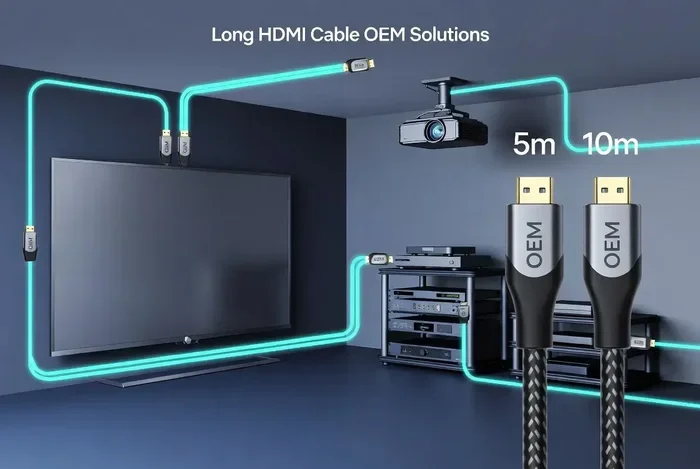
Many people mount their TV on the wall and place the media player, soundbar, or streaming device on a console across the room. A 30ft HDMI cable makes this easy. You can hide the cable along the baseboard or behind the wall for a clean look.
For the best experience, use a fiber optic or active cable. This ensures you get full 4K HDR quality without any flickering or dropouts.
Conference Rooms and Classrooms
In office or school settings, the projector or display is often mounted far from the laptop or media source. A 30ft cable gives you the flexibility to place your device wherever is convenient. Active cables work great here because they handle the long run reliably.
Gaming Setups
Gamers who want 4K at 120Hz need a cable that can handle serious bandwidth. A 30ft fiber optic HDMI cable is perfect for this. It delivers the high frame rates and rich colors that modern gaming demands without any compromise.
Digital Signage and Commercial Displays
Businesses that use large screens for advertising or information displays often need long cable runs. A 30ft HDMI cable keeps the setup clean and professional. Active and fiber optic cables are the go-to choices for commercial installations.
Each of these use cases has different needs. A home theater might prioritize picture quality above all else. A conference room might need reliability and ease of use. Knowing your priorities helps you pick the right cable.
Common Problems with 30ft HDMI Cables
Even good cables can cause issues if you are not careful. Here are the most common problems people run into with long HDMI cables:
Flickering or Intermittent Signal
If your screen flickers or goes dark for a few seconds, the cable might be losing signal. This often happens with passive cables at 30 feet. It can also be caused by a bad connection at the plug. Try tightening the connectors or using a different port on your device.
No Signal at All
A completely blank screen means the signal is not getting through. This could be a cable issue, but it could also be a device problem. Try a shorter cable first to rule out the cable as the cause. If the shorter cable works, the 30ft cable is the problem.
Resolution Drops
Sometimes the cable works, but the display drops to a lower resolution than expected. For example, you might expect 4K but see 1080p instead. This usually means the cable cannot handle the bandwidth required. Upgrading to an active or fiber optic cable often fixes this.
Audio Sync Issues
In some cases, the audio and video get out of sync. This is less common but can happen with long cables that have poor shielding. Interference from nearby power cables can cause this issue. Using a cable with better shielding or rerouting the cable away from power sources helps.
Most of these problems can be solved by choosing the right cable type. If you are dealing with any of these issues, it is worth checking your cable quality before blaming your devices.
How to Choose the Right 30ft HDMI Cable
Buying a 30ft HDMI cable does not have to be confusing. Follow these steps to find the right one for your needs:
- Know your resolution needs: Do you need 4K, 8K, or is 1080p enough? Higher resolutions need better cables.
- Choose active or fiber optic for 30ft: Passive cables are risky at this length. Active and fiber optic cables are much more reliable.
- Check the HDMI version: Look for HDMI 2.0 or HDMI 2.1 on the packaging. These versions support higher bandwidth and better features.
- Look for certification: Premium HDMI Certified cables meet strict quality standards. They are tested to perform at their rated length.
- Check for HDCP support: HDCP (High-bandwidth Digital Content Protection) is needed for streaming services like Netflix and Disney+. Make sure your cable supports it.
- Read reviews: Real user reviews tell you a lot about how a cable performs in the real world. Look for feedback specifically about 30ft performance.
One important thing to keep in mind: the cable is only one part of the equation. Your source device and display also matter. A great cable paired with an old device will not give you 4K quality. Make sure all your devices support the resolution and features you want.
When evaluating cable options, it helps to understand the broader picture of how different cable types perform. For instance, comparing advantages and disadvantages of network cables can teach you a lot about signal transmission principles that apply to HDMI cables as well. Both cable types deal with the same fundamental challenge: delivering a clean signal over distance.
Expert Tips for Getting the Best Performance
Want to squeeze every bit of performance out of your 30ft HDMI cable? Here are some tips from the pros:
- Use cable management: Route your cable neatly to avoid sharp bends. Sharp bends can damage the internal wiring and weaken the signal.
- Keep it away from power cables: Electromagnetic interference from power cords can degrade your HDMI signal. Run them on opposite sides of the room if possible.
- Use cable testers: A simple HDMI tester can check if your cable is transmitting properly. It is a cheap tool that saves a lot of headaches.
- Buy from reputable brands: Brands like Belkin, Cable Matters, and AudioQuest have a track record of quality long HDMI cables.
- Consider an HDMI extender: If a single 30ft cable does not work for your setup, an HDMI extender can boost the signal over longer distances. It uses Ethernet or fiber to carry the signal.
- Check your ports: Sometimes the problem is not the cable but the HDMI port on your device. Try a different port before assuming the cable is bad.
These tips might seem small, but they make a big difference. A little extra care in setup can mean the difference between a flawless picture and a frustrating experience.
Final Thoughts
So, do 30ft HDMI cables work? Absolutely. The key is choosing the right type of cable for your needs. If you need basic 1080p, a decent passive cable might get the job done. But for 4K, HDR, or high refresh rates, you want an active cable or a fiber optic cable.
Do not fall for the cheapest option at the store. A 30ft cable that costs five dollars is almost certainly not going to perform well. Spend a little more on a quality cable and you will enjoy a reliable, high-quality connection for years to come.
The bottom line is simple: invest in the right cable, set it up carefully, and you will have a great viewing experience no matter how far your display is from your source device. A 30ft HDMI cable is a practical solution for many setups, and with the right choice, it works beautifully.
Frequently Asked Questions
Can a 30ft HDMI cable support 4K resolution?
Yes, but only if you use the right type of cable. A fiber optic or active HDMI cable can reliably deliver 4K at 30 feet. A passive cable may struggle with 4K at this length and could cause signal issues. Always check the cable specifications before buying.
Why does my 30ft HDMI cable keep losing signal?
Signal loss at 30 feet is common with passive cables or low-quality cables. The signal weakens as it travels through the wire. Interference from nearby power cables can also cause dropouts. Upgrading to an active or fiber optic cable usually fixes this problem.
Do I need a special HDMI port for a 30ft cable?
No, you do not need a special port. Any standard HDMI port will work with a 30ft cable. However, your source device and display must support the resolution and features you want. For example, 4K at 60Hz requires HDMI 2.0 or newer on both ends.
Is a fiber optic HDMI cable better than a regular cable for 30ft runs?
Yes, fiber optic HDMI cables are significantly better for long runs. They use light to carry the signal, which means virtually no signal loss. They also support the latest HDMI 2.1 features and are immune to electromagnetic interference. They are the top choice for 30ft and longer connections.
Can I use an HDMI extender instead of a long cable?
Yes, an HDMI extender is a great alternative. It uses Ethernet or fiber optic cable to extend the HDMI signal over long distances. Extenders are useful when a single cable is not practical or when you need to go beyond 30 feet. They add a small bit of setup complexity but deliver excellent results.
How can I test if my 30ft HDMI cable is working properly?
You can use an HDMI cable tester to check signal integrity. Simply connect the cable between two devices and run the test. If the tester shows all signals passing, your cable is working. You can also test by playing 4K content and checking for flickering or resolution drops on your display.
=== CONCLUSION ===
A 30ft HDMI cable is a practical and reliable solution for many setups. Whether you are building a home theater, setting up a conference room, or connecting a gaming console across the room, the right cable gets the job done. The key takeaway is to match your cable type to your needs. Active cables and fiber optic cables are the best choices for long runs. Passive cables work for short distances but can cause problems at 30 feet. Invest in quality, set up your cable properly, and you will enjoy a crisp, clear connection every time.