Can Usb A Be Converted To Usb C With Simple Adapters
Yes, you can convert USB A to USB C with simple adapters or cables. This process is easy, affordable, and lets you use older USB A devices with modern USB C ports. Learn how adapters work, what to watch for, and which ones are worth buying.
Key Takeaways
- USB A to USB C adapters are widely available: You can find them online and in stores for just a few dollars.
- Data transfer speeds depend on the adapter: Not all adapters support USB 3.0 or faster speeds.
- Charging works too: USB A to USB C adapters can charge devices, but speed varies by adapter quality.
- Check compatibility first: Some adapters only support data, some only support charging, and some do both.
- Avoid cheap no-name adapters: They may damage your devices or fail to deliver promised speeds.
- USB C is the future: More devices are switching to USB C, making adapters a smart short-term solution.
📑 Table of Contents
- Can USB A Be Converted To USB C With Simple Adapters?
- What Is USB A And What Is USB C?
- How USB A To USB C Adapters Work
- Do USB A To USB C Adapters Support Fast Data Transfer?
- Can You Charge Devices With A USB A To USB C Adapter?
- Common Mistakes When Using USB A To USB C Adapters
- Best USB A To USB C Adapters To Buy
- Is USB C Really Better Than USB A?
- Frequently Asked Questions
- Final Thoughts
Can USB A Be Converted To USB C With Simple Adapters?
The short answer is yes. USB A to USB C conversion is simple, cheap, and works in most cases. You just need the right adapter or cable. Whether you have an older printer, a flash drive, or a legacy mouse, you can connect it to a modern laptop with a USB C port.
But not all adapters are the same. Some support fast data transfer. Some only handle charging. And some are total junk that could harm your devices. This guide breaks down everything you need to know about converting USB A to USB C. You will learn how adapters work, what to look for, and which ones to avoid.
USB A has been around for decades. It is the classic rectangular USB port you have seen on computers, printers, and chargers for years. USB Type C is the newer, smaller, reversible connector that most modern laptops, phones, and tablets use now. The good news is you do not need to throw away your old USB A devices. A simple USB adapter bridges the gap between the old and the new.
Let us dive into how this all works and what you need to pick the right adapter for your setup.
What Is USB A And What Is USB C?
Before you buy any USB adapter, it helps to understand the basics. USB A and USB C look different and serve different roles in the tech world.
Understanding USB Type A
USB Type A is the flat, rectangular connector that has been standard since the late 1990s. You will find it on desktop computers, older laptops, printers, external hard drives, and many chargers. It is not reversible, meaning you have to flip it to get the right orientation.
USB A comes in several versions:
- USB 2.0: Max speed of 480 Mbps. Common on older devices.
- USB 3.0: Max speed of 5 Gbps. Often has a blue insert inside the port.
- USB 3.1: Max speed of 10 Gbps.
- USB 3.2: Max speed of 20 Gbps.
Even though USB A is older, millions of devices still use it. That is why USB A to USB C adapters remain so popular.
Understanding USB Type C
USB Type C is the modern standard. It is small, oval-shaped, and reversible. You can plug it in either way, which is a huge convenience. Most new laptops, smartphones, and tablets use USB C.
USB C supports faster data transfer and more power delivery than USB A. It can handle speeds up to 40 Gbps with USB4 and Thunderbolt 4. It also supports higher wattage charging, up to 240 watts with USB Power Delivery.
The challenge? Many of us still have USB A devices lying around. That is where adapters come in handy.
How USB A To USB C Adapters Work
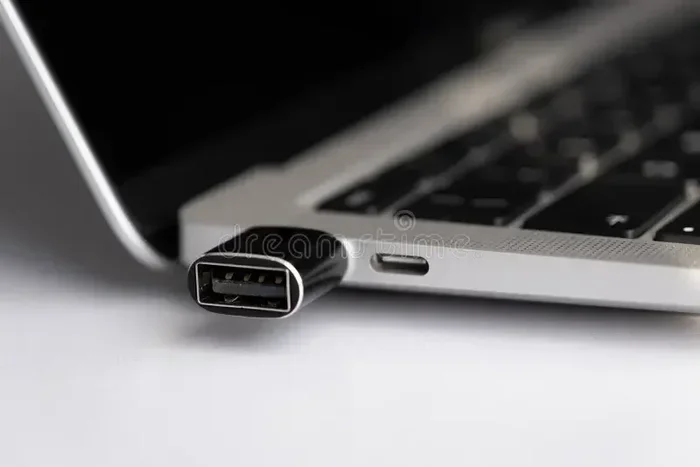
A USB A to USB C adapter is a small device that converts the USB A plug into a USB C plug (or vice versa). It allows two different types of ports to communicate with each other. The adapter contains internal wiring and, in some cases, a USB controller chip that manages the data and power signals.
There are three main types of adapters you will encounter:
USB A to USB C Adapter (Adapter Only)
This is a small dongle that plugs into a USB A port on one end and has a USB C port on the other. You plug your USB A device into the adapter, and then plug the adapter into your USB C laptop or phone. It is simple and portable.
USB A to USB C Cable
This is a cable with a USB A plug on one end and a USB C plug on the other. It works the same way as an adapter but is more convenient for permanent setups. You do not need to carry a separate dongle. Just plug and go.
USB C to USB A Hub
A hub is a step up from a simple adapter. It gives you multiple ports, including USB A, USB C, HDMI, and SD card slots. Hubs are great if you need to connect several older devices to a new laptop.
All of these options let you convert USB A to USB C easily. The key is choosing the right one for your needs.
Do USB A To USB C Adapters Support Fast Data Transfer?
This is the question most people ask. The answer depends on the adapter you buy. Not all adapters support the same speeds.
Here is what you need to know:
- USB 2.0 adapters: These only support speeds up to 480 Mbps. They work fine for charging and basic tasks like using a computer mouse or keyboard. But they are slow for large file transfers.
- USB 3.0 adapters: These support speeds up to 5 Gbps. They are great for transferring photos, videos, and documents quickly.
- USB 3.1 and USB 3.2 adapters: These support speeds of 10 Gbps to 20 Gbps. They are ideal for professionals who work with large files.
If you want fast data transfer, look for an adapter that explicitly states it supports USB 3.0 or higher. Many cheap adapters only support USB 2.0 speeds, even if they look the same on the outside.
Quick Tip
Check the product description for the USB specification. If it does not mention USB 3.0 or higher, assume it is USB 2.0 speed.
Can You Charge Devices With A USB A To USB C Adapter?
Yes, you can charge devices with a USB A to USB C adapter. But there are some important limitations to keep in mind.
USB A ports typically deliver 5 watts of power (5 volts at 1 amp). USB C ports can deliver much more power, especially with USB Power Delivery technology. When you use an adapter, the power output is limited by the USB A port on the source side.
This means:
- Your phone will charge, but it may charge slowly.
- Tablets may charge very slowly or not charge at all if they need more power.
- Laptops generally need a USB C charger with USB PD. A USB A adapter will not provide enough power to charge a laptop quickly.
If fast charging matters to you, consider a USB C hub with power delivery that has its own power source. This way, your devices get the power they need.
Common Mistakes When Using USB A To USB C Adapters
People make several common mistakes when using these adapters. Avoiding these pitfalls will save you time and money.
Buying the Cheapest Adapter
It is tempting to grab the cheapest adapter online. But cheap adapters often use poor-quality components. They may overheat, fail to support advertised speeds, or even damage your devices. Stick with reputable brands like Anker, Belkin, or Cable Matters.
Assuming All Adapters Are the Same
Not all adapters support data transfer. Some are charge-only adapters. They will power your device but will not transfer any data. Always check the product listing to confirm data support.
Forcing the Adapter
USB C is reversible, but the USB A side is not. If the adapter does not fit, do not force it. You may be inserting it upside down or using the wrong adapter type.
Ignoring Compatibility With Your Device
Some devices have specific compatibility requirements. For example, certain smartphones only work with specific USB adapter types for file transfer. Check your device manual or manufacturer website if you run into issues.
Best USB A To USB C Adapters To Buy
Not sure which adapter to get? Here are some things to look for:
- USB 3.0 or higher support: For fast data transfer speeds.
- Metal construction: Metal adapters dissipate heat better and last longer.
- Branded products: Stick with known brands to avoid counterfeit or low-quality adapters.
- Right-angle adapters: These are great for tight spaces where a straight adapter would not fit.
- Adapter with power delivery: If you need to charge laptops, look for adapters that support USB PD.
A good adapter costs between $5 and $20. Spending a little more on a quality adapter saves you from frustration and potential device damage.
If you are looking for ways to simplify your tech setup, you might also enjoy our article on 10 gadgets that make life easier for busy parents who juggle multiple devices daily.
Is USB C Really Better Than USB A?
USB C has many advantages over USB A. Here is a quick comparison:
| Feature | USB A | USB C |
|---|---|---|
| Shape | Rectangular, not reversible | Oval, reversible |
| Max Data Speed | 20 Gbps (USB 3.2 Gen 2) | 40 Gbps (USB4) |
| Max Power | 15 watts (standard) | 240 watts (USB PD) |
| Durability | Moderate | High (designed for 10,000+ cycles) |
| Future-Proof | No | Yes |
USB C is clearly the better option for the future. But USB A is not going away anytime soon. Millions of devices still use it. That is why USB A to USB C adapters remain essential tools in any tech toolkit.
If you use a USB mouse or other peripherals connected via USB A, an adapter lets you keep using them with your new USB C laptop without buying replacements. Check out our guide on the advantages and disadvantages of a computer mouse to learn more about choosing the right peripherals for your setup.
Frequently Asked Questions
Can I use a USB A to USB C adapter for file transfer?
Yes, as long as the adapter supports data transfer. Most adapters do, but some are charge-only. Check the product description to confirm that it supports data transfer before purchasing.
Will a USB A to USB C adapter slow down my charging speed?
It might. USB A ports typically deliver less power than USB C ports. If you need fast charging, use a USB C charger directly or a hub with its own power source.
Are all USB A to USB C adapters the same?
No. Adapters vary in speed, build quality, and features. Some support USB 2.0 speeds while others support USB 3.0 or higher. Always check the specifications before buying.
Can I plug a USB C device into a USB A port using an adapter?
Yes. You can use a USB C to USB A adapter to connect a USB C device to a USB A port. The process works in both directions.
Do USB A to USB C adapters work with all devices?
Most adapters work with a wide range of devices. However, some specialized devices may have compatibility limitations. Always check with your device manufacturer if you are unsure.
Can I use a USB A to USB C adapter with a docking station?
Yes, many docking stations include USB A ports built in. If your dock only has USB C, a simple adapter will let you connect USB A devices like external drives and printers.
Final Thoughts
Converting USB A to USB C is easy, affordable, and very practical. With a simple adapter, you can keep using your favorite older devices with modern USB C laptops and phones. Just remember to buy a quality adapter that supports the speeds and features you need.
Avoid cheap no-name adapters. Check for USB 3.0 or higher support. And always confirm that your adapter supports both data and charging if you need both features.
The world is moving toward USB C, but that does not mean your USB A devices are obsolete. A good USB adapter keeps them relevant and functional for years to come. Whether you are transferring files, charging your phone, or connecting a peripheral, the right adapter makes all the difference.
Invest in a reliable adapter today. It is one of the smallest and most useful tech accessories you can own.